Best free budgeting apps of 2026
Every free budgeting app makes the same trade, and it helps to see it before you pick one. Linking your bank costs the app company money for every account it keeps connected, so a free plan does one of two things. Either it makes you type in your purchases yourself, or it pays for your bank connection some other way: a premium plan it keeps pitching, investment management it hopes to sell you, or credit card and loan offers. Free apps that do real budgeting almost all fall in the first group. Free apps that sync your bank almost all fall in the second, and none of them does much budgeting.
So decide which kind you want. If you’ll plan your money at a computer once or twice a week, Actual Budget is the best free budgeting app you can get: a complete envelope budget (you divide your income into categories, and each category can only spend what you put in it) with no caps, no ads, and your data on your own machine. If you want to budget on your phone starting tonight, pick Goodbudget for envelopes or EveryDollar for zero-based budgeting. And if you just want to see where your money goes without typing anything, Empower syncs your accounts for free.
Quick picks




Budgeting or bank syncing: what each free plan gives you
| App | How you budget for free | How purchases get in for free | Paid upgrade (as of November 2026) |
|---|---|---|---|
| Actual Budget | Envelopes, no caps | Typed or imported from bank files | No paid plan; a server for your phone is about $1.50 to $2 a month |
| Goodbudget | Envelopes, 20 at most | Typed or imported from bank files | $80 a year adds bank sync |
| Empower | One monthly spending target | Synced automatically | None; it sells investment management |
| EveryDollar | Zero-based, unlimited categories | Typed | $79.99 a year adds bank sync |
| Google Sheets | Planned vs. actual by category | Typed or pasted | Tiller, $99 a year, feeds in bank data |
| Wallet | Category budgets | Typed | Premium, or $49.99 for life |
| Spendee | One overall budget | Typed | $27.99 to $44.99 a year |
| Credit Karma | No budgets | Synced automatically | None; it shows credit and loan offers |
| Rocket Money | No budgets | Synced automatically | $7 to $14 a month, you choose |
Typing in purchases takes a few seconds each, and logging them yourself makes you notice what you spend in a way a synced feed doesn’t. What makes people quit is falling a week behind and facing a pile of receipts. If you know you won’t keep up, skip straight to the syncing apps, or to the section on paying further down. Prices are as of November 2026.
Actual Budget
Most budget for $0, on a computer
#1 4.0/5
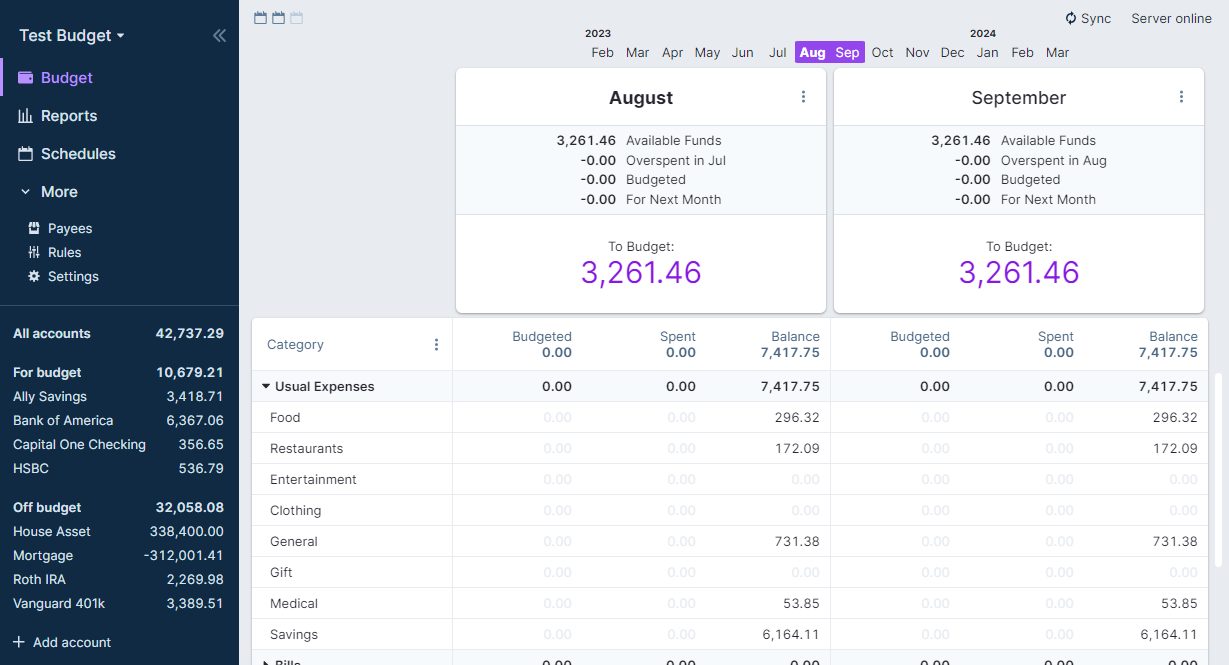
Actual Budget is an open-source envelope budgeting app, and on the free plan it does everything that most people otherwise pay for in YNAB, a well-known paid budgeting app. Each dollar of income goes into a category. What you don’t spend rolls into next month, overspending shows in red until you move money to cover it, and you can set targets for bills that come once a year. There’s no cap on accounts or categories, no upgrade screen, and no ads, because there’s nothing to sell. If envelopes feel like too much, a tracking mode lets you set a plan per category and compare it with what you spent.
The cost is where it runs. Free means the desktop app for Windows, Mac, or Linux, with the budget file on that one computer. To use the same budget on your phone, Actual needs a server: your phone opens a web version of the app that you add to your home screen.
You can run that server yourself if you’re comfortable with Docker, a tool for running server software. Otherwise you can rent one from PikaPods for about $1.50 to $2 a month. Automatic bank syncing for US banks goes through a service called SimpleFIN Bridge for $15 a year, and it also needs the server. The free way in is downloading a transactions file from your bank’s website and importing it.
Privacy is the other reason to choose it. With the desktop app your budget never leaves your computer, and on a server you can turn on end-to-end encryption, though a forgotten encryption password can’t be recovered. Expect a few evenings of learning: the envelope method is the same one YNAB teaches, and it asks you to think about money differently before it clicks.
What it does
- Envelope budgeting with rollover and targets for future bills
- Imports transaction files from your bank
- Reports on spending, cash flow, and net worth
- Optional sync server with end-to-end encryption
Pros
- A complete budgeting system with no caps or paid tier
- No ads, upgrade prompts, or company holding your data
- Cheap bank syncing if you later want it
Cons
- Phone use and bank sync need a server you run or rent
- The envelope method takes some learning
- Choose if:
- You'd otherwise pay for YNAB and don't mind budgeting at a computer
- Skip if:
- You want to log purchases on your phone without any setup
Goodbudget
Envelope budgeting on your phone
#2 3.5/5
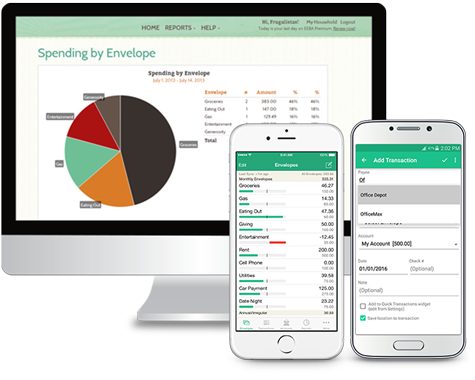
Goodbudget is the paper-envelope system on your phone. On payday you fill envelopes like Groceries, Gas, and Eating Out, and every purchase you log comes out of one of them, so you can see at a glance what’s left in each. It’s the easiest budgeting method to understand, which makes it the place to start if you’ve never budgeted. The free plan works on two phones plus the website, and the website doesn’t count toward that limit.
The free plan’s limits are what you have to check. You get 10 regular envelopes, 10 more for annual bills and goals, and one account. Ten envelopes covers a simple budget, but one account is the real squeeze: if you pay with a credit card and a debit card, both have to live in the same account, which makes reconciling against your statements fiddly. History is limited to a year, though older data isn’t being deleted.
You type in purchases on your phone, or import a file from your bank on the website (QFX, OFX, or CSV), and either way you sort each one into an envelope yourself. Goodbudget doesn’t sell or rent your personal information, and the free plan never connects to your bank at all. Premium, at $10 a month or $80 a year, adds bank syncing, unlimited envelopes and accounts, and more devices.
What it does
- 10 regular and 10 annual or goal envelopes on the free plan
- Imports bank files on the website
- Debt tracking and spending reports
Pros
- The simplest budgeting method to learn
- Works on two phones plus the web for free
- Never needs your bank login on the free plan
Cons
- One account, so cards and checking share a single register
- Every purchase is typed or imported and sorted by hand
- Bank sync costs $80 a year
- Choose if:
- You're new to budgeting and want a method that makes sense on day one
Empower Personal Dashboard
Automatic tracking and net worth
#3 3.5/5
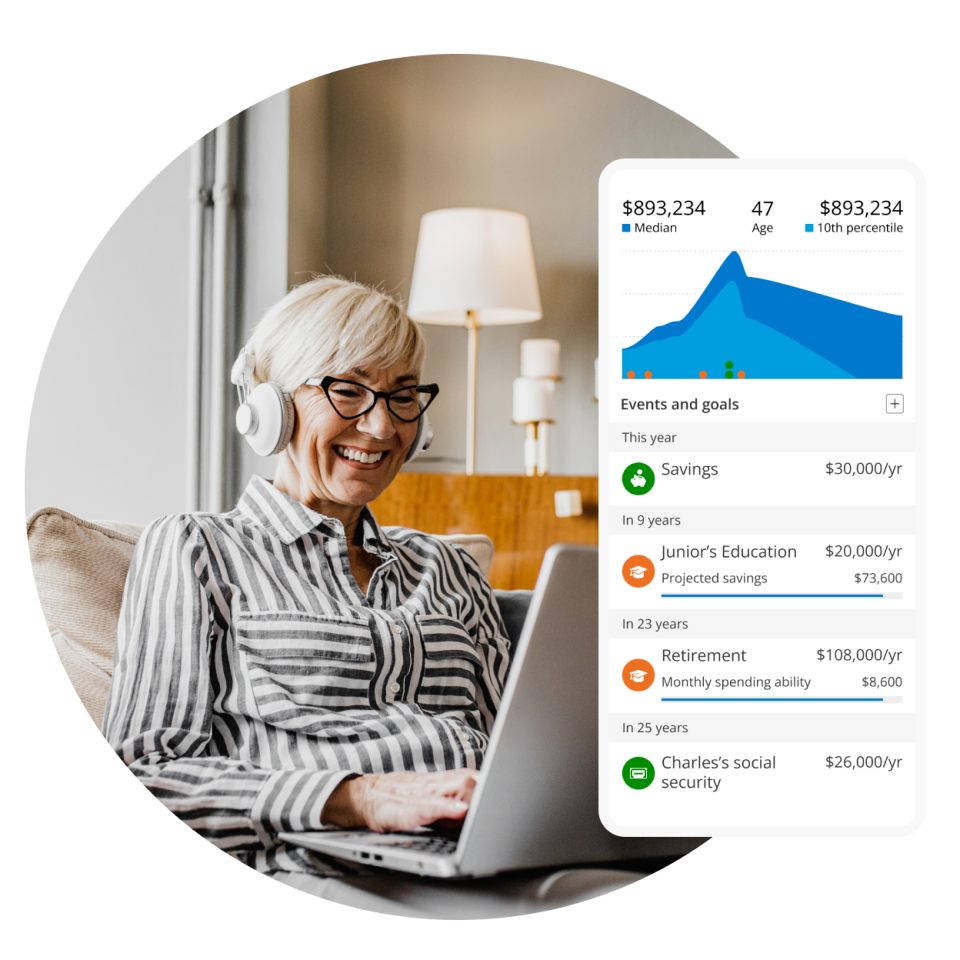
Empower’s free dashboard, which used to be called Personal Capital, is the closest thing still free to Mint, the free budgeting app Intuit shut down. You link checking, credit cards, loans, and investment and retirement accounts, and your transactions arrive and sort themselves into categories. It’s at its best on the bigger picture: net worth across every account, a tool that shows what your investment funds charge in fees, and a retirement planner that runs on your real balances.
As a budget, though, it’s thin. You set one monthly spending target and Empower compares your total spending against it. There are no per-category budgets, no envelopes, and nothing that makes you plan ahead. The categories need correcting for the first few weeks, and the website is more pleasant to use than the phone app.
Empower pays for all this by selling investment management. Once your linked investments pass roughly $100,000, expect emails and possibly phone calls offering an adviser; you can decline. If you want a free, automatic picture of your money and you’ll do the planning in your head, Empower is the pick. If you want an actual budget, it sits alongside Goodbudget rather than replacing it, since the two do different jobs.
What it does
- Free syncing of bank, card, loan, and investment accounts
- Net worth and cash flow
- Investment fee analyzer and retirement planner
Pros
- No typing; transactions arrive on their own
- The best free net worth and investment view
- No paid tier for the dashboard
Cons
- One overall spending target instead of a real budget
- Sales outreach once your investments get large
- The phone app trails the website
- Choose if:
- You want to see your whole financial picture without entering anything
EveryDollar
Zero-based budgeting with no category cap
#4 3.3/5
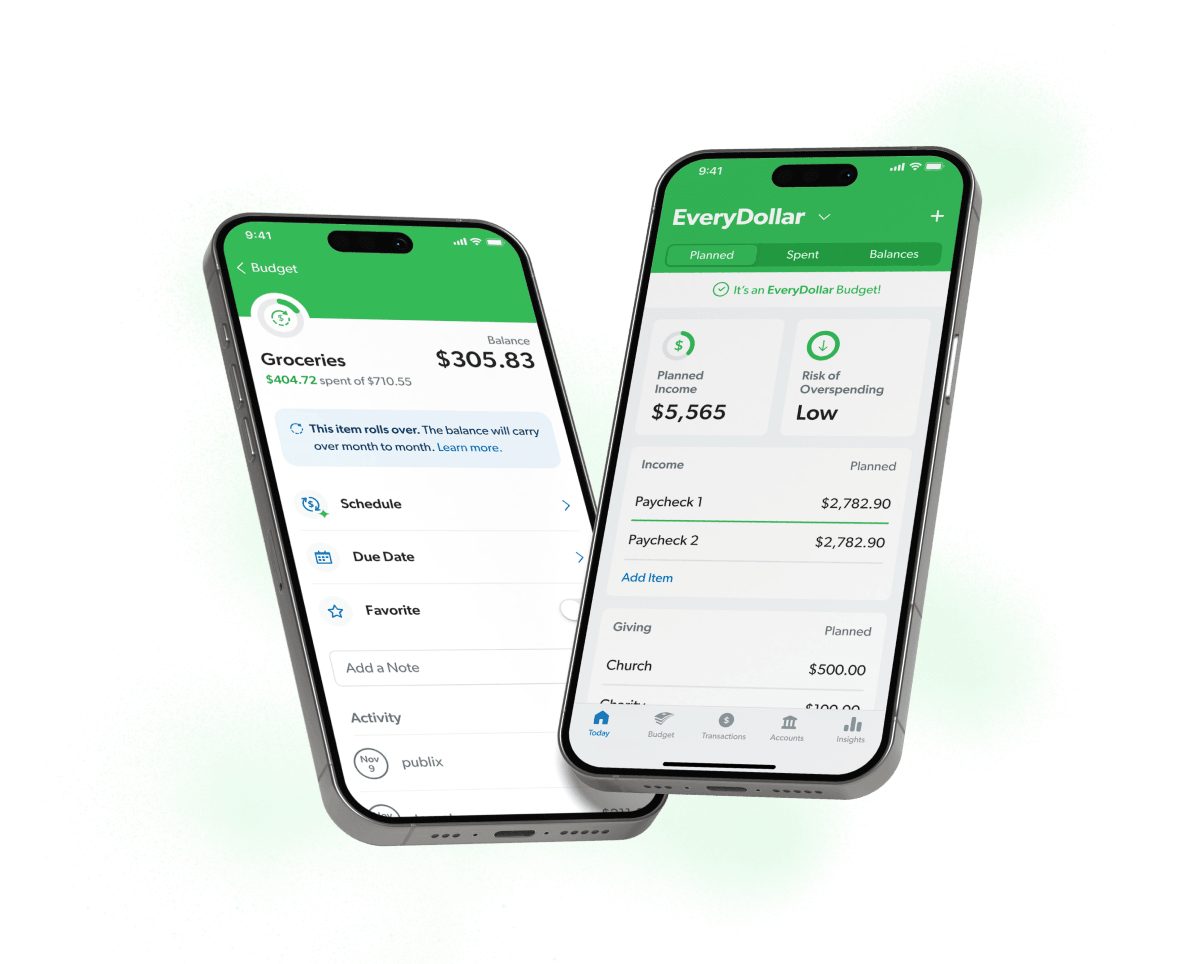
EveryDollar comes from Dave Ramsey’s company and uses zero-based budgeting: you assign every dollar of the month’s income to something (bills, groceries, savings, debt) until there’s nothing left unassigned. The free version has no cap on categories, lets you set up funds that carry money from month to month for things like car repairs or holidays, and works on your phone and on the web. Next to Goodbudget’s 20 envelopes and one account, that’s a lot more room.
You pay for it in two ways. Every purchase is typed in by hand, because only Premium connects to your bank. And the free app shows ads for Premium that you can’t turn off; the reminders can feel distracting, and the website has fewer. The app also promotes Ramsey’s other products, and it’s built around his debt plan, listing debts from smallest to largest. If you don’t follow Ramsey, you can ignore all that, but you’ll keep seeing it.
EveryDollar doesn’t sell your personal information, but its privacy policy allows using your details for marketing and sharing analyzed customer information with marketing partners and advertisers. Premium, at $79.99 a year or $17.99 a month, adds bank syncing, reports, and a debt payoff tracker.
What it does
- Zero-based budget with unlimited categories
- Funds that carry money over between months
- Split one purchase across categories
Pros
- No cap on categories
- Clear, easy monthly workflow
- Same budget on phone and web
Cons
- Premium ads you can't turn off
- Every purchase typed in by hand
- Ramsey promotions throughout the app
- Choose if:
- You want to plan every dollar and need more room than Goodbudget's free envelopes

Google Sheets
A budget you build yourself
#5 3.2/5
A spreadsheet is the free budgeting tool lots of people use instead of an app. Google Sheets has a Monthly budget template built in: you list planned income and spending by category, log transactions on a second tab with a category dropdown, and it shows planned against actual with a couple of charts. If you want envelopes, free community templates such as Aspire Budgeting turn a sheet into a YNAB-style system.
The cost is upkeep. You type purchases in or paste them from your bank’s download, start each new month by copying the tab, and fix formulas when you add a category. It works on a phone, but editing a spreadsheet on a small screen is awkward enough that many people log purchases in a notes app and catch up at a computer. No bank connection is involved. If you’d like the spreadsheet without the typing, a paid service called Tiller feeds your bank transactions into a sheet for $99 a year.
Pros
- Complete control over categories and layout
- Free, with no caps or upgrade plan for the budget
- No bank connection needed
Cons
- You maintain the formulas and start each month by hand
- Awkward for logging purchases on a phone
- Choose if:
- You already like spreadsheets and find budgeting apps rigid
Wallet by BudgetBakers
Category budgets and charts
#6 3.0/5
Wallet by BudgetBakers is an expense tracker first: you log spending by account and category, set budgets for categories with alerts when you’re close, and look at a lot of charts. Its free tier is manual entry only, and it limits how many accounts you can add before asking you to upgrade. The app crams in many screens and options, which suits people who like digging through their numbers more than people who want one figure to check. Bank syncing is a Premium feature. It also sells a lifetime Premium for a one-time $49.99 on the US App Store, a fair deal if you hate subscriptions.
Pros
- Category budgets with alerts on the free tier
- Detailed charts and reports
- One-time lifetime upgrade available
Cons
- Account limit on the free tier
- Busy interface with a lot of screens to learn
Spendee
A good-looking tracker for one wallet
#7 2.8/5
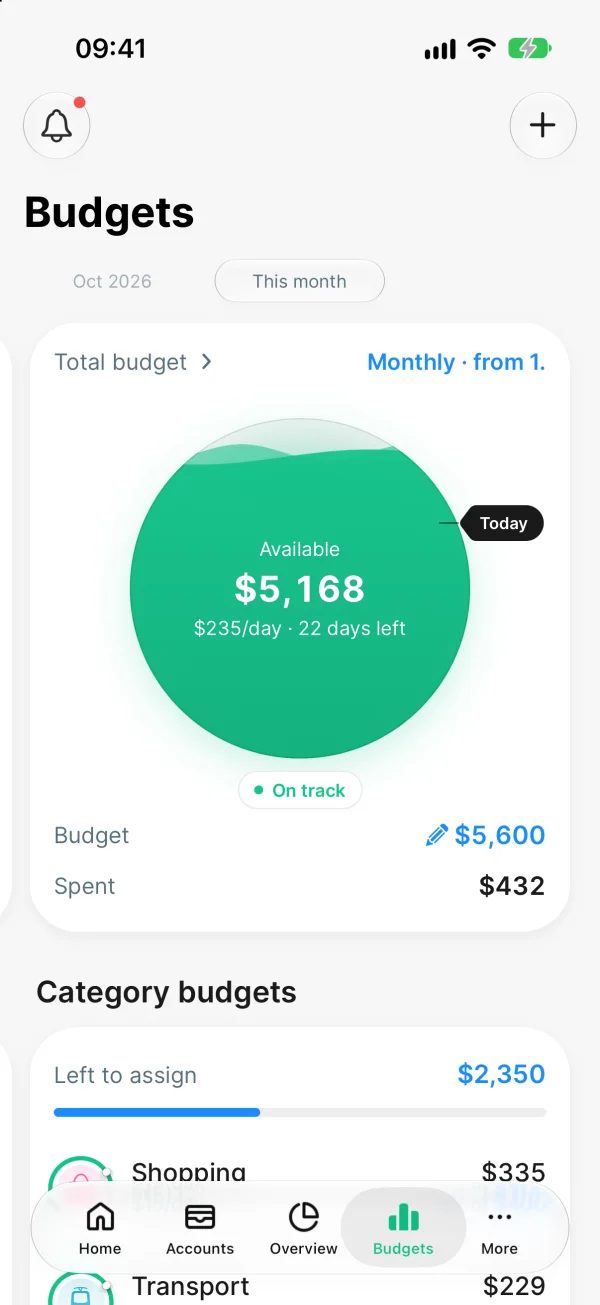
Spendee is the most pleasant of the manual trackers to look at, with a clean budget ring that shows how much you can spend per day. Its free plan is narrow, though: one cash wallet and one overall budget. Category budgets and more wallets need Plus ($27.99 a year), and bank connections need Premium ($44.99 a year). The free app shows no ads, but a longtime user reported crashes and slow screens. It’s fine for tracking cash spending or a single account; for a full budget, Goodbudget’s free plan does more.
Pros
- Clear, attractive design
- No ads in the free app
Cons
- One wallet and one overall budget on the free plan
- Reports of crashes and slow loading
- Skip if:
- You want budgets per category without paying

Intuit Credit Karma
Credit scores with passive tracking
#8 2.7/5

When Intuit shut down Mint, it pointed Mint’s users to Credit Karma, and many were frustrated by that. Credit Karma will link your bank, card, loan, and investment accounts for free, sort your spending into categories, compare months, list recurring charges, estimate what you’ll have left after bills, and track your net worth. It won’t let you set a budget, so you can see what you spent on restaurants but can’t set a limit for them.
The business model is credit card, loan, and insurance offers, and the app recommends them often. The FTC took action against Credit Karma in 2022 for telling people they were “pre-approved” for cards they often didn’t qualify for, and the company paid $3 million. Your data is also shared across Intuit’s other products for marketing.
If you already check your credit score there, the spending view is a free bonus. As a budgeting app, it’s the wrong tool.
Pros
- Free automatic syncing and net worth
- Free credit scores in the same app
Cons
- No budgets at all
- Built around credit card and loan offers
- Data shared across Intuit for marketing

Rocket Money
Subscription finder with a thin free plan
#9 2.4/5
Rocket Money is best known for finding the subscriptions you forgot about, and the free app is good at that. It links your accounts, lists recurring charges, breaks down spending, and warns you about low balances. The budgeting is where it falls short for free users: budgets are a Premium feature, though some users report two category budgets on the free plan. The website is Premium-only too, so free means the phone app.
For Premium you choose your own price, from $7 to $14 a month, and the free app promotes it hard. Rocket Money also belongs to the company behind Rocket Mortgage, and its privacy notice says it shares your transaction information with those affiliates for everyday business purposes, which you can’t opt out of. A good use of the free version is a one-time subscription cleanup. Then budget somewhere else.
Pros
- Finds forgotten subscriptions quickly
- Free automatic syncing
Cons
- Budgets are a Premium feature
- Heavy Premium promotion and no website on the free plan
- Shares data with Rocket Mortgage and its other affiliates
Also considered
- PocketGuard. Its pricing page offers only a 7-day trial, then $74.99 a year or $12.99 a month. Some reviewers were offered a free version after turning the trial down, but it allowed just two linked accounts and two budget categories.

1–5 per criterion · select a score for its reasoning and any sources
| # | Product | Overall | Budgeting on the free plan , counts double | Free on your phone | Getting transactions in | Easy to learn and use | Caps on the free plan | Free of ads and sales pitches | Privacy of your money data | Reports and net worth , counts half |
|---|---|---|---|---|---|---|---|---|---|---|
| 1 | Actual Budget | 4.0 | 5 | 2 | 3 | 3 | 4 | 5 | 5 | 4 |
| 2 | Goodbudget | 3.5 | 4 | 4 | 2 | 4 | 2 | 4 | 4 | 3 |
| 3 | Empower Personal Dashboard | 3.5 | 2 | 5 | 4 | 3 | 5 | 3 | 3 | 5 |
| 4 | EveryDollar | 3.3 | 4 | 5 | 1 | 4 | 4 | 2 | 3 | 2 |
| 5 | Google Sheets | 3.2 | 3 | 3 | 2 | 2 | 5 | 4 | 4 | 2 |
| 6 | Wallet by BudgetBakers | 3.0 | 3 | 5 | 2 | 3 | 2 | 3 | 3 | 3 |
| 7 | Spendee | 2.8 | 2 | 5 | 1 | 3 | 2 | 4 | 4 | 2 |
| 8 | Intuit Credit Karma | 2.7 | 1 | 5 | 4 | 3 | 5 | 1 | 1 | 4 |
| 9 | Rocket Money | 2.4 | 1 | 3 | 4 | 4 | 2 | 2 | 2 | 2 |
Equal displayed overall scores are ordered by the earlier criteria; a known score comes before an unknown score. Identical scores use alphabetical order.
×2 = counts double in the overall score, ×½ = counts half.
How each criterion is scored
Budgeting on the free plan
Counts double in the overall score: Planning where the money goes is the job people pick a budgeting app for, so it counts double.
How much real budgeting the free version does: budgets by category, a method such as envelope or zero-based budgeting, money that carries over between months, and goals or targets for bills that come later. Judged from the features the free version has and what reviewers and long-time users say about budgeting with it.
- 5 A complete envelope or zero-based system with no caps, including rollovers, targets for future bills, goals and rules
- 4 A full envelope or zero-based method with money that carries over and goals, but with caps or missing tools on the free plan
- 3 Category budgets that compare plan with actual spending, with little help planning ahead
- 2 One overall spending target, or budgets for only a couple of categories
- 1 No budgets; it tracks spending only
Free on your phone
Whether the free version works on the phone you carry, and on a computer too, with the same budget on every device, without paying for hosting or running a server.
- 5 Phone apps and the web on as many devices as you like, kept in sync
- 4 Phone apps and the web, with a cap on how many devices
- 3 A phone app with a real limit, such as no web or computer access, or a phone interface awkward for daily entry
- 2 Works on a phone only through a server you run yourself or pay to host
- 1 No phone app on the free setup
Getting transactions in
How purchases get into the app without paying for a subscription: typed in by hand, imported from files your bank lets you download, or pulled in automatically from linked bank and card accounts.
- 5 Free automatic syncing for every account type, including loans and investments, with categories that rarely need fixing
- 4 Free automatic syncing for checking, cards and other accounts, with the usual broken connections and categories to fix
- 3 Free automatic syncing for only a couple of accounts, or automatic syncing as a cheap add-on far below a budgeting subscription
- 2 Typed in, or imported from files you download from your bank
- 1 Every transaction is typed in by hand
Easy to learn and use
How quickly a newcomer gets going and how well the app behaves day to day: setup, the learning curve of its method, and bugs or clutter. How transactions get in is scored separately. Judged from how the app works and what reviewers and many users agree on.
- 5 Polished and easy from the first day
- 4 Easy to pick up, with a few rough spots
- 3 Takes some learning or has rough edges, such as bugs, slow screens or a crowded interface
- 2 You build or maintain the budget tool yourself, or the app is unreliable
- 1 Needs technical setup before it works
Caps on the free plan
How far the free version stretches for one person before it asks for money: caps on accounts, budgets or envelopes, devices and history, and core tools held back for the paid plan. Bank syncing is scored separately.
- 5 No caps on the core tools, and no paid plan that holds them back
- 4 Few caps; some extras, such as reports or debt tools, need the paid plan
- 3 One noticeable cap, such as a single device or a short history
- 2 Tight caps that a normal one-person budget runs into, such as one account, a handful of budgets or one wallet
- 1 The free version is hidden or capped so tightly it works like a trial
Free of ads and sales pitches
How much the free app pushes you to pay or to buy something else: upgrade prompts, ads, offers for credit cards and loans, and sales calls from advisers.
- 5 Nothing to sell; no ads and no upgrade prompts
- 4 No ads, and few prompts to upgrade
- 3 Occasional upgrade prompts, mostly when you hit a limit, or outreach only for some users
- 2 Frequent upgrade prompts or sales outreach, such as ads for the paid plan every few screens
- 1 Ads and offers for credit cards and loans are how the free app pays for itself, throughout the app
Privacy of your money data
What happens to your financial data on the free plan: whether you must link bank accounts, whether the company uses the data for marketing or shares it with affiliates and partners, and how it makes money.
- 5 Your budget stays on your own device or server, with an option for end-to-end encryption
- 4 No bank link needed, a company that says it doesn't sell your data, and no ads
- 3 Data goes to a company that says it doesn't sell it, but you link banks through an aggregator or the company uses your details for marketing
- 2 The company shares your data with affiliates or marketing partners, and you can't fully opt out
- 1 Your account and transaction data drive ads or offers for financial products
Reports and net worth
Counts half in the overall score: Reports help, but people choose a budgeting app for the budget itself, and only some readers track net worth or investments.
What the free version shows you about your money beyond the budget: spending reports over time, income against spending, net worth across accounts, and investment tools.
- 5 Net worth plus investment tools, such as fee analysis, asset allocation and retirement planning
- 4 Reports across months plus net worth from all your accounts
- 3 Spending and income reports across months
- 2 Basic charts of spending by category for the current month
- 1 A list of transactions and little else
When a paid app is worth it
Paying makes sense once you’ve proved to yourself that typing in purchases is the reason you stop budgeting. Two months with a free manual app is a fair test. If you’re still behind on entries, bank syncing is the upgrade worth paying for, and these are the usual ways to get it:
| Option | Cost per year (as of November 2026) |
|---|---|
| Actual Budget with a rented server and SimpleFIN | About $33 to $39 |
| EveryDollar Premium | $79.99 |
| Goodbudget Premium | $80 |
| Monarch Money | $99.99 |
| YNAB | $109 |
Upgrading the app you already use keeps your budget and history where they are. Actual Budget is the cheapest route to a full budget with bank syncing, if you’re willing to set it up. YNAB is the most expensive, but college students get a free year, and it has a 34-day trial for everyone else.
How to choose
- You’ll budget at a computer and want the most for free: Actual Budget.
- You want envelopes on your phone and you’re new to this: Goodbudget.
- You want to plan every dollar and need more than 20 categories: EveryDollar, if you can live with its upgrade ads.
- You want to see your spending and net worth without typing: Empower.
- You won’t give any company your bank login: Actual Budget, Google Sheets, or Goodbudget.
- You love spreadsheets: Google Sheets with a community template.
The verdict
The free budgeting app that does the most is Actual Budget, and the price of that is a computer instead of a phone, plus a learning curve. If those two things put you off, Goodbudget is the easiest place to start budgeting for real, as long as one account and 20 envelopes cover your life; EveryDollar gives you more room but makes you sit through its ads. None of those three will pull in your bank transactions for free. If that’s what you’re after, Empower does it, and you’ll only hear from its advisers if your investments are large; just don’t expect it to budget for you. Credit Karma and Rocket Money sync for free too, but neither gives a free user much of a budget, and both are built to sell you something.