
Aegis Authenticator
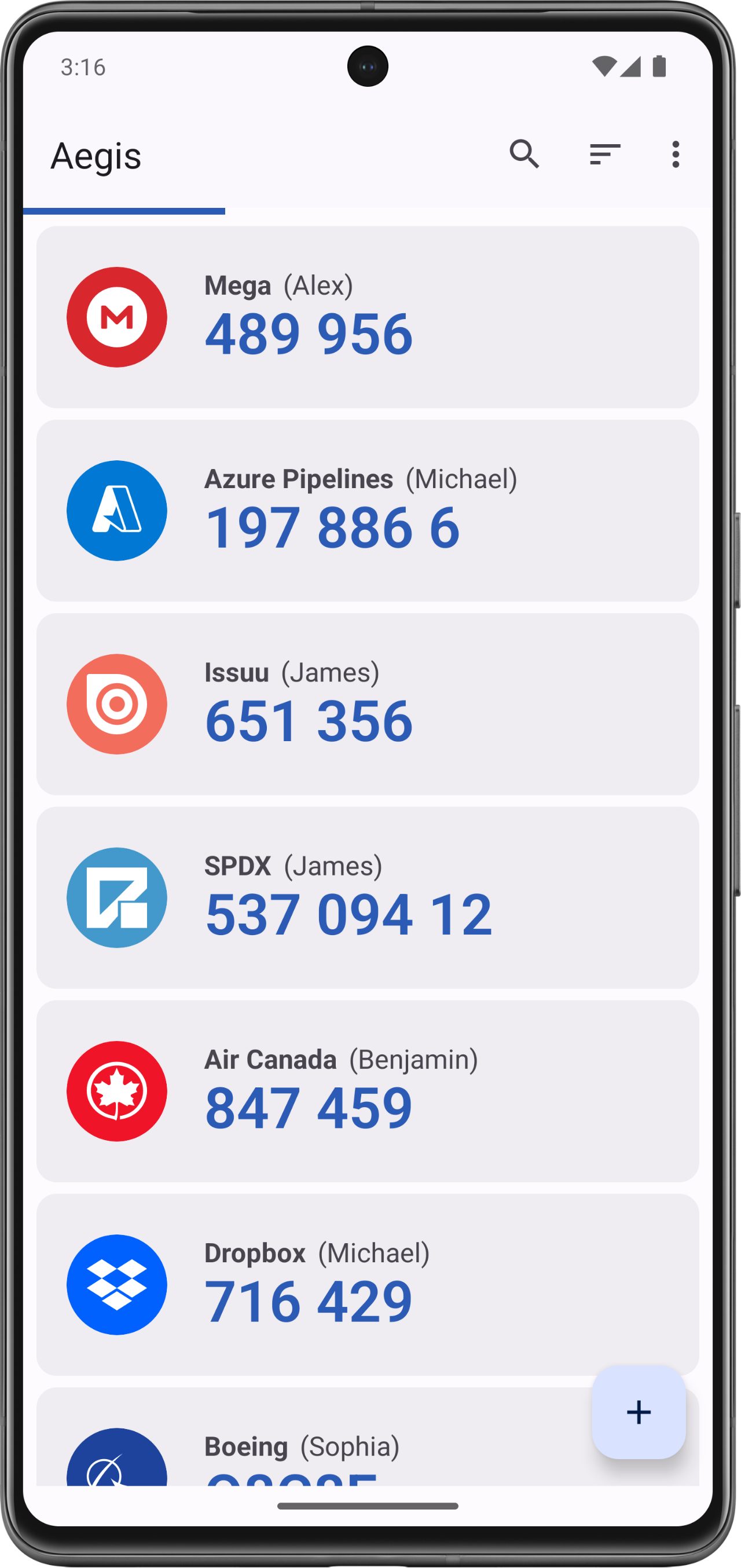
Free, open-source Android authenticator with an encrypted vault and automatic backups to a folder.
Our verdict
#6 of 9 in Authenticator apps · For Android users who want codes offline
What it does
- Encrypted vault on the phone, with no internet access
- Automatic encrypted backups to a folder you choose
- Imports from about a dozen other apps
Pros
- Nothing leaves the phone unless you send it
- No account at all
- Easy to export, encrypted or plain
Cons
- Android only
- Offsite backup is up to you
- Choose if:
- You're on Android and never want codes in anyone's cloud
Aegis Authenticator is a free, open-source two-factor authentication app for Android, built by Beem Development and licensed GPL-3.0. It generates TOTP and HOTP codes from an AES-256-GCM encrypted vault that unlocks with a password and optional biometrics. It needs no account and has no cloud of its own. Backups are encrypted vault files written automatically to a folder you choose, which a separate app such as Syncthing or Nextcloud can carry off the phone. It imports from many other authenticators. It has no iOS, desktop or browser version.
What users say
Evidence ↓The only user comments read are reviews that the project selected from its Google Play listing, so they are favorable by choice. They praise being free and ad-free, control over where backups go, not being tied to a phone number, and easy moves between phones. No independent critical practitioner view was read in this pass.
Rankings and alternatives
- Authenticator apps #6 of 9 For Android users who want codes offline
- Ente Auth #1 Best for most people
- Proton Authenticator #2 For people already using Proton
- 2FAS Auth #3 For browser autofill without an account


Authenticator apps scores
Evaluated Nov 21, 2026 Evidence ↓- Getting your codes back on a new phone · counts double 3
3/5 means: An automatic backup you have to set up, such as a file saved to a folder or cloud drive, that you restore with that file and its password
Automatic backups of the encrypted vault go to a folder you choose, and restoring needs that file plus the vault password. There is no account or cloud of its own, and cloud sync only works through a Storage Access Framework cloud app or Syncthing.
- Moving your codes in and out 5
5/5 means: Exports to a standard file, plain or encrypted, and imports from most popular authenticators
Exports an encrypted or plaintext file and imports from 2FAS, Authy, Google Authenticator, Microsoft Authenticator, andOTP, FreeOTP, Steam, WinAuth and more. Some importers need root.
- Codes on all your devices 1
1/5 means: One phone system only, such as Android only
Android only, with no plans for iOS, desktop or a browser extension, and no sync between devices.
- Easy to set up and use every day 4
4/5 means: Easy to add accounts, quick to find and copy a code, with search and clear icons
Search, groups, icon packs, QR or image scanning, manual entry and themes are documented. Only project-selected reviews praise the interface, and no next-code preview or autofill is documented, so 4 rather than 5.
- Security and openness 4
4/5 means: Open source code or independent audits, end-to-end encrypted storage and an app lock, with no known incident
Open source GPL-3.0, AES-256-GCM vault, password and biometric lock, screen capture prevention, and no known incident. No independent audit was found, so not 5.
- No account, no tracking 5
5/5 means: Works without any account and collects no data, keeping codes on your devices unless you choose a backup
No account needed, and the app has no internet access, so it sends no data anywhere. Backups stay in a folder you choose.
- Extras that save time · counts half 1
1/5 means: None
None of the six extras is documented. The maintainers decline autofill, and there is no browser extension or watch app. Widget, push approval and passkeys were not found.
Pricing
- Free Free
Prices checked Nov 22, 2026.
Evidence and sources
What users say
Summary 2 quotes
-
Exactly what I was looking for! It's open source, ad-free, and lets me control my keys. It doesn't suck all my data into the cloud and lock it up like some other authenticator apps do. I can back up my keys where and when I want to. It's not tied to a SIM or phone number, so I can move to another device any time I want. This app has worked with every site/server I've tried (4 so far)
Google Play reviewer, user quoted on the product's homepage · getaegis.app · checked -
Google did not allow me to move from one phone to another: It did not recognize my own QR code. But this application recognized it. There are many interface settings and backup!
Google Play reviewer, user quoted on the product's homepage · getaegis.app · checked
Authenticator apps scores
Getting your codes back on a new phone 5 quotes
-
Export (plaintext or encrypted)
github.com/beemdevelopment/Aegis · checked -
Automatic backups of the vault to a location of your choosing
github.com/beemdevelopment/Aegis · checked -
Aegis can only automatically back up to the cloud if the app of your cloud provider is installed on your device and fully participates in the Android Storage Access Framework. Aegis doesn't have access to the internet and we don't have plans to change this, so adding support for specific cloud providers in the app is not possible.
github.com/beemdevelopment/Aegis/blob/master/FAQ.md · checked -
Another common setup is to configure Aegis to back up to a folder on local storage of your device and then have a separate app (like Syncthing) sync that folder anywhere you want.
github.com/beemdevelopment/Aegis/blob/master/FAQ.md · checked -
Since forgetting your password will result in loss of access to the contents of the vault, we do NOT recommend disabling the password reminder.
github.com/beemdevelopment/Aegis/blob/master/FAQ.md · checked
Moving your codes in and out 2 quotes
-
Import from other authenticator apps: 2FAS Authenticator, Authenticator Plus, Authy, andOTP, FreeOTP, FreeOTP+, Google Authenticator, Microsoft Authenticator, Plain text, Steam, TOTP Authenticator and WinAuth (root access is required for some of these)
github.com/beemdevelopment/Aegis · checked -
Export (plaintext or encrypted)
github.com/beemdevelopment/Aegis · checked
Codes on all your devices 2 quotes
-
Aegis Authenticator is a free, secure and open source app for Android to manage your 2-step verification tokens for your online services.
getaegis.app · checked -
We don't have plans to port Aegis to other platforms.
github.com/beemdevelopment/Aegis/blob/master/FAQ.md · checked
Easy to set up and use every day 4 quotes
-
Import from other authenticator apps: 2FAS Authenticator, Authenticator Plus, Authy, andOTP, FreeOTP, FreeOTP+, Google Authenticator, Microsoft Authenticator, Plain text, Steam, TOTP Authenticator and WinAuth (root access is required for some of these)
github.com/beemdevelopment/Aegis · checked -
On Android, only one app can be active in the Autofill slot at a time, and since this is typically occupied by the password manager, we don't see much value in adding support for this feature in Aegis.
github.com/beemdevelopment/Aegis/blob/master/FAQ.md · checked -
Exactly what I was looking for! It's open source, ad-free, and lets me control my keys. It doesn't suck all my data into the cloud and lock it up like some other authenticator apps do. I can back up my keys where and when I want to. It's not tied to a SIM or phone number, so I can move to another device any time I want. This app has worked with every site/server I've tried (4 so far)
Google Play reviewer, user quoted on the product's homepage · getaegis.app · checked -
Google did not allow me to move from one phone to another: It did not recognize my own QR code. But this application recognized it. There are many interface settings and backup!
Google Play reviewer, user quoted on the product's homepage · getaegis.app · checked
Security and openness 2 quotes
-
This project is licensed under the GNU General Public License v3.0.
github.com/beemdevelopment/Aegis · checked -
The vault is encrypted (AES-256-GCM), and can be unlocked with:
github.com/beemdevelopment/Aegis · checked
No account, no tracking 3 quotes
-
Aegis Authenticator is a free, secure and open source app for Android to manage your 2-step verification tokens for your online services.
getaegis.app · checked -
Aegis can only automatically back up to the cloud if the app of your cloud provider is installed on your device and fully participates in the Android Storage Access Framework. Aegis doesn't have access to the internet and we don't have plans to change this, so adding support for specific cloud providers in the app is not possible.
github.com/beemdevelopment/Aegis/blob/master/FAQ.md · checked -
Exactly what I was looking for! It's open source, ad-free, and lets me control my keys. It doesn't suck all my data into the cloud and lock it up like some other authenticator apps do. I can back up my keys where and when I want to. It's not tied to a SIM or phone number, so I can move to another device any time I want. This app has worked with every site/server I've tried (4 so far)
Google Play reviewer, user quoted on the product's homepage · getaegis.app · checked
Extras that save time 2 quotes
-
We don't have plans to port Aegis to other platforms.
github.com/beemdevelopment/Aegis/blob/master/FAQ.md · checked -
On Android, only one app can be active in the Autofill slot at a time, and since this is typically occupied by the password manager, we don't see much value in adding support for this feature in Aegis.
github.com/beemdevelopment/Aegis/blob/master/FAQ.md · checked
Facts
License 1 quote
-
This project is licensed under the GNU General Public License v3.0.
github.com/beemdevelopment/Aegis · checked
Runs on 2 quotes
-
Aegis Authenticator is a free, secure and open source app for Android to manage your 2-step verification tokens for your online services.
getaegis.app · checked -
We don't have plans to port Aegis to other platforms.
github.com/beemdevelopment/Aegis/blob/master/FAQ.md · checked
Needs 2 quotes
-
Aegis Authenticator is a free, secure and open source app for Android to manage your 2-step verification tokens for your online services.
getaegis.app · checked -
Exactly what I was looking for! It's open source, ad-free, and lets me control my keys. It doesn't suck all my data into the cloud and lock it up like some other authenticator apps do. I can back up my keys where and when I want to. It's not tied to a SIM or phone number, so I can move to another device any time I want. This app has worked with every site/server I've tried (4 so far)
Google Play reviewer, user quoted on the product's homepage · getaegis.app · checked
Users 1 quote
-
675K+ installs
getaegis.app · checked
More from the sources
Features 1 quote
-
Exporting is done manually and backups are done automatically. The format of the vault file is exactly the same for both.
github.com/beemdevelopment/Aegis/blob/master/FAQ.md · checked
Pricing
getaegis.app · checked