
Fedora Workstation
Free Linux desktop from the Fedora Project with a clean GNOME interface, up-to-date software and a release every six months or so
Our verdict
#9 of 9 in Linux distros for beginners · For learners who want the newest software
What it does
- The newest kernel and GNOME desktop
- In-place upgrades from the Software app
- A KDE Plasma edition with a Windows-style layout
Pros
- Excellent support for brand-new hardware
- Polished, up-to-date software
Cons
- Video codecs and NVIDIA drivers need terminal commands
- No taskbar or dock by default
- A version upgrade about once a year
- Choose if:
- You want to learn Linux and don't mind the terminal
Fedora Workstation is the flagship desktop edition of Fedora Linux, a free, open source operating system for PCs and laptops sponsored by Red Hat. It uses an unmodified GNOME desktop with no taskbar by default, installs from a live USB made with Fedora Media Writer (which runs on Windows), and can be installed alongside Windows. Each release is supported for about 13 months and the Software app offers the next version as an upgrade. The current release is Fedora 45 (GNOME 51, Linux 7.2). Apps come from Fedora’s repositories and Flathub, with no Snap. Codecs, NVIDIA drivers and Steam come from third-party repositories (a first-run switch, plus RPM Fusion for video codecs). Fedora KDE Plasma Desktop is a separate official edition with the KDE Plasma desktop.
What users say
Evidence ↓A reviewer writing for Windows switchers calls Fedora Workstation 43 stable, modern and refined, with all hardware working on one Meteor Lake laptop, though Fedora does nothing special for Windows switchers. The critical side comes from an install guide for Fedora 45, which found that common H.264 video does not play until RPM Fusion codecs are added with terminal commands, that NVIDIA drivers need a command and a Secure Boot key step, and that GNOME has no dock or tray without extensions. Each view comes from one author, not a survey.
Rankings and alternatives
- Linux distros for beginners #9 of 9 For learners who want the newest software
- Linux Mint #1 Best for most people leaving Windows
- Zorin OS #2 Closest to the look of Windows
- Kubuntu #3 Windows-style desktop on a newer base



Linux distros for beginners scores
Evaluated Nov 17, 2026 Evidence ↓- Easy for a newcomer · counts double 2
2/5 means: Installs with help, but routine tasks such as drivers, codecs or apps regularly need the terminal
Graphical installer with a dual-boot option, Secure Boot works, and first-run third-party switch gives Flathub. But H.264 video does not play until RPM Fusion codecs are added with terminal commands, and NVIDIA's driver also needs a terminal command (plus a signing key with Secure Boot on).
- Familiar to Windows users 1
1/5 means: No taskbar, dock or app menu by default; apps open from a full-screen overview
Default GNOME has no taskbar, dock or system tray; apps open from the Activities overview. A dock and tray need extensions. The KDE Plasma edition would score higher but is not scored here.
- Hardware support out of the box 3
3/5 means: Current hardware works, but NVIDIA's driver needs a third-party repository or terminal steps, or the kernel lags new hardware
Fast-moving kernel (Linux 7.2) handles new hardware well, and one reviewer had a new laptop fully working. NVIDIA's proprietary driver needs RPM Fusion and terminal steps.
- Updates that don't break 3
3/5 means: Fast-moving base or a young desktop with more bugs, without a set-up way to roll back
Fast-moving base with new GNOME and kernel every release; generally well regarded as stable but not conservative. Btrfs is default but no rollback is set up for the user. Judged largely from general knowledge.
- Years before a reinstall 3
3/5 means: Supported into 2029 or later but the next major version needs a reinstall, or an in-place version upgrade about once a year
Each release is supported only about 13 months (Fedora 45 to December 2027), so an in-place upgrade through the Software app is needed roughly every year. Upgrades are in place and easy, which keeps this from level 2.
- Ready for PC gaming 3
3/5 means: Steam installs from the store, but NVIDIA's driver needs extra steps or the graphics stack lags
The first-run third-party switch enables RPM Fusion's Steam repository so Steam installs from the store, and Mesa and kernel are current. NVIDIA's driver still needs extra steps.
- Runs on older PCs 3
3/5 means: Needs about 4 GB of RAM, with no lighter edition of its own
Recommends 4 GB RAM and 40 GB disk, 64-bit only. Official lighter Spins (Xfce, LXQt) exist but are not the main edition and were not read in this research.
- Help when you're stuck 4
4/5 means: A large forum and good documentation, and most help for its base applies
Official forum, docs and Red Hat backing, and much general Linux help applies, though RPM-specific commands differ from Debian/Ubuntu guides. Community smaller than Ubuntu's; no size figure found.
Pricing
- Fedora Workstation Free Free to download and use, with no ads. The KDE Plasma Desktop edition is also free.
Prices checked Nov 17, 2026.
Evidence and sources
What users say
Summary 7 quotes
-
I've used so many different Linux distributions this year that I've lost count, but Fedora Workstation 43 really stands out as a happy surprise. This is a stable, modern, and refined take on the Linux desktop, and for me, a welcome respite after a few less than successful adventures with other distributions.
Paul Thurrott, reviewer at Thurrott.com · thurrott.com/linux/334538/switcher-2026-fedora-workstation · checked -
I installed Fedora on a 14-inch Intel Core Ultra ("Meteor Lake") laptop with Nvidia RTX A500 graphics, 32 GB of RAM, and 512 GB of SSD storage. Fedora recognizes all that.
Paul Thurrott, reviewer at Thurrott.com · thurrott.com/linux/334538/switcher-2026-fedora-workstation · checked -
Fedora doesn't do anything special for Windows switchers out of the box, but the bundled Software app is serviceable
Paul Thurrott, reviewer at Thurrott.com · thurrott.com/linux/334538/switcher-2026-fedora-workstation · checked -
A fresh Fedora install cannot play some common video formats. An H.264 file, the most common format, opens in Video Player with a Missing Plugin message instead of the picture.
Jim Mendenhall, author of the Starry Hope Linux guide · starryhope.com/linux/install-fedora-45-workstation · published · checked -
Open Terminal (press super , type terminal, and press enter ) and run these three commands from RPM Fusion’s Configuration and Multimedia pages.
Jim Mendenhall, author of the Starry Hope Linux guide · starryhope.com/linux/install-fedora-45-workstation · published · checked -
If your PC has an NVIDIA graphics card, RPM Fusion’s NVIDIA guide covers the driver: install the system updates first, then sudo dnf install akmod-nvidia for GeForce 16 series, RTX 20 series, and newer cards, and wait a few minutes for the driver module to build before you restart. GeForce 800, 900, and 10 series cards need the older 580xx driver instead, and older cards need older legacy drivers. With Secure Boot on, set up a signing key with RPM Fusion’s Secure Boot guide before you install the driver, or the driver will not load.
Jim Mendenhall, author of the Starry Hope Linux guide · starryhope.com/linux/install-fedora-45-workstation · published · checked -
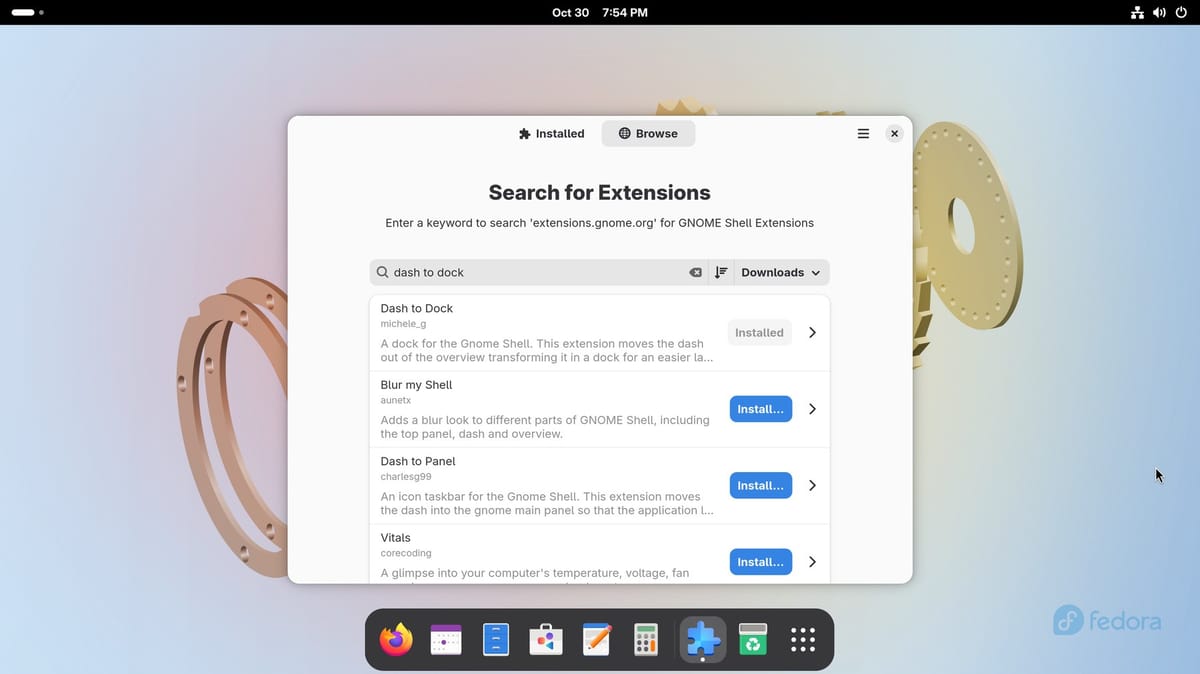
Two extensions add a tray and a dock, which plain GNOME does not have:
Jim Mendenhall, author of the Starry Hope Linux guide · starryhope.com/linux/install-fedora-45-workstation · published · checked
Linux distros for beginners scores
Easy for a newcomer 6 quotes
-
The easiest route is Fedora Media Writer, Fedora’s own app for Windows, macOS, and Linux. It downloads Fedora Workstation for you, or writes an ISO you already downloaded, to a USB stick.
Jim Mendenhall, author of the Starry Hope Linux guide · starryhope.com/linux/install-fedora-45-workstation · published · checked -
Share disk with other operating systems keeps Windows (or another system) and installs Fedora into free space for dual boot. Its Reclaim space step can shrink or delete partitions to make room. A Windows partition encrypted with BitLocker cannot be shrunk from here: the installer tells you to reboot into Windows and shrink it there first.
Jim Mendenhall, author of the Starry Hope Linux guide · starryhope.com/linux/install-fedora-45-workstation · published · checked -
The Third-Party Repositories page turns on software sources run by someone other than Fedora. Some of what they carry is not open source, so Fedora leaves them off until you agree. One click on Enable Third-Party Repositories turns on: Flathub, a large app store that works across Linux distros, with its full catalog Google’s repository for Chrome RPM Fusion’s NVIDIA driver repository RPM Fusion’s Steam repository
Jim Mendenhall, author of the Starry Hope Linux guide · starryhope.com/linux/install-fedora-45-workstation · published · checked -
A fresh Fedora install cannot play some common video formats. An H.264 file, the most common format, opens in Video Player with a Missing Plugin message instead of the picture.
Jim Mendenhall, author of the Starry Hope Linux guide · starryhope.com/linux/install-fedora-45-workstation · published · checked -
Open Terminal (press super , type terminal, and press enter ) and run these three commands from RPM Fusion’s Configuration and Multimedia pages.
Jim Mendenhall, author of the Starry Hope Linux guide · starryhope.com/linux/install-fedora-45-workstation · published · checked -
If your PC has an NVIDIA graphics card, RPM Fusion’s NVIDIA guide covers the driver: install the system updates first, then sudo dnf install akmod-nvidia for GeForce 16 series, RTX 20 series, and newer cards, and wait a few minutes for the driver module to build before you restart. GeForce 800, 900, and 10 series cards need the older 580xx driver instead, and older cards need older legacy drivers. With Secure Boot on, set up a signing key with RPM Fusion’s Secure Boot guide before you install the driver, or the driver will not load.
Jim Mendenhall, author of the Starry Hope Linux guide · starryhope.com/linux/install-fedora-45-workstation · published · checked
Familiar to Windows users 3 quotes
-
Featuring GNOME Desktop, Workstation is carefully curated to deliver a high-quality experience. The desktop is clean and uncluttered.
fedoraproject.org/workstation · checked -
Two extensions add a tray and a dock, which plain GNOME does not have:
Jim Mendenhall, author of the Starry Hope Linux guide · starryhope.com/linux/install-fedora-45-workstation · published · checked -
Fedora doesn't do anything special for Windows switchers out of the box, but the bundled Software app is serviceable
Paul Thurrott, reviewer at Thurrott.com · thurrott.com/linux/334538/switcher-2026-fedora-workstation · checked
Hardware support out of the box 3 quotes
-
Fedora 45 came out on Tuesday, November 3, 2026. Workstation is the Fedora edition for desktops and laptops, and this release ships GNOME 51 with Linux 7.2. Each Fedora release gets about 13 months of updates: the Fedora 45 schedule ends support on December 8, 2027, and by then the Software app will offer you the next version as an upgrade.
Jim Mendenhall, author of the Starry Hope Linux guide · starryhope.com/linux/install-fedora-45-workstation · published · checked -
If your PC has an NVIDIA graphics card, RPM Fusion’s NVIDIA guide covers the driver: install the system updates first, then sudo dnf install akmod-nvidia for GeForce 16 series, RTX 20 series, and newer cards, and wait a few minutes for the driver module to build before you restart. GeForce 800, 900, and 10 series cards need the older 580xx driver instead, and older cards need older legacy drivers. With Secure Boot on, set up a signing key with RPM Fusion’s Secure Boot guide before you install the driver, or the driver will not load.
Jim Mendenhall, author of the Starry Hope Linux guide · starryhope.com/linux/install-fedora-45-workstation · published · checked -
I installed Fedora on a 14-inch Intel Core Ultra ("Meteor Lake") laptop with Nvidia RTX A500 graphics, 32 GB of RAM, and 512 GB of SSD storage. Fedora recognizes all that.
Paul Thurrott, reviewer at Thurrott.com · thurrott.com/linux/334538/switcher-2026-fedora-workstation · checked
Updates that don't break 2 quotes
-
Btrfs is Fedora’s default file system. Root and home are two subvolumes on one partition, so they share the free space, and Fedora mounts them with zstd compression.
Jim Mendenhall, author of the Starry Hope Linux guide · starryhope.com/linux/install-fedora-45-workstation · published · checked -
I've used so many different Linux distributions this year that I've lost count, but Fedora Workstation 43 really stands out as a happy surprise. This is a stable, modern, and refined take on the Linux desktop, and for me, a welcome respite after a few less than successful adventures with other distributions.
Paul Thurrott, reviewer at Thurrott.com · thurrott.com/linux/334538/switcher-2026-fedora-workstation · checked
Years before a reinstall 2 quotes
-
Each version is updated for approximately 13 months, and upgrades between versions are quick and easy.
fedoraproject.org/workstation · checked -
Fedora 45 came out on Tuesday, November 3, 2026. Workstation is the Fedora edition for desktops and laptops, and this release ships GNOME 51 with Linux 7.2. Each Fedora release gets about 13 months of updates: the Fedora 45 schedule ends support on December 8, 2027, and by then the Software app will offer you the next version as an upgrade.
Jim Mendenhall, author of the Starry Hope Linux guide · starryhope.com/linux/install-fedora-45-workstation · published · checked
Ready for PC gaming 2 quotes
-
The Third-Party Repositories page turns on software sources run by someone other than Fedora. Some of what they carry is not open source, so Fedora leaves them off until you agree. One click on Enable Third-Party Repositories turns on: Flathub, a large app store that works across Linux distros, with its full catalog Google’s repository for Chrome RPM Fusion’s NVIDIA driver repository RPM Fusion’s Steam repository
Jim Mendenhall, author of the Starry Hope Linux guide · starryhope.com/linux/install-fedora-45-workstation · published · checked -
If your PC has an NVIDIA graphics card, RPM Fusion’s NVIDIA guide covers the driver: install the system updates first, then sudo dnf install akmod-nvidia for GeForce 16 series, RTX 20 series, and newer cards, and wait a few minutes for the driver module to build before you restart. GeForce 800, 900, and 10 series cards need the older 580xx driver instead, and older cards need older legacy drivers. With Secure Boot on, set up a signing key with RPM Fusion’s Secure Boot guide before you install the driver, or the driver will not load.
Jim Mendenhall, author of the Starry Hope Linux guide · starryhope.com/linux/install-fedora-45-workstation · published · checked
Runs on older PCs 1 quote
-
Fedora’s download page recommends 40 GB of disk space and 4 GB of RAM. Workstation comes for 64-bit Intel and AMD PCs (x86_64) and for 64-bit ARM (aarch64). The installer is one ISO file of about 2.9 GB (2.7 GiB), and you need a USB stick of at least 4 GB to boot it.
Jim Mendenhall, author of the Starry Hope Linux guide · starryhope.com/linux/install-fedora-45-workstation · published · checked
Help when you're stuck 2 quotes
-
Developed in partnership with upstream projects. Rigorously tested. Backed by Red Hat.
fedoraproject.org/workstation · checked -
Ask and answer questions on discussion.fedoraproject.org/tag/workstation
fedoraproject.org/workstation · checked
Facts
License 2 quotes
-
With Fedora, your desktop is your own. It's free, there are no ads, and your data belongs to you.
fedoraproject.org/workstation · checked -
There are several third-party software repositories for Fedora. They have more liberal licensing policies and provide software packages that Fedora excludes for various reasons. These software repositories are not officially affiliated or endorsed by the Fedora Project.
docs.fedoraproject.org/en-US/quick-docs/rpmfusion-setup · checked
Runs on 1 quote
-
Fedora’s download page recommends 40 GB of disk space and 4 GB of RAM. Workstation comes for 64-bit Intel and AMD PCs (x86_64) and for 64-bit ARM (aarch64). The installer is one ISO file of about 2.9 GB (2.7 GiB), and you need a USB stick of at least 4 GB to boot it.
Jim Mendenhall, author of the Starry Hope Linux guide · starryhope.com/linux/install-fedora-45-workstation · published · checked
Needs 1 quote
-
Fedora’s download page recommends 40 GB of disk space and 4 GB of RAM. Workstation comes for 64-bit Intel and AMD PCs (x86_64) and for 64-bit ARM (aarch64). The installer is one ISO file of about 2.9 GB (2.7 GiB), and you need a USB stick of at least 4 GB to boot it.
Jim Mendenhall, author of the Starry Hope Linux guide · starryhope.com/linux/install-fedora-45-workstation · published · checked
More from the sources
Features 4 quotes
-
Easily install the very best desktop apps with the click of a button from Fedora's repositories, Flathub or anywhere else.
fedoraproject.org/workstation · checked -
Fedora KDE Plasma Desktop lets you customize your desktop to your need and workflows, instead of the other way around.
fedoraproject.org/kde · checked -
Fedora KDE offers fresher drivers, kernel updates, and gaming libraries. This is especially critical for gaming on Linux, where performance gains from the latest Mesa drivers, Proton improvements, and Vulkan support can be game-changing.
fedoraproject.org/kde · checked -
The Fedora 45 installer has four screens: Welcome, Installation method, Storage configuration, and Review and install. Nothing is written to the disk until you click the button on the last one, so you can go back and change anything until then.
Jim Mendenhall, author of the Starry Hope Linux guide · starryhope.com/linux/install-fedora-45-workstation · published · checked
Limits and known issues 1 quote
-
Mixing many third party repositories is not recommended since they might conflict with each other causing instability and hard to debug issues.
docs.fedoraproject.org/en-US/quick-docs/rpmfusion-setup · checked
Pricing
fedoraproject.org/workstation · checked