
Kubuntu
Free Ubuntu-based Linux with the KDE Plasma desktop, a Windows-like layout and a 3-year LTS release
Our verdict
#3 of 9 in Linux distros for beginners · Windows-style desktop on a newer base
What it does
- KDE Plasma with a Windows-style panel and menu
- Built on Ubuntu's newest long-term release
- Discover app store and updater
Pros
- Familiar layout that you can reshape as much as you like
- Better odds on brand-new laptops than Mint or Zorin
- Ubuntu's large pool of help applies
Cons
- Three years of updates, not Ubuntu's five
- Plasma's many settings can overwhelm a beginner
- Rough edges in its newer Wayland session
- Choose if:
- Your laptop is new and you still want a Windows-style desktop
Kubuntu is an official flavor of Ubuntu that uses the KDE Plasma desktop instead of GNOME. It shares Ubuntu’s repositories and release schedule and is developed by community contributors. The current long-term support release is 26.04 LTS (Resolute Raccoon, Plasma 6.6), supported until April 2029. Kubuntu 26.10 is an interim release supported until July 2027. It installs from a live USB and can be set up alongside Windows. Plasma defaults to a Wayland session, and Discover is the app store and updater. Free and open source for x86-64 PCs and laptops.
What users say
Evidence ↓One long-time Kubuntu reviewer found the 26.04 LTS decent, fast and much better than the previous LTS, with a dual-boot install next to Windows finishing in about 15 minutes and laptop hardware features working. The same reviewer was critical of the new Wayland default, including lost window positions on session restore, and of the Calamares installer's warnings. This is one reviewer's test on one AMD laptop, not a survey, and it did not cover NVIDIA hardware or gaming.
Rankings and alternatives
- Linux distros for beginners #3 of 9 Windows-style desktop on a newer base
- Linux Mint #1 Best for most people leaving Windows
- Zorin OS #2 Closest to the look of Windows
- Ubuntu #4 Longest support and the most help online



Linux distros for beginners scores
Evaluated Nov 17, 2026 Evidence ↓- Easy for a newcomer · counts double 4
4/5 means: Graphical installer with dual boot, and almost everything is done from graphical tools, with a few rough edges
Live USB and a graphical Calamares installer that set up a dual boot next to Windows 11 in about 15 minutes, with Discover for apps and updates. Rough edges are installer warnings, Firefox as a Snap wrapper and some terminal use for extras. Secure Boot and driver tooling come from Ubuntu's base (own knowledge).
- Familiar to Windows users 5
5/5 means: A Windows-style taskbar, start menu and system tray by default
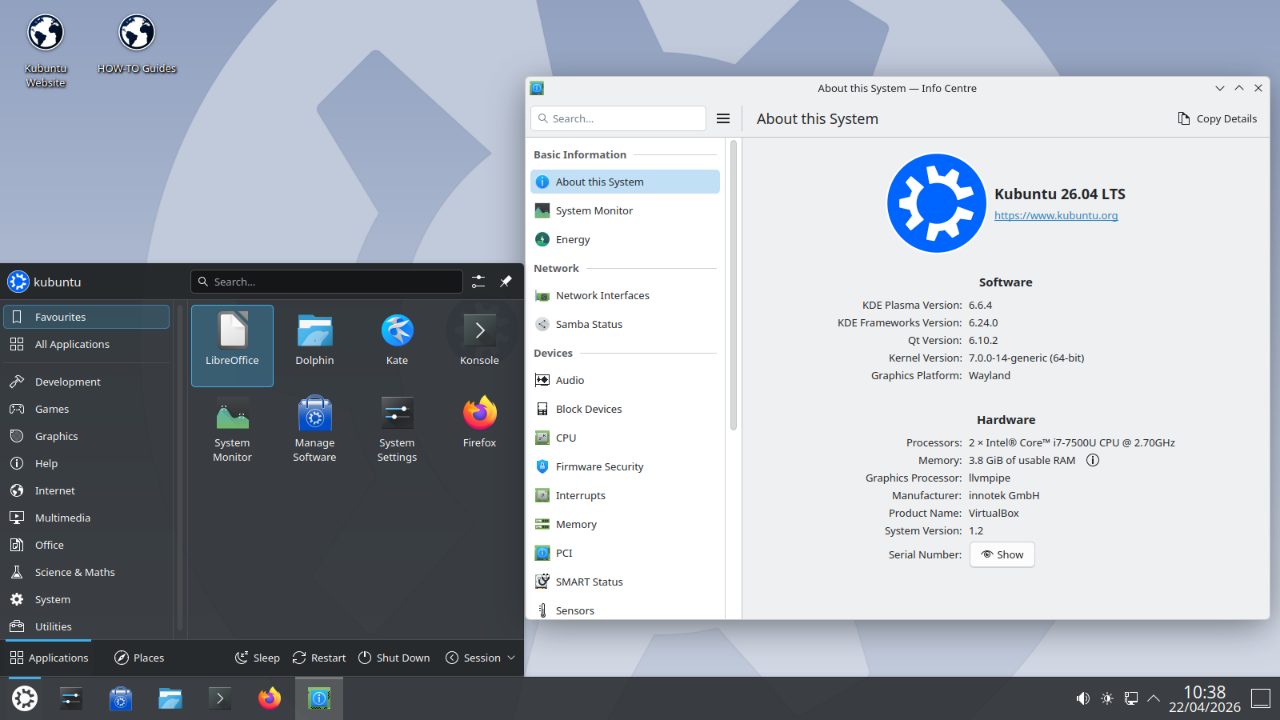
Plasma's default is a bottom panel with a start-style application menu, task buttons and a system tray, as the 26.04 desktop screenshot shows.
- Hardware support out of the box 4
4/5 means: NVIDIA's driver installs from a graphical tool after setup, and the kernel handles most current hardware
Kernel 7.0 handles current hardware, and NVIDIA's proprietary driver installs from a graphical driver tool through Ubuntu's driver tooling (own knowledge). It is not an automatic install-time default for every setup, and the reviewer's laptop test was AMD only.
- Updates that don't break 4
4/5 means: Conservative, well-tested base with a record of quiet updates, without a rollback set up by default
Conservative Ubuntu base and a reviewer who found the LTS fast and bug-fixed. No snapshot rollback is set up by default. The new Wayland default has known gaps.
- Years before a reinstall 4
4/5 means: Supported into 2029 or later, with an in-place upgrade to the next version
26.04 LTS is supported until April 2029 (3 years, shorter than Ubuntu's 5), with in-place upgrades to the next LTS through the release upgrader (own knowledge). Not 5 because it is under 4 years from now.
- Ready for PC gaming 4
4/5 means: Steam installs from the store in a click, NVIDIA's driver is easy, and the graphics stack is current enough
Steam installed fine from the software tools in the review. Mesa is current for an April 2026 release and NVIDIA's driver is a graphical install (own knowledge). NVIDIA gaming was not tested in the sources read.
- Runs on older PCs 3
3/5 means: Needs about 4 GB of RAM, with no lighter edition of its own
Wikipedia lists a 2 GB RAM minimum with 8 GB recommended, so plan on about 4 GB for KDE Plasma in daily use. Xubuntu and Lubuntu are separate Ubuntu flavors, not Kubuntu editions, so Kubuntu has no lighter edition of its own. (Writer calibration, changed from 4 to match how Ubuntu's flavors were treated.)
- Help when you're stuck 4
4/5 means: A large forum and good documentation, and most help for its base applies
Ubuntu's large pool of forum answers and documentation applies, plus Kubuntu's own forums and KDE docs. The Kubuntu community is smaller and community-led.
Pricing
- Kubuntu Free Free to download and use.
Prices checked Nov 17, 2026.
Evidence and sources
What users say
Summary 4 quotes
-
So yes, Kubuntu 26.04 is decent, it works well, lots of old Plasma bugs are gone, and you will probably like it more than the previous LTS, provided you go with the X11 desktop.
Dedoimedo, independent Linux reviewer and long-time Kubuntu user · dedoimedo.com/computers/kubuntu-26-04-review.html · published · checked -
The thing is, Wayland is LESS capable than X11. This is a given. For example, with a bunch of programs open, each with their own specific position, which is something you may definitely want if you use the solid Plasma session restore functionality, then, when you log in again, you want your apps to be where you left them. Well, in Wayland, all the programs get bunched in the center.
Dedoimedo, independent Linux reviewer and long-time Kubuntu user · dedoimedo.com/computers/kubuntu-26-04-review.html · published · checked -
The Calamares installer remains annoying. It will "alert" you if you try to install on battery, plus it always scans for that one module when launched.
Dedoimedo, independent Linux reviewer and long-time Kubuntu user · dedoimedo.com/computers/kubuntu-26-04-review.html · published · checked -
Suspend & resume, brightness, all those hardware bits, noice.
Dedoimedo, independent Linux reviewer and long-time Kubuntu user · dedoimedo.com/computers/kubuntu-26-04-review.html · published · checked
Linux distros for beginners scores
Easy for a newcomer 4 quotes
-
The Calamares installer remains annoying. It will "alert" you if you try to install on battery, plus it always scans for that one module when launched.
Dedoimedo, independent Linux reviewer and long-time Kubuntu user · dedoimedo.com/computers/kubuntu-26-04-review.html · published · checked -
Discover is fast(er), much more so than in the past. It also no longer offers "offline" updates (on reboot) as the default option
Dedoimedo, independent Linux reviewer and long-time Kubuntu user · dedoimedo.com/computers/kubuntu-26-04-review.html · published · checked -
If you run the command which, it will tell you Firefox is at /usr/bin/firefox, but this is just a wrapper for the snap version.
Dedoimedo, independent Linux reviewer and long-time Kubuntu user · dedoimedo.com/computers/kubuntu-26-04-review.html · published · checked -
So yes, Kubuntu 26.04 is decent, it works well, lots of old Plasma bugs are gone, and you will probably like it more than the previous LTS, provided you go with the X11 desktop.
Dedoimedo, independent Linux reviewer and long-time Kubuntu user · dedoimedo.com/computers/kubuntu-26-04-review.html · published · checked
Familiar to Windows users 2 quotes
-
Browse through a wide range of applications in Discover, customize the desktop to your liking, and make your system truly your own.
kubuntu.org · checked -
Kubuntu (/kʊˈbʊntuː/ kuu-BUUN-too)[3] is an official flavor of Ubuntu, a Linux distribution that uses the KDE Plasma Desktop Environment instead of GNOME. As part of the Ubuntu project, Kubuntu uses the same underlying systems. Kubuntu shares the same repositories as Ubuntu[4] and is released regularly on the same schedule as Ubuntu.[5]
en.wikipedia.org/wiki/Kubuntu · checked
Hardware support out of the box 1 quote
-
Suspend & resume, brightness, all those hardware bits, noice.
Dedoimedo, independent Linux reviewer and long-time Kubuntu user · dedoimedo.com/computers/kubuntu-26-04-review.html · published · checked
Updates that don't break 3 quotes
-
So yes, Kubuntu 26.04 is decent, it works well, lots of old Plasma bugs are gone, and you will probably like it more than the previous LTS, provided you go with the X11 desktop.
Dedoimedo, independent Linux reviewer and long-time Kubuntu user · dedoimedo.com/computers/kubuntu-26-04-review.html · published · checked -
The thing is, Wayland is LESS capable than X11. This is a given. For example, with a bunch of programs open, each with their own specific position, which is something you may definitely want if you use the solid Plasma session restore functionality, then, when you log in again, you want your apps to be where you left them. Well, in Wayland, all the programs get bunched in the center.
Dedoimedo, independent Linux reviewer and long-time Kubuntu user · dedoimedo.com/computers/kubuntu-26-04-review.html · published · checked -
Kubuntu (/kʊˈbʊntuː/ kuu-BUUN-too)[3] is an official flavor of Ubuntu, a Linux distribution that uses the KDE Plasma Desktop Environment instead of GNOME. As part of the Ubuntu project, Kubuntu uses the same underlying systems. Kubuntu shares the same repositories as Ubuntu[4] and is released regularly on the same schedule as Ubuntu.[5]
en.wikipedia.org/wiki/Kubuntu · checked
Years before a reinstall 1 quote
-
The latest Long Term Support (LTS) version of the Kubuntu operating system for desktop PCs and laptops, Kubuntu 26.04 supported with security and maintenance updates, until April 2029.
kubuntu.org/download · checked
Ready for PC gaming 1 quote
-
Suspend & resume, brightness, all those hardware bits, noice.
Dedoimedo, independent Linux reviewer and long-time Kubuntu user · dedoimedo.com/computers/kubuntu-26-04-review.html · published · checked
Runs on older PCs 1 quote
-
Processor · 64-bit, 2.0 GHz dual-core · 64-bit, 2.5 GHz quad-core
en.wikipedia.org/wiki/Kubuntu · checked
Help when you're stuck 1 quote
-
Kubuntu (/kʊˈbʊntuː/ kuu-BUUN-too)[3] is an official flavor of Ubuntu, a Linux distribution that uses the KDE Plasma Desktop Environment instead of GNOME. As part of the Ubuntu project, Kubuntu uses the same underlying systems. Kubuntu shares the same repositories as Ubuntu[4] and is released regularly on the same schedule as Ubuntu.[5]
en.wikipedia.org/wiki/Kubuntu · checked
Facts
License 1 quote
-
Kubuntu is an open-source operating system that you can freely download and use today. It combines the power of Ubuntu together with the elegant KDE Plasma desktop.
kubuntu.org · checked
Runs on 1 quote
-
The desktop version of Kubuntu currently supports the X86-64 architecture.
en.wikipedia.org/wiki/Kubuntu · checked
Needs 1 quote
-
Processor · 64-bit, 2.0 GHz dual-core · 64-bit, 2.5 GHz quad-core
en.wikipedia.org/wiki/Kubuntu · checked
More from the sources
Features 1 quote
-
The Kubuntu team does not officially support X11 in Kubuntu anymore, but that shouldn't bother you, because you get packages from Ubuntu repositories
Dedoimedo, independent Linux reviewer and long-time Kubuntu user · dedoimedo.com/computers/kubuntu-26-04-review.html · published · checked
Limits and known issues 2 quotes
-
Kubuntu 26.10 supported with security and maintenance updates, until July 2027.
kubuntu.org/download · checked -
Canonical provides support and security updates for Kubuntu components that are shared with Ubuntu for 18 months – five years in the case of long-term support (LTS) versions – after release.[15]
en.wikipedia.org/wiki/Kubuntu · checked
How widely it is used 1 quote
-
Kubuntu rollouts include the world's largest Linux desktop deployment, that includes more than 500,000 desktops in Brazil (in 42,000 schools of 4,000 cities).117119
en.wikipedia.org/wiki/Kubuntu · checked
Pricing
kubuntu.org/download · checked