
Zorin OS
Ubuntu-based Linux desktop with Windows-like layouts, free Core edition and paid Pro edition
Our verdict
#2 of 9 in Linux distros for beginners · Closest to the look of Windows
What it does
- Zorin Appearance switches between Windows-like and other layouts
- Windows App Support runs many .exe and .msi installers
- Graphics drivers, including NVIDIA's, included
- A Lite edition for older computers
Pros
- The most polished desktop for someone coming from Windows
- Installs next to Windows from a live USB
- Updates until June 2029
Cons
- The Windows 11-style layout costs extra (Pro)
- No snapshot tool set up for you
- Smaller community than Mint or Ubuntu
- Choose if:
- You want to keep running one or two small Windows programs
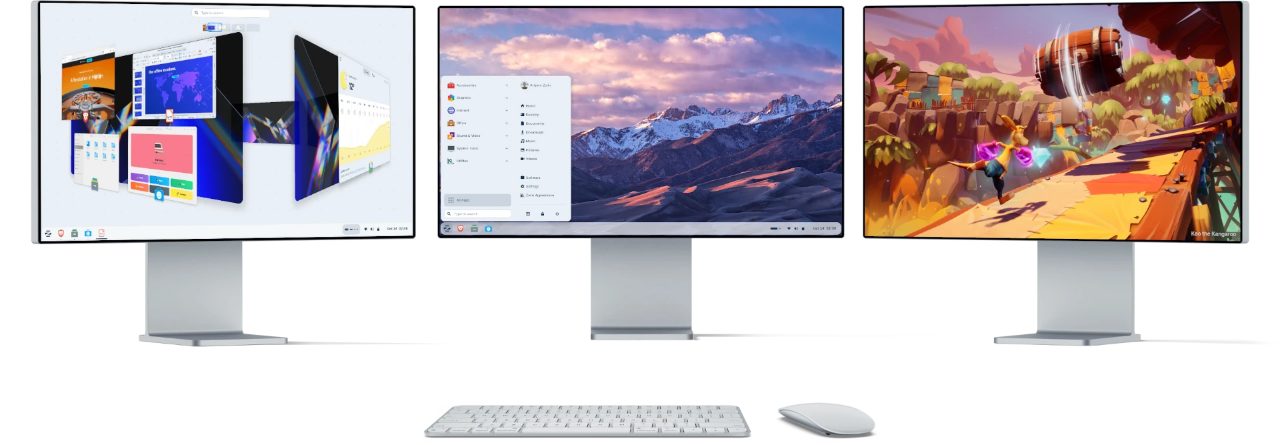
Zorin OS is a Linux operating system built on Ubuntu 24.04 LTS and aimed at people moving from Windows or macOS. Its Zorin Appearance app switches the GNOME desktop between familiar layouts, and Windows App Support can run many .exe and .msi apps. The free Core edition has 4 layouts; the one-time-purchase Pro edition adds 8 more layouts (including Windows 11-like), bundled creative and productivity apps and email installation support. A Lite edition uses XFCE for older computers. It runs from a live USB, can be installed alongside Windows, and is supported with updates until June 2029. Zorin describes it as open source and makes it from Dublin.
What users say
Evidence ↓Reviewers in the saved pages are positive about the polish and familiar desktop (one open source advocate, one Windows-focused writer), and one reports near-perfect hardware support on a single laptop. The one cautionary account is a USB install media problem that was fixed by switching tools. Both are single-reviewer accounts, not a survey of users.
Rankings and alternatives
- Linux distros for beginners #2 of 9 Closest to the look of Windows
- Linux Mint #1 Best for most people leaving Windows
- Kubuntu #3 Windows-style desktop on a newer base
- Ubuntu #4 Longest support and the most help online



Linux distros for beginners scores
Evaluated Nov 17, 2026 Evidence ↓- Easy for a newcomer · counts double 4
4/5 means: Graphical installer with dual boot, and almost everything is done from graphical tools, with a few rough edges
Graphical Ubuntu-style installer with a dual-boot option, live USB trial, Software store with Flatpak, Snap and deb, and a Windows-app tool. Codecs and drivers are bundled from my knowledge of the distro; Secure Boot and NVIDIA boot-entry details were not read, and one reviewer had USB-writing trouble.
- Familiar to Windows users 5
5/5 means: A Windows-style taskbar, start menu and system tray by default
Core's default Windows-like layout has a taskbar, start-style menu and tray, and Zorin Appearance switches layouts in a few clicks. The Windows 11-like layout is Pro-only and Core's looks like Windows 7/10.
- Hardware support out of the box 4
4/5 means: NVIDIA's driver installs from a graphical tool after setup, and the kernel handles most current hardware
Kernel 6.17 in 18.1 and bundled NVIDIA, AMD and Intel drivers, with good results on one laptop. From my knowledge NVIDIA is offered as a separate boot option at install, which would make it a 5, but I did not confirm that on the pages read.
- Updates that don't break 4
4/5 means: Conservative, well-tested base with a record of quiet updates, without a rollback set up by default
Conservative Ubuntu 24.04 LTS base. Rollback is not set up by default as far as I know (Timeshift is not configured); the record of quiet updates is from general knowledge.
- Years before a reinstall 4
4/5 means: Supported into 2029 or later, with an in-place upgrade to the next version
Supported until June 2029 (about 2.5 years from now), with a vendor-stated in-place upgrade app for major versions. I did not read the upgrade guide, so whether it covers 17 to 18 is unconfirmed.
- Ready for PC gaming 4
4/5 means: Steam installs from the store in a click, NVIDIA's driver is easy, and the graphics stack is current enough
Steam, Lutris, Heroic, GOG and itch.io are available from the store with bundled NVIDIA drivers and game optimizations. Steam is not preinstalled as far as I know, and Ubuntu 24.04's Mesa is not the newest.
- Runs on older PCs 4
4/5 means: Runs in about 2 to 4 GB of RAM, with an official lighter edition
Zorin says computers up to 15 years old should work and an XFCE Lite edition exists. My knowledge is that Core needs about 2 GB of RAM, but the published requirements page was not read.
- Help when you're stuck 4
4/5 means: A large forum and good documentation, and most help for its base applies
An official forum and help center, plus most Ubuntu help applies since it is Ubuntu-based. Forum size was not checked and the community is smaller than Ubuntu's or Mint's.
Pricing
- Core Free Free download with 4 desktop layouts (Windows-like, Touch, Windows List-like, GNOME Shell-like), live USB trial and Windows App Support.
- Pro $47.99 one-time One-time purchase, tax extra, for Zorin OS 18. Price from a December 2025 review; another October 2025 review paid about $35 to upgrade from Core, so the current vendor price is unconfirmed. Adds 8 premium layouts, creative and productivity apps, wallpapers and email installation support for one computer. Zorin OS 19 Pro would be bought separately at a discount. Core to Pro upgrades in place.
- Lite Contact sales XFCE-based edition for older hardware. Its price and requirements were not read on the pages saved.
- Education Contact sales Offered on the download page according to one review; price and contents were not read.
Prices checked Nov 17, 2026.
Evidence and sources
What users say
Summary 3 quotes
-
It isn’t trying to reinvent Linux so much as refine it—building on Ubuntu’s stability, adding a carefully tuned Gnome experience, and delivering a level of out-of-the-box polish that many distros only reach after a weekend of tweaks.
Don Watkins, open source advocate and reviewer · allthingsopen.org/articles/zorin-os-18-review-linux-distro-windows-users · published · checked -
Hardware support, at least for this 2- or 3-year-old Intel-based laptop, is perfect, from what I can tell.
Paul Thurrott, Windows-focused tech writer at Thurrott.com · thurrott.com/linux/328717/first-steps-zorin-os-18 · published · checked -
I usually use Rufus to create USB-based installation media, but I couldn't get that first laptop noted above to boot with that (or any other USB disk, I later discovered). And so I tried again on the EliteBook I’m now using and that didn’t work either. So I switched to balenaEtcher, which, granted, Zorin recommends, and the installation media I created with that app worked fine.
Paul Thurrott, Windows-focused tech writer at Thurrott.com · thurrott.com/linux/328717/first-steps-zorin-os-18 · published · checked
Linux distros for beginners scores
Easy for a newcomer 5 quotes
-
You can install Zorin OS alongside Windows or macOS to keep your files and apps. You'll be able to choose which OS to use at each boot-up.
zorin.com/os · checked -
You can run Zorin OS from a USB flash drive to test-drive it without touching your computer's internal drive. When you're ready to install it, simply double-click on the "Install Zorin OS" icon on the desktop and follow the step-by-step instructions on the screen.
zorin.com/os · checked -
APT Flatpak Snap .deb AppImage .exe & .msi (with optional Windows App Support) Web Apps
zorin.com/os/details · checked -
I usually use Rufus to create USB-based installation media, but I couldn't get that first laptop noted above to boot with that (or any other USB disk, I later discovered). And so I tried again on the EliteBook I’m now using and that didn’t work either. So I switched to balenaEtcher, which, granted, Zorin recommends, and the installation media I created with that app worked fine.
Paul Thurrott, Windows-focused tech writer at Thurrott.com · thurrott.com/linux/328717/first-steps-zorin-os-18 · published · checked -
It gave me the option to dual-boot with Windows, but I wiped out the existing installation and installed Zorin OS 18 as the only OS. Once that was done, I started configuring the system and then decided to upgrade from Zorin OS 18 Core to Zorin OS 18 Pro. This costs about $35 and adds 8 more desktop layouts
Paul Thurrott, Windows-focused tech writer at Thurrott.com · thurrott.com/linux/328717/first-steps-zorin-os-18 · published · checked
Familiar to Windows users 2 quotes
-
The Zorin Appearance app has been extended to include all 12 desktop layouts in Zorin OS Pro.
zorin.com/os/pro · checked -
It isn’t trying to reinvent Linux so much as refine it—building on Ubuntu’s stability, adding a carefully tuned Gnome experience, and delivering a level of out-of-the-box polish that many distros only reach after a weekend of tweaks.
Don Watkins, open source advocate and reviewer · allthingsopen.org/articles/zorin-os-18-review-linux-distro-windows-users · published · checked
Hardware support out of the box 3 quotes
-
Zorin OS comes with NVIDIA, AMD, and Intel graphics drivers as well as game optimizations, so you can get great performance easily.
zorin.com/os · checked -
GNOME Shell (Core & Pro editions) XFCE (Lite edition)
zorin.com/os/details · checked -
Hardware support, at least for this 2- or 3-year-old Intel-based laptop, is perfect, from what I can tell.
Paul Thurrott, Windows-focused tech writer at Thurrott.com · thurrott.com/linux/328717/first-steps-zorin-os-18 · published · checked
Updates that don't break 1 quote
-
Base system · Ubuntu 24.04 LTS Supported untilwith software updates and security patches · 1 June 2029
zorin.com/os/details · checked
Years before a reinstall 2 quotes
-
Zorin OS 18 will receive software updates and security patches until at least June 2029. We normally release major versions every 2 years, so you'll have plenty of time to upgrade to future versions to extend support.
zorin.com/os · checked -
Base system · Ubuntu 24.04 LTS Supported untilwith software updates and security patches · 1 June 2029
zorin.com/os/details · checked
Ready for PC gaming 2 quotes
-
Zorin OS comes with NVIDIA, AMD, and Intel graphics drivers as well as game optimizations, so you can get great performance easily.
zorin.com/os · checked -
APT Flatpak Snap .deb AppImage .exe & .msi (with optional Windows App Support) Web Apps
zorin.com/os/details · checked
Runs on older PCs 2 quotes
-
If your computer is 15 years old or newer, chances are it should work with Zorin OS.
zorin.com/os · checked -
GNOME Shell (Core & Pro editions) XFCE (Lite edition)
zorin.com/os/details · checked
Help when you're stuck 1 quote
-
Zorin has an active community of users who help provide support for the distribution.
Don Watkins, open source advocate and reviewer · allthingsopen.org/articles/zorin-os-18-review-linux-distro-windows-users · published · checked
Facts
License 1 quote
-
Zorin OS is Open Source, so anyone can audit its source code to verify its privacy.
zorin.com/os · checked
Runs on 3 quotes
-
You can install Zorin OS alongside Windows or macOS to keep your files and apps. You'll be able to choose which OS to use at each boot-up.
zorin.com/os · checked -
You can run Zorin OS from a USB flash drive to test-drive it without touching your computer's internal drive. When you're ready to install it, simply double-click on the "Install Zorin OS" icon on the desktop and follow the step-by-step instructions on the screen.
zorin.com/os · checked -
GNOME Shell (Core & Pro editions) XFCE (Lite edition)
zorin.com/os/details · checked
Needs 2 quotes
-
If your computer is 15 years old or newer, chances are it should work with Zorin OS.
zorin.com/os · checked -
GNOME Shell (Core & Pro editions) XFCE (Lite edition)
zorin.com/os/details · checked
Users 1 quote
-
Join the millions who have downloaded Zorin OS.
zorin.com/os · checked
More from the sources
Pricing 4 quotes
-
You can download and use the Core edition of Zorin OS completely free. For more advanced features, additional apps, and support, you can purchase Zorin OS Pro
zorin.com/os · checked -
No, it's a one-time purchase. You won't need to pay again to keep using your copy of Zorin OS 18 Pro.
zorin.com/os/pro · checked -
Future major versions — such as Zorin OS 19 Pro — will need to be purchased separately when they will be released in the future. However, you'll be able to upgrade to future major versions at a discount.
zorin.com/os/pro · checked -
I opted for Zorin Core, which is free to download (Zorin Pro was listed as $47.99 plus tax).
Don Watkins, open source advocate and reviewer · allthingsopen.org/articles/zorin-os-18-review-linux-distro-windows-users · published · checked
Features 4 quotes
-
Zorin OS is also natively compatible with third-party Ubuntu & Linux apps (.deb or .AppImage executables), and you can run many Windows apps by simply double-clicking on their .exe or .msi installer file.
zorin.com/os · checked -
Yes, you can upgrade your existing installation of Zorin OS Core to Pro in-place while keeping your files, apps, and settings.
zorin.com/os/pro · checked -
Zorin OS Pro includes an advanced video editor, Photoshop-compatible image editor, illustration software, audio workstation, animation software, and the same 3D graphics & effects software used by Hollywood studios
zorin.com/os/pro · checked -
Zorin even has built-in Microsoft Windows application support with Wine and Bottles as part of the System Utilities menu item.
Don Watkins, open source advocate and reviewer · allthingsopen.org/articles/zorin-os-18-review-linux-distro-windows-users · published · checked
Pricing
zorin.com/os/pro · checked