
Ubuntu
Free Linux desktop from Canonical with a GNOME-based interface, a five-year LTS release and a live USB trial
Our verdict
#4 of 9 in Linux distros for beginners · Longest support and the most help online
What it does
- Updates until 2031, or 2036 with free Ubuntu Pro
- Installer offers NVIDIA and other third-party drivers
- App Center with Snap packages
- Certified laptops from Dell, Lenovo and HP
Pros
- The longest support of any distro here
- The most tutorials and forum answers online
- Strong hardware support
Cons
- Desktop layout is unlike Windows
- Needs 6 GB of RAM
- Snap apps can be slow to open
- Choose if:
- You want to install once and leave it for years
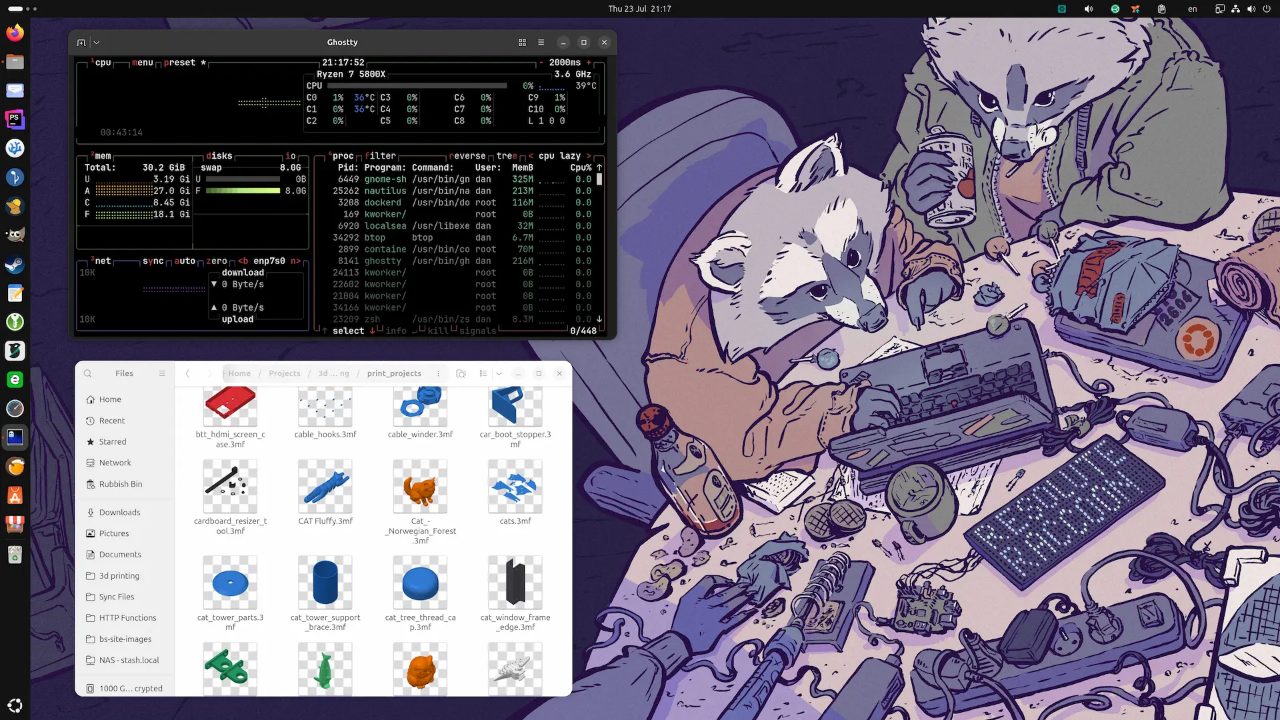
Ubuntu Desktop is a free, open source Linux operating system from Canonical for PCs and laptops. The default edition uses a customized GNOME desktop with a dock on the left, and the current long-term support release is 26.04 LTS (Resolute Raccoon, GNOME 50, Wayland only), supported with security updates until April 2031. It installs from a live USB that can be tried first and can be set up alongside Windows. Apps come mostly as Snap packages through its app store. Ubuntu Pro is free for personal use on up to 5 machines and extends security coverage. Official flavors such as Kubuntu, Xubuntu and Lubuntu offer other desktops and have shorter support.
What users say
Evidence ↓Reviewers and long-time users describe the current LTS as fast, stable and easy to install, with a live session to test before committing. Cautions come from the same sources: new releases can have early bugs (waiting for the first point release is the advice), the Wayland-only desktop can break software that needs Xorg, Wi-Fi and printer problems are best ruled out in the live session, and Ubuntu's customized GNOME differs from other GNOME distros. Each view comes from one or two authors, not a survey.
Rankings and alternatives
- Linux distros for beginners #4 of 9 Longest support and the most help online
- Linux Mint #1 Best for most people leaving Windows
- Zorin OS #2 Closest to the look of Windows
- Kubuntu #3 Windows-style desktop on a newer base



Linux distros for beginners scores
Evaluated Nov 17, 2026 Evidence ↓- Easy for a newcomer · counts double 4
4/5 means: Graphical installer with dual boot, and almost everything is done from graphical tools, with a few rough edges
Live USB, a graphical installer with a dual-boot option, Secure Boot works out of the box, and the App Center and Software Updater cover apps and updates (5, 13, 19). Rough edges are Snap-versus-deb app confusion and some tasks that still send people to the terminal.
- Familiar to Windows users 2
2/5 means: A dock and top bar in the style of macOS or GNOME, with no built-in Windows-like layout
Default is a GNOME-based left dock and top bar with an Activities overview, and there is no built-in Windows-style layout (21).
- Hardware support out of the box 5
5/5 means: NVIDIA's driver is included or offered during install, and the kernel is recent enough for new hardware
The installer offers third-party drivers (including NVIDIA's proprietary driver), the 26.04 kernel is 7.0, and Dell, HP, Lenovo and Framework certify machines (6). Wi-Fi problems still occur on some machines, so test the live USB (17).
- Updates that don't break 4
4/5 means: Conservative, well-tested base with a record of quiet updates, without a rollback set up by default
Conservative LTS base with a record of quiet updates, though new releases can have early bugs (16). No rollback is set up by default.
- Years before a reinstall 5
5/5 means: Supported for 4 or more years from now, or updates continuously with no version upgrades to manage
Standard support runs to April 2031 (about 4.4 years from now) and the 24.04 to 26.04 upgrade is in place (11). Free personal Ubuntu Pro adds 5 more years (12).
- Ready for PC gaming 4
4/5 means: Steam installs from the store in a click, NVIDIA's driver is easy, and the graphics stack is current enough
Steam installs from the App Center in a click, NVIDIA's driver is easy to get from the installer, and the graphics stack is current enough for an LTS (7). It is not preinstalled, and LTS Mesa versions trail rolling distros.
- Runs on older PCs 2
2/5 means: Needs about 6 GB of RAM, with no lighter edition of its own
The main edition lists 6 GB of RAM, a 2 GHz dual-core processor and 25 GB of disk (10). One reviewer calls the 6 GB a recommendation rather than a rule (23). The lighter flavors are separate products and are not counted.
- Help when you're stuck 5
5/5 means: The largest pool of beginner tutorials, forum answers and documentation
Ask Ubuntu, Discourse and official documentation, plus the largest pool of third-party tutorials, which assume Ubuntu or Debian commands (9). The pool size is from general knowledge; no page measured it.
Pricing
- Ubuntu Desktop Free Free to download and use.
- Ubuntu Pro (personal) Free , extra Free for personal use on up to 5 machines. Adds up to 5 more years of security updates on top of the 5-year standard support; a paid Legacy add-on reaches up to 15 years in total. Enterprises get a 30-day free trial.
Prices checked Nov 17, 2026.
Evidence and sources
What users say
Summary 6 quotes
-
In my experience, a new Ubuntu release often brings up bugs and issues that have gone unnoticed in the testing phase. If you easily get annoyed and don't want to troubleshoot, I would advise upgrading for a few week from the release. If you want to take it even more slow and comfortable, you can wait till the first point release of Ubuntu 26.04.1.
Abhishek Prakash, founder of It's FOSS (a Linux news site) and 17-year Ubuntu user · itsfoss.com/ubuntu-26-04-faq · published · checked -
While a newer version brings newer kernel that supports more hardware, it is not unheard to encounter wifi connectivity issues. A good approach here would be to create a live USB of Ubuntu 26.04 and boot into the live OS. If the live session encounters WiFi, graphics or printer issues, it is likely that you might face it when you install or upgrade to Ubuntu 26.04.
Abhishek Prakash, founder of It's FOSS (a Linux news site) and 17-year Ubuntu user · itsfoss.com/ubuntu-26-04-faq · published · checked -
Just like before, once you boot from your Ubuntu 26.04 installation media, you’ll have a chance to test the new release in Live mode, and then once you’re ready all you have to do is launch the installer and answer a handful of questions. The entire process took less than five minutes for me.
Learn Linux TV reviewer, Linux educator and reviewer · learnlinux.tv/ubuntu-26-04-lts-review-is-it-worth-the-upgrade · checked -
One downside of this is that Ubuntu’s implementation of GNOME is quite unlike other distros that feature GNOME, so for newcomers it might be a bit confusing to switch to or away from Ubuntu and have a different experience, but the quality of life improvements are probably a good thing for most people.
Learn Linux TV reviewer, Linux educator and reviewer · learnlinux.tv/ubuntu-26-04-lts-review-is-it-worth-the-upgrade · checked -
As I used my desktop, I was very satisfied with the performance – at no point did I feel my desktop was lagging or struggling in any way. Applications launch quickly, and the system kept up with me just fine. And I haven’t experienced any crashes or anything either, the entire release has been very stable.
Learn Linux TV reviewer, Linux educator and reviewer · learnlinux.tv/ubuntu-26-04-lts-review-is-it-worth-the-upgrade · checked -
While it is still possible to install the legacy Xorg display serveron KDE, GNOME 50 has completely removed Xorg support. As far as I know, you cannot use Xorg on GNOME 50 or higher anymore.
Abhishek Prakash, founder of It's FOSS (a Linux news site) and 17-year Ubuntu user · itsfoss.com/ubuntu-26-04-faq · published · checked
Linux distros for beginners scores
Easy for a newcomer 3 quotes
-
Download Ubuntu Desktop and replace your current operating system. It's easy to install in place of Windows, or run Ubuntu alongside it.
ubuntu.com/desktop · checked -
You download the ISO, make a live USB and use it to install Ubuntu on your system. You can dual boot it as well.
Abhishek Prakash, founder of It's FOSS (a Linux news site) and 17-year Ubuntu user · itsfoss.com/ubuntu-26-04-faq · published · checked -
Just like before, once you boot from your Ubuntu 26.04 installation media, you’ll have a chance to test the new release in Live mode, and then once you’re ready all you have to do is launch the installer and answer a handful of questions. The entire process took less than five minutes for me.
Learn Linux TV reviewer, Linux educator and reviewer · learnlinux.tv/ubuntu-26-04-lts-review-is-it-worth-the-upgrade · checked
Familiar to Windows users 1 quote
-
One downside of this is that Ubuntu’s implementation of GNOME is quite unlike other distros that feature GNOME, so for newcomers it might be a bit confusing to switch to or away from Ubuntu and have a different experience, but the quality of life improvements are probably a good thing for most people.
Learn Linux TV reviewer, Linux educator and reviewer · learnlinux.tv/ubuntu-26-04-lts-review-is-it-worth-the-upgrade · checked
Hardware support out of the box 2 quotes
-
Certified devices benefit from bespoke optimizations and are tested for reliability and performance in our dedicated hardware labs. Whether buying pre-installed or installing on certified hardware yourself, you'll get the same device-specific optimizations.
ubuntu.com/desktop · checked -
While a newer version brings newer kernel that supports more hardware, it is not unheard to encounter wifi connectivity issues. A good approach here would be to create a live USB of Ubuntu 26.04 and boot into the live OS. If the live session encounters WiFi, graphics or printer issues, it is likely that you might face it when you install or upgrade to Ubuntu 26.04.
Abhishek Prakash, founder of It's FOSS (a Linux news site) and 17-year Ubuntu user · itsfoss.com/ubuntu-26-04-faq · published · checked
Updates that don't break 2 quotes
-
In my experience, a new Ubuntu release often brings up bugs and issues that have gone unnoticed in the testing phase. If you easily get annoyed and don't want to troubleshoot, I would advise upgrading for a few week from the release. If you want to take it even more slow and comfortable, you can wait till the first point release of Ubuntu 26.04.1.
Abhishek Prakash, founder of It's FOSS (a Linux news site) and 17-year Ubuntu user · itsfoss.com/ubuntu-26-04-faq · published · checked -
As I used my desktop, I was very satisfied with the performance – at no point did I feel my desktop was lagging or struggling in any way. Applications launch quickly, and the system kept up with me just fine. And I haven’t experienced any crashes or anything either, the entire release has been very stable.
Learn Linux TV reviewer, Linux educator and reviewer · learnlinux.tv/ubuntu-26-04-lts-review-is-it-worth-the-upgrade · checked
Years before a reinstall 2 quotes
-
It is a long-term support (LTS) release and like any LTS release, it will be supported for five years. Which means that Ubuntu 26.04 will get security and maintenance updates until April 2031. Flavors get supported for three years only.
Abhishek Prakash, founder of It's FOSS (a Linux news site) and 17-year Ubuntu user · itsfoss.com/ubuntu-26-04-faq · published · checked -
You can enable Ubuntu Pro, free for personal use, and get extended support for five more years. This will give you just security and maintenance updates; new features and software versions will mostly not be available.
Abhishek Prakash, founder of It's FOSS (a Linux news site) and 17-year Ubuntu user · itsfoss.com/ubuntu-26-04-faq · published · checked
Ready for PC gaming 1 quote
-
Ubuntu offers essential applications for web browsing, messaging, gaming, and content creation, including Firefox, Chrome, Discord, Steam, and OBS Studio, supporting all your daily computing needs.
ubuntu.com/desktop · checked
Runs on older PCs 2 quotes
-
Ubuntu 26.04 requires a 2 GHz dual core processor or better, a minimum of 6 GB RAM and at least 25 GB of free disk space. These stats for the default GNOME version. KDE and Xfce flavors may work with 4 GB RAM.
Abhishek Prakash, founder of It's FOSS (a Linux news site) and 17-year Ubuntu user · itsfoss.com/ubuntu-26-04-faq · published · checked -
The 6GB requirement that’s listed is more of a recommendation, not a rule.
Learn Linux TV reviewer, Linux educator and reviewer · learnlinux.tv/ubuntu-26-04-lts-review-is-it-worth-the-upgrade · checked
Help when you're stuck 1 quote
-
Ask Ubuntu A forum for users to ask and answer troubleshooting questions regarding Ubuntu, part of the Stack Exchange network.
ubuntu.com/desktop · checked
Facts
License 1 quote
-
Ubuntu has always been free to download, use, and share. We believe in the power of open source software; Ubuntu could not exist without its worldwide community of voluntary developers.
ubuntu.com/desktop · checked
Runs on 2 quotes
-
Certified devices benefit from bespoke optimizations and are tested for reliability and performance in our dedicated hardware labs. Whether buying pre-installed or installing on certified hardware yourself, you'll get the same device-specific optimizations.
ubuntu.com/desktop · checked -
In addition to devices from HP, Dell, Lenovo, and other OEMs, Ubuntu Desktop is also certified on the Raspberry Pi, delivering a rich developer experience on this powerful Arm device.
ubuntu.com/desktop · checked
Needs 1 quote
-
Ubuntu 26.04 requires a 2 GHz dual core processor or better, a minimum of 6 GB RAM and at least 25 GB of free disk space. These stats for the default GNOME version. KDE and Xfce flavors may work with 4 GB RAM.
Abhishek Prakash, founder of It's FOSS (a Linux news site) and 17-year Ubuntu user · itsfoss.com/ubuntu-26-04-faq · published · checked
Users 1 quote
-
Fast, secure, and stylishly simple, the Ubuntu operating system is used by 50 million people worldwide every day.
ubuntu.com/desktop · checked
More from the sources
Pricing 2 quotes
-
Anyone can use Ubuntu Pro for free on up to 5 machines, and enterprises can try it for free for 30 days.
ubuntu.com/desktop · checked -
Get up to 15 years of security coverage and benefit from enterprise-grade security, management tooling, and extended support for developers and organisations. Ubuntu Pro Desktop is free for personal use and enterprises can try it for free for 30-days.
ubuntu.com/desktop · checked
Features 4 quotes
-
Ubuntu 26.04 now supports TPM-based full disk encryption by default, and also includes post-quantum cryptographic algorithms enabled by default as well that will further enhance security.
Learn Linux TV reviewer, Linux educator and reviewer · learnlinux.tv/ubuntu-26-04-lts-review-is-it-worth-the-upgrade · checked -
You can now secure your Ubuntu Desktop installation using TPM-backed full-disk encryption (TPM/FDE). With TPM/FDE, the encryption keys for your disk are automatically generated and stored safely in your computer’s Trusted Platform Module (TPM). Your disk unlocks automatically at boot when the TPM verifies that your system hasn’t been tampered with. Optionally, you can add a PIN or passphrase for an extra layer of security.
documentation.ubuntu.com/release-notes/26.04/summary-for-lts-users · checked -
The GNOME desktop environment has been updated to version 50.
documentation.ubuntu.com/release-notes/26.04/summary-for-lts-users · checked -
Snap applications using XDG Desktop Portals are now better integrated into the desktop. Users can fully manage their access permissions and reach resources outside of the application’s confinement in a natural way.
documentation.ubuntu.com/release-notes/26.04/summary-for-lts-users · checked
Limits and known issues 2 quotes
-
If you are dual booting it with Windows, you should at least give it 50 GB or even 100 GB. 25 GB will be filled way too soon.
Abhishek Prakash, founder of It's FOSS (a Linux news site) and 17-year Ubuntu user · itsfoss.com/ubuntu-26-04-faq · published · checked -
You can enable TPM/FDE during the Ubuntu installation. See Encrypt your disk with TPM. Some limitations remain: see Limitations of TPM-backed full disk encryption.
documentation.ubuntu.com/release-notes/26.04/summary-for-lts-users · checked
Pricing
ubuntu.com/desktop · checked