
Fork
A fast, native Git desktop client for Mac and Windows with a one-time license
Our verdict
#1 of 10 in Git GUI clients · Best for most Mac and Windows developers
What it does
- Drag-and-drop interactive rebase
- Built-in merge-conflict editor
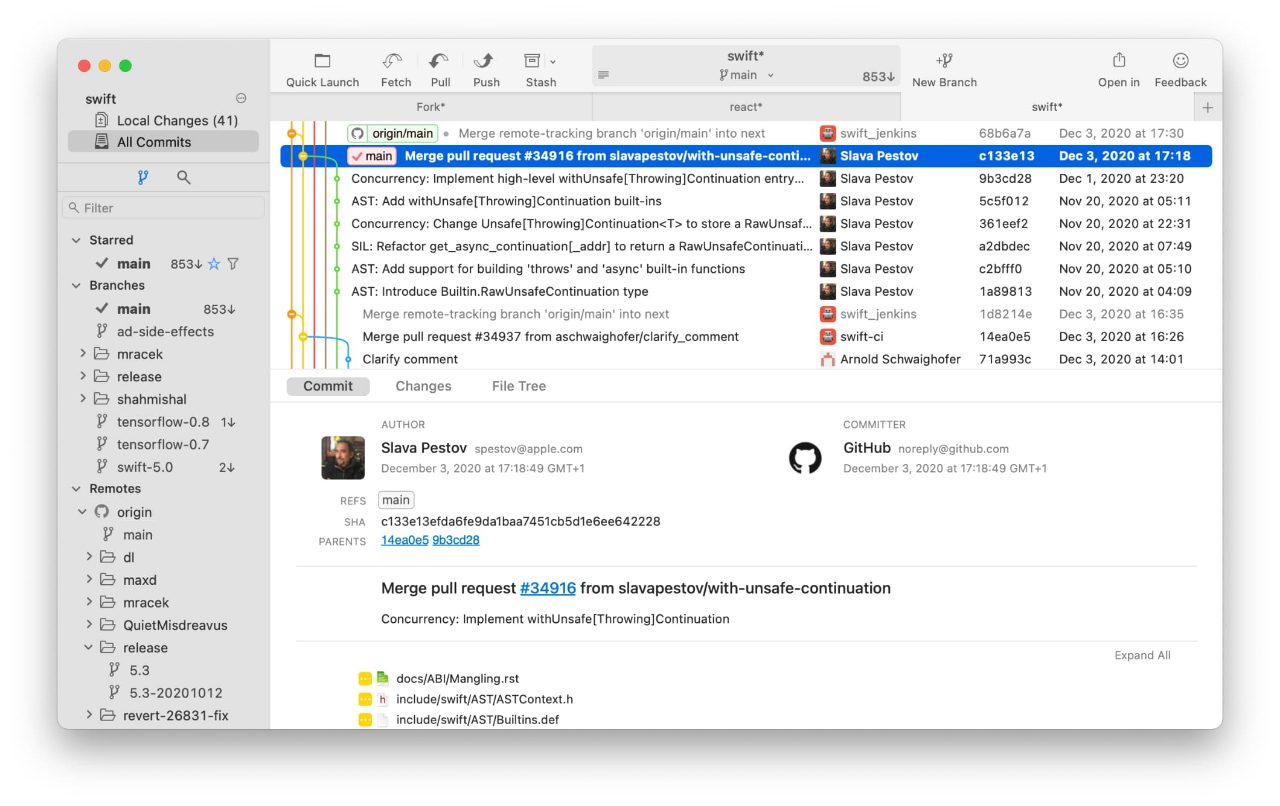
- Commit graph with file history and blame
- Reflog view for recovering lost commits
- AI commit messages through an AI coding tool you already use, such as Codex or Cursor
Pros
- Fast native app on both Mac and Windows
- Covers history, rebases and conflicts without needing another tool
- One-time license instead of a subscription
Cons
- No Linux version
- Assumes you already know Git's vocabulary
- Choose if:
- You want one paid license and never want to think about a subscription
Fork is a paid, proprietary desktop Git client for macOS and Windows, built by two independent developers. Mac uses native Swift/Cocoa and Windows uses .NET/WPF. It shows a commit graph, side-by-side diffs, file history and blame, line-by-line staging, drag-and-drop interactive rebase, a built-in merge-conflict resolver, stashes, reflog, submodules, worktrees, Git Flow and Git LFS. Recent releases add AI-written commit messages and code review through external agents such as Codex and Cursor. There is no Linux build. A free evaluation is available, then a one-time license is sold per platform.
What users say
Evidence ↓Reddit comments gathered by an aggregator (14 about Fork, not read directly) are favorable, with users saying they switched from Sourcetree and praising the fair license price. One reviewer calls the drag-and-drop interactive rebase its standout feature and says the native build stays responsive on large repositories, without benchmarks. The main criticisms from the reviewer are no Linux build and no permanent free tier. No critical practitioner comment was found.
Rankings and alternatives
- Git GUI clients #1 of 10 Best for most Mac and Windows developers
- Sublime Merge #2 Fast on huge repositories, and the pick for Linux
- GitKraken Desktop #3 Most visual graph, on every platform
- Tower Git Client #4 Undo for nearly everything, by subscription




Git GUI clients scores
Evaluated Nov 17, 2026 Evidence ↓- Seeing history and branches 5
5/5 means: A clear, fast graph of all branches with history search or filters, file history, blame and comparison of any two commits, all in the app.
A readable colored commit graph of all branches with a sidebar filter and commit search, file and directory history, blame, and browsing the file tree at any commit.
- Rewriting commits and undoing mistakes 5
5/5 means: A full visual interactive rebase that is quick to use, plus an undo or a view of lost commits that recovers most mistakes.
Its visual interactive rebase lets you reorder, squash, reword, edit and drop commits from a list you drag, which reviewers single out as its best feature, and the reflog view recovers lost commits.
- Resolving merge conflicts 5
5/5 means: A built-in merge editor that shows both sides and an editable result, lets you take changes piece by piece, and finishes the merge or rebase from the app.
A built-in merge-conflict resolver shows both sides and the merged result, lets you take changes piece by piece and continue the merge or rebase from the app.
- Easy for someone new to Git 4
4/5 means: A clear layout where common tasks are obvious and most mistakes can be undone, with only a few rough edges for newcomers.
A clean, uncluttered layout that users describe as simple, and the usual first stop for people leaving Sourcetree. It assumes you know what a rebase or a stash is, and it has no guided start or general undo button.
- Speed on large repositories 5
5/5 means: Known for staying fast on very large repositories, with history and diffs that appear almost instantly.
Native apps on both platforms (Swift/Cocoa on Mac, .NET/WPF on Windows) rather than a web-based shell, and widely praised for opening and drawing large histories quickly.
- Everyday Git tools beyond committing 5
5/5 means: Seven or all eight.
All eight: line staging, stashes shown in the commit list, cherry-pick, reflog, worktrees, submodules, Git LFS and bisect.
- Cost for work use · counts half 4
4/5 means: $1 to $100 over three years, such as a one-time license.
A one-time $59.99 license covers commercial use for one user on up to three machines, though Mac and Windows reportedly need separate licenses.
- Runs on Mac, Windows and Linux · counts half 3
3/5 means: macOS and Windows, with no Linux build.
macOS and Windows only; there is no Linux build.
Pricing
- Evaluation Free Free evaluation for trying the full app; the time limit and any nag screen were not found in pages read.
- License $59.99 one-time Reported by a third-party review as one user on up to three machines at a time, personal and commercial use, per platform (Mac and Windows need separate licenses per that review). Update terms not found. Not confirmed on the vendor's own site.
Prices checked Nov 17, 2026.
Evidence and sources
What users say
Summary 5 quotes
-
That native approach is the whole point: Fork is not an Electron app, so it launches quickly and stays responsive even on large repositories.
MakerStack, review site · makerstack.co/reviews/fork-review · published · checked -
The two real caveats are the lack of Linux support and the absence of any permanently free tier beyond the trial.
MakerStack, review site · makerstack.co/reviews/fork-review · published · checked -
Fork’s interactive rebase is the feature people rave about. You get a drag-and-drop list of commits where you can reorder, squash, edit, and drop commits visually, then apply the whole plan at once.
MakerStack, review site · makerstack.co/reviews/fork-review · published · checked -
I used SourceTree for a long time, however, a couple of years ago I switched to Fork and never looked back.
Reddit user (unnamed), Fork user · gummysearch.com/tools/best-products/git-gui · checked -
Git-fork has become my main git client over the years. The price for the license is very fair.
Reddit user (unnamed), Fork user · gummysearch.com/tools/best-products/git-gui · checked
Git GUI clients scores
Seeing history and branches 2 quotes
-
Interactive rebase Blame Browse the repository file tree at any commit Intuitive merge conflict resolving Restore lost commits with Reflog See your stashes right in the commit list Git-flow Git LFS GPG
git-fork.com · checked -
With history view you can find all commits where a particular file or directory was changed.
git-fork.com · checked
Rewriting commits and undoing mistakes 3 quotes
-
Edit, reorder and squash your commits using visual interactive rebase.
git-fork.com · checked -
Interactive rebase Blame Browse the repository file tree at any commit Intuitive merge conflict resolving Restore lost commits with Reflog See your stashes right in the commit list Git-flow Git LFS GPG
git-fork.com · checked -
Fork’s interactive rebase is the feature people rave about. You get a drag-and-drop list of commits where you can reorder, squash, edit, and drop commits visually, then apply the whole plan at once.
MakerStack, review site · makerstack.co/reviews/fork-review · published · checked
Resolving merge conflicts 2 quotes
-
Resolve your merge-conflicts easily using the merge-conflict helper and built-in merge-conflict resolver.
git-fork.com · checked -
Interactive rebase Blame Browse the repository file tree at any commit Intuitive merge conflict resolving Restore lost commits with Reflog See your stashes right in the commit list Git-flow Git LFS GPG
git-fork.com · checked
Easy for someone new to Git 2 quotes
-
I used SourceTree for a long time, however, a couple of years ago I switched to Fork and never looked back.
Reddit user (unnamed), Fork user · gummysearch.com/tools/best-products/git-gui · checked -
Git-fork has become my main git client over the years. The price for the license is very fair.
Reddit user (unnamed), Fork user · gummysearch.com/tools/best-products/git-gui · checked
Speed on large repositories 1 quote
-
That native approach is the whole point: Fork is not an Electron app, so it launches quickly and stays responsive even on large repositories.
MakerStack, review site · makerstack.co/reviews/fork-review · published · checked
Everyday Git tools beyond committing 2 quotes
-
Interactive rebase Blame Browse the repository file tree at any commit Intuitive merge conflict resolving Restore lost commits with Reflog See your stashes right in the commit list Git-flow Git LFS GPG
git-fork.com · checked -
Repository settings and issue tracker rules are shared between worktrees
git-fork.com/releasenotes · checked
Cost for work use 2 quotes
-
Fork costs a one-time $59.99 for a personal-and-commercial license that covers one user on up to three machines at a time. There is no subscription and no free tier; you get a free evaluation to try it, then a single payment unlocks it permanently.
makerstack.co/reviews/fork-review · published · checked -
That price is per platform, so if you work across both Mac and Windows you would buy two licenses.
makerstack.co/reviews/fork-review · published · checked
Runs on Mac, Windows and Linux 2 quotes
-
a fast and friendly git client for Mac and Windows
git-fork.com/releasenotes · checked -
The two real caveats are the lack of Linux support and the absence of any permanently free tier beyond the trial.
MakerStack, review site · makerstack.co/reviews/fork-review · published · checked
Facts
License 1 quote
-
Fork is Paid and Proprietary
alternativeto.net/software/fork · checked
Runs on 2 quotes
-
a fast and friendly git client for Mac and Windows
git-fork.com/releasenotes · checked -
The two real caveats are the lack of Linux support and the absence of any permanently free tier beyond the trial.
MakerStack, review site · makerstack.co/reviews/fork-review · published · checked
More from the sources
Features 2 quotes
-
Fork gently informs you about GitHub notifications without being annoying.
git-fork.com · checked -
Add Codex support for AI commit messages and code review
git-fork.com/releasenotes · checked
Pricing
makerstack.co/reviews/fork-review · checked