
Tower Git Client
Native Git client for Mac and Windows with undo, drag-and-drop rebase and a conflict wizard
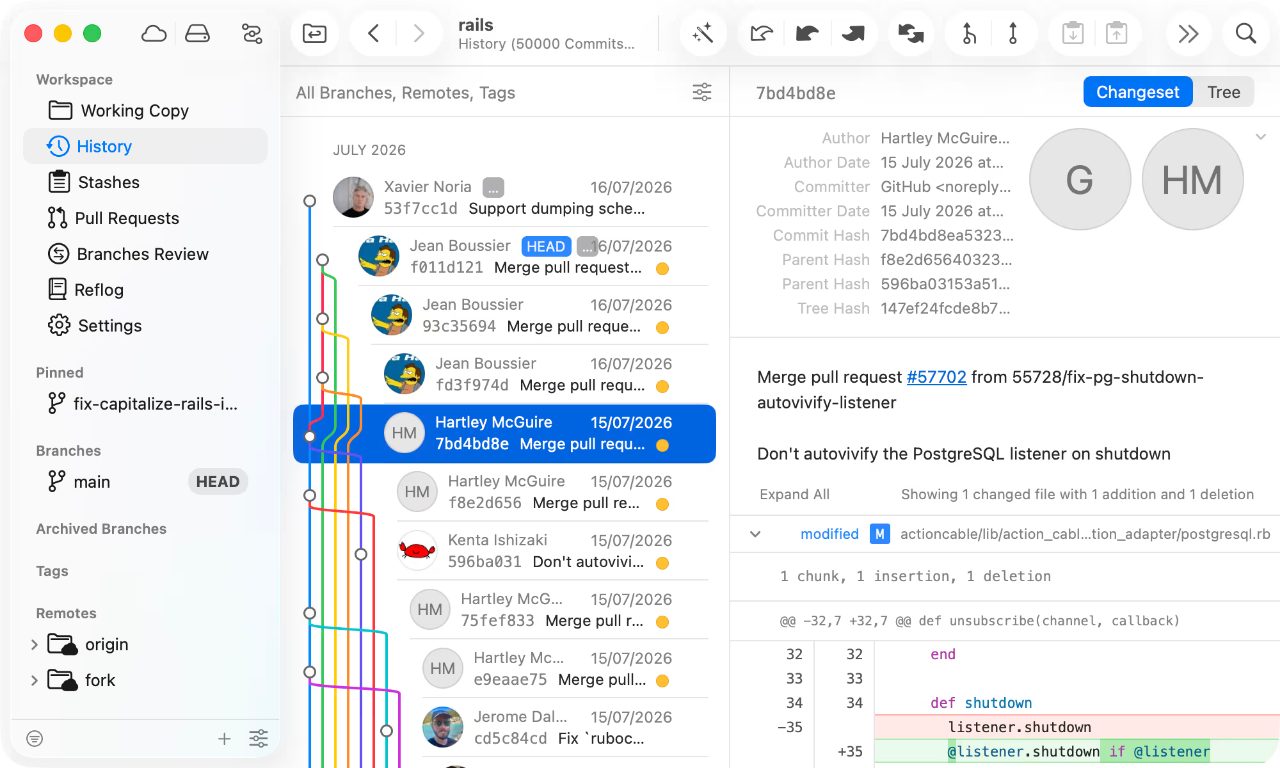
Our verdict
#4 of 10 in Git GUI clients · Undo for nearly everything, by subscription
What it does
- Cmd+Z or Ctrl+Z undo for commits, merges, branches and stashes
- Drag-and-drop interactive rebase and cherry-pick
- Pull requests inside the app
- Free step-by-step Git guide for learners
Pros
- The most complete undo of any client here
- One license covers Mac and Windows
Cons
- Combining conflicting changes needs a separate merge tool
- Yearly subscription only
- No Linux version
- Choose if:
- You want a safety net for every Git mistake and don't mind paying yearly
Tower is a paid, native desktop Git client from fournova for macOS and Windows; there is no Linux version. It shows history, branches and diffs visually and covers commits, merges, interactive rebase, cherry-pick, line staging, stashing, submodules, Git LFS, Git-Flow and conflict resolution, with undo for most Git operations. It connects to GitHub, GitLab, Bitbucket and Azure DevOps and includes AI-written commit messages. It is sold as an annual per-user subscription (Basic, Pro, Enterprise) with a 30-day trial and free use for students and educators.
Rankings and alternatives
- Git GUI clients #4 of 10 Undo for nearly everything, by subscription
- Fork #1 Best for most Mac and Windows developers
- Sublime Merge #2 Fast on huge repositories, and the pick for Linux
- GitKraken Desktop #3 Most visual graph, on every platform



Git GUI clients scores
Evaluated Nov 17, 2026 Evidence ↓- Seeing history and branches 5
5/5 means: A clear, fast graph of all branches with history search or filters, file history, blame and comparison of any two commits, all in the app.
A colored branch graph with history search, file history, blame, and branch comparison and review views.
- Rewriting commits and undoing mistakes 5
5/5 means: A full visual interactive rebase that is quick to use, plus an undo or a view of lost commits that recovers most mistakes.
Drag-and-drop interactive rebase for reordering and squashing, plus undo with Cmd+Z or Ctrl+Z for commits, merges, deleted branches and stashes, and a reflog view.
- Resolving merge conflicts 2
2/5 means: The app lists conflicted files and lets you finish the operation, but you resolve the contents in an editor or external tool, at most taking one whole side of a file in the app.
The Conflict Wizard resolves a file by taking one whole version; combining both versions opens the external merge tool you configure, and there is no in-app editor for the merged result.
- Easy for someone new to Git 4
4/5 means: A clear layout where common tasks are obvious and most mistakes can be undone, with only a few rough edges for newcomers.
Polished and consistent, with undo for nearly everything and a free step-by-step Git course from the same company. The screen is dense with panels and options, which takes a newcomer some time.
- Speed on large repositories 4
4/5 means: Quick on large repositories, with only occasional reports of lag.
A native app on Mac and Windows that handles large histories well, though it is not singled out for speed the way Fork and Sublime Merge are.
- Everyday Git tools beyond committing 5
5/5 means: Seven or all eight.
Single-line staging, stashes, cherry-pick, reflog, worktrees, submodules and Git LFS are all built in; bisect was not found.
- Cost for work use · counts half 3
3/5 means: $101 to $250 over three years.
The Basic plan is $69 per user per year with no one-time option, about $207 over three years; Pro is $129 a year.
- Runs on Mac, Windows and Linux · counts half 3
3/5 means: macOS and Windows, with no Linux build.
macOS and Windows on one license; there is no Linux version.
Pricing
- Basic $69.00 /year per seat Billed annually; about $5.75 a month (69 / 12). One user, Mac and Windows with one license, unlimited updates, pull requests and services manager for cloud hosting.
- Pro $129.00 /year per seat Billed annually; about $10.75 a month (129 / 12). Everything in Basic plus Pro-only features and basic team management; 10% off at 10+ seats. The 30-day trial includes all Pro features.
- Enterprise $149.00 /year per seat Billed annually; about $12.42 a month. Everything in Pro plus advanced team management, invoicing, priority support, SSO.
Prices checked Nov 17, 2026.
Evidence and sources
Git GUI clients scores
Seeing history and branches 2 quotes
-
AI Commits Image Diffing Git Hooks support Commit Templates Syntax Highlighting Light and Dark Mode Git Worktrees support Merge Conflict Wizard Native Git LFS support Support for Multiple Authors Branch Comparison and Review Automatic Stashing and Fetching Git-Flow and Stacked Branches support
git-tower.com/blog/best-git-client · published · checked -
Pull Requests • Single-line staging • Interactive Rebase • Conflict Wizard• Submodules • Git LFS • Git-Flow • File History • Blame • Cherry-Pick
git-tower.com · checked
Rewriting commits and undoing mistakes 3 quotes
-
with Tower, you can undo any Git operations, such as commits, merges, or stash deletions, by pressing ⌘ + Z (or CTRL + Z on Windows).
Bruno Brito, author at Tower (fournova) · git-tower.com/blog/best-git-client · published · checked -
many complex operations, such as merging branches or cherry-picking commits, can be achieved by performing a drag and drop operation. This is also true for interactive rebase, allowing you to reorder or squash commits with ease.
Bruno Brito, author at Tower (fournova) · git-tower.com/blog/best-git-client · published · checked -
Pull Requests • Single-line staging • Interactive Rebase • Conflict Wizard• Submodules • Git LFS • Git-Flow • File History • Blame • Cherry-Pick
git-tower.com · checked
Resolving merge conflicts 1 quote
-
declare one of the two versions to be correct
git-tower.com/help/mac/working-copy/merge-conflicts · checked
Easy for someone new to Git 3 quotes
-
with Tower, you can undo any Git operations, such as commits, merges, or stash deletions, by pressing ⌘ + Z (or CTRL + Z on Windows).
Bruno Brito, author at Tower (fournova) · git-tower.com/blog/best-git-client · published · checked -
A step-by-step guide for beginners helps you learn Git with Tower.
git-tower.com/features/easy · checked -
You should use Tower. It changed the game for me and made Git much more visual for me to understand.
Daniel Schutzsmith, Amnesty International (testimonial on Tower's homepage) · git-tower.com · checked
Speed on large repositories 1 quote
-
Tower offers the best of both worlds: it's as easy to use as it is powerful, making it the ideal choice for beginners and Git veterans alike. It's also a native client, combining performance and stability with a beautiful interface.
Bruno Brito, author at Tower (fournova) · git-tower.com/blog/best-git-client · published · checked
Everyday Git tools beyond committing 2 quotes
-
AI Commits Image Diffing Git Hooks support Commit Templates Syntax Highlighting Light and Dark Mode Git Worktrees support Merge Conflict Wizard Native Git LFS support Support for Multiple Authors Branch Comparison and Review Automatic Stashing and Fetching Git-Flow and Stacked Branches support
git-tower.com/blog/best-git-client · published · checked -
Pull Requests • Single-line staging • Interactive Rebase • Conflict Wizard• Submodules • Git LFS • Git-Flow • File History • Blame • Cherry-Pick
git-tower.com · checked
Cost for work use 3 quotes
-
$69 $5.75 per user billed annually
git-tower.com/pricing · checked -
Pro For professionals & small teams $129 $10.75 per user billed annually 10% off at 10+ seats
git-tower.com/pricing · checked -
Tower is offered as a standard subscription: you'll have access to Tower (including updates and support) as long as your subscription is active / paid for.
git-tower.com/pricing · checked
Runs on Mac, Windows and Linux 2 quotes
-
Limitations: No Linux support; paid subscription (30-day free trial available).
git-tower.com/blog/best-git-client · published · checked -
All plans include versions for Mac and Windows
git-tower.com/pricing · checked
Facts
License 1 quote
-
Tower is offered as a standard subscription: you'll have access to Tower (including updates and support) as long as your subscription is active / paid for.
git-tower.com/pricing · checked
Runs on 2 quotes
-
All plans include versions for Mac and Windows
git-tower.com/pricing · checked -
Limitations: No Linux support; paid subscription (30-day free trial available).
git-tower.com/blog/best-git-client · published · checked
Users 1 quote
-
for over 100,000 users worldwide
git-tower.com/pricing · checked
More from the sources
Pricing 2 quotes
-
Download our latest version and try Tower completely free for 30 days - no credit card required! The trial includes all features of Tower Pro.
git-tower.com/pricing · checked -
If you are an enrolled student, a teacher, or an educational institution, you can use Tower for free.
git-tower.com/pricing · checked
Features 2 quotes
-
This Git client also integrates seamlessly with code hosting platforms such as GitHub, GitLab, Azure or BitBucket, making it easy to clone repositories or manage pull requests.
git-tower.com/blog/best-git-client · published · checked -
If you are a fan of Stacked Branches, you can also read a branch's parent and stacking status, or stack it on its parent
git-tower.com/blog/tower-mac-18 · published · checked
Platforms and requirements 1 quote
-
The most powerful Git client for Mac and Windows
git-tower.com · checked
Pricing
git-tower.com/pricing · checked