
GitKraken Desktop
Visual Git client for Windows, macOS and Linux, free for local and public repos
Our verdict
#3 of 10 in Git GUI clients · Most visual graph, on every platform
What it does
- Colorful commit graph where you drag branches to merge or rebase them
- Built-in merge editor with AI-suggested resolutions on paid plans
- Undo button for recent actions
- Pull requests for GitHub, GitLab, Bitbucket and Azure DevOps
Pros
- The easiest graph to read at a glance
- Runs on Linux as well as Mac and Windows
- Undo makes experimenting less scary
Cons
- Private repositories need a paid subscription
- Heavy on memory and slower on big repositories
- Skip if:
- Your repositories are private and you don't want another subscription
GitKraken Desktop is a cross-platform visual Git client built around a commit graph, a diff view and a built-in merge tool, with AI commit and conflict helpers and, more recently, views for running coding agents in worktrees. It runs on Windows, macOS and Linux. The Community plan is free but limited to local repos and public remotes; private repos need a paid plan (Pro for one or two seats), and self-hosted Git servers need Advanced or higher. The same company sells GitLens for VS Code and a CLI, which are bundled in the same plans.
What users say
Evidence ↓Published practitioner views are thin. The vendor's own page carries testimonials praising the daily-driver UX. A third-party aggregator rates it 4.7 out of 5 across 212 G2 and Capterra reviews and lists resource use as a recurring con, without naming reviewers.
Rankings and alternatives
- Git GUI clients #3 of 10 Most visual graph, on every platform
- Fork #1 Best for most Mac and Windows developers
- Sublime Merge #2 Fast on huge repositories, and the pick for Linux
- Tower Git Client #4 Undo for nearly everything, by subscription



Git GUI clients scores
Evaluated Nov 17, 2026 Evidence ↓- Seeing history and branches 5
5/5 means: A clear, fast graph of all branches with history search or filters, file history, blame and comparison of any two commits, all in the app.
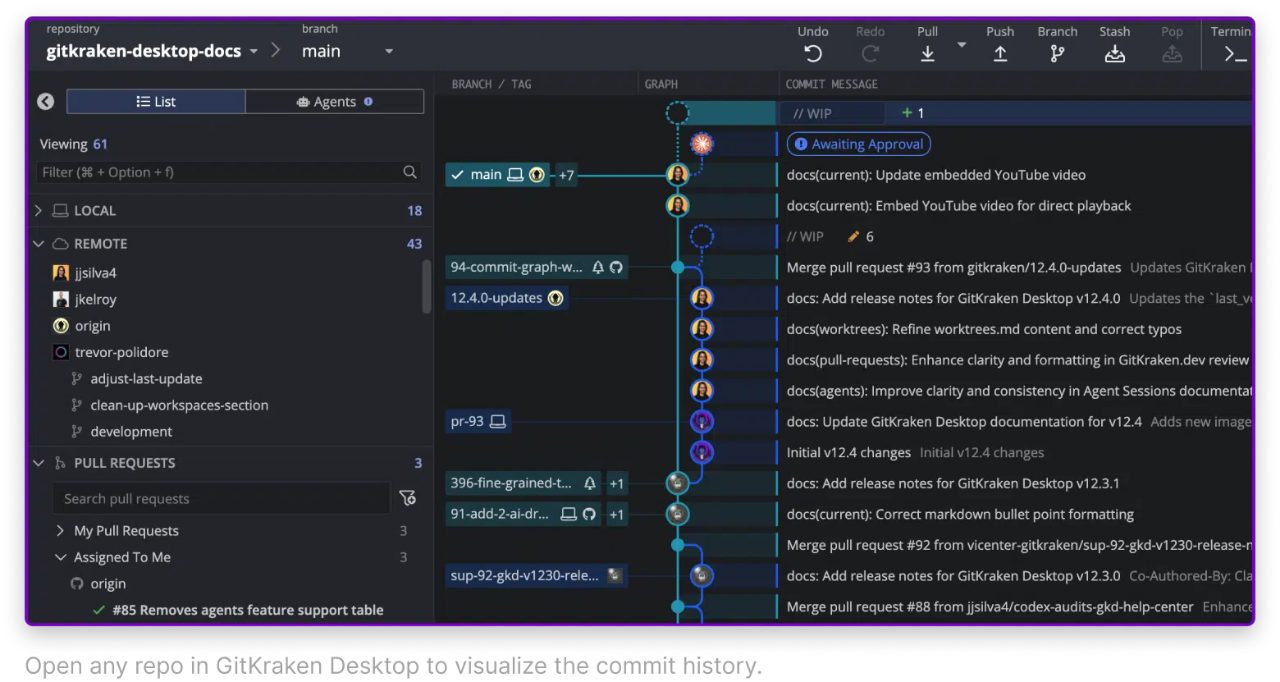
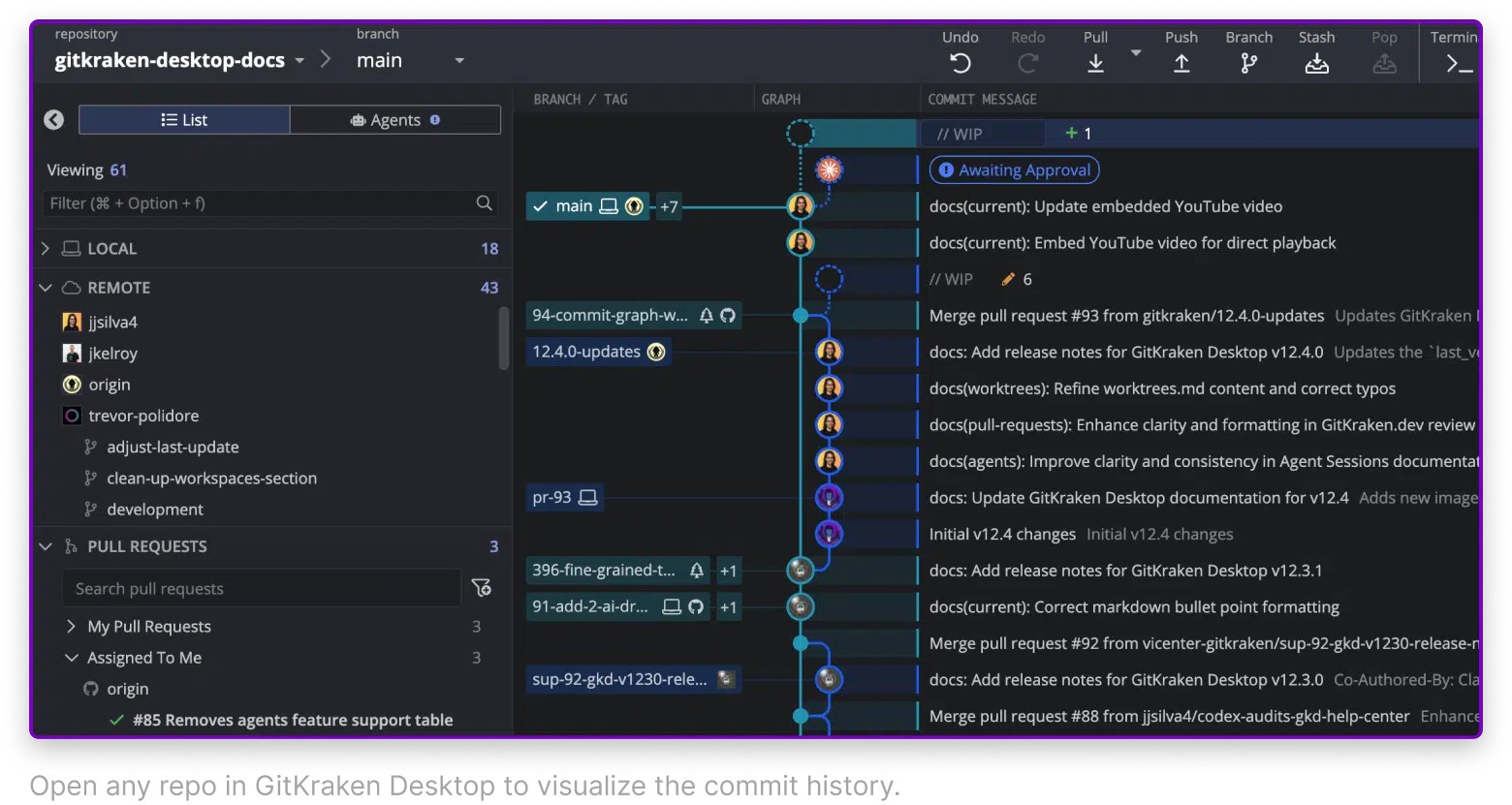
Its commit graph is the product's centerpiece: colored branch lanes with avatars, a filter box, file history, blame and diffs between commits.
- Rewriting commits and undoing mistakes 5
5/5 means: A full visual interactive rebase that is quick to use, plus an undo or a view of lost commits that recovers most mistakes.
Dragging one branch onto another offers an interactive rebase view where you reorder, squash, reword and drop commits, and the toolbar Undo button reverses most recent actions.
- Resolving merge conflicts 5
5/5 means: A built-in merge editor that shows both sides and an editable result, lets you take changes piece by piece, and finishes the merge or rebase from the app.
A built-in merge tool shows both sides above an editable output, lets you pick lines or hunks from each, and adds AI suggestions on paid plans; private-repo work needs the Pro plan anyway.
- Easy for someone new to Git 4
4/5 means: A clear layout where common tasks are obvious and most mistakes can be undone, with only a few rough edges for newcomers.
The visual graph and Undo button make branching easy to follow, and it is often recommended to newcomers. Sign-in, upsell prompts and newer agent panels add clutter.
- Speed on large repositories 2
2/5 means: Fine on small repositories, but slowness or heavy memory use on large ones is a common complaint.
An Electron app whose memory use and slowness on large repositories are a recurring complaint.
- Everyday Git tools beyond committing 4
4/5 means: Six of the eight.
Hunk and line staging, stashes, cherry-pick, worktrees, submodules and Git LFS; it has no reflog view or bisect.
- Cost for work use · counts half 2
2/5 means: $251 to $400 over three years.
The free Community plan covers only local repos and public remotes; private repositories need Pro at $10 per seat per month billed annually, about $360 over three years.
- Runs on Mac, Windows and Linux · counts half 5
5/5 means: macOS, Windows and Linux officially.
Windows, macOS and Linux.
Pricing
- Community Free Free. Local repos and public remotes only, with GitKraken Desktop, GitLens and CLI. Includes a 14-day trial of paid features.
- Pro $10.00 /month per seat Per seat per month, paid annually (the vendor showed a promotional $5 for the first seat). Adds private repos, multiple profiles, conflict detection and AI features. Maximum 2 seats.
- Advanced $14.00 /month per seat Per seat per month, paid annually. Adds self-hosted and enterprise Git integrations, SSO, up to 10 seats.
- Business $18.00 /month per seat Per seat per month, paid annually. Up to 100 seats.
- On-Premise Contact sales , extra Self-Hosted Server or Serverless license, sold separately from standard subscriptions.
Prices checked Nov 17, 2026.
Evidence and sources
What users say
Summary 3 quotes
-
Can be resource-heavy
toolradar.com/tools/gitkraken · published · checked -
GitKraken holds an aggregate rating of 4.7 out of 5 from 212 reviews across G2 and Capterra, last checked September 17, 2026.
toolradar.com/tools/gitkraken · published · checked -
GitKraken Desktop is my daily driver for all source control work. The UX allows me to work very effectively with repositories, work items, and PRs.
Kevin Bost, Senior Software Architect · gitkraken.com/git-client · checked
Git GUI clients scores
Seeing history and branches 2 quotes
-
The Commit Graph provides an easy-to-use interface to address common Git challenges. Feel more confident about managing version control and get a clear view of who changed what and when.
gitkraken.com/git-client · checked -
With the flexible Diff View you can review past changes, explore File Blame or File History, and even edit code directly, enabling you to stay on top of your project development with ease.
gitkraken.com/git-client · checked
Rewriting commits and undoing mistakes 1 quote
-
The Commit Graph provides an easy-to-use interface to address common Git challenges. Feel more confident about managing version control and get a clear view of who changed what and when.
gitkraken.com/git-client · checked
Resolving merge conflicts 2 quotes
-
Resolve merge conflicts faster with a built-in merge tool and AI-powered auto-resolution. GitKraken AI suggests context-aware fixes with explanations and confidence levels, so you can review and stay in control.
gitkraken.com/git-client · checked -
Essential AI features Leverage AI Commit Messages, AI Merge Conflict Resolution, Commit Composer, AI PR Title and Description Generation, AI Stash Messages, AI Commit Explanations and AI Explain Branch Changes all in GitKraken.
gitkraken.com/pricing · checked
Easy for someone new to Git 2 quotes
-
The Commit Graph provides an easy-to-use interface to address common Git challenges. Feel more confident about managing version control and get a clear view of who changed what and when.
gitkraken.com/git-client · checked -
GitKraken holds an aggregate rating of 4.7 out of 5 from 212 reviews across G2 and Capterra, last checked September 17, 2026.
toolradar.com/tools/gitkraken · published · checked
Speed on large repositories 1 quote
-
Can be resource-heavy
toolradar.com/tools/gitkraken · published · checked
Everyday Git tools beyond committing 1 quote
-
With the flexible Diff View you can review past changes, explore File Blame or File History, and even edit code directly, enabling you to stay on top of your project development with ease.
gitkraken.com/git-client · checked
Cost for work use 3 quotes
-
Only local repos and public remotes
gitkraken.com/pricing · checked -
Works with private repos Access privately-hosted repo remotes
gitkraken.com/pricing · checked -
for the first seat, then $10 per seat per month, paid annually*
gitkraken.com/pricing · checked
Runs on Mac, Windows and Linux 1 quote
-
GitKraken Desktop is a visual Git client for Windows, macOS, and Linux. You can use it for everyday Git work and to run coding agents on their own branches and worktrees, where their changes show up in the Commit Graph next to yours.
help.gitkraken.com/gitkraken-desktop/gitkraken-desktop-home · checked
Facts
Runs on 1 quote
-
GitKraken Desktop is a visual Git client for Windows, macOS, and Linux. You can use it for everyday Git work and to run coding agents on their own branches and worktrees, where their changes show up in the Commit Graph next to yours.
help.gitkraken.com/gitkraken-desktop/gitkraken-desktop-home · checked
More from the sources
Pricing 6 quotes
-
GitKraken Desktop is always free to use with local and public cloud-hosted repos. It includes a 14-day Pro trial to work with private repos and access to premium features.
gitkraken.com/git-client · checked -
Basic GitKraken Desktop, CLI & GitLens for OSS development
gitkraken.com/pricing · checked -
Robust productivity & private repo access for solo devs
gitkraken.com/pricing · checked -
With GitKraken Pro, you gain access to a range of advanced features designed to enhance your development workflow. Here are some key features included in the Pro plan:
gitkraken.com/git-client · checked -
$4.95/month per user
toolradar.com/tools/gitkraken · published · checked -
Yes. GitKraken Desktop On-Premise is available as a Self-Hosted Server (Docker on Linux) or a Serverless option activated via license file, both designed for teams that need to keep their Git workflows fully inside their own infrastructure. Both options are sold separately from standard subscriptions.
gitkraken.com/git-client · checked
Features 3 quotes
-
Self-hosted Git integrations Includes GitLab Self-hosted, Github Self-hosted and more.
gitkraken.com/pricing · checked -
Yes. AI-powered workflows including commit message generation, PR descriptions, and merge conflict resolution are available On-Prem when connected to an approved internal LLM such as Azure OpenAI, Anthropic, or a locally hosted model like Ollama.
gitkraken.com/git-client · checked -
Unlimited cloud Git integrations Connect to non-enterprise, cloud integrations such as GitHub, GitLab and Bitbucket
gitkraken.com/pricing · checked
Limits and known issues 1 quote
-
Maximum Seats · 2 · 10 · 100
gitkraken.com/pricing · checked
Pricing
gitkraken.com/pricing · checked