
Foxit PDF Editor
Windows PDF editor with a Word-style ribbon, sold as a subscription or a one-time license
Our verdict
#2 of 10 in PDF editors for Windows · Acrobat-level editing with a one-time option
What it does
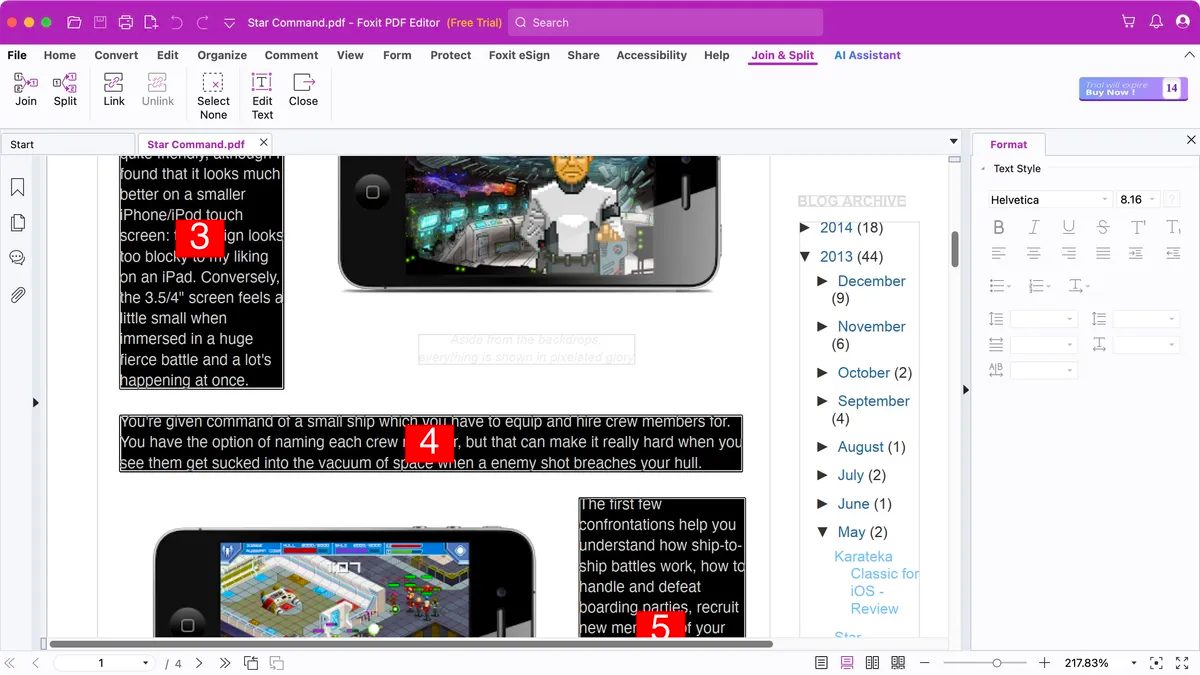
- Paragraph editing with linked text boxes
- OCR, Word conversion, compare and redaction by search in every plan
- Office-style ribbon interface
- Perpetual license or yearly subscription
Pros
- Text editing that matches Acrobat's
- Costs less than a year of Acrobat Pro when bought once
- Light and quick to open, even with large files
Cons
- The one-time license excludes AI, cloud features and future major versions
- Prone to crashing when merging documents
- E-signature requests and mobile apps need the pricier Editor+
- Choose if:
- You edit PDFs weekly and want Acrobat's capabilities without its subscription
Foxit PDF Editor is a desktop PDF editor for Windows and macOS, with web and mobile apps alongside it. It edits text and images, converts to and from Office formats, runs OCR on scans, creates and signs forms, redacts and compares documents. It is sold as a yearly or monthly subscription (PDF Editor, or PDF Editor+ with mobile apps, Smart Redact and eSign envelopes) or as a one-time Foxit PDF Editor 14 license without the AI, cloud and Smart Redact features. There is no free editing version, only a 14-day trial; the separate free Foxit PDF Reader covers viewing and light tasks.
What users say
Evidence ↓Reviewers and G2 and Capterra users mostly praise the price against Adobe Acrobat, the Office-style ribbon, and fast, light performance, and TechRadar rates its text editing and redaction highly. Complaints are less common but specific, such as crashes when merging large files, imperfect OCR on older documents, conversion formatting glitches, and slow support for licensing and activation. These views come from one professional reviewer and a few quotes from larger review sites relayed by an aggregator, so they show themes rather than a measured split.
Rankings and alternatives
- PDF editors for Windows #2 of 10 Acrobat-level editing with a one-time option
- Adobe Acrobat #1 The reference for high-stakes documents
- Tungsten Power PDF #3 One-time license that stays offline
- PDF-XChange Editor #4 Cheapest full license, for power users

Windows PDF editors scores
Evaluated Nov 17, 2026 Evidence ↓- Editing existing text and images 5
5/5 means: The most dependable paragraph editing, with reflow across text boxes, font matching and full image editing
TechRadar describes paragraph reflow, Link & Join Text across boxes and word-processor text controls, and calls it the most versatile editor it has tested. Font matching and image replacement were not tested by any source I read.
- OCR for scanned documents 4
4/5 means: Searchable and editable output with good accuracy on ordinary scans and many languages
Searchable or editable output, with automatic OCR from a scanner and "pretty good" results per TechRadar, in the base plan and perpetual license. A TrustRadius reviewer reports misses on older legal documents, and language support was not found in the sources.
- Converting to and from Word 4
4/5 means: Converts both ways in batches, with layouts that hold up on ordinary documents
Converts to and from Word, Excel and PowerPoint in the base plan; batch conversion is from my knowledge of the product, not the quotes. Only second-hand reports of formatting glitches when converting into PDF; no direct fidelity test of PDF to Word.
- Forms and signatures 4
4/5 means: Creates fillable forms with field detection and signs with certificates
Creating fillable forms and fill-and-sign are in the base plan, and the compare grid lists certificate signatures (plan marks not captured). Sending documents for others to sign needs Editor+ eSign, so not a 5. Users find form creation harder than average.
- Document tools for professional work 5
5/5 means: All five
True search-and-redact and compare are documented in the base plan. Bates numbering and PDF/A are on Foxit's grid and batch processing is from my knowledge, but the grid's per-plan marks were not captured, so the base plan having all five is not confirmed.
- Cost over three years 3
3/5 means: $100 to $250
The perpetual PDF Editor 14 license is $209.99 once, cheaper than three years of the $129.99 annual plan ($389.97). It includes editing, OCR and Office conversion. Maintenance and AI add-ons are left out.
- Ease of use 4
4/5 means: An Office-style or clean layout most people pick up quickly, with a few rough edges
Office-style ribbon that TechRadar rates 5/5 for clarity and that G2 and Capterra users say is quick to learn; the number of tools and form creation add some rough edges.
- Keeps your files on your PC 4
4/5 means: Everyday work runs locally; cloud and AI features are optional and clearly marked
Editing, OCR and conversion run in the desktop app from my knowledge of the product. AI features are optional but need online sign-in and upload documents. Whether the app itself needs an account or license check online was not found.
- Speed with large files · counts half 4
4/5 means: Opens large files quickly, with occasional slowdowns or crashes reported
Users describe it as lightweight and fast even with large JavaScript-heavy forms, but several report crashes and hangs when merging large documents. No benchmark exists.
Pricing
- PDF Editor $129.99 /year per seat Billed yearly; monthly billing from $10.99 per month. Windows, macOS and web. Editing, Office conversion, OCR, forms, compare, password security, fill-and-sign only, DMS and 300 free AI credits per month. 14-day free trial, no credit card.
- PDF Editor+ $159.99 /year per seat Billed yearly; a May 2025 review gave $13.99 per month on monthly billing. Adds iOS and Android apps, AI Smart Redact and Foxit eSign Essentials with 150 envelopes per year. Education discount for students and educators with a school email.
- PDF Editor 14 (perpetual license) $209.99 one-time per seat One-time license for Windows or macOS. Includes editing, conversion, OCR, forms and security. Does not include the AI Assistant, Workspace, Smart Redact, DMS or cloud features. Updates to later major versions are not included, and a G2 reviewer says support needs a current version.
- AI Assistant add-on $49.99 /year , extra 2,000 AI credits per month instead of the 300 free ones.
Prices checked Nov 17, 2026.
Evidence and sources
What users say
Summary 6 quotes
-
Every time we go back to Foxit PDF Editor, we're reminded just how good it is, especially when it comes to editing a PDF's existing text. Being able to link text boxes together so your writing flows from one to the other as you write brings PDF editing as close to working with a word processor as you can get.
Steve Paris, reviewer at TechRadar · techradar.com/reviews/foxit-pdf-editor-12 · published · checked -
I use Foxit PDF Editor for handling and processing multiple client forms, and I find it very efficient as it does not hog memory and resources, unlike Adobe. Even with large files that use a lot of JavaScript, Foxit runs fast and doesn't bog down computer resources.
Tom W., G2 reviewer · checkthat.ai/brands/foxit/reviews · published · checked -
Downside is that it crashes CONSTANTLY when combining documents, & then hangs/lags.
unnamed, G2 reviewer · checkthat.ai/brands/foxit/reviews · published · checked -
I purchased a lifetime license with the understanding that it would not be eligible for updates. Unfortunately, the program stopped responding after the last update... Customer service will not help because it is not the latest version.
J W., G2 reviewer · checkthat.ai/brands/foxit/reviews · published · checked -
"The OCR will sometimes not fully capture all of the document properly, especially with older legal documents." — Verified User, TrustRadius review
unnamed, TrustRadius verified reviewer · checkthat.ai/brands/foxit/reviews · published · checked -
"Lightweight, fast to open. Editing tools are fine for basic tasks. Doesn't eat up system resources like Adobe." — Jasmin C., Capterra review
Jasmin C., Capterra reviewer · checkthat.ai/brands/foxit/reviews · published · checked
Windows PDF editors scores
Editing existing text and images 2 quotes
-
Edit text, images, and pages Convert to/from Word, Excel, PowerPoint Create, fill, sign, and send forms OCR: Scan to searchable PDFs Compare two PDF versions Password protection & security
foxit.com/pdf-editor/pricing · checked -
Every time we go back to Foxit PDF Editor, we're reminded just how good it is, especially when it comes to editing a PDF's existing text. Being able to link text boxes together so your writing flows from one to the other as you write brings PDF editing as close to working with a word processor as you can get.
Steve Paris, reviewer at TechRadar · techradar.com/reviews/foxit-pdf-editor-12 · published · checked
OCR for scanned documents 4 quotes
-
Download once, own it forever One-time purchase, no subscription Download for Windows or macOS Full editing, conversion, OCR, forms, and security
foxit.com/pdf-editor · checked -
Edit text, images, and pages Convert to/from Word, Excel, PowerPoint Create, fill, sign, and send forms OCR: Scan to searchable PDFs Compare two PDF versions Password protection & security
foxit.com/pdf-editor/pricing · checked -
You can also choose for the software to automatically perform an OCR pass automatically, enabling you to edit as soon as the process is done.
Steve Paris, reviewer at TechRadar · techradar.com/reviews/foxit-pdf-editor-12 · published · checked -
"The OCR will sometimes not fully capture all of the document properly, especially with older legal documents." — Verified User, TrustRadius review
unnamed, TrustRadius verified reviewer · checkthat.ai/brands/foxit/reviews · published · checked
Converting to and from Word 2 quotes
-
Edit text, images, and pages Convert to/from Word, Excel, PowerPoint Create, fill, sign, and send forms OCR: Scan to searchable PDFs Compare two PDF versions Password protection & security
foxit.com/pdf-editor/pricing · checked -
Some users have reported formatting issues when converting files from other formats into PDFs using Foxit PDF Editor+. These issues can include misaligned text or altered layouts, which may require additional adjustments post-conversion to ensure the document appears as intended. While we did not experience any of these issues, that the community of users occassionally reports them needs to be included.
Daniel W. Rasmus, reviewer at Serious Insights · seriousinsights.net/foxit-pdf-editor-review · published · checked
Forms and signatures 3 quotes
-
Edit text, images, and pages Convert to/from Word, Excel, PowerPoint Create, fill, sign, and send forms OCR: Scan to searchable PDFs Compare two PDF versions Password protection & security
foxit.com/pdf-editor/pricing · checked -
Foxit eSign · Fill-and-sign only · 150 envelopes/year
foxit.com/pdf-editor · checked -
"The OCR will sometimes not fully capture all of the document properly, especially with older legal documents." — Verified User, TrustRadius review
unnamed, TrustRadius verified reviewer · checkthat.ai/brands/foxit/reviews · published · checked
Document tools for professional work 2 quotes
-
Edit text, images, and pages Convert to/from Word, Excel, PowerPoint Create, fill, sign, and send forms OCR: Scan to searchable PDFs Compare two PDF versions Password protection & security
foxit.com/pdf-editor/pricing · checked -
It's a powerful tool which also allows you to perform search and redact options, automatically looking through the document for a specific word for instance, or instructing Foxit PDF Editor to redact all phone numbers or emails in the file.
Steve Paris, reviewer at TechRadar · techradar.com/reviews/foxit-pdf-editor-12 · published · checked
Cost over three years 2 quotes
-
Foxit PDF Editor costs $129.99 per user per year, and Foxit PDF Editor+ costs $159.99 per user per year, with monthly billing available from $10.99. Foxit also sells a perpetual license, Foxit PDF Editor 14, for a one-time $209.99 per user.
foxit.com/pdf-editor/pricing · checked -
Download once, own it forever One-time purchase, no subscription Download for Windows or macOS Full editing, conversion, OCR, forms, and security
foxit.com/pdf-editor · checked
Ease of use 2 quotes
-
Every time we go back to Foxit PDF Editor, we're reminded just how good it is, especially when it comes to editing a PDF's existing text. Being able to link text boxes together so your writing flows from one to the other as you write brings PDF editing as close to working with a word processor as you can get.
Steve Paris, reviewer at TechRadar · techradar.com/reviews/foxit-pdf-editor-12 · published · checked -
"The OCR will sometimes not fully capture all of the document properly, especially with older legal documents." — Verified User, TrustRadius review
unnamed, TrustRadius verified reviewer · checkthat.ai/brands/foxit/reviews · published · checked
Keeps your files on your PC 2 quotes
-
Does not include AI Assistant, Workspace, Smart Redact, DMS, or cloud features
foxit.com/pdf-editor · checked -
The AI Assistant is available through AI Assistant access, but it requires online sign-in, with documents capped at 25 MB and 120 pages. AI features are excluded from perpetual licenses and the free tier, which complicates the cost story for organizations that want them.
checkthat.ai/brands/foxit/reviews · published · checked
Speed with large files 3 quotes
-
I use Foxit PDF Editor for handling and processing multiple client forms, and I find it very efficient as it does not hog memory and resources, unlike Adobe. Even with large files that use a lot of JavaScript, Foxit runs fast and doesn't bog down computer resources.
Tom W., G2 reviewer · checkthat.ai/brands/foxit/reviews · published · checked -
Downside is that it crashes CONSTANTLY when combining documents, & then hangs/lags.
unnamed, G2 reviewer · checkthat.ai/brands/foxit/reviews · published · checked -
"Lightweight, fast to open. Editing tools are fine for basic tasks. Doesn't eat up system resources like Adobe." — Jasmin C., Capterra review
Jasmin C., Capterra reviewer · checkthat.ai/brands/foxit/reviews · published · checked
Facts
License 3 quotes
-
Foxit PDF Editor costs $129.99 per user per year, and Foxit PDF Editor+ costs $159.99 per user per year, with monthly billing available from $10.99. Foxit also sells a perpetual license, Foxit PDF Editor 14, for a one-time $209.99 per user.
foxit.com/pdf-editor/pricing · checked -
Download once, own it forever One-time purchase, no subscription Download for Windows or macOS Full editing, conversion, OCR, forms, and security
foxit.com/pdf-editor · checked -
Foxit PDF Editor is available as a perpetual, one-time-purchase license for Windows and macOS, with no subscription required, and includes full editing, conversion, OCR, forms, document security, and fill-and-sign.
foxit.com/pdf-editor · checked
Runs on 2 quotes
-
Foxit PDF Editor+ ($159.99 per user per year) includes everything in Foxit PDF Editor ($129.99 per user per year) plus mobile apps for iOS and Android, Foxit eSign Essentials with 150 envelopes per year, and AI-powered Smart Redact for automatic PII removal.
foxit.com/pdf-editor/pricing · checked -
Foxit PDF Editor is available as a perpetual, one-time-purchase license for Windows and macOS, with no subscription required, and includes full editing, conversion, OCR, forms, document security, and fill-and-sign.
foxit.com/pdf-editor · checked
Users 1 quote
-
Trusted by 700M+ users and 660,000+ organizations worldwide
foxit.com/pdf-editor · checked
More from the sources
Pricing 1 quote
-
Every subscription includes Foxit DMS with unlimited cloud storage and 300 free AI credits per month, and every plan starts with a 14-day free trial with no credit card required.
foxit.com/pdf-editor/pricing · checked
Limits and known issues 3 quotes
-
we tried converting www.techradar.com, www.apple.com, and even www.microsoft.com, but we only got various errors for our troubles.
Steve Paris, reviewer at TechRadar · techradar.com/reviews/foxit-pdf-editor-12 · published · checked -
Unfortunately, the AI Assistant is of limited value in the basic product due to its AI-credits access limitations (20 credits a month).
Daniel W. Rasmus, reviewer at Serious Insights · seriousinsights.net/foxit-pdf-editor-review · published · checked -
"You can only convert one file at a time and you can only get no OCR versions of word docs with the free version. You need to pay 7$ a month for the premium." — G2 reviewer
unnamed, G2 reviewer · checkthat.ai/brands/foxit/reviews · published · checked
How widely it is used 1 quote
-
G2 · 4.6/5 · 3,650 · Largest sample by far, with 77% five-star and zero one-star ratings, signaling broad satisfaction.
checkthat.ai/brands/foxit/reviews · published · checked
Pricing
foxit.com/pdf-editor/pricing · checked