PDF-XChange Editor
Windows PDF editor with a free version and a one-time paid license
Our verdict
#4 of 10 in PDF editors for Windows · Cheapest full license, for power users
What it does
- Free version with watermarked paid tools
- Editable OCR, form creation and compare in Editor Plus
- Redaction by search, Bates numbering and PDF/A
- Windows only, runs fully offline
Pros
- The cheapest one-time license that covers the full job
- Fast and light, even with very large files
- No account and nothing sent to the cloud
Cons
- Paragraph editing and Word export are weaker than Foxit's or Acrobat's
- A dense interface that takes time to learn
- The free version's PRO tools watermark saved files without warning you first
- Skip if:
- You mainly rewrite paragraphs of text
PDF-XChange Editor is a Windows desktop app from PDF-XChange Co. (formerly Tracker Software) for viewing, annotating, editing, OCR, form work and redaction in PDF files. A free version has no time limit and can be used privately and commercially, but features marked as licensed still run and put a watermark on the output until a license is bought. Paid licenses are one-time purchases that include a year of maintenance: Editor at $62, Editor Plus at $79, and a Pro bundle at $131. Plus adds enhanced OCR, fillable form creation, dynamic stamps and document comparison.
What users say
Evidence ↓The one professional review read, from TechRadar in 2022, is favorable. It calls the free tier generous but notes that licensed tools watermark output, describes the interface as practical rather than attractive, and says the reviewer did not need another PDF editor. It is a single reviewer; no user discussion on speed, privacy or OCR accuracy was read.
Rankings and alternatives
- PDF editors for Windows #4 of 10 Cheapest full license, for power users
- Adobe Acrobat #1 The reference for high-stakes documents
- Foxit PDF Editor #2 Acrobat-level editing with a one-time option
- Tungsten Power PDF #3 One-time license that stays offline


Windows PDF editors scores
Evaluated Nov 17, 2026 Evidence ↓- Editing existing text and images 3
3/5 means: Edits text blocks and images, with limited reflow or font matching
Edits text blocks and replaces images, but from general knowledge reflow and font matching are limited, so longer edits can need manual fixing. The saved sources do not report layout shifts either way.
- OCR for scanned documents 4
4/5 means: Searchable and editable output with good accuracy on ordinary scans and many languages
Editor Plus has the enhanced OCR engine and editable output (basic OCR output is not editable). Multi-language OCR is noted by a reviewer; accuracy on messy scans is not documented in the saved sources.
- Converting to and from Word 3
3/5 means: Converts PDFs to Word, Excel and PowerPoint, but layouts and tables often need fixing
Exports to Word, Excel and PowerPoint, and creates PDFs from Office files; batch conversion is listed. No fidelity reports were found, and from general knowledge complex layouts and tables need fixing.
- Forms and signatures 4
4/5 means: Creates fillable forms with field detection and signs with certificates
Plus creates and edits fillable forms and recognizes form fields, and the product supports certificate digital signatures. Sending documents out for others to sign and tracking them is not offered beyond a DocuSign integration.
- Document tools for professional work 5
5/5 means: All five
Editor Plus lists redaction with find and redact, compare documents, Bates numbering, PDF/A and batch conversion. Compare is Plus-only; the other four are listed rows not marked Plus-only.
- Cost over three years 4
4/5 means: Under $100
Standard Editor at $62 one-time, with a year of maintenance included, covers text editing, basic OCR and Word export; Plus is $79. Both are under $100 over three years. Whether the standard Editor's Word export is watermarked is not clear from the saved sources.
- Ease of use 3
3/5 means: A familiar layout, but the number of tools or a few awkward workflows slow newcomers down
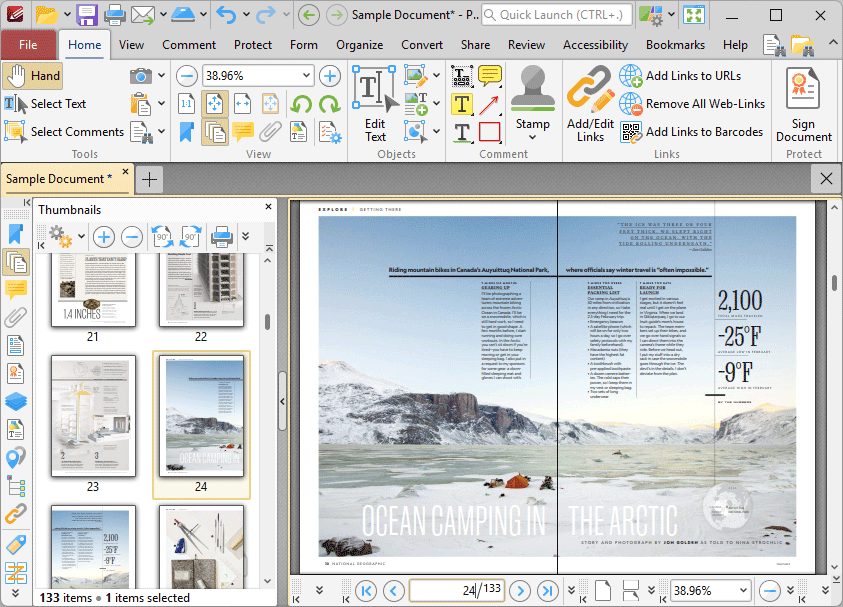
A familiar Office-style ribbon that a reviewer found logical, though not attractive. The large number of tools and the watermark trap on licensed features slow newcomers.
- Keeps your files on your PC 5
5/5 means: Works fully offline with no account and no cloud features in the way
A Windows desktop app that works locally with no account needed, from general knowledge; the saved sources do not state processing location or telemetry. Cloud storage connections are optional integrations.
- Speed with large files · counts half 4
4/5 means: Opens large files quickly, with occasional slowdowns or crashes reported
From general knowledge it is known as a fast, light editor that opens large files quickly, with occasional slowdowns on very heavy files. No practitioner reports were in the saved sources.
Pricing
- Free version Free No time limit; free for private and commercial use. Licensed features are marked with a PRO symbol, still work, and add watermarks to the output; the watermark cannot be removed without a user license, though a licensed copy can remove watermarks via Organize, Watermarks, Remove All.
- PDF-XChange Editor $62.00 one-time Single user license; includes 1 year of maintenance (updates). Extending to 2 or 3 years at purchase adds $15.50 or $23.25 at list ($12.40 or $18.60 reduced, offered only at purchase). Renewal within 30 days of expiry costs about 25% of the license price per year. No refunds after license keys are released. Volume packs start at $168 for 3 users.
- PDF-XChange Editor Plus $79.00 one-time Single user license; 1 year of maintenance included, extension $19.75 (2 years) or $29.63 (3 years) at list. Adds enhanced OCR, creating and editing fillable forms, forms recognition, dynamic stamps and document comparison. Volume packs start at $214 for 3 users.
- PDF-XChange Pro $131.00 one-time Single user bundle of Editor Plus, PDF-Tools and PDF-XChange Printer Standard, listed as "Starting at $131.00" on the vendor comparison chart.
Prices checked Nov 17, 2026.
Evidence and sources
What users say
Summary 3 quotes
-
PDF-XChange Editor has a fully functional free tier, and some upgradable pro features. However, what is worth noting is that the free tier may just be all that the majority of users need. The paid features are even usable and simply add a watermark.
Collin Probst, reviewer at TechRadar · techradar.com/reviews/pdf-xchange-editor · published · checked -
PDF-XChange Editor’s interface is a great middle ground between expansive and simple. While it’s not the most aesthetically pleasing to look at, it gets the job done in an efficient matter.
Collin Probst, reviewer at TechRadar · techradar.com/reviews/pdf-xchange-editor · published · checked -
My experience was good, however there was nothing mind blowing.
Collin Probst, reviewer at TechRadar · techradar.com/reviews/pdf-xchange-editor · published · checked
Windows PDF editors scores
Editing existing text and images 2 quotes
-
PDF-XChange Editor Plus includes the extra features detailed below. These features are not available in an unrestricted capacity with a regular PDF-XChange Editor license.
pdf-xchange.com/product/pdf-xchange-editor · checked -
Find and Redact Document Content
pdf-xchange.com/pdf-xchange-products-comparison-chart · checked
OCR for scanned documents 3 quotes
-
Optical Character Recognition Functionality (output is not directly editable unless Editor Plus or PDF-XChange Pro is Purchased) · Using Editor Plus
pdf-xchange.com/pdf-xchange-products-comparison-chart · checked -
Enhanced OCR · Using Editor Plus
pdf-xchange.com/pdf-xchange-products-comparison-chart · checked -
The paid version includes additional features such as fillable PDF Forms, converting to Microsoft Word format, combining PDFs, deleting or moving pages, scanning direct to PDF and more.
Collin Probst, reviewer at TechRadar · techradar.com/reviews/pdf-xchange-editor · published · checked
Converting to and from Word 2 quotes
-
Find and Redact Document Content
pdf-xchange.com/pdf-xchange-products-comparison-chart · checked -
The paid version includes additional features such as fillable PDF Forms, converting to Microsoft Word format, combining PDFs, deleting or moving pages, scanning direct to PDF and more.
Collin Probst, reviewer at TechRadar · techradar.com/reviews/pdf-xchange-editor · published · checked
Forms and signatures 2 quotes
-
Create Fillable PDF Forms · Using Editor Plus
pdf-xchange.com/pdf-xchange-products-comparison-chart · checked -
Find and Redact Document Content
pdf-xchange.com/pdf-xchange-products-comparison-chart · checked
Document tools for professional work 2 quotes
-
Compare Documents · Using Editor Plus
pdf-xchange.com/pdf-xchange-products-comparison-chart · checked -
Find and Redact Document Content
pdf-xchange.com/pdf-xchange-products-comparison-chart · checked
Cost over three years 4 quotes
-
Prices start at USD $62.00 for Editor and USD $79.00 for Editor Plus
pdf-xchange.com/product/pdf-xchange-editor · checked -
We recommend that you test out the free version of the software to ensure that you are satisfied with the application before making a purchase, as we do not offer refunds after the release of license keys.
pdf-xchange.com/product/pdf-xchange-editor/pricing · checked -
Optical Character Recognition Functionality (output is not directly editable unless Editor Plus or PDF-XChange Pro is Purchased) · Using Editor Plus
pdf-xchange.com/pdf-xchange-products-comparison-chart · checked -
The paid version includes additional features such as fillable PDF Forms, converting to Microsoft Word format, combining PDFs, deleting or moving pages, scanning direct to PDF and more.
Collin Probst, reviewer at TechRadar · techradar.com/reviews/pdf-xchange-editor · published · checked
Ease of use 2 quotes
-
many menu items are marked with a symbol, which indicates that they are licensed features. These features can still be used, but watermarks will be present on output content, as detailed below.
pdf-xchange.com/product/pdf-xchange-editor/demo-limitations · checked -
PDF-XChange Editor’s interface is a great middle ground between expansive and simple. While it’s not the most aesthetically pleasing to look at, it gets the job done in an efficient matter.
Collin Probst, reviewer at TechRadar · techradar.com/reviews/pdf-xchange-editor · published · checked
Keeps your files on your PC 1 quote
-
Supported operating systems: MS Windows 10 and later
pdf-xchange.com/product/pdf-xchange-editor · checked
Facts
License 2 quotes
-
The PDF-XChange Editor Free, Evaluation/Demo version is free for both private and commercial use, provided it is not bundled with other software for financial gain.
pdf-xchange.com/product/pdf-xchange-editor/demo-limitations · checked -
many menu items are marked with a symbol, which indicates that they are licensed features. These features can still be used, but watermarks will be present on output content, as detailed below.
pdf-xchange.com/product/pdf-xchange-editor/demo-limitations · checked
Runs on 1 quote
-
Supported operating systems: MS Windows 10 and later
pdf-xchange.com/product/pdf-xchange-editor · checked
More from the sources
Pricing 3 quotes
-
Maintenance renewal is optional but recommended to ensure continued access to new features and updates.
pdf-xchange.com/product/pdf-xchange-editor · checked -
Renewals completed within 30 days of expiry cost approximately 25% of the original licence price per year.
pdf-xchange.com/product/pdf-xchange-editor · checked -
PDF-XChange Pro is a bundle product that contains a license for PDF-XChange Editor Plus, PDF-Tools and PDF-XChange Printer Standard.
pdf-xchange.com/pdf-xchange-products-comparison-chart · checked
Limits and known issues 2 quotes
-
Please note that it is not possible to remove evaluation watermarks without a user license.
pdf-xchange.com/product/pdf-xchange-editor/demo-limitations · checked -
If you want to use a licensed version of PDF-XChange Editor to remove watermarks, then click the Organize tab, click Watermarks and then click Remove All.
pdf-xchange.com/product/pdf-xchange-editor/demo-limitations · checked
Pricing
pdf-xchange.com/product/pdf-xchange-editor/pricing · checked