
Gemini in Google Slides
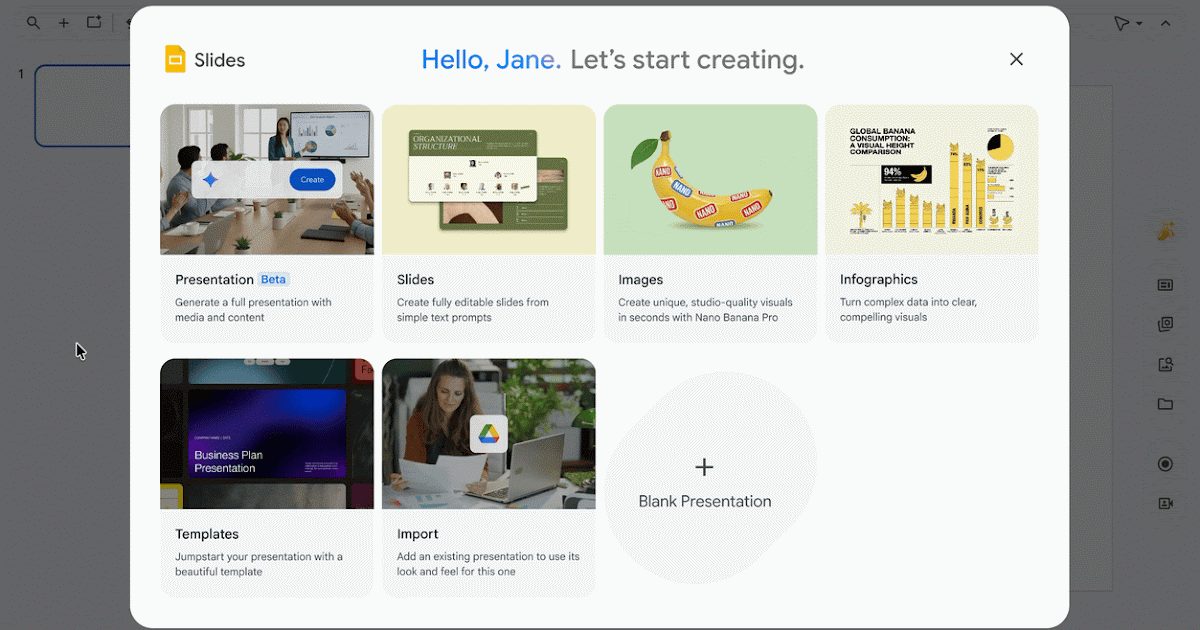
Google's Gemini AI inside Google Slides, which builds a full, editable Slides deck from a prompt and your Drive files
Our verdict
#8 of 10 in AI presentation makers · For teams already on Google Workspace
What it does
- Generates a full deck in Google Slides from a prompt and attached Drive files
- Copies the style of a reference deck
- Lets you edit the outline before building
Pros
- Native, fully editable Slides output
- No extra cost on Workspace Business Standard and up
Cons
- Not on free accounts or Workspace Business Starter
- Launched in US English only
- Skip if:
- Your Google account is free or on Business Starter
Gemini in Google Slides is Google’s AI assistant in the Slides side panel. It can generate a full multi-slide presentation from a prompt, grounded in files you attach from Google Drive and styled after an existing deck you choose, after letting you edit or approve an outline; the result is an ordinary Google Slides deck you can edit, share and present as usual. It also rewrites text and generates images on existing slides. Full-deck generation is included with Google Workspace Business Standard and Plus, Enterprise plans and the Google AI Pro and Ultra consumer plans, and launched in US English only. It is proprietary and runs in the browser.
What users say
Evidence ↓Zapier's reviewer left Gemini in Google Slides off its list, judging dedicated AI deck makers ahead on output quality and ease of use, though it suggests trying it if you already pay for Google's AI.
Rankings and alternatives
- AI presentation makers #8 of 10 For teams already on Google Workspace
- Gamma #1 Best-looking drafts for most decks
- Canva #2 For decks that share a brand kit with your other designs
- Copilot in PowerPoint #3 For decks that must stay in PowerPoint



AI presentation makers scores
Evaluated Nov 17, 2026 Evidence ↓- How good the generated slides look · counts double 3
3/5 means: A clean, consistent theme with some layout variety and images; looks like a decent template
Builds native Slides decks that can follow the style of a reference deck; no hands-on comparison of its looks was found, and Zapier's reviewer judged dedicated AI deck makers ahead on output quality.
- How good the outline and words are 4
4/5 means: A well-organized story with specific points that uses your material, needing light edits
Grounds the deck in attached Drive files, suggests relevant files, emails and chats, asks follow-up questions and lets you edit the outline first.
- Fixing the draft 4
4/5 means: Full direct editing plus AI edits to a chosen slide
Every element stays a native Slides element you edit as usual, and Gemini rewrites and generates content for slides from the side panel.
- Works with PowerPoint and Google Slides 4
4/5 means: Builds natively in PowerPoint or Google Slides, or exports to both with the deck's structure intact
The deck is a native Google Slides file and can follow a reference deck's style; PowerPoint users get it through Slides' own PPTX download.
- What you get free 1
1/5 means: No free way to generate decks; trial only, or a paid plan is required
Full-deck generation needs Google AI Pro or Ultra, or Workspace Business Standard or higher; free accounts and Business Starter are not included.
- Price of a plan for regular use 4
4/5 means: 10 to 14.99 a month
Workspace Business Standard is $14 per user per month on the annual plan; the consumer Google AI Pro plan is $19.99 a month.
- Brand and team features 4
4/5 means: All of 3, plus shared team libraries of templates, slides or assets
Matches a reference deck's style, real-time co-editing in Slides, and organization template galleries in Workspace.
- Presenting and sharing · counts half 3
3/5 means: Present from the app and share links with access control
Present from Slides and share with Google Drive permissions; no viewer analytics, from established knowledge of Google Slides.
Pricing
- Google AI Pro $19.99 /month Consumer plan for a personal Google account; includes full-deck generation in Slides.
- Google Workspace Business Standard $14.00 /month per seat Per user per month on the annual plan. The cheapest Workspace business plan with full-deck generation; Business Starter is not included.
Prices checked Nov 17, 2026.
Evidence and sources
What users say
Summary 1 quote
-
new AI presentation builders offer high output quality and a smooth user experience that neither tech giant has been able to fully achieve yet.
Miguel Rebelo, reviewer at Zapier · zapier.com/blog/best-ai-presentation-maker · published · checked
AI presentation makers scores
How good the generated slides look 2 quotes
-
Attach an existing deck to use as a style reference to ensure your presentation matches your desired look and feel.
workspaceupdates.googleblog.com/2026/06/create-fully-native-and-editable-presentations-with-Gemini-in-Google-Slides.html · published · checked -
new AI presentation builders offer high output quality and a smooth user experience that neither tech giant has been able to fully achieve yet.
Miguel Rebelo, reviewer at Zapier · zapier.com/blog/best-ai-presentation-maker · published · checked
How good the outline and words are 2 quotes
-
You can now create a full, multi-slide presentation using Gemini in Google Slides. With a single prompt, you can ground the presentation in existing content from Google Drive, match the style of another presentation, and build fully editable slides, allowing you to make any necessary adjustments.
workspaceupdates.googleblog.com/2026/06/create-fully-native-and-editable-presentations-with-Gemini-in-Google-Slides.html · published · checked -
You will also have the chance to edit or approve the presentation outline before the actual slides are created.
workspaceupdates.googleblog.com/2026/06/create-fully-native-and-editable-presentations-with-Gemini-in-Google-Slides.html · published · checked
Fixing the draft 1 quote
-
Once the deck is generated, every single text box, shape, chart, and background element remains fully native to the Google Slides ecosystem, allowing you to manually tweak headers or swap images exactly like a traditional file.
Robby Payne, founder of Chrome Unboxed · chromeunboxed.com/gemini-comes-to-google-slides-to-generate-fully-native-and-editable-presentations · published · checked
Works with PowerPoint and Google Slides 2 quotes
-
You can now create a full, multi-slide presentation using Gemini in Google Slides. With a single prompt, you can ground the presentation in existing content from Google Drive, match the style of another presentation, and build fully editable slides, allowing you to make any necessary adjustments.
workspaceupdates.googleblog.com/2026/06/create-fully-native-and-editable-presentations-with-Gemini-in-Google-Slides.html · published · checked -
Attach an existing deck to use as a style reference to ensure your presentation matches your desired look and feel.
workspaceupdates.googleblog.com/2026/06/create-fully-native-and-editable-presentations-with-Gemini-in-Google-Slides.html · published · checked
What you get free 1 quote
-
Google AI Pro and Ultra
workspaceupdates.googleblog.com/2026/06/create-fully-native-and-editable-presentations-with-Gemini-in-Google-Slides.html · published · checked
Price of a plan for regular use 2 quotes
-
$19.99/ month
gemini.google/subscriptions · checked -
Chat with AI in Gemini, your company data is [not used to train models]
workspace.google.com/pricing · checked
Brand and team features 1 quote
-
Attach an existing deck to use as a style reference to ensure your presentation matches your desired look and feel.
workspaceupdates.googleblog.com/2026/06/create-fully-native-and-editable-presentations-with-Gemini-in-Google-Slides.html · published · checked
More from the sources
Limits and known issues 2 quotes
-
At launch, this feature will be supported in English (United States) only.
workspaceupdates.googleblog.com/2026/06/create-fully-native-and-editable-presentations-with-Gemini-in-Google-Slides.html · published · checked -
Per-user usage limits will apply after that date
workspaceupdates.googleblog.com/2026/06/create-fully-native-and-editable-presentations-with-Gemini-in-Google-Slides.html · published · checked
Pricing
workspace.google.com/pricing · checked