
GitButler
Git client for working on several branches at once, with drag-and-drop commit editing
Our verdict
#8 of 10 in Git GUI clients · For juggling several branches at once
What it does
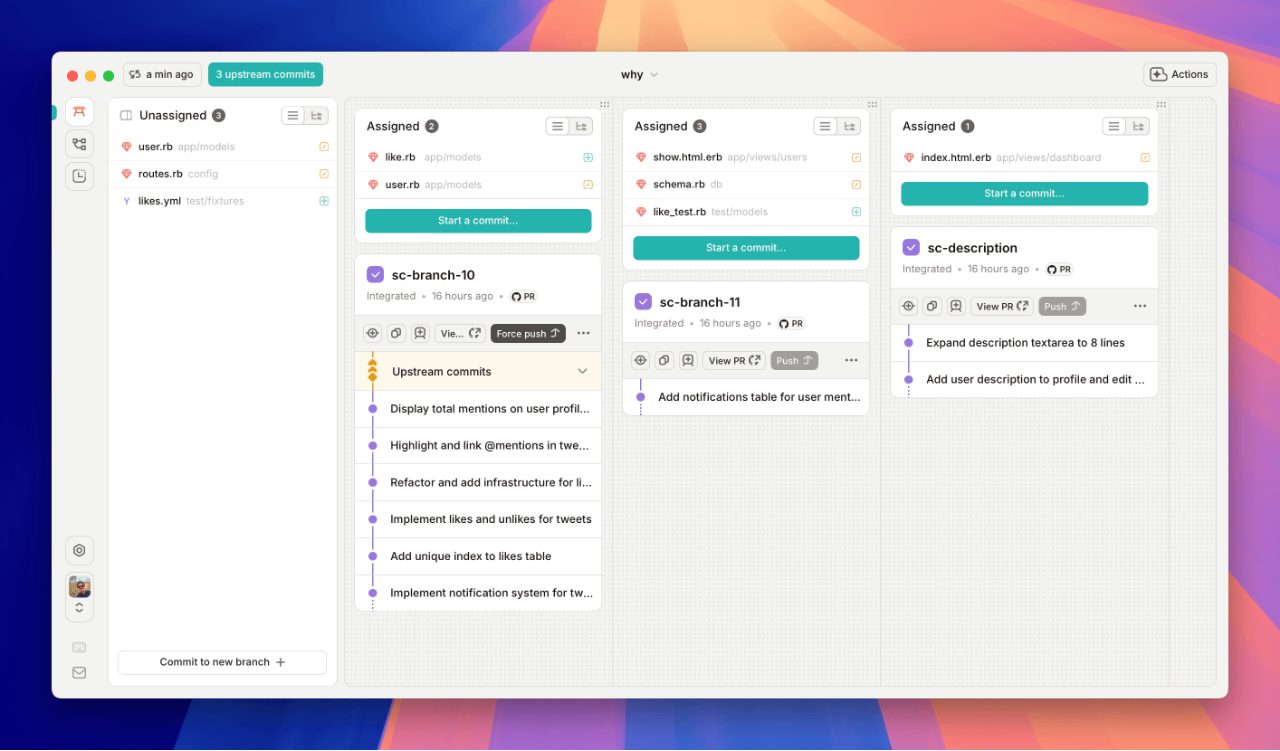
- Several branches applied at once, each in its own lane
- Drag-and-drop commit editing
- Undo through an operations log
- Stacked pull requests
Pros
- Free to use
- Makes parallel and stacked branches easy to see
Cons
- Its own branch model clashes with plain Git commands
- No full history graph or merge editor
GitButler is a Git client built around parallel and stacked branches, available as a desktop app (Tauri, Rust and Svelte) and as a but command-line tool that work on the same repository state. It lets you apply several branches to one working directory, edit, reorder, squash and split commits by dragging, undo any operation from a timeline, and open pull requests on GitHub, GitLab or Bitbucket. It works in an existing Git repository and is aimed at developers who want a visual workflow around branches and commits. It is released under a Fair Source license that becomes MIT after two years.
What users say
Evidence ↓The vendor's own testimonial wall is uniformly positive, so it says little about dislikes. One independent reviewer (Console, 2024) praised the easy-to-understand GUI and drag-and-drop between branches, and flagged that Git branches and virtual branches could not be used at the same time. The vendor's docs confirm that normal Git branching commands can behave unexpectedly while its workspace branch is active.
Rankings and alternatives
- Git GUI clients #8 of 10 For juggling several branches at once
- Fork #1 Best for most Mac and Windows developers
- Sublime Merge #2 Fast on huge repositories, and the pick for Linux
- GitKraken Desktop #3 Most visual graph, on every platform



Git GUI clients scores
Evaluated Nov 17, 2026 Evidence ↓- Seeing history and branches 2
2/5 means: A commit list without a branch graph, or a graph you only reach in a limited mode, with few ways to explore it.
It shows the commits on each branch you are working on, but not a graph of the whole repository's history.
- Rewriting commits and undoing mistakes 5
5/5 means: A full visual interactive rebase that is quick to use, plus an undo or a view of lost commits that recovers most mistakes.
Drag and drop to uncommit, reword, amend, move, split and squash any commit on your branches, and an operations log undoes any action.
- Resolving merge conflicts 2
2/5 means: The app lists conflicted files and lets you finish the operation, but you resolve the contents in an editor or external tool, at most taking one whole side of a file in the app.
Rebases never stop on a conflict: it marks the conflicted commits and lets you fix them one at a time, but you edit the files yourself.
- Easy for someone new to Git 3
3/5 means: Basics are clear, but advanced actions are hidden or the layout assumes some Git knowledge.
Drag-and-drop lanes make parallel work easy to see, but its own branch model differs from plain Git, and normal Git branch commands can behave unexpectedly while it manages the repository.
- Speed on large repositories unknown
No reliable reports on large repositories.
- Everyday Git tools beyond committing 2
2/5 means: Two or three of the eight.
Hunk staging into lanes and an undo log of operations; the other tools on the list are not part of its desktop app's documented features.
- Cost for work use · counts half 5
5/5 means: Free for commercial use.
Free to use under a Fair Source license that turns into MIT after two years.
- Runs on Mac, Windows and Linux · counts half 5
5/5 means: macOS, Windows and Linux officially.
macOS, Windows and Linux.
Evidence and sources
What users say
Summary 3 quotes
-
You can’t use git branches and virtual branches at the same time - you need to pick one.
David Mytton, reviewer at Console · console.dev/tools/gitbutler · published · checked -
GUI makes it easy to understand and allows drag & drop of changes to other branches.
David Mytton, reviewer at Console · console.dev/tools/gitbutler · published · checked -
Tried the gitbutler for the first time. Amazing tool! After so many years using CLI only, this is first UI git tool I enjoy working with. Awesome job guys! 👏
Alesh, DevOps Engineer · gitbutler.com · checked
Git GUI clients scores
Seeing history and branches 1 quote
-
Each lane also has its own staging area, so you can stage changes for each branch before deciding to commit them.
docs.gitbutler.com/features/branch-management/virtual-branches · checked
Rewriting commits and undoing mistakes 2 quotes
-
Uncommit, reword, amend, move, split and squash commits by dragging and dropping or simple CLI commands. Forget about rebase -i, you don't need it anymore.
github.com/gitbutlerapp/gitbutler · checked -
Logs all operations and changes and allows you to easily undo or revert any operation.
github.com/gitbutlerapp/gitbutler · checked
Resolving merge conflicts 1 quote
-
If there is conflicting work in a commit, GitButler will ignore the parts that conflict and keep rebasing. In other words, rebases always work. Then you can focus resolving each conflicted commit, one at a time.
docs.gitbutler.com/overview · checked
Easy for someone new to Git 3 quotes
-
When using GitButler, we setup a special branch to handle the multiple branches in a way that Git can understand a bit better. This means if you use vanilla git branching commands like git switch, GitButler will pause and ask you to return to GitButler's method when you return.
docs.gitbutler.com/overview · checked -
You can’t use git branches and virtual branches at the same time - you need to pick one.
David Mytton, reviewer at Console · console.dev/tools/gitbutler · published · checked -
GUI makes it easy to understand and allows drag & drop of changes to other branches.
David Mytton, reviewer at Console · console.dev/tools/gitbutler · published · checked
Everyday Git tools beyond committing 2 quotes
-
Logs all operations and changes and allows you to easily undo or revert any operation.
github.com/gitbutlerapp/gitbutler · checked -
Each lane also has its own staging area, so you can stage changes for each branch before deciding to commit them.
docs.gitbutler.com/features/branch-management/virtual-branches · checked
Cost for work use 1 quote
-
The TLDR is that GitButler is under a Fair Source software license, meaning that you can use it, view the source, contribute, etc. You just can't build a competitor with it. It also becomes MIT after 2 years. So, MIT with an expiring non-compete clause.
github.com/gitbutlerapp/gitbutler · checked
Runs on Mac, Windows and Linux 1 quote
-
Windows (MSI)
gitbutler.com/downloads · checked
Facts
License 1 quote
-
The TLDR is that GitButler is under a Fair Source software license, meaning that you can use it, view the source, contribute, etc. You just can't build a competitor with it. It also becomes MIT after 2 years. So, MIT with an expiring non-compete clause.
github.com/gitbutlerapp/gitbutler · checked
Runs on 1 quote
-
Windows (MSI)
gitbutler.com/downloads · checked
More from the sources
Features 3 quotes
-
GitButler is a Git CLI and desktop client built for humans and AI coding agents. Stacked and parallel branches, absorb, unlimited undo and stacked pull requests, on any Git repository.
gitbutler.com · checked -
Authenticate to GitHub, GitLab, or Bitbucket to easily open and update Pull Requests, list branches, get CI statuses and more. No other tools required.
github.com/gitbutlerapp/gitbutler · checked -
Use built-in AI handlers to help create commit messages, branch names, PR descriptions and more.
github.com/gitbutlerapp/gitbutler · checked
Limits and known issues 2 quotes
-
The reason is stock Git can only handle one branch at a time, it does not have tooling to use or understand multiple branches, so most commands having to do with the index or HEAD or branching (commit, branch, checkout, etc) may behave unexpectedly.
docs.gitbutler.com/overview · checked -
Here you will find documentation on the product and the way that we're running our beta and building our product with your help.
docs.gitbutler.com · checked
How widely it is used 1 quote
-
22.0k stars
github.com/gitbutlerapp/gitbutler · checked