
GitHub Desktop
Free, open-source Git client from GitHub for macOS and Windows, built for simple everyday Git workflows.
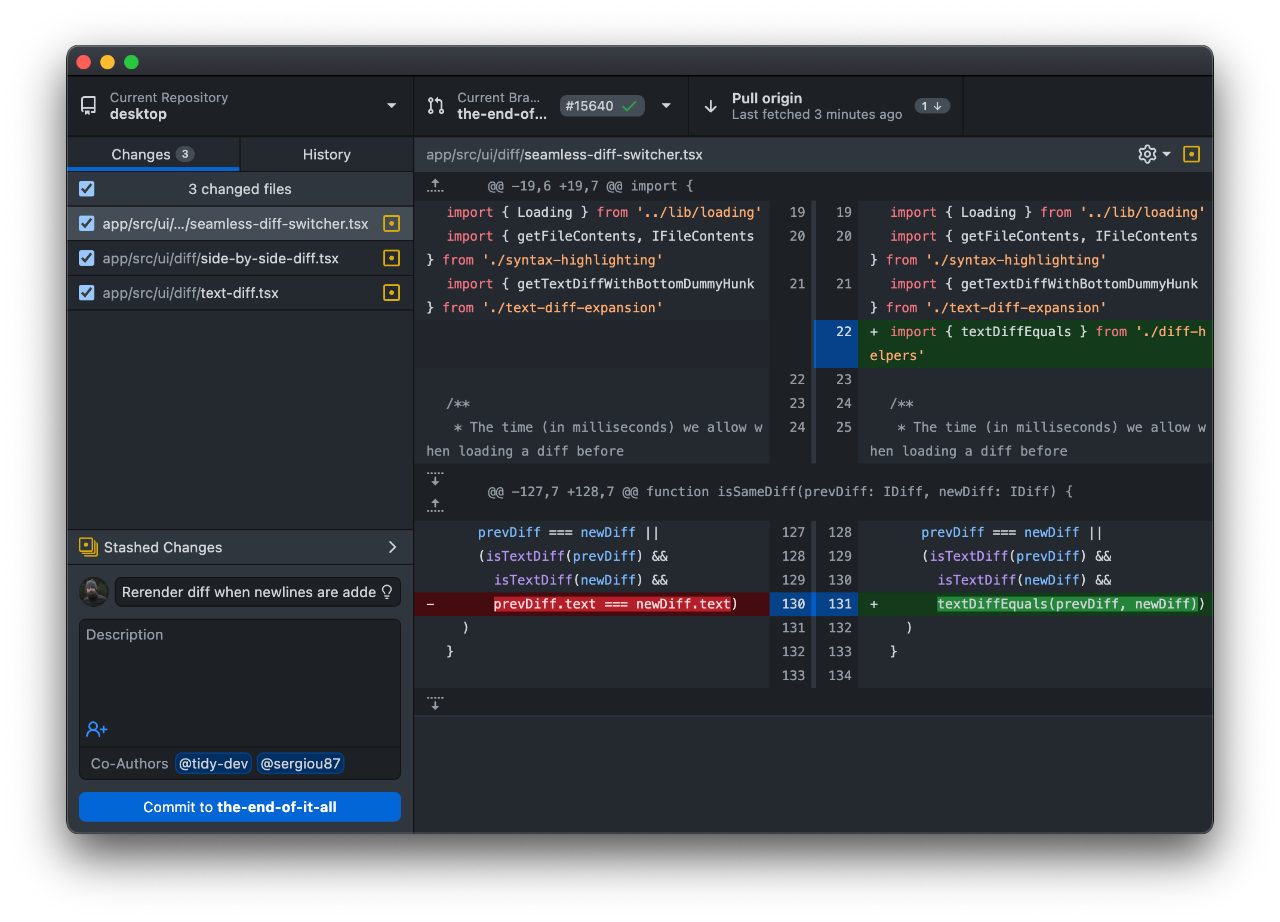
Our verdict
#9 of 10 in Git GUI clients · Gentlest start for Git newcomers
What it does
- One-screen commits where you can pick single lines to include
- Drag to reorder or squash commits
- Pull requests and branch syncing with GitHub
Pros
- The simplest client to learn
- Free and open source
Cons
- No branch graph
- Conflicts are resolved in your text editor
- Choose if:
- You're learning Git and your code lives on GitHub
GitHub Desktop is a free, open-source (MIT) Electron app from GitHub that gives a graphical interface to everyday Git work such as cloning, committing, branching, merging, rebasing, stashing and opening pull requests. It runs on macOS and Windows; Linux is supported only through a community fork. It is optimized for GitHub and GitHub Enterprise and for beginners, and can open any local Git repository, but the maintainers state that non-GitHub hosts get only very basic support.
Rankings and alternatives
- Git GUI clients #9 of 10 Gentlest start for Git newcomers
- Fork #1 Best for most Mac and Windows developers
- Sublime Merge #2 Fast on huge repositories, and the pick for Linux
- GitKraken Desktop #3 Most visual graph, on every platform



Git GUI clients scores
Evaluated Nov 17, 2026 Evidence ↓- Seeing history and branches 2
2/5 means: A commit list without a branch graph, or a graph you only reach in a limited mode, with few ways to explore it.
A list of commits on the current branch with diffs and branch comparison, but no branch graph and no blame.
- Rewriting commits and undoing mistakes 3
3/5 means: Some visual editing, such as reordering and squashing recent commits, but not the full set of rebase steps.
Drag commits to reorder or squash them, amend, and undo the last commit; rewording older commits or editing and dropping them needs the command line.
- Resolving merge conflicts 2
2/5 means: The app lists conflicted files and lets you finish the operation, but you resolve the contents in an editor or external tool, at most taking one whole side of a file in the app.
It lists conflicted files and lets you take one branch's whole version, but you resolve their contents in a text editor or another tool.
- Easy for someone new to Git 5
5/5 means: Built for newcomers: a guided start, plain language, a simple screen and obvious undo, so a beginner rarely needs the command line.
Designed for beginners first: a simple screen, plain labels, a guided first repository and an undo button for the last commit.
- Speed on large repositories 3
3/5 means: Acceptable on most repositories, with some lag or documented limits on very large ones.
An Electron app that stays usable on ordinary repositories; its simple views keep it lighter than GitKraken, but it is not built for very large histories.
- Everyday Git tools beyond committing 3
3/5 means: Four or five of the eight.
Line staging, a stash, cherry-pick and Git LFS; no reflog view, worktrees, submodule management or bisect.
- Cost for work use · counts half 5
5/5 means: Free for commercial use.
Free and MIT licensed.
- Runs on Mac, Windows and Linux · counts half 4
4/5 means: macOS and Windows officially, with a maintained community build for Linux.
macOS and Windows officially; Linux users rely on a maintained community fork.
Pricing
- GitHub Desktop Free Free to download and use.
Prices checked Nov 17, 2026.
Evidence and sources
Git GUI clients scores
Seeing history and branches 1 quote
-
Cherry-pick a commit · Copies a commit from one branch to another. Useful if you have accidentally committed changes on the wrong branch, or if you need to apply a bug fix across different branches you're working on.
docs.github.com/en/desktop/managing-commits/options-for-managing-commits-in-github-desktop · checked
Rewriting commits and undoing mistakes 3 quotes
-
Reorder commits · Changes the order of commits in your history. Useful if changing the order would make your progress easier to follow.
docs.github.com/en/desktop/managing-commits/options-for-managing-commits-in-github-desktop · checked -
Undo a commit · Restores the changes from a commit to your working directory, so you can make further changes before re-committing. Useful if you made a mistake in the changes you included. Not possible if you have already pushed the commit to the remote repository.
docs.github.com/en/desktop/managing-commits/options-for-managing-commits-in-github-desktop · checked -
Copy commits from one branch to another, combine multiple commits in your branch history, or alter your commit history with an intuitive drag and drop functionality unique to GitHub Desktop.
desktop.github.com · checked
Resolving merge conflicts 1 quote
-
Resolve any merge conflicts in your preferred way, using a text editor, the command line, or another tool.
docs.github.com/en/desktop/working-with-your-remote-repository-on-github-or-github-enterprise/syncing-your-branch-in-github-desktop · checked
Easy for someone new to Git 2 quotes
-
when we have to choose between workflows for advanced Git users and workflows for beginner Git users, we prioritize beginners.
github.com/desktop/desktop/blob/development/docs/process/what-is-desktop.md · checked -
GitHub Desktop is really one of the best 80/20 programs I have seen. It hides the details of git (which are irrelevant) and just lets you get on with your work.
Sean Cassiere, user quoted on the vendor's page · desktop.github.com · checked
Speed on large repositories 1 quote
-
GitHub Desktop is an open-source Electron-based GitHub app. It is written in TypeScript and uses React.
github.com/desktop/desktop · checked
Everyday Git tools beyond committing 2 quotes
-
Cherry-pick a commit · Copies a commit from one branch to another. Useful if you have accidentally committed changes on the wrong branch, or if you need to apply a bug fix across different branches you're working on.
docs.github.com/en/desktop/managing-commits/options-for-managing-commits-in-github-desktop · checked -
GitHub Desktop includes Git Large File Storage for managing large files.
docs.github.com/en/desktop · checked
Cost for work use 1 quote
-
MIT
github.com/desktop/desktop · checked
Runs on Mac, Windows and Linux 2 quotes
-
Linux is not officially supported; however, you can find installers created for Linux from a fork of GitHub Desktop in the Community Releases section.
github.com/desktop/desktop · checked -
This repository contains specific patches on top of the upstream desktop/desktop repository to support Linux usage.
github.com/shiftkey/desktop · checked
Facts
License 1 quote
-
MIT
github.com/desktop/desktop · checked
Runs on 2 quotes
-
Linux is not officially supported; however, you can find installers created for Linux from a fork of GitHub Desktop in the Community Releases section.
github.com/desktop/desktop · checked -
This repository contains specific patches on top of the upstream desktop/desktop repository to support Linux usage.
github.com/shiftkey/desktop · checked
More from the sources
Features 2 quotes
-
It is intended primarily to extend the features of GitHub, not to be an agnostic Git client or replicate the feature set of github.com. While we support very basic functionality that will allow the app to function with other hosting providers, we prioritize work that allows the end-to-end GitHub and GitHub Enterprise experience to shine
github.com/desktop/desktop/blob/development/docs/process/what-is-desktop.md · checked -
You can add any Git repository to GitHub Desktop, even if it's not a GitHub repository.
docs.github.com/en/desktop · checked
Limits and known issues 1 quote
-
The GitHub Desktop maintainers are constrained in time and resources, and diagnosing individual configurations can be difficult and time consuming.
github.com/desktop/desktop · checked
How widely it is used 1 quote
-
Star22.1k (22.1k)
github.com/desktop/desktop · checked
Pricing
desktop.github.com · checked