
iCloud+
Apple's cloud storage for iPhone, iPad and Mac, end-to-end encrypted for Drive and Photos only after you turn on Advanced Data Protection
Our verdict
#7 of 9 in Cloud storage for photos · Easiest for all-iPhone families
What it does
- Backup built into iPhone, iPad and Mac
- Shared Photo Library for up to six people
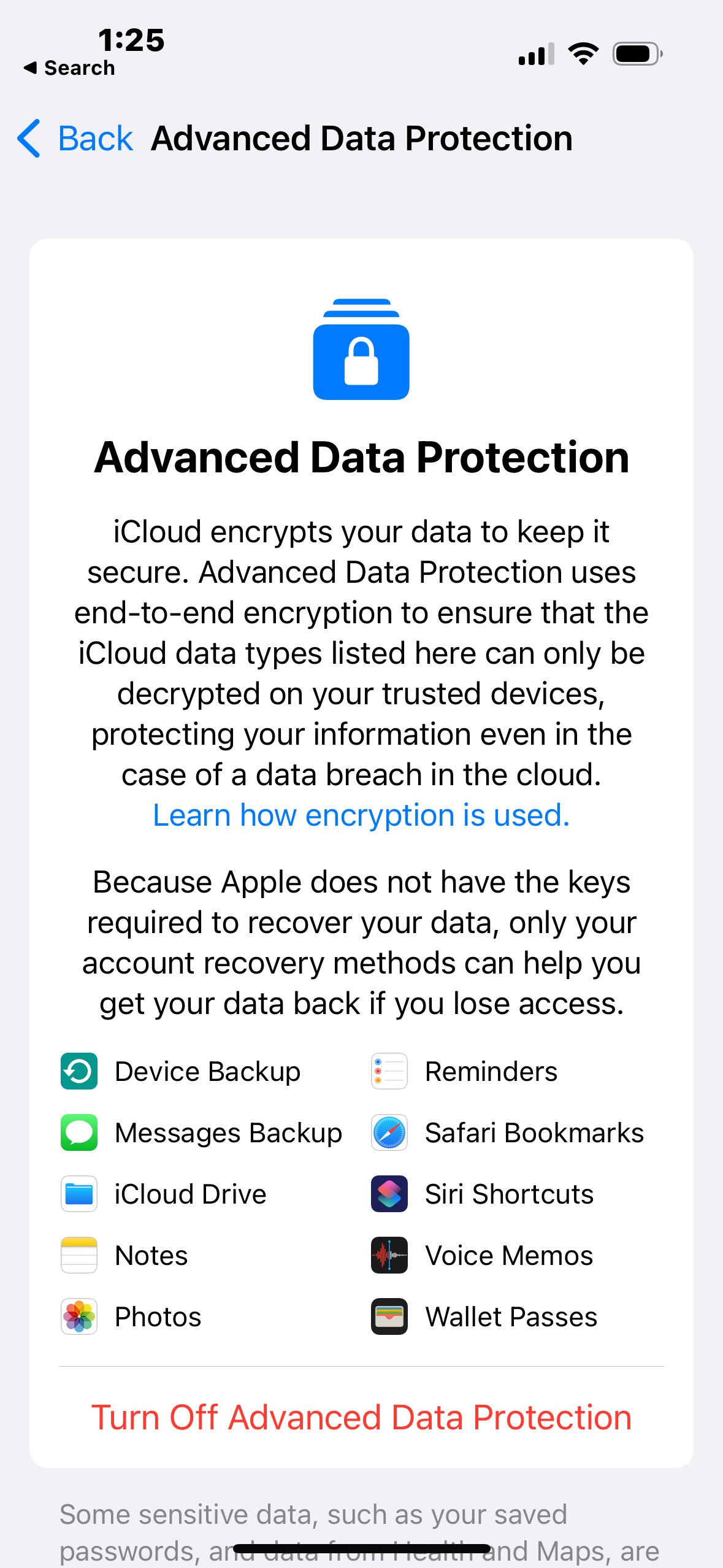
- Optional end-to-end encryption with Advanced Data Protection
- Plans up to 12 TB
Pros
- No app to manage on iPhone
- Recognition runs on your devices
- Best family library for Apple users
Cons
- No Android app
- Sync, not backup: deletions spread everywhere
- Shared Albums shrink photos and video
- Choose if:
- Every phone in your family is an iPhone
iCloud+ is Apple’s paid cloud storage subscription, used for iCloud Drive file sync, iCloud Photos and device backup on iPhone, iPad, Mac and Windows, and in a browser at iCloud.com. By default (standard data protection) Apple holds the encryption keys for Drive, Photos, Backup and Notes. The opt-in Advanced Data Protection setting moves most categories, including Drive, Photos and Backup, to end-to-end encryption, but not Mail, Contacts or Calendars, and some file metadata stays readable to Apple. It needs updated Apple devices and a recovery contact or key, and Apple stopped offering it to UK users in 2025. The software is closed source and the service is aimed at consumers rather than businesses.
What users say
Evidence ↓The independent sources I read agree that Advanced Data Protection is a meaningful step, and EFF recommends most people turn it on if all their devices can be updated. They also agree on its limits. EFF and Proton criticize that it is opt-in, that Mail, Contacts and Calendars are excluded, that some metadata stays visible, and that older devices that cannot update block it. Proton, which sells a competing product, adds that Apple can withdraw the feature, as it did in the UK. This rests on a few commentary pieces, not user reviews or sampled complaints.
Rankings and alternatives
- Cloud storage for photos #7 of 9 Easiest for all-iPhone families
- Google Photos #1 Best for most families
- Ente Photos #2 For privacy without losing search
- Microsoft OneDrive #3 If you already pay for Microsoft 365
- Secure cloud storage #7 of 9 For iPhone and Mac households
- Proton Drive #1 Best for most people
- Tresorit #2 For businesses sharing client files
- MEGA #3 Most storage for the money
- Free cloud storage services #8 of 10 iPhone owners who need an affordable upgrade
- Google Drive #1 Best for most people
- Filen #4 Encrypted 10 GB for files you keep to yourself
- pCloud #5 Fast sync on every desktop, Linux included









Cloud storage for phone photos scores
Evaluated Nov 17, 2026 Evidence ↓- Phone backup on iPhone and Android · counts double 1
1/5 means: Automatic backup on only one of iPhone and Android
iCloud Photos backs up an iPhone's camera roll automatically in the background, but no Android app was found, so Android has no automatic backup (browser at iCloud.com only; whether it can upload there was not confirmed). The Windows app adds photos from a PC, which does not lift the score on this scale.
- Finding photos 4
4/5 means: Face grouping and search by objects, places and text in the photo
From knowledge, Photos on iPhone groups people and pets and searches by objects, scenes, places and text in photos, with recognition on the device. Apple confirms on-device face and object detection; I did not verify how well natural-language search works.
- Sharing with family 5
5/5 means: One plan for the family, shared albums others add to, and a shared library or partner sharing that adds new photos automatically
One iCloud+ plan is shared with up to five family members who each keep a private library. Shared Albums accept contributions, and iCloud Shared Photo Library adds new photos automatically for up to six people (participant count from a search summary of Apple's guide).
- Price for 2 TB 3
3/5 means: $110 to $149 a year
2 TB costs $9.99 a month in the US with no annual price, so $9.99 x 12 = $119.88 a year.
- Privacy of your photos 4
4/5 means: End-to-end encryption of the library is an option you turn on, and recognition runs on your devices
Advanced Data Protection is an opt-in setting that end-to-end encrypts Photos, and face and object recognition run on the device. Standard protection leaves Apple with the keys, Shared Albums are never end-to-end encrypted, and Enhanced Visual Search sends an encrypted query to Apple.
- Getting photos back out 4
4/5 means: A desktop app or one-step tool copies the whole library as original files
Mac Photos can keep full originals locally ("Download Originals") and Apple offers a copy-transfer to Google Photos, which takes days, drops shared albums, Live Photos and original-before-edit versions, and is unavailable with ADP on. Bulk download from iCloud.com has a per-download cap I could not confirm, and exports from Photos separate albums from files. On recalibration, Download Originals on a Mac, and iCloud for Windows downloading the library into a folder, copy the whole library as original files, which is level 4.
Free cloud storage scores
Evaluated Nov 17, 2026 Evidence ↓- Usable free space · counts double 2
2/5 means: About 5 GB that your email, phone backups or photos also fill
5 GB shared by iCloud Photos, device backups, iCloud Drive, Mail and Messages; when full, backups and photo uploads stop and Mail can't receive.
- How well it works day to day 3
3/5 means: Dependable for basic use, with rough edges such as slow uploads, clunky apps or occasional sync trouble
Built-in sync is smooth on Apple devices, but users commonly report slow or stuck iCloud Drive and Photos syncing and a clunky Windows app; no independent speed tests were read, so this rests on general knowledge.
- Sync apps on the free plan 2
2/5 means: Desktop sync on one or two systems with a limit on devices, or phone apps only
Built in on iPhone, iPad and Mac, with an iCloud for Windows app and a web app; no Android app and no Linux client, so phone apps cover Apple devices only. Borderline between 2 and 3.
- Phone photo backup on the free plan 2
2/5 means: Automatic backup on only one phone system, or uploads you have to start by hand
iCloud Photos uploads automatically with a full library on iPhone, but there is no Android app (only the web), so automatic backup works on one phone system, and it fills the 5 GB.
- Privacy and encryption on the free plan 3
3/5 means: Provider holds the keys by default, but the free plan offers optional end-to-end encryption for chosen files or services
Apple holds the keys by default; Advanced Data Protection is an optional setting, not tied to a paid plan in anything I read, that makes Drive, Photos and Backup end-to-end. Mail, Contacts and Calendars stay readable by Apple.
- Sharing and working together 4
4/5 means: Public links and shared folders with either link passwords and expiry dates or editing documents together
Shared folders and anyone-with-the-link sharing, plus real-time iWork co-editing; no link passwords or expiry dates on the free plan as far as I know.
- Price of the cheapest upgrade 5
5/5 means: Under $2.50 a month
iCloud+ 50 GB is $0.99 a month in the US.
- Few limits on the free plan 4
4/5 means: Minor limits that few people notice
Apple documents 50 GB per file for Drive, so the 5 GB quota is the practical cap; the web upload limit was reported at 10 GB in 2020. Photos deleted while over quota skip Recently Deleted.
- How long files survive if you stop signing in · counts half unknown
Apple documents only that backups are kept 180 days after Backup stops; no inactive-account or Drive deletion rule was found.
Secure cloud storage scores
Evaluated Nov 17, 2026 Evidence ↓- Files the provider can't read · counts double 3
3/5 means: End-to-end encryption for the whole drive that you have to turn on yourself, with file names and some other data still readable by the provider
With ADP turned on, Drive and Photos are end-to-end encrypted, but it is opt-in, and file names, checksums, sizes and dates stay under Apple-held keys. Mail, Contacts and Calendars are never E2EE.
- Independent security checks 3
3/5 means: Some outside scrutiny, such as open-source apps without a published audit or certified operations around a closed design, and no known serious flaw left unfixed
Apple publishes the Platform Security guide and runs a bounty, and I know of no serious unfixed flaw, but the apps are closed source and I found no published independent audit of iCloud or ADP in the pages I read (from knowledge, not a source).
- Track record and jurisdiction 3
3/5 means: No exposure of stored files, but a young or small company, notable controversies or outages, or a government that has forced its protections to be withdrawn somewhere
Established provider with no known exposure of stored files through iCloud itself (the 2014 leak was account phishing, from knowledge), but the UK forced ADP to be withdrawn for UK users in 2025.
- Sharing that stays encrypted 2
2/5 means: Sharing stays encrypted only when everyone involved uses the same platform with its protection turned on, and links aren't encrypted
Shared folders and Shared Photo Library stay E2EE only when all participants have ADP on. "Anyone with the link" sharing, Shared Albums and iWork collaboration are not E2EE.
- Sync and phone apps 4
4/5 means: Solid desktop sync and automatic photo backup, with a few gaps or occasional complaints about speed
From general knowledge, Drive and Photos sync is solid on Apple devices with automatic photo backup and previews, with scattered sync complaints. With ADP on, iCloud.com access is off by default (evidence 8). I found no reviewer test or complaint data in the pages I read.
- Works on all your devices 2
2/5 means: Built mainly for one company's devices, with other phones and computers limited to a browser or nothing
Apps on iPhone, iPad, Mac and Windows plus the web, but no Android app and no Linux client, so those get a browser only (the missing Android and Linux apps are from knowledge).
- Price per terabyte 4
4/5 means: About $3 to $5.50 per TB per month
The 2 TB plan is $9.99 a month, about $5.00 per TB per month ($9.99 / 2 = $4.995). ADP costs nothing extra. Apple bills monthly, with no discounted annual plan.
Pricing
- Free Free 5 GB of storage with every Apple Account, shared by iCloud Photos, device backups, iCloud Drive, iCloud Mail and Messages in iCloud. When it is full, backups and photo uploads stop and iCloud Mail can't send or receive.
- iCloud+ 50 GB $0.99 /month US price; some states add tax. Advanced Data Protection is a setting on the account, not a separate plan. Share with up to five family members.
- iCloud+ 200 GB $2.99 /month US price; some states add tax. Share with up to five family members.
- iCloud+ 2 TB $9.99 /month US price; some states add tax. About $5.00 per TB per month ($9.99 / 2 = $4.995). Share with up to five family members.
- iCloud+ 6 TB $29.99 /month US price; some states add tax. About $5.00 per TB per month ($29.99 / 6 = $4.998).
- iCloud+ 12 TB $59.99 /month US price; some states add tax. About $5.00 per TB per month ($59.99 / 12 = $4.999).
- Apple One Individual $21.95 /month , extra Bundle of Apple subscriptions including 50 GB of iCloud+. US price from Apple's Apple One page.
- Apple One Family $27.95 /month , extra Bundle including 200 GB of iCloud+, shared with up to five people.
- Apple One Premier $39.95 /month , extra Bundle including 2 TB of iCloud+, shared with up to five people.
Prices checked Nov 17, 2026.
Evidence and sources
What users say
Summary 3 quotes
-
With Advanced Data Protection enabled, your backups and most important files get that end-to-end encryption benefit, better securing your files against mass surveillance, rogue Apple employees, or potential data leaks. If all your devices support the newest operating systems, you can turn Advanced Data Protection on without losing any features, so, most people should turn it on, if you can.
EFF, Electronic Frontier Foundation (digital rights nonprofit) · eff.org/node/108427 · checked -
If you have an older device that can't be updated to iOS 16.3 or newer, enabling Advanced Data Protection is only possible if you remove your Apple ID from that device. In many cases, this makes that device useless.
EFF, Electronic Frontier Foundation (digital rights nonprofit) · eff.org/node/108427 · checked -
It'd be even better if this became Apple’s default, instead of an opt-in.
EFF, Electronic Frontier Foundation (digital rights nonprofit) · eff.org/node/108427 · checked
Cloud storage for phone photos scores
Phone backup on iPhone and Android 3 quotes
-
You can upgrade to iCloud+ from your iPhone, iPad, Mac, or PC.
support.apple.com/en-us/108047 · checked -
iCloud Photos works with the Photos app to keep your photos and videos securely stored in iCloud.
support.apple.com/en-us/108782 · checked -
new photos and videos you add to iCloud on other devices are automatically downloaded to your PC.
support.apple.com/en-us/guide/icloud-windows/icw864162159/icloud · checked
Finding photos 1 quote
-
Face recognition and scene and object detection are done completely on your device rather than in the cloud.
apple.com/privacy/features · checked
Sharing with family 4 quotes
-
Share everything with up to five other family members.
support.apple.com/en-us/108047 · checked -
When shared, photos are reduced to 2048 pixels on the long edge.
support.apple.com/en-us/148868 · checked -
Maximum combined number of photos and videos from all contributors in any one shared album: 5000
support.apple.com/en-us/148868 · checked -
Advanced Data Protection is designed to maintain end-to-end encryption for shared content as long as all participants have Advanced Data Protection enabled. This level of protection is supported in most iCloud sharing features, including iCloud Shared Photo Library, iCloud Drive shared folders, shared Notes, and the collaboration feature in Freeform.
support.apple.com/en-us/102651 · checked
Price for 2 TB 1 quote
-
United States4 (USD) $0.99 $2.99 $9.99 $29.99 $59.99
support.apple.com/en-us/108047 · checked
Privacy of your photos 5 quotes
-
Standard data protection is the default setting for your account. Your iCloud data is encrypted, the encryption keys are secured in Apple data centers so we can help you with data recovery, and only certain data is end-to-end encrypted.
support.apple.com/en-us/102651 · checked -
Advanced Data Protection for iCloud is an optional setting that offers our highest level of cloud data security. If you choose to enable Advanced Data Protection, your trusted devices retain sole access to the encryption keys for the majority of your iCloud data, thereby protecting it using end-to-end encryption. Additional data protected includes iCloud Backup, Photos, Notes, and more.
support.apple.com/en-us/102651 · checked -
iWork collaboration, the Shared Albums feature in Photos, and sharing content with “anyone with the link,” do not support Advanced Data Protection. When you use these features, the encryption keys for the shared content are securely uploaded to Apple data centers so that iCloud can facilitate real-time collaboration or web sharing. This means shared content is not end-to-end encrypted, even when Advanced Data Protection is enabled.
support.apple.com/en-us/102651 · checked -
Face recognition and scene and object detection are done completely on your device rather than in the cloud.
apple.com/privacy/features · checked -
the embedding is quantized to 8-bit precision before being encrypted.
machinelearning.apple.com/research/homomorphic-encryption · checked
Getting photos back out 3 quotes
-
HEIF, JPEG, RAW, PNG, GIF, TIFF, HEVC, and MP4
support.apple.com/en-us/108782 · checked -
You can't export photo or video data from iCloud while Advanced Data Protection for iCloud is turned on for your account.
support.apple.com/es-py/118257 · checked -
Some content—including shared albums, smart albums, live photos, some metadata
support.apple.com/es-py/118257 · checked
Free cloud storage scores
Usable free space 3 quotes
-
iCloud keeps your information safe, automatically backed up, and available anywhere you go — with 5 GB of storage for free.
support.apple.com/en-us/108047 · checked -
When you set up iCloud, you automatically get 5 GB of storage for free. You can use that space for your iCloud backups, to keep your photos and videos stored in iCloud Photos, to keep your files up to date in iCloud Drive, and more.
support.apple.com/en-us/108922 · checked -
If you run out of iCloud storage, your device won’t back up to iCloud, new photos and videos won't upload to iCloud Photos, and iCloud Drive and other iCloud apps won't stay up to date across your devices. And you won't be able to send or receive emails with your iCloud email address.
support.apple.com/en-us/108922 · checked
Sync apps on the free plan 2 quotes
-
When Advanced Data Protection is enabled, access to your data via iCloud.com is disabled by default. You have the option to turn on data access on iCloud.com, which allows the web browser that you're using and Apple to have temporary access to data-specific encryption keys provided by your device to decrypt and view your information.
support.apple.com/en-us/102651 · checked -
You can upgrade to iCloud+ from your iPhone, iPad, Mac, or PC.
support.apple.com/en-us/108047 · checked
Phone photo backup on the free plan 2 quotes
-
When you set up iCloud, you automatically get 5 GB of storage for free. You can use that space for your iCloud backups, to keep your photos and videos stored in iCloud Photos, to keep your files up to date in iCloud Drive, and more.
support.apple.com/en-us/108922 · checked -
If you run out of iCloud storage, your device won’t back up to iCloud, new photos and videos won't upload to iCloud Photos, and iCloud Drive and other iCloud apps won't stay up to date across your devices. And you won't be able to send or receive emails with your iCloud email address.
support.apple.com/en-us/108922 · checked
Privacy and encryption on the free plan 4 quotes
-
Standard data protection is the default setting for your account. Your iCloud data is encrypted, the encryption keys are secured in Apple data centers so we can help you with data recovery, and only certain data is end-to-end encrypted.
support.apple.com/en-us/102651 · checked -
Advanced Data Protection for iCloud is an optional setting that offers our highest level of cloud data security. If you choose to enable Advanced Data Protection, your trusted devices retain sole access to the encryption keys for the majority of your iCloud data, thereby protecting it using end-to-end encryption. Additional data protected includes iCloud Backup, Photos, Notes, and more.
support.apple.com/en-us/102651 · checked -
iCloud Mail does not use end-to-end encryption because of the need to interoperate with the global email system.
support.apple.com/en-us/102651 · checked -
Because the majority of your iCloud data will be protected by end-to-end encryption, you’ll be guided to set up at least one recovery contact or recovery key before you turn on Advanced Data Protection. You must also update all your Apple devices to a software version that supports this feature.
support.apple.com/en-us/102651 · checked
Sharing and working together 3 quotes
-
Advanced Data Protection is designed to maintain end-to-end encryption for shared content as long as all participants have Advanced Data Protection enabled. This level of protection is supported in most iCloud sharing features, including iCloud Shared Photo Library, iCloud Drive shared folders, shared Notes, and the collaboration feature in Freeform.
support.apple.com/en-us/102651 · checked -
iWork collaboration, the Shared Albums feature in Photos, and sharing content with “anyone with the link,” do not support Advanced Data Protection. When you use these features, the encryption keys for the shared content are securely uploaded to Apple data centers so that iCloud can facilitate real-time collaboration or web sharing. This means shared content is not end-to-end encrypted, even when Advanced Data Protection is enabled.
support.apple.com/en-us/102651 · checked -
If you're a participant in someone else's shared folder, it doesn't count towards your iCloud storage.
support.apple.com/en-us/108922 · checked
Price of the cheapest upgrade 1 quote
-
United States4 (USD) $0.99 $2.99 $9.99 $29.99 $59.99
support.apple.com/en-us/108047 · checked
Few limits on the free plan 2 quotes
-
If you exceed your iCloud storage limit, your device immediately removes any photos and videos you delete and they won't be available for recovery in your Recently Deleted album.
support.apple.com/en-us/108922 · checked -
You can store any type of file in iCloud Drive, as long as it's 50GB or less in size and you don't exceed your iCloud storage limit.
Apple Support Community user, forum answerer quoting Apple's iCloud Drive FAQ · discussions.apple.com/thread/251227549 · published · checked
How long files survive if you stop signing in 1 quote
-
iCloud backups are available for 180 days after you disable or stop using iCloud Backup.
support.apple.com/en-us/108922 · checked
Secure cloud storage scores
Files the provider can't read 4 quotes
-
Standard data protection is the default setting for your account. Your iCloud data is encrypted, the encryption keys are secured in Apple data centers so we can help you with data recovery, and only certain data is end-to-end encrypted.
support.apple.com/en-us/102651 · checked -
Advanced Data Protection for iCloud is an optional setting that offers our highest level of cloud data security. If you choose to enable Advanced Data Protection, your trusted devices retain sole access to the encryption keys for the majority of your iCloud data, thereby protecting it using end-to-end encryption. Additional data protected includes iCloud Backup, Photos, Notes, and more.
support.apple.com/en-us/102651 · checked -
iCloud Mail does not use end-to-end encryption because of the need to interoperate with the global email system.
support.apple.com/en-us/102651 · checked -
Some metadata and usage information stored in iCloud remains under standard data protection, even when Advanced Data Protection is enabled. For example, dates and times when a file or object was modified are used to sort your information, and checksums of file and photo data are used to help Apple de-duplicate and optimize your iCloud and device storage — all without having access to the files and photos themselves.
support.apple.com/en-us/102651 · checked
Track record and jurisdiction 1 quote
-
As of the 21st, Apple users located in the UK cannot activate Advanced Data Protection (end-to-end encryption) for their iCloud Drive, iCloud Backup, Photos, Notes, and more.
Privacy Guides, independent nonprofit privacy media outlet · privacyguides.org/articles/2025/02/28/uk-forced-apple-to-remove-adp · published · checked
Sharing that stays encrypted 2 quotes
-
Advanced Data Protection is designed to maintain end-to-end encryption for shared content as long as all participants have Advanced Data Protection enabled. This level of protection is supported in most iCloud sharing features, including iCloud Shared Photo Library, iCloud Drive shared folders, shared Notes, and the collaboration feature in Freeform.
support.apple.com/en-us/102651 · checked -
iWork collaboration, the Shared Albums feature in Photos, and sharing content with “anyone with the link,” do not support Advanced Data Protection. When you use these features, the encryption keys for the shared content are securely uploaded to Apple data centers so that iCloud can facilitate real-time collaboration or web sharing. This means shared content is not end-to-end encrypted, even when Advanced Data Protection is enabled.
support.apple.com/en-us/102651 · checked
Sync and phone apps 1 quote
-
When Advanced Data Protection is enabled, access to your data via iCloud.com is disabled by default. You have the option to turn on data access on iCloud.com, which allows the web browser that you're using and Apple to have temporary access to data-specific encryption keys provided by your device to decrypt and view your information.
support.apple.com/en-us/102651 · checked
Works on all your devices 1 quote
-
You can upgrade to iCloud+ from your iPhone, iPad, Mac, or PC.
support.apple.com/en-us/108047 · checked
Price per terabyte 1 quote
-
United States4 (USD) $0.99 $2.99 $9.99 $29.99 $59.99
support.apple.com/en-us/108047 · checked
Facts
Runs on 2 quotes
-
When Advanced Data Protection is enabled, access to your data via iCloud.com is disabled by default. You have the option to turn on data access on iCloud.com, which allows the web browser that you're using and Apple to have temporary access to data-specific encryption keys provided by your device to decrypt and view your information.
support.apple.com/en-us/102651 · checked -
You can upgrade to iCloud+ from your iPhone, iPad, Mac, or PC.
support.apple.com/en-us/108047 · checked
Needs 1 quote
-
Because the majority of your iCloud data will be protected by end-to-end encryption, you’ll be guided to set up at least one recovery contact or recovery key before you turn on Advanced Data Protection. You must also update all your Apple devices to a software version that supports this feature.
support.apple.com/en-us/102651 · checked
More from the sources
Pricing 1 quote
-
Save $35/mo. on all six Apple subscriptions and 2TB of iCloud+ storage.
apple.com/apple-one · checked
Features 7 quotes
-
iCloud Private Relay is an internet privacy service offered as a part of an iCloud+ subscription that allows users on iOS 15, iPadOS 15, and macOS Monterey and later to connect to and browse the web more privately and securely. Private Relay protects users’ web browsing in Safari, DNS resolution queries, and insecure http app traffic.
developer.apple.com/icloud/prepare-your-network-for-icloud-private-relay · checked -
iCloud Private Relay uses an innovative multi-hop architecture in which users’ requests are sent through two separate internet relays operated by different entities. This way, no single party — including Apple — can view or collect the details of users’ browsing activity.
developer.apple.com/icloud/prepare-your-network-for-icloud-private-relay · checked -
The relay IP address presented to networks and web servers accurately represents the client’s coarse city-level location by default, allowing your network to receive relevant location information when attempting to enforce geo-based restrictions based on IP address.
developer.apple.com/icloud/prepare-your-network-for-icloud-private-relay · checked -
The first relay, operated by Apple, knows your IP address but not the destination address you’re connecting to. The second relay, operated by a major content delivery network like Cloudflare or Akamai, doesn’t know your real IP address, but does know the destination.
Howard Oakley, author of The Eclectic Light Company (Mac blog) · eclecticlight.co/2022/01/10/inside-icloud-private-relay-can-it-be-trusted · published · checked -
You can opt for that to preserve your country and time zone, or to be vaguer and merely place you within a larger region.
Howard Oakley, author of The Eclectic Light Company (Mac blog) · eclecticlight.co/2022/01/10/inside-icloud-private-relay-can-it-be-trusted · published · checked -
Private Relay also does not allow you to choose a server region. VPNs can allow you to change your region by connecting to a server in a different location, thereby allowing you to watch Netflix from another country or access YouTube content that's not available in your region, or even land better deals while shopping. You cannot do that with Private Relay.
Keyede Erinfolami, writer at SlashGear · slashgear.com/1205792/icloud-private-relay-vs-vpn-the-key-differences-explained · published · checked -
the IP address can maintain your general location without being specific (the default setting), or if you want the relay to be more private, the IP address can simply include your country and time zone.
Juli Clover, writer at MacRumors · macrumors.com/how-to/adjust-icloud-private-relay-settings · checked
Limits and known issues 8 quotes
-
Some enterprise or school networks might be required to audit all network traffic by policy, and your network can block access to Private Relay in these cases. The user will be alerted that they need to either disable Private Relay for your network or choose another network.
developer.apple.com/icloud/prepare-your-network-for-icloud-private-relay · checked -
Traditional fraud detection that relies on IP addresses might need to be adjusted to ensure legitimate users aren’t impacted.
developer.apple.com/icloud/prepare-your-network-for-icloud-private-relay · checked -
Currently, third-party browsers etc. don’t appear able to use any Private Relay features, which are confined to Safari and other Apple products. VPNs normally work with all software regardless of its vendor.
Howard Oakley, author of The Eclectic Light Company (Mac blog) · eclecticlight.co/2022/01/10/inside-icloud-private-relay-can-it-be-trusted · published · checked -
Traffic routed through a VPN, which always takes precedence, as does a proxy configuration such as Global Proxy.
Howard Oakley, author of The Eclectic Light Company (Mac blog) · eclecticlight.co/2022/01/10/inside-icloud-private-relay-can-it-be-trusted · published · checked -
Apple told Reuters that Private Relay will not be launching in China, Belarus, Colombia, Egypt, Kazakhstan, Saudi Arabia, South Africa, Turkmenistan, Uganda, and the Philippines,
Juli Clover, writer at MacRumors · macrumors.com/2021/06/07/icloud-private-relay-unavailable-some-countries · published · checked -
iCloud Private Relay is not available in all countries or regions.
support.apple.com/en-us/102602 · checked -
in the Recently Deleted folder for 30 days.
support.apple.com/en-us/108782 · checked -
Videos can be up to fifteen minutes in length and are delivered at up to 720p resolution.
support.apple.com/en-us/148868 · checked
What users say 2 quotes
-
Despite its careful design, Private Relay still does have problems with certain sites and services.
Howard Oakley, author of The Eclectic Light Company (Mac blog) · eclecticlight.co/2022/01/10/inside-icloud-private-relay-can-it-be-trusted · published · checked -
If you want basic protection, then iCloud Private Relay is sufficient enough. But for a more complete, device-wide protection, a VPN service makes more sense.
Keyede Erinfolami, writer at SlashGear · slashgear.com/1205792/icloud-private-relay-vs-vpn-the-key-differences-explained · published · checked
Platforms and requirements 1 quote
-
All connections that use Private Relay validate that the client is an iPhone, iPad, or Mac and that the customer has a valid iCloud+ subscription.
developer.apple.com/icloud/prepare-your-network-for-icloud-private-relay · checked
Pricing
support.apple.com/en-us/108047 · checked