lazygit
Free terminal UI for Git with hunk staging, interactive rebase and undo
Our verdict
#6 of 10 in Git GUI clients · For people who live in the terminal
What it does
- Keyboard-driven interactive rebase
- Undo and redo with
zandshift+z - Line and hunk staging, bisect and worktrees
- Runs in any terminal, including over SSH
Pros
- Free and open source
- Fast to start and light on resources
- Works on servers and in containers
Cons
- Keys to learn before you're productive
- No merge editor; bigger conflicts go to your text editor
- Choose if:
- You work in the terminal or over SSH and want speed without a mouse
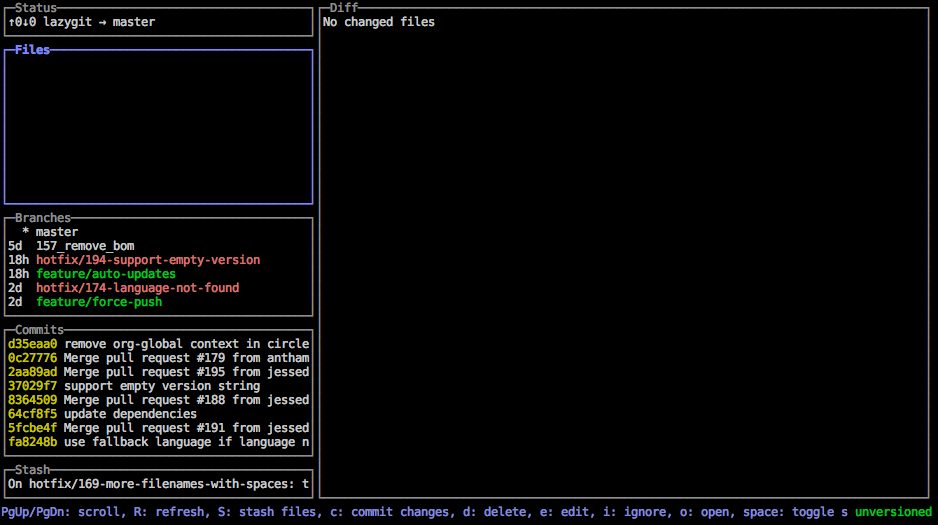
lazygit is an open-source terminal user interface for Git. It runs inside a terminal rather than as a desktop app, so it also works over SSH, and is driven by keyboard shortcuts. It shows files, branches, commits and stashes in panes and covers line and hunk staging, interactive rebase, cherry-pick, bisect, worktrees and a reflog-based undo. It runs on Windows, macOS and Linux and is MIT licensed.
What users say
Evidence ↓The practitioner views found are few and favorable. One web developer who prefers GUIs calls it a fascinating in-between of command-line and GUI Git, and one Hacker News commenter says they love it. No critical practitioner view was in the pages read.
Rankings and alternatives
- Git GUI clients #6 of 10 For people who live in the terminal
- Fork #1 Best for most Mac and Windows developers
- Sublime Merge #2 Fast on huge repositories, and the pick for Linux
- GitKraken Desktop #3 Most visual graph, on every platform




Git GUI clients scores
Evaluated Nov 17, 2026 Evidence ↓- Seeing history and branches 3
3/5 means: A branch graph, but two of history search, file history and blame are missing or awkward, or the graph shows little about each commit.
A commit list per branch with filtering and diffs, but the branch graph only shows in an enlarged screen mode, and blame is not built in.
- Rewriting commits and undoing mistakes 5
5/5 means: A full visual interactive rebase that is quick to use, plus an undo or a view of lost commits that recovers most mistakes.
Full interactive rebase from the keyboard (squash, fixup, drop, edit, reorder, rebase onto a chosen commit) plus undo and redo of commits and branch changes through the reflog.
- Resolving merge conflicts 3
3/5 means: You can pick one side or the other for each conflicting change in the app, but there is no editable merged view.
A conflict view lets you choose your side, theirs or both for each conflicting change, but there is no merged-result editor; manual edits go to your text editor.
- Easy for someone new to Git 2
2/5 means: Usable for basics, but crowded screens, keyboard-only controls or an unusual model make a newcomer's first weeks hard.
A keyboard-driven terminal interface with single-key commands; quick once learned, but a Git newcomer has to learn the keys and the panes before doing anything.
- Speed on large repositories 4
4/5 means: Quick on large repositories, with only occasional reports of lag.
A compiled Go program that starts instantly and handles large repositories well, with occasional slowdowns on very long diffs that releases keep fixing.
- Everyday Git tools beyond committing 5
5/5 means: Seven or all eight.
Line and hunk staging, stashes, cherry-pick, a reflog view, worktrees, submodules and bisect; Git LFS files work through the installed Git.
- Cost for work use · counts half 5
5/5 means: Free for commercial use.
Free and MIT licensed.
- Runs on Mac, Windows and Linux · counts half 5
5/5 means: macOS, Windows and Linux officially.
Windows, macOS and Linux, and anywhere a terminal runs, including over SSH.
Pricing
- Open source Free Free and MIT licensed; the project accepts optional sponsorship.
Prices checked Nov 17, 2026.
Evidence and sources
What users say
Summary 2 quotes
-
I just found out about Lazygit, and am finding it a fascinating in-between of command-line Git and GUI Git.
Frontend Masters blog author, Self-described "GUI guy" for Git · blog.master.dev/lazygit · published · checked -
Lazygit is amazing:
arcanemachiner, Hacker News commenter · hn.svelte.dev/item/45659812 · checked
Git GUI clients scores
Seeing history and branches 1 quote
-
When viewing the commit graph in an enlarged window (use + and _ to cycle screen modes), the commit graph is shown. Colours correspond to the commit authors, and as you navigate down the graph, the parent commits of the selected commit are highlighted.
github.com/jesseduffield/lazygit · checked
Rewriting commits and undoing mistakes 2 quotes
-
Press i to start an interactive rebase. Then squash (s), fixup (f), drop (d), edit (e), move up (ctrl+k) or move down (ctrl+j) any of the TODO commits, before continuing the rebase by bringing up the rebase options menu with m and then selecting continue.
github.com/jesseduffield/lazygit · checked -
You can undo the last action by pressing z and redo with shift+z. Here we drop a couple of commits and then undo the actions. Undo uses the reflog which is specific to commits and branches so we can't undo changes to the working tree or stash.
github.com/jesseduffield/lazygit · checked
Easy for someone new to Git 2 quotes
-
simple terminal UI for git commands
github.com/jesseduffield/lazygit · checked -
I just found out about Lazygit, and am finding it a fascinating in-between of command-line Git and GUI Git.
Frontend Masters blog author, Self-described "GUI guy" for Git · blog.master.dev/lazygit · published · checked
Speed on large repositories 1 quote
-
Improve performance with very long diffs
github.com/jesseduffield/lazygit/releases · checked
Everyday Git tools beyond committing 2 quotes
-
Press shift+c on a commit to copy it and press shift+v to paste (cherry-pick) it.
github.com/jesseduffield/lazygit · checked -
Press 0 on a changed file to focus its diff in the main view. The selection covers a whole hunk to begin with, so <space> stages that hunk and moves on to the next one. When you want only part of a hunk, press a for line-by-line selection and v to select a range of lines.
github.com/jesseduffield/lazygit · checked
Cost for work use 1 quote
-
MIT license
github.com/jesseduffield/lazygit · checked
Runs on Mac, Windows and Linux 1 quote
-
For Windows, Mac OS(10.12+) or Linux, you can download a binary release
github.com/jesseduffield/lazygit · checked
Facts
License 1 quote
-
MIT license
github.com/jesseduffield/lazygit · checked
Runs on 1 quote
-
For Windows, Mac OS(10.12+) or Linux, you can download a binary release
github.com/jesseduffield/lazygit · checked
More from the sources
Features 1 quote
-
For those that have one, you can press shift-G to open the PR in the browser. There is no configuration needed to enable this for github.com, but it requires the gh tool to be installed, and you need to do gh auth login once to allow lazygit to access GitHub.
github.com/jesseduffield/lazygit · checked
How widely it is used 1 quote
-
83.9k stars
github.com/jesseduffield/lazygit · checked
Pricing
github.com/jesseduffield/lazygit · checked