
Microsoft Authenticator
Free Microsoft phone app for sign-in approvals, passkeys and 6-digit codes, with same-platform cloud backup
Our verdict
#8 of 9 in Authenticator apps · For Microsoft and work accounts
What it does
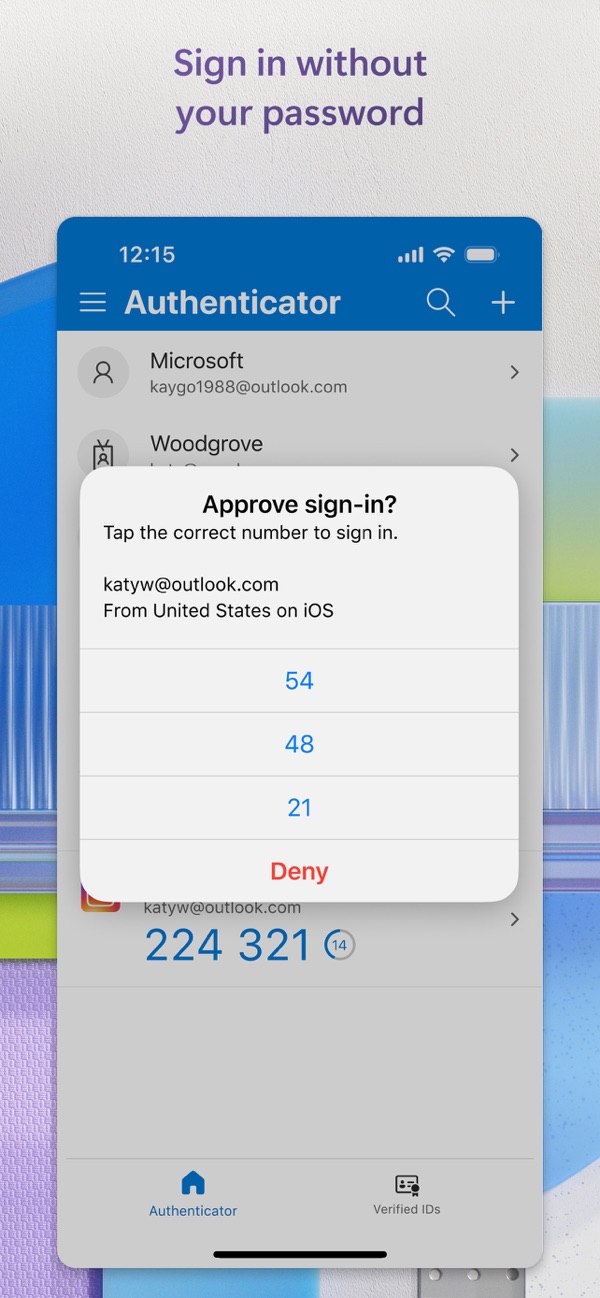
- Push approval with number matching for Microsoft and work accounts
- Passkeys for Microsoft accounts
- Backup to iCloud or a Microsoft account
Pros
- Smooth sign-in to Microsoft and work accounts
- Clean, simple design
Cons
- No export of your codes
- Backups can't move between iPhone and Android
- Choose if:
- Your employer or school requires it, for that account alone
Microsoft Authenticator is Microsoft’s free iPhone and Android app for two-step sign-in. It approves sign-ins for Microsoft personal, work and school accounts with push notifications and passkeys, and it also shows the 6-digit codes that third-party accounts such as Facebook and LinkedIn use. Codes are backed up to iCloud on iPhone or to a Microsoft personal account on Android, and a backup restores only to the same type of phone. Work and school accounts restore only their name, so you register them again on the new phone. The app has no export file for codes. It stopped storing and filling passwords in 2025, and that moved to Edge. It is proprietary software from Microsoft.
What users say
Evidence ↓Only one user voice was read, a Microsoft Q&A user in July 2026 who wanted a way to export the app's data and was told the cloud backup is the only supported move. It is a single request, so it shows how the missing export is felt but not how widely. No broader review sample was read.
Rankings and alternatives
- Authenticator apps #8 of 9 For Microsoft and work accounts
- Ente Auth #1 Best for most people
- Proton Authenticator #2 For people already using Proton
- 2FAS Auth #3 For browser autofill without an account



Authenticator apps scores
Evaluated Nov 22, 2026 Evidence ↓- Getting your codes back on a new phone · counts double 4
4/5 means: An automatic backup you restore by signing in, but the provider could read it, or getting it back depends on a text message to your phone number
Automatic backup restored by signing in (iCloud on iPhone, Microsoft account on Android, Google One from January 2027). Work or school accounts restore name only, and I found no statement that the Android backup is end-to-end encrypted, so it is not a 5.
- Moving your codes in and out 1
1/5 means: No way to export your codes, so leaving means re-adding every account by hand
No export file or transfer for codes, only same-platform backup. Microsoft's moderator confirms it on Q&A, though no official documentation page states the absence.
- Codes on all your devices 3
3/5 means: Both iPhone and Android, but codes don't sync automatically between an iPhone and an Android phone
iOS and Android only, and a backup cannot be restored across the two. No computer or web app.
- Easy to set up and use every day 4
4/5 means: Easy to add accounts, quick to find and copy a code, with search and clear icons
From general knowledge of the app (QR add, search, icons, tap to copy, number-matching prompts). No review sample was read, so the level is uncertain.
- Security and openness 3
3/5 means: Closed code and no published independent audit, with no known incident, and backups protected only by the account password
Closed source, and I found no published independent audit or known loss of codes; the app lock was not verified in the sources read. Backups depend on the cloud account.
- No account, no tracking 3
3/5 means: Works without an account, but its backup ties your codes to a Google, Microsoft or similar account, and the app collects usage data
Third-party codes can generally be added without signing in (not verified here), but backup ties codes to an iCloud or Microsoft account, and Microsoft collects usage telemetry. The data practices were not read.
- Extras that save time · counts half 3
3/5 means: Two
Push approval for Microsoft and work accounts and passkeys count as two, and a screenshot shows number matching. Code autofill, widget and watch app are not confirmed.
Pricing
- Free Free
Prices checked Nov 22, 2026.
Evidence and sources
What users say
Summary 1 quote
-
Thanks, it answers my question but does not solve the problem of exporting the authenticator data. Would be a nice feature to add in the feature. :)
Maya, Microsoft Q&A user who asked the question · learn.microsoft.com/en-us/answers/questions/5939094/how-to-export-data-from-microsoft-authenticator · published · checked
Authenticator apps scores
Getting your codes back on a new phone 4 quotes
-
Microsoft Authenticator backs up one-time password codes for eligible Microsoft personal accounts and third-party accounts, such as LinkedIn and Facebook. Work or school account credentials are not backed up. Only the account name is saved, and you must sign in and register the account again on your new device.
support.microsoft.com/en-us/authenticator/back-up-your-accounts-in-microsoft-authenticator · checked -
To back up your Authenticator one-time password codes and account names on an iOS device, enable iCloud Drive, iCloud Keychain, and iCloud Backup for Authenticator.
support.microsoft.com/en-us/authenticator/back-up-your-accounts-in-microsoft-authenticator · checked -
Turn on the Cloud Backup toggle. Select a Microsoft personal account where the backup will be stored.
support.microsoft.com/en-us/authenticator/back-up-your-accounts-in-microsoft-authenticator · checked -
Starting January 2027, you will no longer use your Microsoft personal account to enable backup. You will need to enable "Microsoft Authenticator" from Google One backup.
support.microsoft.com/en-us/authenticator/back-up-your-accounts-in-microsoft-authenticator · checked
Moving your codes in and out 2 quotes
-
Microsoft Authenticator currently does not support exporting all Authenticator data, such as MFA accounts, verification codes, or work/school sign-in methods, into a file.
Huy-K, Microsoft external staff moderator on Microsoft Q&A · learn.microsoft.com/en-us/answers/questions/5939094/how-to-export-data-from-microsoft-authenticator · published · checked -
Thanks, it answers my question but does not solve the problem of exporting the authenticator data. Would be a nice feature to add in the feature. :)
Maya, Microsoft Q&A user who asked the question · learn.microsoft.com/en-us/answers/questions/5939094/how-to-export-data-from-microsoft-authenticator · published · checked
Codes on all your devices 2 quotes
-
You can only back up and restore on the same device type: accounts backed up using an iOS device cannot be restored on an Android device.
support.microsoft.com/en-us/authenticator/back-up-your-accounts-in-microsoft-authenticator · checked -
Requires iOS 17.0 or later.
apps.apple.com/us/app/microsoft-authenticator/id983156458 · checked
Security and openness 2 quotes
-
To back up your Authenticator one-time password codes and account names on an iOS device, enable iCloud Drive, iCloud Keychain, and iCloud Backup for Authenticator.
support.microsoft.com/en-us/authenticator/back-up-your-accounts-in-microsoft-authenticator · checked -
Turn on the Cloud Backup toggle. Select a Microsoft personal account where the backup will be stored.
support.microsoft.com/en-us/authenticator/back-up-your-accounts-in-microsoft-authenticator · checked
No account, no tracking 2 quotes
-
To back up your Authenticator one-time password codes and account names on an iOS device, enable iCloud Drive, iCloud Keychain, and iCloud Backup for Authenticator.
support.microsoft.com/en-us/authenticator/back-up-your-accounts-in-microsoft-authenticator · checked -
Turn on the Cloud Backup toggle. Select a Microsoft personal account where the backup will be stored.
support.microsoft.com/en-us/authenticator/back-up-your-accounts-in-microsoft-authenticator · checked
Extras that save time 2 quotes
-
Passkeys are handled separately from Authenticator account backup. If a passkey was saved only to the old phone, add a new passkey for the new phone.
learn.microsoft.com/en-us/entra/identity/authentication/how-to-transfer-authenticator-new-phone · checked -
Securely sign in to all your Microsoft accounts—personal, work, school, or any other account—without a password.
microsoft.com/en-us/security/mobile-authenticator-app · checked
Facts
License 1 quote
-
Securely sign in to all your Microsoft accounts—personal, work, school, or any other account—without a password.
microsoft.com/en-us/security/mobile-authenticator-app · checked
Runs on 2 quotes
-
You can only back up and restore on the same device type: accounts backed up using an iOS device cannot be restored on an Android device.
support.microsoft.com/en-us/authenticator/back-up-your-accounts-in-microsoft-authenticator · checked -
Requires iOS 17.0 or later.
apps.apple.com/us/app/microsoft-authenticator/id983156458 · checked
Needs 4 quotes
-
Requires iOS 17.0 or later.
apps.apple.com/us/app/microsoft-authenticator/id983156458 · checked -
To back up your Authenticator one-time password codes and account names on an iOS device, enable iCloud Drive, iCloud Keychain, and iCloud Backup for Authenticator.
support.microsoft.com/en-us/authenticator/back-up-your-accounts-in-microsoft-authenticator · checked -
Turn on the Cloud Backup toggle. Select a Microsoft personal account where the backup will be stored.
support.microsoft.com/en-us/authenticator/back-up-your-accounts-in-microsoft-authenticator · checked -
Starting January 2027, you will no longer use your Microsoft personal account to enable backup. You will need to enable "Microsoft Authenticator" from Google One backup.
support.microsoft.com/en-us/authenticator/back-up-your-accounts-in-microsoft-authenticator · checked
More from the sources
How widely it is used 1 quote
-
4.7 out of 5 731K Ratings
apps.apple.com/us/app/microsoft-authenticator/id983156458 · checked
Pricing
microsoft.com/en-us/security/mobile-authenticator-app · checked