
MX Linux
Free Debian-based Linux desktop with a Windows-style Xfce layout, easy MX Tools, and light enough for older PCs
Our verdict
#7 of 9 in Linux distros for beginners · For old, slow PCs
What it does
- Runs in 1 to 2 GB of RAM
- Debian stable base
- MX Tools for drivers, updates and full-system backups
- Advanced Hardware Support version for newer PCs
Pros
- The lightest distro here
- Changes little from one update to the next
- A helpful, active forum
Cons
- Takes several separate tools to set up the desktop to your liking
- Clunky partitioning when installing next to Windows
- No in-place upgrade to the next major version
- Choose if:
- Your PC has 2 GB of RAM or less
MX Linux is a free, community-built Linux distribution for 64-bit PCs, based on Debian stable and made by the MX Linux community with core components from antiX. Its main edition uses the Xfce desktop, with KDE Plasma and Fluxbox editions and an Advanced Hardware Support (AHS) Xfce edition for newer hardware. The current release is MX-25.3 “Infinity”, built on Debian 13. It runs live from USB before installing, can keep changes with a persistent live USB, and includes its own tools for installing drivers, updating, managing packages and making system snapshots. It is aimed at people who want a stable, lighter alternative to Ubuntu-based distros, including on older PCs.
What users say
Evidence ↓Reviewers and DistroWatch readers praise MX for its stability, its helpful forum, its easy tools and its sensible default Xfce setup, and a Register reviewer calls the default layout one of the best Xfce configurations. The criticisms are the dated default look and the effort Xfce takes to tune (one Dedoimedo review says it needs about an hour and several separate tools, with blurry default scaling), and that MX-25 is less frugal than earlier releases. These are individual reviews, not a survey.
Rankings and alternatives
- Linux distros for beginners #7 of 9 For old, slow PCs
- Linux Mint #1 Best for most people leaving Windows
- Zorin OS #2 Closest to the look of Windows
- Kubuntu #3 Windows-style desktop on a newer base




Linux distros for beginners scores
Evaluated Nov 17, 2026 Evidence ↓- Easy for a newcomer · counts double 3
3/5 means: Easy to use once running, but installing it or one common task (dual boot, Secure Boot, drivers, codecs or non-store apps) needs extra steps
Graphical MX Installer that can set up dual boot, Secure Boot on the standard ISOs, and graphical MX Tools for drivers, apps and updates. But a reviewer found the partitioning step clunky, and getting the Xfce desktop comfortable takes several separate tools and a DPI change, which is more setup than a newcomer expects. (Writer calibration, changed from 4, since the install and first setup need more of the reader than Ubuntu's or Kubuntu's.)
- Familiar to Windows users 4
4/5 means: A taskbar and start-style menu by default or one click away in first-run setup, with noticeable differences from Windows
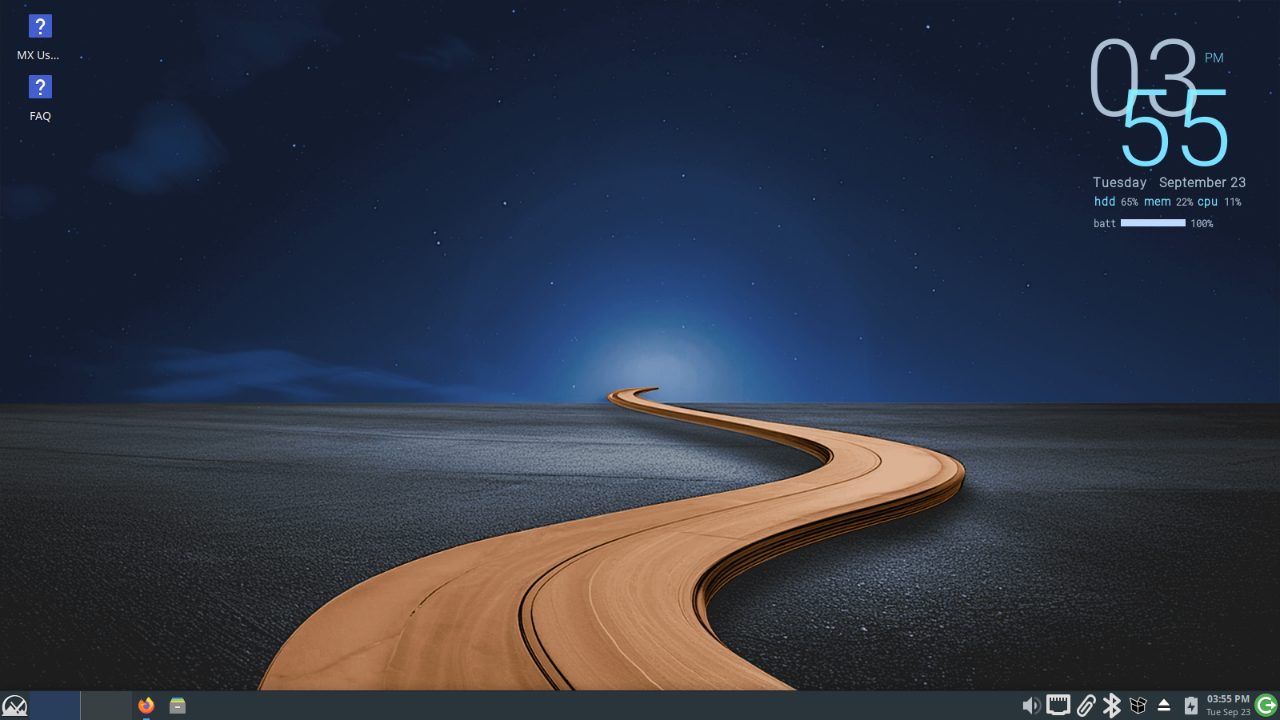
A Docklike taskbar, Whisker start menu with the button at bottom left, and a system tray by default. Differences remain, and the default panel orientation (vertical per the Register, horizontal in a Wikipedia screenshot) is unconfirmed.
- Hardware support out of the box 4
4/5 means: NVIDIA's driver installs from a graphical tool after setup, and the kernel handles most current hardware
MX Tools NVIDIA installer is graphical and the standard kernel is 6.12 LTS, with an AHS ISO on a newer Liquorix kernel (which loses Secure Boot). Dual-GPU switching was not documented.
- Updates that don't break 4
4/5 means: Conservative, well-tested base with a record of quiet updates, without a rollback set up by default
Conservative Debian stable base with a quiet update record in reviews. MX Snapshot makes a bootable ISO backup but is not a rollback set up for the user.
- Years before a reinstall 3
3/5 means: Supported into 2029 or later but the next major version needs a reinstall, or an in-place version upgrade about once a year
MX-25 is listed as supported to 2030-06 (DistroWatch figure). The next major version needs a migration or reinstall, since version-to-version upgrades are not officially supported.
- Ready for PC gaming 3
3/5 means: Steam installs from the store, but NVIDIA's driver needs extra steps or the graphics stack lags
NVIDIA's driver installs easily and gaming tools are in the repos with 32-bit libs. Steam installation was not confirmed from pages read, and standard editions ship Debian stable's older Mesa (newer on AHS).
- Runs on older PCs 5
5/5 means: Runs in 1 to 2 GB of RAM in its main edition
Main Xfce edition lists 1 GB RAM minimum (2 GB recommended) and 15 GB disk, with a lighter Fluxbox edition too. The source is Wikipedia because the vendor page was blocked, and 32-bit is gone.
- Help when you're stuck 4
4/5 means: A large forum and good documentation, and most help for its base applies
An active forum praised by readers, a manual and wiki, and most Debian help applies. The community is smaller than Ubuntu's or Mint's.
Pricing
- MX Linux Free Free to download and use.
Prices checked Nov 17, 2026.
Evidence and sources
What users say
Summary 7 quotes
-
It has an uncommonly sophisticated Xfce configuration – few other distros manage this so well.
Liam Proven, reviewer at The Register · theregister.com/software/2025/11/13/infinity-and-beyond-mx-linux-25-arrives/2791625 · published · checked -
If you want something a little easier than Debian itself, without Ubuntu's deeper changes such as snap, and optionally without systemd, then this is a good option.
Liam Proven, reviewer at The Register · theregister.com/software/2025/11/13/infinity-and-beyond-mx-linux-25-arrives/2791625 · published · checked -
If nothing else, you have to appreciate the following facts: the distro is reasonably consistent, it's slowly improving, the distro team sticks to their goals without getting distracted, and they champion the cause of simplicity quite admirably.
Dedoimedo, independent Linux reviewer · dedoimedo.com/computers/mx-25-xfce.html · checked -
It's the fact you need to go through probably 5-10 different tools and utilities to tweak everything.
Dedoimedo, independent Linux reviewer · dedoimedo.com/computers/mx-25-xfce.html · checked -
I'm using nvidia card, it's an older k620, but the MX Tools nvidia installer was very professional, just plug and play, it installed v580, I hit reboot and everything worked Plasma Wayland + 580 drivers, perfect, on a debian base.
DistroWatch reader (Hungary), rating 10, version 25.3, reader review · distrowatch.com/table.php · published · checked -
The first thing that impressed me (and REALLY impressed me) was the quality and friendliness of the support in the MX forum.
DistroWatch reader, reader review · distrowatch.com/table.php · checked -
Si possible, évitez quand même le dual boot avec un autre OS (qui est une source de potentiels problèmes pour toutes les distributions).
DistroWatch reader (France), rating 10, version 25.3, reader review · distrowatch.com/table.php · published · checked
Linux distros for beginners scores
Easy for a newcomer 4 quotes
-
The system correctly configured a dual boot.
Dedoimedo, independent Linux reviewer · dedoimedo.com/computers/mx-25-xfce.html · checked -
The "AHS" releases with the Liquorix kernels[69] do not support Secure Boot.
en.wikipedia.org/wiki/MX_Linux · checked -
It's the fact you need to go through probably 5-10 different tools and utilities to tweak everything.
Dedoimedo, independent Linux reviewer · dedoimedo.com/computers/mx-25-xfce.html · checked -
Si possible, évitez quand même le dual boot avec un autre OS (qui est une source de potentiels problèmes pour toutes les distributions).
DistroWatch reader (France), rating 10, version 25.3, reader review · distrowatch.com/table.php · published · checked
Familiar to Windows users 2 quotes
-
Moving the left-to-right horizontal panel into a vertical orientation normally puts the launch button at the top, but MX puts it at the end of the panel instead – meaning that users more accustomed to Windows' default horizontal taskbar will find the launch button where they expect it, in the bottom left corner.
Liam Proven, reviewer at The Register · theregister.com/software/2025/11/13/infinity-and-beyond-mx-linux-25-arrives/2791625 · published · checked -
I am not fond of the bottom-up vertical panel. Just feels ... not.
Dedoimedo, independent Linux reviewer · dedoimedo.com/computers/mx-25-xfce.html · checked
Hardware support out of the box 4 quotes
-
I'm using nvidia card, it's an older k620, but the MX Tools nvidia installer was very professional, just plug and play, it installed v580, I hit reboot and everything worked Plasma Wayland + 580 drivers, perfect, on a debian base.
DistroWatch reader (Hungary), rating 10, version 25.3, reader review · distrowatch.com/table.php · published · checked -
The NVIDIA driver installer in MX Tools correctly detected the GPU and recommended either version 340 or 390 of Nvidia's proprietary driver. We went with the newer one, but although it seemed to install successfully, it didn't work and the display remained off.
Liam Proven, reviewer at The Register · theregister.com/software/2025/11/13/infinity-and-beyond-mx-linux-25-arrives/2791625 · published · checked -
MX still offers the same choice of just three desktops: the default middleweight Xfce, the full-fat KDE Plasma, or super-lightweight Fluxbox.
Liam Proven, reviewer at The Register · theregister.com/software/2025/11/13/infinity-and-beyond-mx-linux-25-arrives/2791625 · published · checked -
The "AHS" releases with the Liquorix kernels[69] do not support Secure Boot.
en.wikipedia.org/wiki/MX_Linux · checked
Updates that don't break 2 quotes
-
The distro is still quite sprightly, with excellent responsiveness and low resource usage.
Dedoimedo, independent Linux reviewer · dedoimedo.com/computers/mx-25-xfce.html · checked -
Release Model · Semi-Rolling · Semi-Rolling · Semi-Rolling
distrowatch.com/table.php · checked
Years before a reinstall 2 quotes
-
End Of Life · 2030-06 · 2028-06 · 2026-06
distrowatch.com/table.php · checked -
Release Model · Semi-Rolling · Semi-Rolling · Semi-Rolling
distrowatch.com/table.php · checked
Ready for PC gaming 1 quote
-
I'm using nvidia card, it's an older k620, but the MX Tools nvidia installer was very professional, just plug and play, it installed v580, I hit reboot and everything worked Plasma Wayland + 580 drivers, perfect, on a debian base.
DistroWatch reader (Hungary), rating 10, version 25.3, reader review · distrowatch.com/table.php · published · checked
Runs on older PCs 3 quotes
-
1 GB RAM for AMD64 architectures.
en.wikipedia.org/wiki/MX_Linux · checked -
The distro is still quite sprightly, with excellent responsiveness and low resource usage.
Dedoimedo, independent Linux reviewer · dedoimedo.com/computers/mx-25-xfce.html · checked -
They are all for x86-64: there's no x86-32 edition any more.
Liam Proven, reviewer at The Register · theregister.com/software/2025/11/13/infinity-and-beyond-mx-linux-25-arrives/2791625 · published · checked
Help when you're stuck 3 quotes
-
The first thing that impressed me (and REALLY impressed me) was the quality and friendliness of the support in the MX forum.
DistroWatch reader, reader review · distrowatch.com/table.php · checked -
Si possible, évitez quand même le dual boot avec un autre OS (qui est une source de potentiels problèmes pour toutes les distributions).
DistroWatch reader (France), rating 10, version 25.3, reader review · distrowatch.com/table.php · published · checked -
12 months: 3 (1,706), 6 months: 3 (1,435), 3 months: 3 (1,464), 4 weeks: 4 (1,431), 1 week: 3 (1,410)
distrowatch.com/table.php · checked
Facts
License 1 quote
-
1 GB RAM for AMD64 architectures.
en.wikipedia.org/wiki/MX_Linux · checked
Runs on 2 quotes
-
They are all for x86-64: there's no x86-32 edition any more.
Liam Proven, reviewer at The Register · theregister.com/software/2025/11/13/infinity-and-beyond-mx-linux-25-arrives/2791625 · published · checked -
Release Date · 2026-09-20 · 2025-04-13 · 2023-01-15
distrowatch.com/table.php · checked
Needs 1 quote
-
1 GB RAM for AMD64 architectures.
en.wikipedia.org/wiki/MX_Linux · checked
More from the sources
Pricing 1 quote
-
Price (US$) · Free · Free · Free
distrowatch.com/table.php · checked
Features 2 quotes
-
With the release of 25.1, Dual Init is now again possible.[34]
en.wikipedia.org/wiki/MX_Linux · checked -
Package Format · deb, flatpak · deb, flatpak · deb, flatpak
distrowatch.com/table.php · checked
Pricing
distrowatch.com/table.php · checked