
Nitro PDF
Windows, Mac and iOS PDF editor with a Word-style ribbon, sold as a subscription or a three-year Windows license
Our verdict
#6 of 10 in PDF editors for Windows · Subscription for small teams
What it does
- Paragraph editing and a strong image editor
- OCR, redaction, compare and Bates numbering
- Admin portal for managing seats
- Office-style ribbon
Pros
- Accurate OCR, including on tables
- Easy to learn for anyone used to Office
- True redaction that removes the underlying text
Cons
- About $180 a year, with no free tier
- The one-time Classic license lacks OCR and lasts three years
- E-signature requests and AI redaction cost extra
Nitro PDF (formerly Nitro Pro) is a commercial PDF editor for creating, editing, converting, signing, redacting and securing PDFs, with OCR and AI tools. It runs as a desktop app on Windows, Mac and iOS. Individuals can buy it online, either as the Standard subscription or as Nitro PDF Classic, a Windows-only license paid once for a three-year term. There is no permanent free tier, only a 14-day trial. Nitro Sign (e-signature requests) and Smart Redact (AI redaction) are separate paid products.
What users say
Evidence ↓Reviewers praise the editing, OCR, conversion and redaction tools and the Office-style interface. The one independent hands-on review found text editing precise, image editing strong and OCR above 95% accurate on its test documents, but wanted drag-and-drop page reordering and found it pricey for occasional users. An older TechRadar review also called it one of the easiest editors to use. These are single-reviewer accounts, not a survey of users.
Rankings and alternatives
- PDF editors for Windows #6 of 10 Subscription for small teams
- Adobe Acrobat #1 The reference for high-stakes documents
- Foxit PDF Editor #2 Acrobat-level editing with a one-time option
- Tungsten Power PDF #3 One-time license that stays offline

Windows PDF editors scores
Evaluated Nov 17, 2026 Evidence ↓- Editing existing text and images 4
4/5 means: Paragraph editing with reflow and good font matching; layouts occasionally shift
The vendor lists text and image editing with full-page paragraph reflow, and the one hands-on review found line-level text selection precise and image editing strong. No source tests reflow or font matching on messy layouts, so a 5 is not supported.
- OCR for scanned documents 4
4/5 means: Searchable and editable output with good accuracy on ordinary scans and many languages
Standard turns scans into searchable, editable PDFs with matching fonts and batch OCR. One reviewer measured over 95% accuracy, but merged text blocks made editing harder; no language list was found.
- Converting to and from Word 4
4/5 means: Converts both ways in batches, with layouts that hold up on ordinary documents
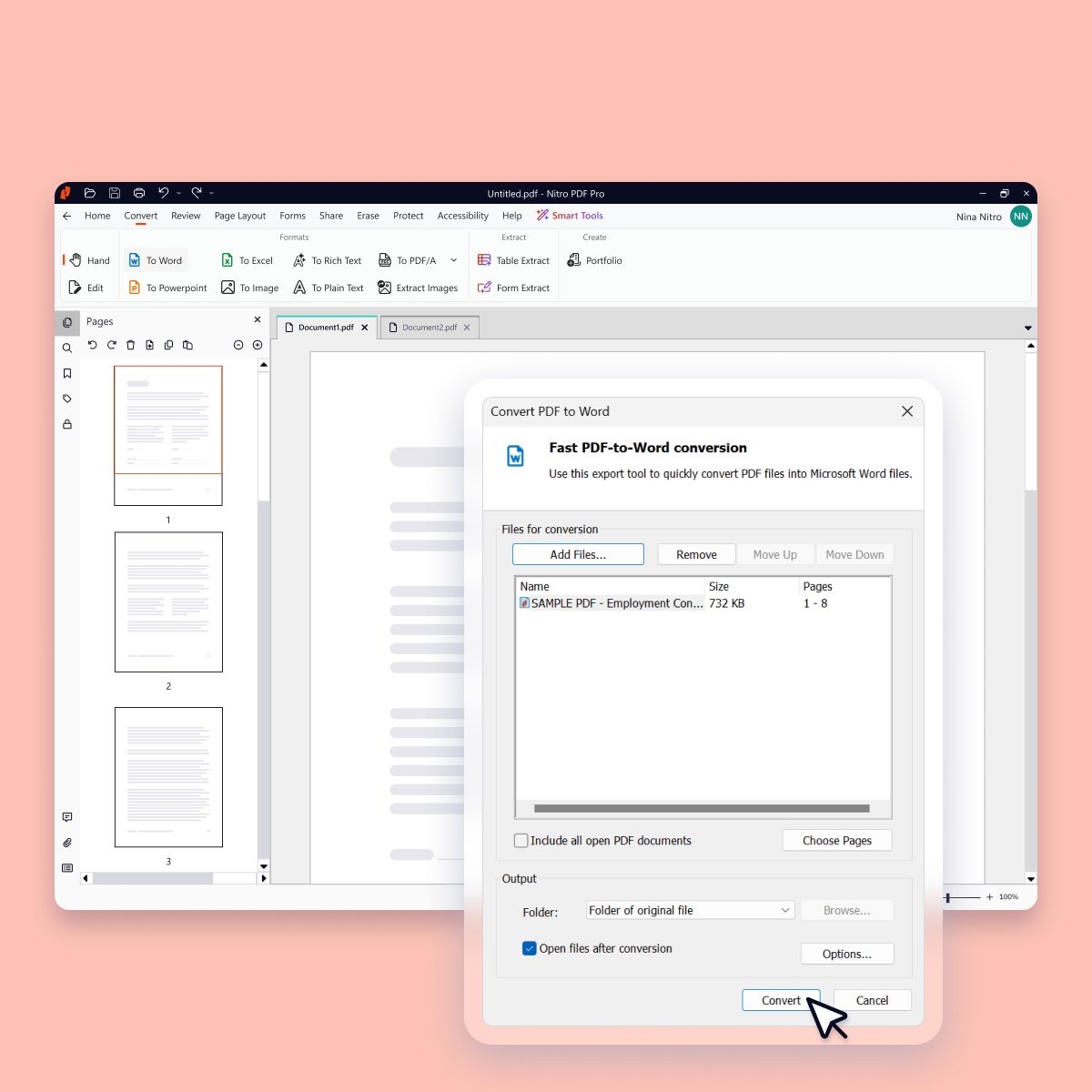
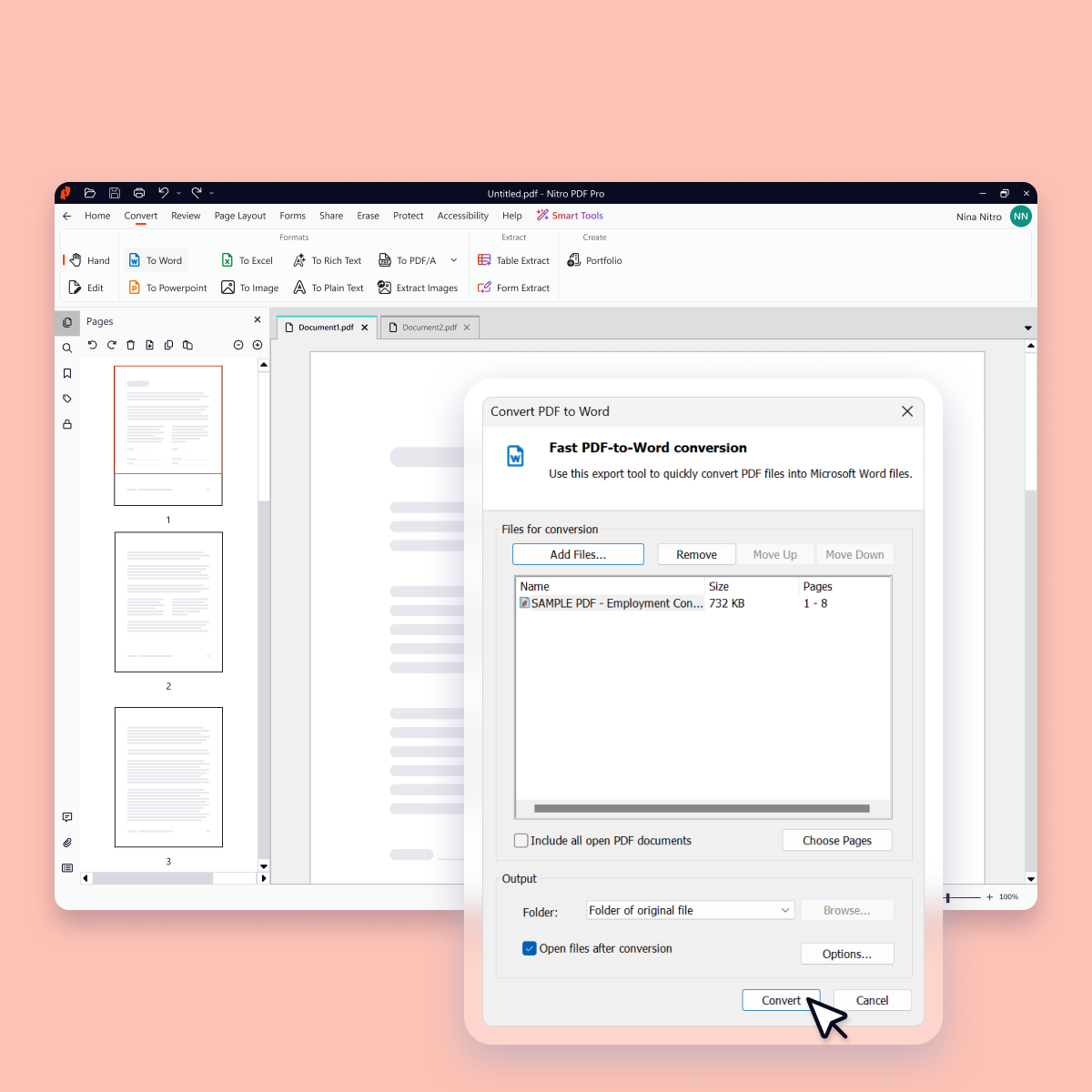
Converts PDFs to Word, Excel, PowerPoint and images and creates PDFs from Office files, with a multi-file convert dialog. The only fidelity evidence is one reviewer's 5/5 on ordinary files; no test of complex tables.
- Forms and signatures 4
4/5 means: Creates fillable forms with field detection and signs with certificates
Standard creates fillable forms with automatic field detection, and the vendor lists certificate signatures and Quick Sign. Sending documents to others to sign needs Nitro Sign, a separate subscription, so it is not counted.
- Document tools for professional work 5
5/5 means: All five
The vendor's feature table lists redaction, compare, Bates numbering, PDF/A conversion and batch create, and a reviewer confirmed permanent redaction. The table's per-plan check marks are blank in the fetched text, so Standard having all five is assumed from product knowledge; search-and-redact was not tested.
- Cost over three years 1
1/5 means: More than $500
Standard is $180 per year, so 180 x 3 = $540 over three years, which is more than $500. Classic is $270 once for a three-year term (score 2 if it qualified), but its feature list does not include OCR, so it is not counted as the cheapest edition that runs OCR. Prices are from third-party reviews.
- Ease of use 4
4/5 means: An Office-style or clean layout most people pick up quickly, with a few rough edges
An Office-style ribbon that both TechRadar (older version) and Business Dive found easy. Rough edges are no visual drag-and-drop page reordering and no easy switching between open documents.
- Keeps your files on your PC 3
3/5 means: Core editing runs locally, but some conversions or AI features send files to the vendor, or an online account is required
Editing, OCR and conversion run in the desktop app, but a reviewer says the AI tools are web-based and need the vendor's cloud, and the trial needs an account. Whether the paid app requires sign-in was not found.
- Speed with large files · counts half unknown
No large-file measurements found; an older TechRadar review only says it runs well on slower machines.
Pricing
- Nitro PDF Standard $15.00 /month per seat Billed annually ($180 per user per year; 15 x 12 = 180). The price is from third-party reviews (Dupple, Business Dive), because the vendor's pricing page text does not show it. Windows, Mac and iOS. No minimum seats; up to 20 licenses can be bought online. Includes AI tools and the Admin portal. 24/7 support listed for 2+ users. Smart Redact and Nitro Sign cost extra.
- Nitro PDF Classic $270.00 one-time One payment for a three-year term, not a perpetual license, per the vendor. Windows desktop only. Lists create, edit, export, combine, split and password protection; it does not list OCR, AI or forms. Price from third-party reviews.
- Nitro PDF Plus Contact sales Contact sales. Adds SSO, domain control, Azure Information Protection, Nitro Analytics and a customer success manager for large organizations.
- Nitro Sign Standard $10.00 /month per seat , extra E-signature requests to others, separate from Nitro PDF. Price from Dupple (a sponsored review); Business Dive lists $180 per year. Billed annually per the vendor.
- Smart Redact Standard $180.00 /year per seat , extra AI redaction add-on that detects 30+ PII categories. Price from Dupple (a sponsored review).
Prices checked Nov 17, 2026.
Evidence and sources
What users say
Summary 4 quotes
-
Nitro offers plans for individuals, teams, and businesses, and includes AI tools, admin features, analytics, and support. However, users who only need basic PDF editing may find lower-cost alternatives.
Aron Kantor, Founder and reviewer at The Business Dive · thebusinessdive.com/nitro-pdf-pro-review · published · checked -
What I noticed first, compared to other PDF editors, is how flexible it is when selecting which text you want to edit. It can either select the whole block or just a line, which is a nice touch for more precise PDF editing.
Aron Kantor, Founder and reviewer at The Business Dive · thebusinessdive.com/nitro-pdf-pro-review · published · checked -
The only thing I missed here is an interface that lets me quickly drag and drop pages to rearrange them.
Aron Kantor, Founder and reviewer at The Business Dive · thebusinessdive.com/nitro-pdf-pro-review · published · checked -
Nitro PDF Pro features a clean, familiar user interface that should feel very comfortable to those coming from Microsoft Office.
Stefan Ionescu, Reviewer at TechRadar · techradar.com/reviews/nitro-pdf-pro · published · checked
Windows PDF editors scores
Editing existing text and images 3 quotes
-
Edit PDF text and images with full-page paragraph reflow
gonitro.com/pdf · checked -
What I noticed first, compared to other PDF editors, is how flexible it is when selecting which text you want to edit. It can either select the whole block or just a line, which is a nice touch for more precise PDF editing.
Aron Kantor, Founder and reviewer at The Business Dive · thebusinessdive.com/nitro-pdf-pro-review · published · checked -
The image editor was also outstanding compared to other PDF editors I tried. Adjusting size, position, brightness, colors, and resolution worked well, and I did not run into formatting issues while moving elements around.
Aron Kantor, Founder and reviewer at The Business Dive · thebusinessdive.com/nitro-pdf-pro-review · published · checked
OCR for scanned documents 2 quotes
-
Create, convert, and combine PDFs Manage and edit PDFs Annotate and share PDFs with ease Efficient team management through Nitro Admin portal AI tools to boost productivity 24/7/365 support for all your PDF needs Integrations and productivity connectors
gonitro.com/pricing · checked -
Nitro delivered over 95% text recognition accuracy and approximately 95% accuracy with tables, making it one of the strongest OCR tools I tested. However, editing recognized text wasn’t always seamless, particularly when Nitro combined multiple text sections into a single block.
Aron Kantor, Founder and reviewer at The Business Dive · thebusinessdive.com/nitro-pdf-pro-review · published · checked
Converting to and from Word 2 quotes
-
Nitro PDF allows you to convert PDFs into Word, Excel, PowerPoint, and image formats. The conversion is almost instant, and you get the file in the desired formats.
Aron Kantor, Founder and reviewer at The Business Dive · thebusinessdive.com/nitro-pdf-pro-review · published · checked -
Edit PDF text and images with full-page paragraph reflow
gonitro.com/pdf · checked
Forms and signatures 2 quotes
-
Add Bates numbering to legal documents
gonitro.com/pdf · checked -
Yes. All Nitro PDF plans include the ability to digitally sign and certify documents.
gonitro.com/pdf · checked
Document tools for professional work 2 quotes
-
Add Bates numbering to legal documents
gonitro.com/pdf · checked -
In addition, you can mark parts of the documents for redaction, and once you are ready, just click on the Apply Redaction for removal. Nitro PDF not only hides the information but permanently removes it from the document.
Aron Kantor, Founder and reviewer at The Business Dive · thebusinessdive.com/nitro-pdf-pro-review · published · checked
Cost over three years 3 quotes
-
Nitro PDF Standard: $15.00 per user, per month. Nitro PDF Plus: Custom pricing based on volume. Nitro PDF Classic: $270 per license for a three-year license.
dupple.com/learn/nitro-review · published · checked -
Nitro Pro Standard — $180/year · Makes sense for professionals who regularly edit PDFs and want the AI/business functionality bundled in. Nitro PDF Classic — $270 one-time · More interesting for users who prefer perpetual licensing and don’t need the full subscription package.
Aron Kantor, Founder and reviewer at The Business Dive · thebusinessdive.com/nitro-pdf-pro-review · published · checked -
Create, edit, and export PDF documents Combine files and split PDFs Protect documents with password-based security Easy-to-use Microsoft Office-style interface One-time payment for three years of use
gonitro.com/pricing · checked
Ease of use 2 quotes
-
Nitro PDF Pro features a clean, familiar user interface that should feel very comfortable to those coming from Microsoft Office.
Stefan Ionescu, Reviewer at TechRadar · techradar.com/reviews/nitro-pdf-pro · published · checked -
The only thing I missed here is an interface that lets me quickly drag and drop pages to rearrange them.
Aron Kantor, Founder and reviewer at The Business Dive · thebusinessdive.com/nitro-pdf-pro-review · published · checked
Keeps your files on your PC 2 quotes
-
Features like Nitro Assistant and smart extraction tools are not available directly in the desktop app.
Aron Kantor, Founder and reviewer at The Business Dive · thebusinessdive.com/nitro-pdf-pro-review · published · checked -
Every Nitro PDF plan includes built-in AI tools designed for privacy and control, so you can boost productivity without compromising security.
gonitro.com/pdf · checked
Speed with large files 1 quote
-
Nitro PDF Pro features a clean, familiar user interface that should feel very comfortable to those coming from Microsoft Office.
Stefan Ionescu, Reviewer at TechRadar · techradar.com/reviews/nitro-pdf-pro · published · checked
Facts
License 2 quotes
-
For individuals and small teams requiring essential PDF editing tools on their Windows device for a three-year term.
gonitro.com/pricing · checked -
Nitro PDF Classic offers essential PDF editing for Windows desktop users under a three-year license with one upfront payment.
gonitro.com/pricing · checked
Runs on 1 quote
-
Nitro PDF Standard and Plus plans are available for Windows, Mac, and iOS, making it accessible across the devices your team already uses.
gonitro.com/pdf · checked
More from the sources
Pricing 5 quotes
-
You can purchase up to 20 Nitro subscription licenses directly online through our website. All subscriptions are billed annually, providing cost predictability for your budgeting.
gonitro.com/pricing · checked -
Yes, Nitro offers a comprehensive 14-day free trial that provides full access to the platform with no credit card required and no features locked.
gonitro.com/pricing · checked -
Single users can access all the core editing, conversion, and signing features, while businesses benefit from advanced options like volume licensing, centralized deployment, and team collaboration tools.
gonitro.com/pdf · checked -
Smart Redact is available as a separate add-on subscription.
gonitro.com/pdf · checked -
Provision users, reassign licenses, and manage feature and AI access in real time through the Admin Portal. No negotiations. No minimum seat commitments.
gonitro.com/pdf · checked
Features 1 quote
-
Smart Redact processes files in a temporary session with no storage or data retention.
gonitro.com/pdf · checked
Pricing
gonitro.com/pricing · checked