pass, the standard unix password manager
Command-line password manager that keeps one GPG-encrypted file per entry and syncs through git
Our verdict
#7 of 7 in Password managers for Linux · For the terminal and git
What it does
- One GPG-encrypted file per password, synced with git
- Packaged by every major distribution
- Desktop, browser, and phone apps from community projects
Pros
- Plain files you can script with any Unix tool
- Free, tiny, and easy to audit
Cons
- Needs comfort with GPG and git
- The browser and phone apps are separate community projects
- Entry names aren't encrypted
- The original Android app is archived
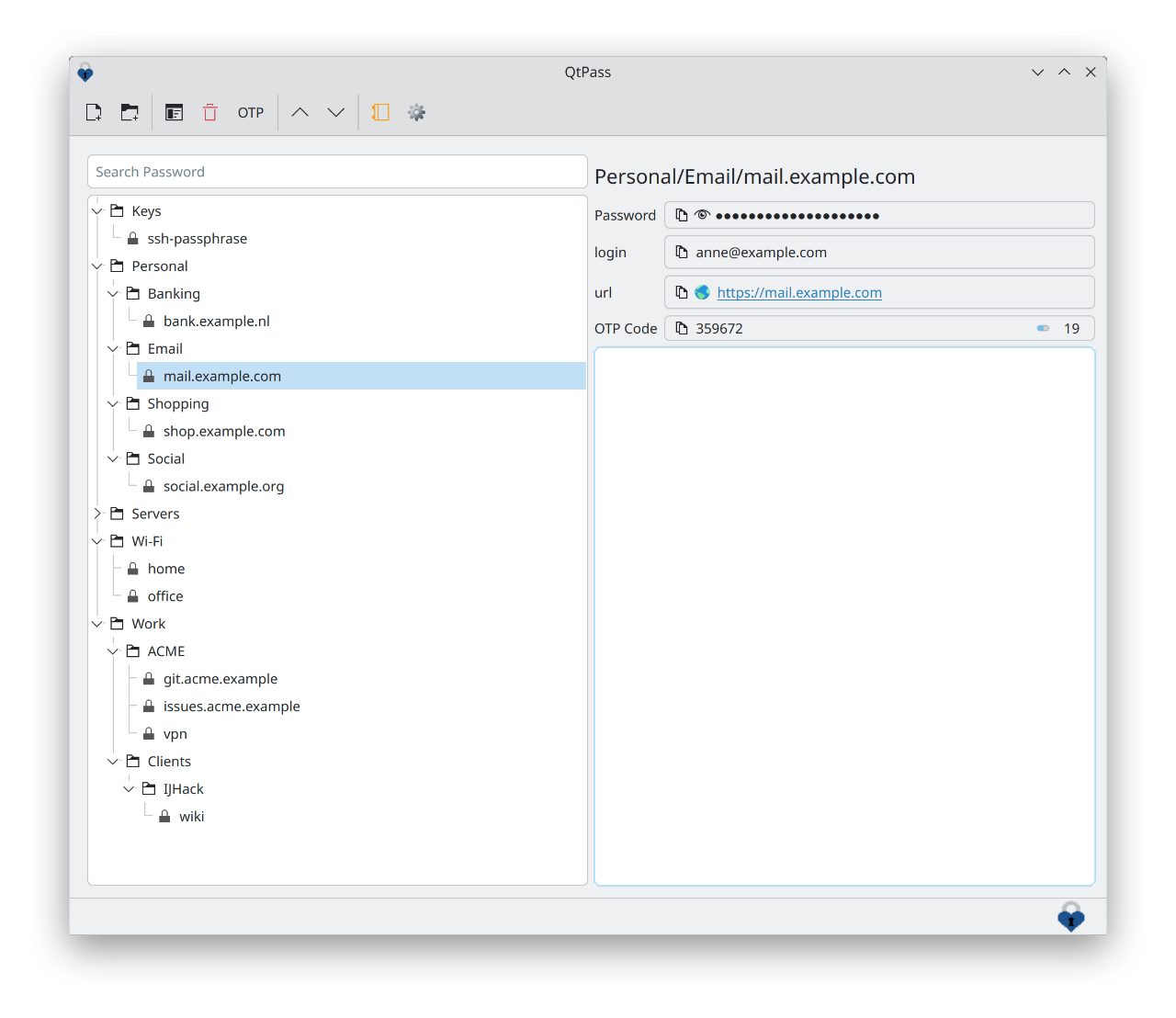
pass is a free, open-source command-line password manager for Linux, BSD and macOS. Each entry is a GPG-encrypted file under ~/.password-store, and the store can be a git repository that you sync through a remote you run or rent. There is no vendor server and no official desktop or phone app: the Linux GUI (QtPass), browser extensions (browserpass, PassFF), the iOS app (Pass for iOS) and the Android app (Password Store, whose original repository is archived) are community projects. TOTP codes come from the pass-otp extension. It suits Linux users who are comfortable with GnuPG and the terminal.
What users say
Evidence ↓The one third-party account saved is a 2017 LWN review by a pass user, who praises the small, intuitive command line, git integration and multi-recipient group support, but notes that pass does not encrypt entry names, that it is primarily a command-line tool that may be less accessible to regular users, and that sharing means running your own git or file sync. One reviewer's view, not a measure of how widely it is held.
Rankings and alternatives
- Password managers for Linux #7 of 7 For the terminal and git
- Bitwarden (official self-hosted server) #1 Free sync for Linux and your phone
- 1Password #2 The most polished, if you'll pay
- Proton Pass #3 Free, with email aliases



Password managers for Linux scores
Evaluated Nov 22, 2026 Evidence ↓- Fits a Linux desktop 3
3/5 means: An official app that you update by hand or that installs only on some distributions, or no official window at all but a tool packaged by every distribution
No official window, but the CLI is packaged by every major distribution (apt, dnf, zypper, pacman, emerge), and QtPass adds a community desktop app.
- Autofill in your Linux browser 2
2/5 means: Browser filling only through community add-ons that need their own setup
Filling comes only from community extensions (browserpass, PassFF) that each need a native helper installed and set up.
- Syncs with your phone 2
2/5 means: Only community phone apps, with at least one platform poorly maintained, and sync you set up yourself
Community apps only, with git sync you set up yourself. Pass for iOS has autofill and OTP codes; the original Android app is archived, leaving Android users on community forks.
- Easy day to day 1
1/5 means: Built for people comfortable with the terminal and with tools such as GPG and git
Needs GPG keys and git and is primarily a command-line tool, which the 2017 LWN reviewer says may be less accessible to regular users.
- Security track record 3
3/5 means: No known breach, but little independent review, or a design that leaves some data unencrypted
Open code and a same-day patch for the 2018 SigSpoof variant, but entry names are stored unencrypted by design and no independent audit was found.
- Cost for one person 4
4/5 means: Under $25 a year, or free with a catch, such as sync you set up yourself or a paid phone app on one platform
Free, with sync you set up yourself through a git remote you provide.
- Command line and developer tools 4
4/5 means: A full official command-line tool, but no SSH agent, or both only on a paid plan when a free plan exists
A full command-line tool with insert, edit, generate, show, git and extensions such as pass-otp. It has no SSH agent. The tool is also the official product, so score 4 rather than 5.
- Control of your data 5
5/5 means: The vault is a file in an open format that works fully offline and syncs however you like
Each entry is a plain GPG file that works offline and syncs through git, Syncthing or any file-sharing tool.
Pricing
- pass Free Free. Sync needs a git remote or file-sync tool you provide, and the phone apps are separate community projects (Pass for iOS is on the App Store; the Android app's original repository is archived).
Prices checked Nov 22, 2026.
Evidence and sources
What users say
Summary 3 quotes
-
The main issue with pass is that it doesn't encrypt the name of those entries: if someone were to compromise my machine, they could easily see which sites I have access to simply by listing the passwords stored in ~/.password-store.
Antoine Beaupré, LWN contributor who says he uses pass · lwn.net/Articles/714473 · published · checked -
As you can see, pass is primarily a command-line application, which may make it less accessible to regular users.
Antoine Beaupré, LWN contributor who says he uses pass · lwn.net/Articles/714473 · published · checked -
Nothing keeps you, however, from sharing the ~/.password-store directory through another file sharing mechanism like (say) Syncthing or Dropbox.
Antoine Beaupré, LWN contributor who says he uses pass · lwn.net/Articles/714473 · published · checked
Password managers for Linux scores
Fits a Linux desktop 2 quotes
-
$ sudo apt-get install pass
passwordstore.org · checked -
qtpass: cross-platform GUI client
passwordstore.org · checked
Autofill in your Linux browser 1 quote
-
qtpass: cross-platform GUI client
passwordstore.org · checked
Syncs with your phone 4 quotes
-
If the password store is a git repository, since each manipulation creates a git commit, you can synchronize the password store using pass git push and pass git pull, which call git-push or git-pull on the store.
passwordstore.org · checked -
This repository was archived by the owner on Oct 15, 2024. It is now read-only.
github.com/android-password-store/Android-Password-Store · checked -
Pass is an iOS client compatible with ZX2C4's Pass command line application. It is a password manager using GPG for encryption and Git for version control.
github.com/mssun/passforios · checked -
Support one-time password tokens (two-factor authentication codes).
github.com/mssun/passforios · checked
Easy day to day 2 quotes
-
pass init "ZX2C4 Password Storage Key" mkdir: created directory ‘/home/zx2c4/.password-store’ Password store initialized for ZX2C4 Password Storage Key.
passwordstore.org · checked -
As you can see, pass is primarily a command-line application, which may make it less accessible to regular users.
Antoine Beaupré, LWN contributor who says he uses pass · lwn.net/Articles/714473 · published · checked
Security track record 2 quotes
-
The main issue with pass is that it doesn't encrypt the name of those entries: if someone were to compromise my machine, they could easily see which sites I have access to simply by listing the passwords stored in ~/.password-store.
Antoine Beaupré, LWN contributor who says he uses pass · lwn.net/Articles/714473 · published · checked -
In June 2018, pass was found to be vulnerable to a variant of the SigSpoof attack. The issue was patched the same day that the vulnerability was disclosed.
en.wikipedia.org/wiki/Pass_(software) · checked
Cost for one person 2 quotes
-
If the password store is a git repository, since each manipulation creates a git commit, you can synchronize the password store using pass git push and pass git pull, which call git-push or git-pull on the store.
passwordstore.org · checked -
Nothing keeps you, however, from sharing the ~/.password-store directory through another file sharing mechanism like (say) Syncthing or Dropbox.
Antoine Beaupré, LWN contributor who says he uses pass · lwn.net/Articles/714473 · published · checked
Command line and developer tools 3 quotes
-
With pass, each password lives inside of a gpg encrypted file whose filename is the title of the website or resource that requires the password.
passwordstore.org · checked -
If the password store is a git repository, since each manipulation creates a git commit, you can synchronize the password store using pass git push and pass git pull, which call git-push or git-pull on the store.
passwordstore.org · checked -
pass-otp: support for one-time-password (OTP) tokens
passwordstore.org · checked
Control of your data 3 quotes
-
With pass, each password lives inside of a gpg encrypted file whose filename is the title of the website or resource that requires the password.
passwordstore.org · checked -
If the password store is a git repository, since each manipulation creates a git commit, you can synchronize the password store using pass git push and pass git pull, which call git-push or git-pull on the store.
passwordstore.org · checked -
Nothing keeps you, however, from sharing the ~/.password-store directory through another file sharing mechanism like (say) Syncthing or Dropbox.
Antoine Beaupré, LWN contributor who says he uses pass · lwn.net/Articles/714473 · published · checked
Facts
License 1 quote
-
With pass, each password lives inside of a gpg encrypted file whose filename is the title of the website or resource that requires the password.
passwordstore.org · checked
Runs on 1 quote
-
$ sudo apt-get install pass
passwordstore.org · checked
Needs 2 quotes
-
If the password store is a git repository, since each manipulation creates a git commit, you can synchronize the password store using pass git push and pass git pull, which call git-push or git-pull on the store.
passwordstore.org · checked -
pass init "ZX2C4 Password Storage Key" mkdir: created directory ‘/home/zx2c4/.password-store’ Password store initialized for ZX2C4 Password Storage Key.
passwordstore.org · checked
Pricing
passwordstore.org · checked