
1Password
Hosted password manager with a Families plan for up to five people and unlimited shared vaults
Our verdict
#1 of 10 in Business password managers · Best for most companies
What it does
- Shared vaults with permissions per vault, groups, and guest accounts
- Unlock with SSO and automatic provisioning from the major identity providers (Business)
- Event streaming to Splunk, Elastic, Sumo Logic, and Panther (Business)
- Admin recovery of locked-out employees
- A free Families plan for every employee
Pros
- The easiest manager here for non-technical staff to adopt
- SSO, provisioning, and SIEM streaming all included in Business, with no add-ons
- Developer tools included: CLI, SSH agent, and Git commit signing
Cons
- Business costs more per user than any other plan with SSO here
- The Teams Starter Pack stops at 20 people, then the price more than doubles
- No self-hosted option
- Skip if:
- You need the vault on servers you control
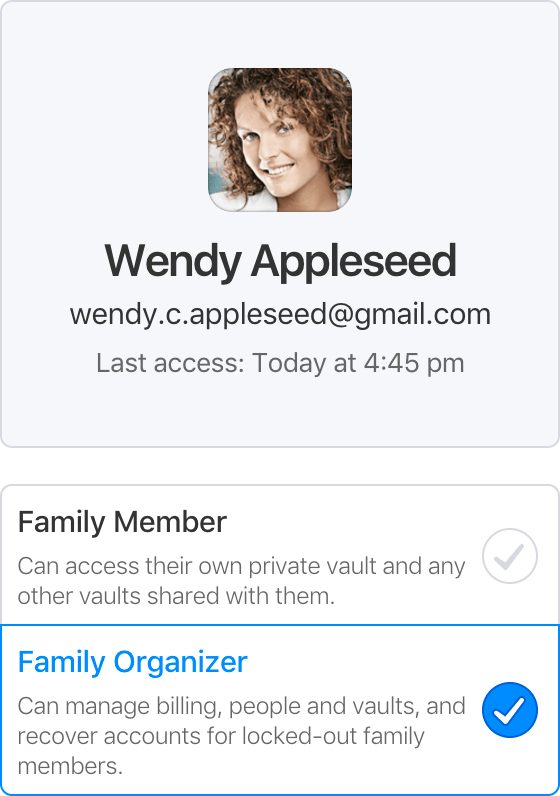
1Password is a subscription password manager that stores logins, passkeys, cards and documents in end-to-end encrypted vaults synced through 1Password’s servers. Its Families plan covers five people, each with private vaults plus unlimited shared vaults, and lets family organizers recover members who forget their account password or Secret Key. It runs on macOS, iOS, watchOS, Windows, Android and Linux, with browser extensions for Chrome, Safari, Edge, Firefox and Brave. It is proprietary software with no free plan, only a 14-day free trial.
What users say
Evidence ↓Reviewers describe 1Password as easy to use, with a consistent interface across phone, desktop and browser and autofill that worked on every site tested. Criticisms in the quotes read are few and individual, not widespread: one reviewer could not set Travel Mode from the phone app, a Families user found the iPhone app slower to open than Android and Windows (2023), and a 2021 commenter found support slow. Sources are one hands-on review and reader comments, so this is a small sample.
Rankings and alternatives
- Business password managers #1 of 10 Best for most companies
- Bitwarden (official self-hosted server) #2 Open source and a third cheaper
- Keeper Password Manager #3 Built for audits and large org charts
- Dashlane #4 Polished, with SSO in its one plan
- Password managers for families #1 of 9 The one the whole family will actually use
- Proton Pass #3 For privacy-minded families
- Apple Passwords #4 Free pick for all-Apple households
- RoboForm #7 Low-cost plan with a long record in form filling
- Password managers for Linux #2 of 7 The most polished, if you'll pay







Password managers for families scores
Evaluated Nov 17, 2026 Evidence ↓- Easy for everyone in the family · counts double 4
4/5 means: Easy setup and reliable autofill on phones and computers, with few complaints
Reviewers find the interface consistent across phone, desktop and browser and autofill reliable. Snags are the Secret Key on each new device and a reported slower iPhone app, so not a 5.
- Sharing logins within the family 5
5/5 means: As many shared vaults as a family needs, with permission levels and private vaults, plus a way to share a login with someone outside the plan
Unlimited shared vaults, a private vault per member, per-vault permission levels (known from 1Password's design; not in the pages read), and sharing with people outside the plan.
- Works on everyone's devices 5
5/5 means: Apps for iPhone, Android, Windows, Mac and Linux, and extensions for all major browsers including Safari and Firefox
Apps for macOS, iOS, Windows, Android and Linux, plus extensions for Chrome, Safari, Edge, Firefox and Brave.
- Security track record 5
5/5 means: End-to-end encryption, regular independent audits by several firms, open code or a published security design, a public bug bounty, and no breach of vault data
End-to-end encryption with a Secret Key and a published security white paper, regular audits by several firms and a public Bugcrowd bounty (from knowledge), and no breach of vault data. The 2023 Okta incident touched 1Password's support systems, not vaults.
- Getting back in after a forgotten password 5
5/5 means: A family organizer can restore a locked-out member's access, with nothing saved in advance
A family organizer can restore a member who forgot their password or Secret Key, with nothing saved in advance.
- Emergency access for a trusted person 2
2/5 means: No emergency access feature, but a documented fallback such as a recovery kit or code to leave with a will
No built-in emergency access; staff recommend keeping the Emergency Kit with a will and having a second family organizer.
- Yearly cost for the family 3
3/5 means: About $50 to $75 a year
Regular price $5.99 a month billed yearly is $71.88 a year for five users, with unlimited shared vaults included. The $53.88 first-year price is ignored.
- Extras beyond passwords · counts half 5
5/5 means: All five
Passkeys, built-in TOTP codes, Watchtower breach alerts, 1GB file storage per user and Masked Email via Fastmail are all in the family plan. TOTP and Masked Email rest on knowledge, not the pages read.
Password managers for Linux scores
Evaluated Nov 22, 2026 Evidence ↓- Fits a Linux desktop 4
4/5 means: An official app with packages that update themselves on the major distributions and unlocks with the system password or a fingerprint, with known snags such as Wayland trouble or features missing from the Flatpak or Snap
Official signed apt, dnf and zypper repos plus AUR and tarball (ARM64 by tarball), with unlock by Linux password, fingerprint or security key. Snags are Wayland Quick Access shortcut reports, no system unlock or SSH agent in the Snap and Flatpak, and the account password after every restart.
- Autofill in your Linux browser 4
4/5 means: An official extension that works on its own in the major browsers, with some reported filling snags
Official extensions for Firefox, Chrome, Edge and Brave. Lock and unlock sync with the app breaks when the app or the browser is a Snap or Flatpak (Ubuntu's default Firefox), though signing in from the extension itself is a general ability not tested here; some user complaints about Firefox sync on native installs.
- Syncs with your phone 5
5/5 means: Official phone apps with autofill and automatic sync through the vendor's service
Official iOS and Android apps with autofill and automatic sync through 1Password's service.
- Easy day to day 4
4/5 means: Easy setup and smooth daily use, with few complaints
Reviewers describe a consistent, easy interface and reliable autofill; Linux adds some packaging and Wayland snags. Based on existing reviews, not Linux-specific praise.
- Security track record 5
5/5 means: Open code or regular audits by several outside firms, a bug bounty, and no breach of vault data
End-to-end encryption with a Secret Key, outside security assessments, a bug bounty and no known breach of vault data; the code is closed.
- Cost for one person 2
2/5 means: $35 to $50 a year
Individual is $3.99 a month billed yearly, about $47.88 a year at the regular price, with no free plan.
- Command line and developer tools 5
5/5 means: A full official command-line tool and SSH key support on every plan
A full official op CLI and an SSH agent built into the app, both available on the one paid membership (no free plan exists); the SSH agent and system-authentication CLI unlock are missing in Snap and Flatpak installs.
- Control of your data 3
3/5 means: Vendor cloud only, with full export and offline access to a synced copy
Vendor cloud only, with a synced offline copy in the apps and a full export.
Business password managers scores
Evaluated Nov 17, 2026 Evidence ↓- Easy for employees to adopt · counts double 5
5/5 means: Non-technical staff get going from an email invite and use it daily with almost no help, with reliable autofill everywhere and a design reviewers widely praise
Reviewers and business buyers widely single out 1Password as the easiest manager to roll out to staff, with an email invite, a consistent interface on phone, desktop and browser, and reliable autofill. The Secret Key on each new device and reported autofill misses on some multi-step logins are minor next to how often it is named the easiest for employees (writer calibration from 4).
- Shared vaults and permissions 5
5/5 means: Shared folders or vaults with permission levels and groups, plus expiring or one-time links for sharing with people outside the company
Business has shared vaults with per-vault permission levels, groups and role-based sharing, 20 guest accounts, and sharing items with people without 1Password using expiration dates and share history.
- Admin control, offboarding and recovery 4
4/5 means: All four
All four are documented on Business (password and 2FA policies, custom groups with delegated admin permissions, suspend with account recovery, owner/admin recovery of locked-out people). Not a 5 because there are no nested groups or role assignments and the policy set was not shown to be large; the page's per-plan checkmarks were not readable.
- Single sign-on and user provisioning 5
5/5 means: Both, with Entra ID, Okta, Google Workspace and generic SAML or SCIM
Business has Unlock with SSO through Okta, Entra ID, Google Workspace, OneLogin, Duo and other OpenID Connect providers, and automated provisioning (SCIM) for Entra ID, Google Workspace, Okta, OneLogin, Rippling and JumpCloud, with no add-on. Unlock with SSO uses OIDC rather than SAML, which still covers the major providers (writer calibration from 4).
- Audit logs and reporting 5
5/5 means: Detailed event log, security reports and built-in SIEM streaming
Business has an audit log, usage reports, Insights, Business Watchtower and sign-in reports, plus built-in Events Reporting to Splunk, Elastic, Sumo Logic and Panther. Sign-in report data is kept 60 days on the servers.
- Security track record 5
5/5 means: End-to-end encryption, regular audits by several firms, SOC 2 Type 2 and ISO 27001, open code or a published security design, a bug bounty, and no vault breach
End-to-end encryption with a Secret Key and a published security white paper, independent audits by several firms (ISE, Onica, annual pen tests), SOC 2 Type 2, ISO 27001/27017/27018/27701 and a HackerOne bounty. The 2023 Okta incident touched 1Password's support systems, not vault data (from knowledge).
- Price per user 2
2/5 means: $7 to $8.99 per user
Business is $8.99 per user per month billed yearly (107.88 a year), in the $7 to $8.99 band, with no add-on needed for SSO, provisioning or policies.
- Extras for staff and IT · counts half 4
4/5 means: Four
Business includes passkeys, Watchtower breach alerts, a free Families plan for every user and developer tools (CLI, SSH key signing). Hosting is a hosted service with data stored in the currency's region rather than a self-host option, so the fifth is at most partly met; this region point is from the pricing page, not a stored quote.
Pricing
- Families $5.99 /month Regular price, billed yearly (5.99 x 12 = 71.88 USD a year). New customers who subscribe directly on 1Password.com pay 4.49 a month for the first year (53.88 USD billed upfront), not available through app stores. Includes 5 users, unlimited shared vaults, 1GB storage per user and 5 guest accounts. 14-day free trial, no card required. The price of extra members beyond five and a separate monthly-billing price were not found.
- Individual $3.99 /month Regular price, billed yearly. 2.99 a month for the first year for new direct customers. One user only.
- Teams Starter Pack $24.95 /month From https://1password.com/pricing/business. Flat price for up to 10 users, billed yearly (24.95 x 12 = 299.40 USD a year), about 2.49 a user a month. The page also lists 10 users minimum, up to 20 users. Up to 10 extra seats cost 4.99 per seat per month (annual billing). No separate monthly-billing price shown. Includes 5 guest accounts, role-based permissions, Watchtower-style security alerts, developer tools and a free Families plan for each user. SSO, automated provisioning, SIEM streaming, custom groups and business reports are Business features. 14-day free trial, no card required.
- Extra Teams Starter Pack seat $4.99 /month per seat , extra Annual billing; up to 10 extra seats, for 20 members in total.
- Business $8.99 /month per seat From https://1password.com/pricing/business. Billed yearly (8.99 x 12 = 107.88 USD per user per year), 1 user minimum, no seat cap. Self-serve with a 14-day free trial, no card required; also buyable through AWS Marketplace. Adds Unlock with SSO, automated provisioning (Entra ID, Google Workspace, Okta, OneLogin, Rippling, JumpCloud), SIEM event streaming, custom groups, custom business reports, Watchtower and 20 guest accounts. No separate monthly price or first-year promotion is shown on the business page; discounts for nonprofits and volume are by contacting sales.
- Enterprise Contact sales Contact sales. The business pricing page lists Enterprise as a plan with phone support, a Customer Success Manager and training for organizations with 101+ users, quarterly business reviews and extended trials; its price is not published.
Prices checked Nov 17, 2026.
Evidence and sources
What users say
Summary 4 quotes
-
1Password is easy to use, and the interface is similar across the mobile and desktop apps and the browser extension.
Rebecca White, reviewer at Cloudwards · cloudwards.net/1password-review · published · checked -
However, I was disappointed to discover that I couldn’t mark vaults as safe for travel on the mobile app; I had to do so on the desktop app.
Rebecca White, reviewer at Cloudwards · cloudwards.net/1password-review · published · checked -
I’ve been impressed with the speed and ease of use on Win 10 & 11, with the native Windows App. The Android app works great (on my Samsung), but feels like it take 1/2-1 second or more to load up on iPhone (11 & 13).
E.J. Simonsen, Families plan user, commenting on the Cloudwards review · cloudwards.net/1password-review · published · checked -
They need MUCH BETTER support. It took days for them to get back to me.
Mark, user commenting on the Cloudwards review · cloudwards.net/1password-review · published · checked
Password managers for families scores
Easy for everyone in the family 4 quotes
-
1Password is easy to use, and the interface is similar across the mobile and desktop apps and the browser extension.
Rebecca White, reviewer at Cloudwards · cloudwards.net/1password-review · published · checked -
However, I was disappointed to discover that I couldn’t mark vaults as safe for travel on the mobile app; I had to do so on the desktop app.
Rebecca White, reviewer at Cloudwards · cloudwards.net/1password-review · published · checked -
You’ll need it the first time you log in on a new device. However, 1Password’s browser extension and apps do retain memory of it, so you won’t need it every time.
cloudwards.net/1password-review · published · checked -
I’ve been impressed with the speed and ease of use on Win 10 & 11, with the native Windows App. The Android app works great (on my Samsung), but feels like it take 1/2-1 second or more to load up on iPhone (11 & 13).
E.J. Simonsen, Families plan user, commenting on the Cloudwards review · cloudwards.net/1password-review · published · checked
Sharing logins within the family 2 quotes
-
Yes. The Families plan lets you invite up to five family members, share unlimited vaults, and manage access with simple admin controls. Each family member can keep personal information private while sharing items through shared vaults.
1password.com/pricing/personal · checked -
Share securely with anyone, even those without 1Password
1password.com/pricing/personal · checked
Works on everyone's devices 2 quotes
-
Apps for macOS, iOS, watchOS, Windows, Android, Linux
1password.com/pricing/personal · checked -
Browser extensions for Chrome, Safari, Edge, Firefox, Brave
1password.com/pricing/personal · checked
Security track record 2 quotes
-
The data in your 1Password account is protected by your 128-bit Secret Key, which is combined with your account password to encrypt your data.
support.1password.com/1password-security · checked -
At the time of writing, 1Password has not had any data breaches
cloudwards.net/1password-review · published · checked
Getting back in after a forgotten password 2 quotes
-
Restore access for family members who forget their 1Password account password or can’t find their Secret Key.
support.1password.com/family-organizer · checked -
Make sure you have at least one other family organizer. That way, if you can’t sign in, someone will be able to help you.
support.1password.com/family-organizer · checked
Emergency access for a trusted person 3 quotes
-
I know this isn’t the most elegant solution, and the feature request for a built-in legacy manager or emergency access feature in 1Password remains open. For now, as the simplest option, we recommend storing your Emergency Kit alongside with your will in a secure place, along with clear instructions on how to use it for your executor or trusted contact.
1P_Dave, 1Password employee, pinned reply in the 1Password Community · 1password.community/1password-at-home-31/feature-request-1password-access-after-death-legacy-contacts-1114 · checked -
I recommend ensuring anyone in a family membership has a secondary organizer.
1P_Tommy, 1Password employee in the 1Password Community · 1password.community/1password-at-home-31/feature-request-1password-access-after-death-legacy-contacts-1114 · published · checked -
Because 1Password is unable to help you recover access to your vault, you’ll be locked out unless you’ve set up the emergency kit.
cloudwards.net/1password-review · published · checked
Yearly cost for the family 2 quotes
-
In USD, the Individual plan costs $2.99 per month with annual billing during the current promotion. The Families plan costs $4.49 per month with annual billing during the current promotion. Regular prices are $3.99 per month for Individual and $5.99 per month for Families.
1password.com/pricing/personal · checked -
*Promotional pricing is available to new 1Password customers subscribing directly through 1Password.com only, for the first year with annual billing. Promotions are not available through Google Play, the Apple App Store, or other third-party app stores.
1password.com/pricing/personal · checked
Password managers for Linux scores
Fits a Linux desktop 6 quotes
-
Download and install the .deb package to get 1Password for Debian or Ubuntu. Installing the .deb package will configure the signing key and apt repository for automatic updates.
support.1password.com/install-linux · checked -
Download and install the .tar.gz file for amd64 or arm64, depending on your architecture.
support.1password.com/install-linux · checked -
These installation methods don’t support integrations with other apps or system resources, such as: Using system authentication to unlock the 1Password app or 1Password CLI. - Turning on the SSH agent. - Locking and unlocking the 1Password browser extension with the 1Password app.
support.1password.com/install-linux · checked -
With system authentication turned on, you can unlock the 1Password app with: your Linux user password, instead of your 1Password account password - your fingerprint or other biometrics - a security key
support.1password.com/system-authentication-linux · checked -
If you’ve restarted 1Password, including after updating 1Password or restarting your computer
support.1password.com/system-authentication-linux · checked -
The Quick Access shortcut works for some time and then stops. It usually breaks after I restart 1Password or log in again.
Forum user, 1Password Community poster on KDE Plasma Wayland · 1password.community/developers-69/linux-kde-wayland-global-shortcut-ctrl-shift-space-does-not-work-after-1password-restarts-25707 · published · checked
Autofill in your Linux browser 2 quotes
-
Browser extensions for Chrome, Safari, Edge, Firefox, Brave
1password.com/pricing/personal · checked -
If 1Password for Linux or your browser is running in a sandbox, like as a Snap package or Flatpak, the 1Password app won’t be able to communicate with the 1Password browser extension.
support.1password.com/connect-1password-browser-app · checked
Syncs with your phone 1 quote
-
Apps for macOS, iOS, watchOS, Windows, Android, Linux
1password.com/pricing/personal · checked
Easy day to day 4 quotes
-
1Password is easy to use, and the interface is similar across the mobile and desktop apps and the browser extension.
Rebecca White, reviewer at Cloudwards · cloudwards.net/1password-review · published · checked -
However, I was disappointed to discover that I couldn’t mark vaults as safe for travel on the mobile app; I had to do so on the desktop app.
Rebecca White, reviewer at Cloudwards · cloudwards.net/1password-review · published · checked -
If 1Password for Linux or your browser is running in a sandbox, like as a Snap package or Flatpak, the 1Password app won’t be able to communicate with the 1Password browser extension.
support.1password.com/connect-1password-browser-app · checked -
The Quick Access shortcut works for some time and then stops. It usually breaks after I restart 1Password or log in again.
Forum user, 1Password Community poster on KDE Plasma Wayland · 1password.community/developers-69/linux-kde-wayland-global-shortcut-ctrl-shift-space-does-not-work-after-1password-restarts-25707 · published · checked
Security track record 3 quotes
-
The data in your 1Password account is protected by your 128-bit Secret Key, which is combined with your account password to encrypt your data.
support.1password.com/1password-security · checked -
At the time of writing, 1Password has not had any data breaches
cloudwards.net/1password-review · published · checked -
1Password has achieved ISO 27001:2022, 27017:2015, 27018:2019, and 27701:2019 certifications.
support.1password.com/security-assessments · checked
Cost for one person 2 quotes
-
In USD, the Individual plan costs $2.99 per month with annual billing during the current promotion. The Families plan costs $4.49 per month with annual billing during the current promotion. Regular prices are $3.99 per month for Individual and $5.99 per month for Families.
1password.com/pricing/personal · checked -
1Password for Linux requires a 1Password membership.
support.1password.com/install-linux · checked
Command line and developer tools 3 quotes
-
These installation methods don’t support integrations with other apps or system resources, such as: Using system authentication to unlock the 1Password app or 1Password CLI. - Turning on the SSH agent. - Locking and unlocking the 1Password browser extension with the 1Password app.
support.1password.com/install-linux · checked -
The 1Password desktop app includes an SSH agent that, when turned on, runs in the background to handle authentication for your SSH clients.
1password.dev/ssh/get-started · checked -
1Password CLI brings 1Password to your terminal. Learn how to install the CLI, then integrate it with your 1Password app and sign in with Touch ID, Windows Hello, or another system authentication option.
1password.dev/cli/get-started · checked
Control of your data 1 quote
-
The data in your 1Password account is protected by your 128-bit Secret Key, which is combined with your account password to encrypt your data.
support.1password.com/1password-security · checked
Business password managers scores
Easy for employees to adopt 4 quotes
-
1Password is easy to use, and the interface is similar across the mobile and desktop apps and the browser extension.
Rebecca White, reviewer at Cloudwards · cloudwards.net/1password-review · published · checked -
However, I was disappointed to discover that I couldn’t mark vaults as safe for travel on the mobile app; I had to do so on the desktop app.
Rebecca White, reviewer at Cloudwards · cloudwards.net/1password-review · published · checked -
You’ll need it the first time you log in on a new device. However, 1Password’s browser extension and apps do retain memory of it, so you won’t need it every time.
cloudwards.net/1password-review · published · checked -
I’ve been impressed with the speed and ease of use on Win 10 & 11, with the native Windows App. The Android app works great (on my Samsung), but feels like it take 1/2-1 second or more to load up on iPhone (11 & 13).
E.J. Simonsen, Families plan user, commenting on the Cloudwards review · cloudwards.net/1password-review · published · checked
Shared vaults and permissions 3 quotes
-
1Password Business is priced per user and adds identity-provider integrations, expanded role-based vault sharing and permissions, Watchtower alerts, and broader business administration and reporting capabilities.
1password.com/pricing/business · checked -
Invite guests to specific vaults with limited-access guest accounts
1password.com/pricing/business · checked -
You can also allow only certain groups to create shared vaults. By default, everyone in the Team Members group can create shared vaults, but you can remove this permission from the group.
support.1password.com/business-security-practices · checked
Admin control, offboarding and recovery 7 quotes
-
Recover your and others' accounts if locked out
1password.com/pricing/business · checked -
Owners and administrators can recover accounts for team members and create custom groups to give group members permission to recover accounts.
support.1password.com/business-security-practices · checked -
You can set minimum account password requirements for your account. Before you invite your organization, create an account password policy. The policy isn’t retroactively enforced, so people who join your 1Password account before the policy is set will only be required to adhere to the policy if they change their password or if their account is recovered.
support.1password.com/business-security-practices · checked -
You can also require only certain team members or groups to use two-factor authentication. Create a written policy, then use team reports to see who has turned on two-factor authentication.
support.1password.com/business-security-practices · checked -
You can also allow only certain groups to create shared vaults. By default, everyone in the Team Members group can create shared vaults, but you can remove this permission from the group.
support.1password.com/business-security-practices · checked -
When you suspend or delete a team member, their data will be removed from the app and device only if they are connected to the internet and 1Password is unlocked. If the team member is offline when you suspend or delete their account, their items remain accessible until the next time they try to unlock 1Password while connected to the internet.
support.1password.com/business-security-practices · checked -
1Password does not support nested groups or role assignments.
support.1password.com/provisioning-best-practices · checked
Single sign-on and user provisioning 4 quotes
-
Integrate with Okta, Entra ID, OneLogin, Duo, and more
1password.com/pricing/business · checked -
Provision users and groups with Azure AD, Google Workspace, Okta, OneLogin, Rippling, and JumpCloud
1password.com/pricing/business · checked -
Team members can unlock 1Password with their identity provider credentials using the OpenID Connect (OIDC) protocol.
support.1password.com/provisioning-best-practices · checked -
When you deprovision a user in your identity provider, their account will be suspended in 1Password.
support.1password.com/provisioning-best-practices · checked
Audit logs and reporting 4 quotes
-
Stream events to SIEM tools like Splunk, Elastic, Sumo Logic, and Panther (or build your own integration)
1password.com/pricing/business · checked -
Generate custom business reports that dive into usage, account activity, and more
1password.com/pricing/business · checked -
Report data for sign-in attempts is kept on the 1Password servers for 60 days. If you require access to this data for a longer period of time, use 1Password Events Reporting.
support.1password.com/business-security-practices · checked -
The developer secrets discovery report allows people in the Owners and Security groups to discover developer secrets that team members have stored in plaintext on their local disks, such as unencrypted SSH private keys and plaintext environment variables.
support.1password.com/business-security-practices · checked
Security track record 6 quotes
-
The data in your 1Password account is protected by your 128-bit Secret Key, which is combined with your account password to encrypt your data.
support.1password.com/1password-security · checked -
At the time of writing, 1Password has not had any data breaches
cloudwards.net/1password-review · published · checked -
1Password has achieved ISO 27001:2022, 27017:2015, 27018:2019, and 27701:2019 certifications.
support.1password.com/security-assessments · checked -
1Password is SOC 2 type 2 certified.
support.1password.com/security-assessments · checked -
As of December 2024, 1Password has moved its bug bounty initiative to HackerOne.
support.1password.com/security-assessments · checked -
Independent Security Evaluators (ISE) was engaged to perform a penetration test and code review of the 1Password system. The assessment was performed during April and June, 2020.
support.1password.com/security-assessments · checked
Price per user 2 quotes
-
In USD, 1Password Business costs $8.99 per user per month when billed annually, or $107.88 per user per year.
1password.com/pricing/business · checked -
1 user minimum
1password.com/pricing/business · checked
Extras for staff and IT 3 quotes
-
1Password Business is priced per user and adds identity-provider integrations, expanded role-based vault sharing and permissions, Watchtower alerts, and broader business administration and reporting capabilities.
1password.com/pricing/business · checked -
Give every user a free Families plan for personal use
1password.com/pricing/business · checked -
Secure workflows with developer tools like SSH key signing, Git commit signing, CLI, and SDKs
1password.com/pricing/business · checked
Facts
License 1 quote
-
In USD, the Individual plan costs $2.99 per month with annual billing during the current promotion. The Families plan costs $4.49 per month with annual billing during the current promotion. Regular prices are $3.99 per month for Individual and $5.99 per month for Families.
1password.com/pricing/personal · checked
Runs on 2 quotes
-
Apps for macOS, iOS, watchOS, Windows, Android, Linux
1password.com/pricing/personal · checked -
Browser extensions for Chrome, Safari, Edge, Firefox, Brave
1password.com/pricing/personal · checked
Users 1 quote
-
Trusted by 200,000 businesses and millions of families
1password.com/pricing/personal · checked
More from the sources
Pricing 3 quotes
-
Yes. You can try 1Password Individual or Families free for 14 days before choosing a plan.
1password.com/pricing/personal · checked -
Teams Starter Pack costs $24.95 per month when billed annually, or $299.40 per year, and includes 10 members. You can add up to 10 additional seats at per-member pricing.
1password.com/pricing/business · checked -
The plan includes up to 10 members. You can add up to 10 additional seats, for 20 members total.
1password.com/pricing/business · checked
Features 2 quotes
-
If you use a self-hosted SCIM bridge, the bridge typically confirms the user within five minutes.
support.1password.com/provisioning-best-practices · checked -
To open Quick Access, right-click the 1Password icon in the system tray, then select Open Quick Access (or CtrlShiftSpace).
support.1password.com/getting-started-linux · checked
Limits and known issues 1 quote
-
If you use GNOME and the 1Password icon doesn’t appear in your system tray, install the AppIndicator shell extension.
support.1password.com/install-linux · checked
Pricing
1password.com/pricing/personal · checked