
PDF24 Creator
Free Windows PDF toolbox and virtual PDF printer that works offline, with no limits for personal or business use
Our verdict
#8 of 10 in PDF editors for Windows · Free offline toolbox, not a text editor
What it does
- Merge, split, compress, OCR, compare and PDF/A
- A virtual printer that saves anything as a PDF
- Works offline, files stay on the PC
Pros
- Free for personal and business use, with no limits
- Light on older PCs
Cons
- Can't edit existing text
- Each tool opens in its own window
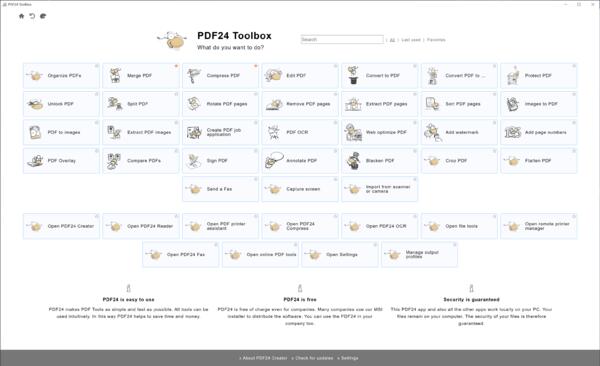
PDF24 Creator is a free desktop app for Windows 10 and 11 from Geek Software GmbH in Germany. It bundles the PDF24 toolbox as offline software with a virtual PDF printer, a PDF reader, and tools to merge, split, reorder, compress, convert, OCR, watermark, protect, sign and compare PDFs, plus batch processing. The vendor says files stay on the PC. It adds text, images, shapes and form entries to PDFs, but the vendor advises converting a PDF to Word to change existing text. It is free for private and commercial use and funded by advertising on its website. The same tools also run in a browser as PDF24 Tools, which upload files to the vendor’s servers in Germany.
What users say
Evidence ↓A TechRadar review recommended it as a feature-rich, free and light editor, while noting that it lacks some advanced features found in paid tools and that its modular interface can feel clunky. An LO4D review also found low CPU and RAM use. Both are single-reviewer accounts of the desktop app, neither tested large files, and I found no Reddit or forum accounts.
Rankings and alternatives
- PDF editors for Windows #8 of 10 Free offline toolbox, not a text editor
- Adobe Acrobat #1 The reference for high-stakes documents
- Foxit PDF Editor #2 Acrobat-level editing with a one-time option
- Tungsten Power PDF #3 One-time license that stays offline


Windows PDF editors scores
Evaluated Nov 17, 2026 Evidence ↓- Editing existing text and images 1
1/5 means: Can't change existing content; you can only add text, shapes or white boxes on top
The vendor's own FAQ says to convert to Word first to change text, and TechRepublic rates its editing of existing text as limited. The editor adds text, images, shapes and black-out boxes on top. The desktop app's behavior is not stated directly.
- OCR for scanned documents 3
3/5 means: Makes scans searchable and editable, with mixed or unproven accuracy
The desktop app has an OCR tool that produces PDFs with a text layer, which is searchable and copyable. Language count, accuracy and whether it runs fully offline were not found.
- Converting to and from Word 3
3/5 means: Converts PDFs to Word, Excel and PowerPoint, but layouts and tables often need fixing
Office files and images convert to PDF on import or via the printer, and batch tools exist. PDF to Word is recommended by the vendor, but fidelity and whether it runs offline were not verified.
- Forms and signatures 3
3/5 means: Adds either fillable-form creation or certificate-based digital signatures
The vendor lists filling forms and signatures, and a reviewer says it manages self-signed certificates for signing. Fillable-form creation and sending for signature were not found.
- Document tools for professional work 3
3/5 means: Three of the five
Compare, PDF/A output and batch processing are documented. Bates numbering was not found, and the Blacken tool's removal of underlying text is unverified, so it is not counted.
- Cost over three years 5
5/5 means: Free, with no watermarks
Free for personal and commercial use with no limits, no premium tier and no watermark. Text editing is not included, but other criteria cover that.
- Ease of use 3
3/5 means: A familiar layout, but the number of tools or a few awkward workflows slow newcomers down
A launcher grid of tools is easy to find, but features sit in separate windows, which a reviewer calls clunky when working through many files.
- Keeps your files on your PC 5
5/5 means: Works fully offline with no account and no cloud features in the way
The vendor says the desktop app works offline and files are never uploaded, and TechRepublic agrees; no account is needed. The separate online PDF24 Tools upload files, but they are a different product.
- Speed with large files · counts half 4
4/5 means: Opens large files quickly, with occasional slowdowns or crashes reported
Two reviewers say it is light with low CPU and RAM use. No large-file or thousand-page tests were found, so the level is partly general impression.
Pricing
- PDF24 Creator (Windows desktop) Free Free for private and commercial use with no task limits, and no premium tier. The vendor says the online PDF24 Tools are free thanks to advertising.
Prices checked Nov 17, 2026.
Evidence and sources
What users say
Summary 4 quotes
-
PDF24 Creator is also very light on system resource usage, and can run easily on weaker machines without slowing them down.
Steve Paris, reviewer at TechRadar · techradar.com/reviews/pdf24-creator · published · checked -
Something that might annoy some users is that the application offers most of its features in a modular manner, with completely separate interfaces isolated from one another.
Steve Paris, reviewer at TechRadar · techradar.com/reviews/pdf24-creator · published · checked -
What it lacks are some more advanced features typically only found in premium competing applications, but for most users, that will be largely irrelevant.
Steve Paris, reviewer at TechRadar · techradar.com/reviews/pdf24-creator · published · checked -
In terms of performance, PDF24 Creator worked smoothly during testing without causing any issues with the operating system. The software's CPU and RAM consumption was minimal which makes it an ideal piece of software for lower-end systems without much RAM or CPU power.
Sven Sørensen, reviewer at LO4D · pdf24-pdf-creator.en.lo4d.com/windows · checked
Windows PDF editors scores
Editing existing text and images 3 quotes
-
Write on PDF pages, insert images, shapes and signatures, add comments, black out content, rearrange pages and fill in forms, all in one place
tools.pdf24.org/en/edit-pdf · checked -
Editing the text in a PDF is not an easy thing to do, because the PDF format is not a good format for editing the page contents and the text afterwards. On the other hand, structural editing of a PDF, such as removing, adding or extracting pages, is almost straightforward. However, there are also ways to change the text in a PDF file. The best way to do this is to convert a PDF to Word format beforehand.
tools.pdf24.org/en/edit-pdf · checked -
PDF24 · Free Windows PDF utilities · Limited editing tools · Local desktop or cloud · Desktop unlimited; online tools free
techrepublic.com/article/news-best-free-pdf-editors-2026-privacy-limits · checked
OCR for scanned documents 1 quote
-
Recognize text in PDF and image files via OCR and create PDF files with a text layer.
tools.pdf24.org/en/creator · checked
Converting to and from Word 3 quotes
-
Recognize text in PDF and image files via OCR and create PDF files with a text layer.
tools.pdf24.org/en/creator · checked -
Easily join multiple files, apply profiles, lock or unlock PDFs, convert, split, compress, send files, ... Batch processing of files
tools.pdf24.org/en/creator · checked -
Editing the text in a PDF is not an easy thing to do, because the PDF format is not a good format for editing the page contents and the text afterwards. On the other hand, structural editing of a PDF, such as removing, adding or extracting pages, is almost straightforward. However, there are also ways to change the text in a PDF file. The best way to do this is to convert a PDF to Word format beforehand.
tools.pdf24.org/en/edit-pdf · checked
Forms and signatures 2 quotes
-
Write on PDF pages, insert images, shapes and signatures, add comments, black out content, rearrange pages and fill in forms, all in one place
tools.pdf24.org/en/edit-pdf · checked -
PDF24 also enables you to create and manage self-signed certificates and save multiple profiles with different settings.
Sven Sørensen, reviewer at LO4D · pdf24-pdf-creator.en.lo4d.com/windows · checked
Document tools for professional work 4 quotes
-
Different output formats like PDF, PDF/A, PDF/X, images (JPG, PNG, ...) and more.
tools.pdf24.org/en/creator · checked -
Easily join multiple files, apply profiles, lock or unlock PDFs, convert, split, compress, send files, ... Batch processing of files
tools.pdf24.org/en/creator · checked -
Some nice additional features include the ability to spice up your documents with an overlay and page numbers, compare the contexts of different PDFs, and protect your documents against further editing.
Steve Paris, reviewer at TechRadar · techradar.com/reviews/pdf24-creator · published · checked -
Write on PDF pages, insert images, shapes and signatures, add comments, black out content, rearrange pages and fill in forms, all in one place
tools.pdf24.org/en/edit-pdf · checked
Cost over three years 2 quotes
-
PDF24 Creator can be used completely free of charge and without any restrictions. Companies, authorities and agencies can also use PDF24 Creator free of charge.
tools.pdf24.org/en/creator · checked -
PDF24 is completely free. The company doesn’t offer any premium options at all, and there is just one single download option for the main application, no different versions.
Steve Paris, reviewer at TechRadar · techradar.com/reviews/pdf24-creator · published · checked
Ease of use 1 quote
-
Something that might annoy some users is that the application offers most of its features in a modular manner, with completely separate interfaces isolated from one another.
Steve Paris, reviewer at TechRadar · techradar.com/reviews/pdf24-creator · published · checked
Keeps your files on your PC 2 quotes
-
The PDF24 Creator is a desktop solution that works offline. Files remain locally on your PC and are NOT uploaded to the Internet. The topic of data protection or GDPR is therefore not a problem.
tools.pdf24.org/en/creator · checked -
Online processing uses PDF24’s servers. PDF24 Creator processes files locally on Windows.
techrepublic.com/article/news-best-free-pdf-editors-2026-privacy-limits · checked
Speed with large files 2 quotes
-
PDF24 Creator is also very light on system resource usage, and can run easily on weaker machines without slowing them down.
Steve Paris, reviewer at TechRadar · techradar.com/reviews/pdf24-creator · published · checked -
In terms of performance, PDF24 Creator worked smoothly during testing without causing any issues with the operating system. The software's CPU and RAM consumption was minimal which makes it an ideal piece of software for lower-end systems without much RAM or CPU power.
Sven Sørensen, reviewer at LO4D · pdf24-pdf-creator.en.lo4d.com/windows · checked
Facts
License 1 quote
-
PDF24 Creator can be used completely free of charge and without any restrictions. Companies, authorities and agencies can also use PDF24 Creator free of charge.
tools.pdf24.org/en/creator · checked
Runs on 2 quotes
-
No, the PDF24 Creator can only be installed on Windows systems. Linux and MAC are not currently supported.
tools.pdf24.org/en/creator · checked -
Windows 11, Windows 10
tools.pdf24.org/en/creator · checked
Needs 1 quote
-
The PDF24 Creator is a desktop solution that works offline. Files remain locally on your PC and are NOT uploaded to the Internet. The topic of data protection or GDPR is therefore not a problem.
tools.pdf24.org/en/creator · checked
More from the sources
Pricing 1 quote
-
100% free thanks to advertising
tools.pdf24.org/en/edit-pdf · checked
Features 1 quote
-
Files are automatically deleted from the PDF24 server after one hour
tools.pdf24.org/en/edit-pdf · checked
How widely it is used 1 quote
-
Rated 4.88 out of 5 stars by 132014 users in the last 5 years.
tools.pdf24.org/en/creator · checked
Pricing
tools.pdf24.org/en/creator · checked