
Prezi
Presentation app known for its zooming canvas, whose AI builds a presentation from a prompt or an uploaded file
Our verdict
#9 of 10 in AI presentation makers · For talks that zoom instead of click
What it does
- Zooming canvas, or classic slides when you present
- Builds from a conversation or uploaded PowerPoint, PDF and Word files
- Prezi Video presents beside your camera image
Pros
- Memorable for talks where the big picture matters
- Applies your brand from your guidelines or website
Cons
- Free presentations are public
- The canvas has a learning curve, and the motion can distract
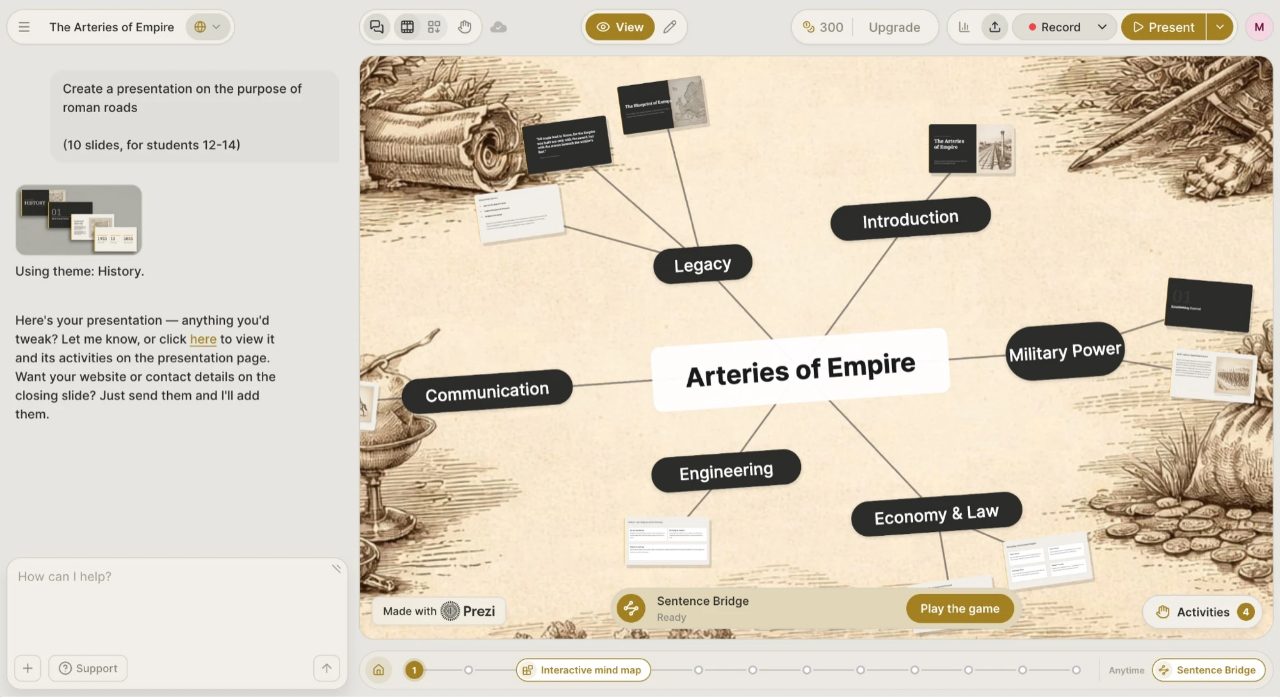
Prezi is a web presentation app best known for its zooming format, where slides sit on one large canvas and the presentation flies between them, though it can also present as classic slides. Prezi AI drafts a presentation from a conversation, pasted notes or an uploaded PowerPoint, PDF or Word file, and can apply brand colors pulled from your website. Presentations can be presented from Prezi, shared as links, or downloaded as PDF or PowerPoint on plans that allow it; Prezi Video lets you present beside your own camera image. It is proprietary, with a free plan whose presentations are public and paid plans billed annually.
What users say
Evidence ↓Reviewers at Zapier and Geekflare found Prezi AI fast and the zooming format memorable, but both said the move from slides to a canvas takes time to learn, and Zapier warned the motion can distract or make some viewers dizzy.
Rankings and alternatives
- AI presentation makers #9 of 10 For talks that zoom instead of click
- Gamma #1 Best-looking drafts for most decks
- Canva #2 For decks that share a brand kit with your other designs
- Copilot in PowerPoint #3 For decks that must stay in PowerPoint



AI presentation makers scores
Evaluated Nov 17, 2026 Evidence ↓- How good the generated slides look · counts double 4
4/5 means: Polished, varied layouts with fitting images; looks professionally designed
Prezi AI produces polished presentations and its zooming canvas is memorable; reviewers also warn the motion can distract.
- How good the outline and words are 3
3/5 means: A sensible structure and serviceable text that needs a normal editing pass
Builds from conversation, notes or uploaded files; reviewers comment on speed and format rather than the text, which reads as a serviceable first draft from general knowledge of the product.
- Fixing the draft 3
3/5 means: Full direct editing or targeted AI edits, but not both, or editing held back by a fixed layout system or a hard-to-learn format
Edits by conversation or directly on slides, but reviewers at Zapier and Geekflare found the canvas takes time to learn for people used to slides.
- Works with PowerPoint and Google Slides 2
2/5 means: Export only on paid plans, or the format loses much of the deck in conversion
Prezi lists PPTX download, but download and PDF export are paid features and the zooming format doesn't survive the conversion to slides.
- What you get free 2
2/5 means: A one-time AI allowance, with no PowerPoint export or with presentations that must be public
The free Basic plan has 500 AI credits and its presentations are public.
- Price of a plan for regular use 3
3/5 means: 15 to 19.99 a month
Unlimited AI generation starts on Plus at $19 a month billed annually; the $7 Standard plan lacks it.
- Brand and team features 3
3/5 means: A brand theme or company template the AI uses, and real-time co-editing
Prezi AI applies brand colors and assets from your guidelines or website, and teams can share and comment; shared libraries and brand locks are not documented.
- Presenting and sharing · counts half 4
4/5 means: All of 3, plus viewer analytics on some plan
Present directly, share links with privacy control, present beside your camera with Prezi Video, and analytics on Premium.
Pricing
- Basic Free 500 AI credits, up to 10 talking points per generation, public presentations only.
- Standard $7.00 /month Billed annually. Adds privacy controls and premium images; AI generation is not unlimited.
- Plus $19.00 /month Billed annually. Unlimited AI presentation and image generation, unlimited PDF and PowerPoint import, no watermark, download and PDF export.
- Premium $29.00 /month Billed annually. Adds presentation analytics and priority support.
Prices checked Nov 17, 2026.
Evidence and sources
What users say
Summary 3 quotes
-
The creation experience was super fast from the AI prompt to having the presentation ready to edit. However, this philosophical shift from slides to a board took me some time to get used to.
Miguel Rebelo, reviewer at Zapier · zapier.com/blog/best-ai-presentation-maker · published · checked -
Excessive animation may be distracting or cause dizziness
Miguel Rebelo, reviewer at Zapier · zapier.com/blog/best-ai-presentation-maker · published · checked -
The canvas interface takes time to master, especially if you're coming from slide-based tools
Rohit Mane, reviewer at Geekflare · geekflare.com/guides/best-ai-presentation-makers · published · checked
AI presentation makers scores
How good the generated slides look 2 quotes
-
The creation experience was super fast from the AI prompt to having the presentation ready to edit. However, this philosophical shift from slides to a board took me some time to get used to.
Miguel Rebelo, reviewer at Zapier · zapier.com/blog/best-ai-presentation-maker · published · checked -
Excessive animation may be distracting or cause dizziness
Miguel Rebelo, reviewer at Zapier · zapier.com/blog/best-ai-presentation-maker · published · checked
How good the outline and words are 2 quotes
-
Drop in a PPTX, PDF, DOCX, or paste your notes. Prezi AI turns your existing work into a polished presentation.
prezi.com/ai · checked -
The creation experience was super fast from the AI prompt to having the presentation ready to edit. However, this philosophical shift from slides to a board took me some time to get used to.
Miguel Rebelo, reviewer at Zapier · zapier.com/blog/best-ai-presentation-maker · published · checked
Fixing the draft 2 quotes
-
The creation experience was super fast from the AI prompt to having the presentation ready to edit. However, this philosophical shift from slides to a board took me some time to get used to.
Miguel Rebelo, reviewer at Zapier · zapier.com/blog/best-ai-presentation-maker · published · checked -
The canvas interface takes time to master, especially if you're coming from slide-based tools
Rohit Mane, reviewer at Geekflare · geekflare.com/guides/best-ai-presentation-makers · published · checked
Works with PowerPoint and Google Slides 2 quotes
-
Unlimited AI presentation generation
prezi.com/gts/pricing · checked -
Download as PPTX, PDF, or weblink. Present directly or share a link.
prezi.com/ai · checked
What you get free 1 quote
-
AI Presentation Generation (500 credits)
prezi.com/gts/pricing · checked
Price of a plan for regular use 2 quotes
-
Create projects with privacy controls
prezi.com/gts/pricing · checked -
Unlimited AI presentation generation
prezi.com/gts/pricing · checked
Brand and team features 1 quote
-
Upload your brand guidelines, colors, and assets or just link to your website. Prezi AI applies your brand consistently across every slide so your presentations look like they came from your own design team.
prezi.com/ai · checked
Presenting and sharing 2 quotes
-
Unlimited AI presentation generation
prezi.com/gts/pricing · checked -
Download as PPTX, PDF, or weblink. Present directly or share a link.
prezi.com/ai · checked
More from the sources
Pricing 1 quote
-
A EDU Plus at $4/mo, a EDU Pro at $8/mo, and a EDU Teams at $19/mo/user
geekflare.com/guides/best-ai-presentation-makers · published · checked
Features 1 quote
-
Choose a classic slide presentation or Prezi's dynamic zooming format when it's time to present.
prezi.com/ai · checked
Pricing
prezi.com/pricing · checked