
Sejda PDF
Browser-based PDF editor and toolkit with a free daily tier, plus an offline Windows desktop app
Our verdict
#10 of 10 in PDF editors for Windows · Quick fixes in the browser
What it does
- Browser editor with an optional desktop app
- Text editing, forms, signing and Word conversion
- Bates numbering and batch tools on paid plans
Pros
- Nothing to install, no sign-up
- A $5 week pass with no auto-renewal
Cons
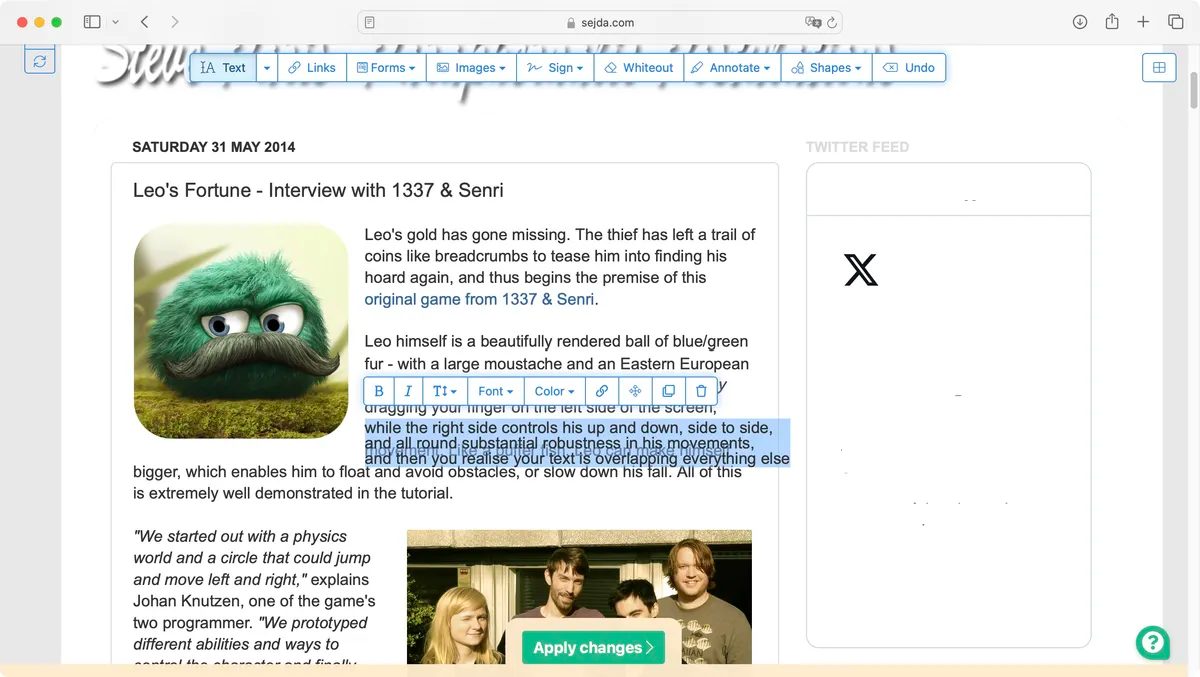
- Edits text a line at a time
- Free use stops at three tasks a day
- Web tasks upload your files
Sejda PDF is a set of PDF tools from Sejda BV in Amsterdam, offered as a web service (sejda.com, files processed on Sejda’s servers) and as Sejda Desktop for Windows, macOS and Linux (files processed on your computer). It edits text and images, fills and signs forms, merges, splits, reorders, compresses, converts to and from Office formats, runs OCR and adds watermarks, page numbers and Bates numbers. Both forms are free with daily limits and need no signup; paid plans remove the limits and are subscriptions or a one-time week pass. The software is proprietary.
What users say
Evidence ↓Reviewers like the clean interface, the no-signup free tier without watermarks, the low price and the local-processing desktop app. The main criticism is text editing, which TechRadar found limited to one line at a time, though MakerStack found it better than most free web tools. Both reviews say it lacks proper redaction. This rests on two reviews, one from a hands-on reviewer at TechRadar and one from MakerStack; neither is a broad user survey.
Rankings and alternatives
- PDF editors for Windows #10 of 10 Quick fixes in the browser
- Adobe Acrobat #1 The reference for high-stakes documents
- Foxit PDF Editor #2 Acrobat-level editing with a one-time option
- Tungsten Power PDF #3 One-time license that stays offline


Windows PDF editors scores
Evaluated Nov 17, 2026 Evidence ↓- Editing existing text and images 2
2/5 means: Edits existing text a line at a time; longer edits overlap or break the layout
TechRadar found existing text is edited one line at a time with no reflow, so longer edits overlap. MakerStack was more positive about retyping inside a paragraph, but also notes layouts shift on dense text. Images can be added or deleted.
- OCR for scanned documents 3
3/5 means: Makes scans searchable and editable, with mixed or unproven accuracy
Paid plans OCR up to 100 pages (free 10) and MakerStack says the output is searchable and editable. No language list or accuracy reports were read, so accuracy is unproven.
- Converting to and from Word 3
3/5 means: Converts PDFs to Word, Excel and PowerPoint, but layouts and tables often need fixing
Converts PDF to Word, Excel and PowerPoint, and Office files back to PDF, with multi-file processing on paid plans. MakerStack says layouts hold up on standard documents, but no fidelity test was read, so a 4 is not supported.
- Forms and signatures 3
3/5 means: Adds either fillable-form creation or certificate-based digital signatures
Fills forms and signs with a drawn, typed or image signature. Fillable-form creation (with AI field detection, per the privacy policy) is from the web tool menu and product knowledge. Certificate digital signatures and send-for-signature tracking were not found; MakerStack says there are no audit trails.
- Document tools for professional work 2
2/5 means: Two of the five
Bates numbering and batch processing are documented. True redaction is doubtful (TechRadar says there does not appear to be one, MakerStack says no advanced redaction), and no compare or PDF/A tool was found.
- Cost over three years 3
3/5 means: $100 to $250
Desktop+Web Annual at $63 per year is $189 over three years ($63 x 3), the cheapest plan with Desktop, Web, OCR to 100 pages and no daily caps. Web Monthly at $7.50 per month would cost $270, so the annual plan is cheapest. The free tier has no watermarks per MakerStack but caps 3 tasks per day.
- Ease of use 4
4/5 means: An Office-style or clean layout most people pick up quickly, with a few rough edges
Reviewers describe a clean, simple interface with a search box and per-tool instructions on the web, no signup, and a similar Desktop interface. Many separate single-purpose tools and the text editor's quirks are rough edges.
- Keeps your files on your PC 2
2/5 means: A desktop app exists, but most people use the web version, or key tasks upload files
Most people use the web editor, which uploads files to Sejda's servers (deleted after processing). Sejda Desktop processes files locally but needs a paid plan for regular use and still sends license checks and, unless you opt out, error reports.
- Speed with large files · counts half 2
2/5 means: Large files hit size or page limits, or have to be uploaded first
Free use stops at 50 MB and 200 pages per document; paid web plans allow 500 MB uploads, and every web task means uploading first. Paid Desktop lifts the limits. No source reports opening speed or crashes on large files.
Pricing
- Free Free No signup. Desktop free limits - 3 tasks per day; documents up to 50 MB and 200 pages; compress up to 100 MB; OCR up to 10 pages; images up to 5 MB; combine up to 30 files and 50 pages; files converted one at a time. The web service also has hourly limits, per-tool limits and limited file uploads, with no numbers on the pricing page.
- Web Week Pass $5.00 one-time Pays for 7 days of Sejda Web, no Desktop. One-time charge, does not auto-renew, then reverts to free. 20% volume discount for 10 users.
- Desktop Week Pass $7.95 one-time 7 days of Sejda Desktop and Sejda Web. One-time charge. The Desktop page shows the price as 795, read as $7.95.
- Web Monthly $7.50 /month per seat Web only, no Desktop. Recurring monthly billing; auto-renews until cancelled ("Stop auto-renewal"), then ends at the end of the billing cycle. Paid plans remove page and hourly limits, allow files up to 500 MB, OCR up to 100 pages, multi-file processing and tasks up to 21 minutes.
- Desktop+Web Annual $63.00 /year per seat Includes Sejda Desktop and Sejda Web for a year. Billed $63 yearly; about $5.25 per month ($63 / 12). Auto-renews until cancelled. Volume discounts from 2 users (10% for 2-4, 20% for 5-24). No perpetual license is offered.
Prices checked Nov 17, 2026.
Evidence and sources
What users say
Summary 5 quotes
-
Although you can edit a PDF’s existing text, you’re restricted to altering each line individually, making it tricky to rewrite a paragraph
Steve Paris, reviewer at TechRadar · techradar.com/reviews/sejda · checked -
It handles existing PDF text better than most free web tools, letting you click into a paragraph and retype rather than just slapping a text box on top.
makerstack.co/reviews/sejda-review · published · checked -
Skip Sejda if you need advanced redaction, e-signature audit trails, deep collaboration and commenting workflows, or a polished mobile app, since those are areas where dedicated tools do it better.
makerstack.co/reviews/sejda-review · published · checked -
Sejda has quietly built a reputation as one of the least annoying PDF sites on the web: no forced signups, no watermarks on the free tier, and a genuinely clean interface.
makerstack.co/reviews/sejda-review · published · checked -
On the whole, Sejda is a pretty polished product, but the text editing side of things is a little disappointing.
Steve Paris, reviewer at TechRadar · techradar.com/reviews/sejda · checked
Windows PDF editors scores
Editing existing text and images 3 quotes
-
Add, edit or move text in your PDF. Change the font type, size and style. Insert, reorder, move or delete pages.
sejda.com/desktop · checked -
Although you can edit a PDF’s existing text, you’re restricted to altering each line individually, making it tricky to rewrite a paragraph
Steve Paris, reviewer at TechRadar · techradar.com/reviews/sejda · checked -
It handles existing PDF text better than most free web tools, letting you click into a paragraph and retype rather than just slapping a text box on top.
makerstack.co/reviews/sejda-review · published · checked
OCR for scanned documents 3 quotes
-
Unlimited documents, no page or hourly limitsOCR documents up to 100 pages
sejda.com/upgrade · checked -
3 tasks per day · Unlimited Docs up to 50MB and 200 pages · Unlimited Compress files up to 100MB · Unlimited OCR files up to 10 pages · Unlimited Images up to 5MB · Unlimited Combine up to 30 files and 50 pages · Unlimited Convert files one by one · Multiple files in one go
sejda.com/desktop · checked -
Sejda runs OCR on scanned documents (up to 100 pages on paid plans) to make them searchable and editable, turning a flat image of a contract into text you can select and copy.
makerstack.co/reviews/sejda-review · published · checked
Converting to and from Word 3 quotes
-
3 tasks per day · Unlimited Docs up to 50MB and 200 pages · Unlimited Compress files up to 100MB · Unlimited OCR files up to 10 pages · Unlimited Images up to 5MB · Unlimited Combine up to 30 files and 50 pages · Unlimited Convert files one by one · Multiple files in one go
sejda.com/desktop · checked -
Convert PDF files to Word, Excel and to image. Convert images to PDF file
sejda.com/desktop · checked -
It also converts between PDF and Word, Excel, PowerPoint, JPG, and HTML in both directions. Conversions preserve layout reasonably well for standard business documents, tables, and forms
makerstack.co/reviews/sejda-review · published · checked
Forms and signatures 2 quotes
-
Skip Sejda if you need advanced redaction, e-signature audit trails, deep collaboration and commenting workflows, or a polished mobile app, since those are areas where dedicated tools do it better.
makerstack.co/reviews/sejda-review · published · checked -
More advanced tools are also available such as watermarking a file, password protecting it, filling in and signing a form, and of course, being able to edit a PDF.
techradar.com/reviews/sejda · checked
Document tools for professional work 3 quotes
-
Do be aware however that whiteout is not the same as a proper redaction tool: the former’s hidden text can still be selected, whereas the latter won’t be - if you need to remove sensitive data, don’t use the whiteout tool; Sedja does not appear to have a redaction tool.
Steve Paris, reviewer at TechRadar · techradar.com/reviews/sejda · checked -
merge, split, extract pages, reorder, rotate, crop, deskew, compress, watermark, add page numbers or Bates numbering, edit metadata, and password-protect or unlock files.
makerstack.co/reviews/sejda-review · published · checked -
Skip Sejda if you need advanced redaction, e-signature audit trails, deep collaboration and commenting workflows, or a polished mobile app, since those are areas where dedicated tools do it better.
makerstack.co/reviews/sejda-review · published · checked
Cost over three years 4 quotes
-
The Monthly and Annual plans are recurring subscriptions and will continue until you cancel.
sejda.com/upgrade · checked -
Unlimited documents, no page or hourly limitsOCR documents up to 100 pages
sejda.com/upgrade · checked -
One week will cost you $5, a recurring monthly contract will set you back $7.50, and for a recurring yearly one, that’s $63.
techradar.com/reviews/sejda · checked -
Sejda has quietly built a reputation as one of the least annoying PDF sites on the web: no forced signups, no watermarks on the free tier, and a genuinely clean interface.
makerstack.co/reviews/sejda-review · published · checked
Ease of use 2 quotes
-
Sejda has quietly built a reputation as one of the least annoying PDF sites on the web: no forced signups, no watermarks on the free tier, and a genuinely clean interface.
makerstack.co/reviews/sejda-review · published · checked -
On the whole, Sejda is a pretty polished product, but the text editing side of things is a little disappointing.
Steve Paris, reviewer at TechRadar · techradar.com/reviews/sejda · checked
Keeps your files on your PC 4 quotes
-
Sejda Desktop is an application that you can install on your computer and files are processed locally, on your computer.
sejda.com/desktop · checked -
The web and desktop interfaces look remarkably similar, and in fact the major difference here is that the Desktop version handles all of the processing locally rather than in the cloud – files never leave your computer, which will appeal to the security conscious.
techradar.com/reviews/sejda · checked -
All user-uploaded files as well as the processed output files will be permanently deleted after upload or processing respectively.
sejda.com/privacy · checked -
We collect error reporting information when you use our downloadable products to help us improve our products and services.
sejda.com/privacy · checked
Speed with large files 3 quotes
-
Unlimited documents, no page or hourly limitsOCR documents up to 100 pages
sejda.com/upgrade · checked -
Large file uploads, up to 500MB per file
sejda.com/upgrade · checked -
3 tasks per day · Unlimited Docs up to 50MB and 200 pages · Unlimited Compress files up to 100MB · Unlimited OCR files up to 10 pages · Unlimited Images up to 5MB · Unlimited Combine up to 30 files and 50 pages · Unlimited Convert files one by one · Multiple files in one go
sejda.com/desktop · checked
Facts
License 1 quote
-
No, we don't offer perpetual licenses anymore.
sejda.com/desktop · checked
Runs on 1 quote
-
Available for Mac Intel Mac Silicon Windows 64bit Windows 64bit (portable)
sejda.com/desktop · checked
More from the sources
Pricing 3 quotes
-
The Week Pass plan is a one-time charge, not a recurring subscription. It does not automatically renew and downgrades to free after 7 days.
sejda.com/upgrade · checked -
You can cancel auto-renewal of your subscription at any time. The subscription will no longer auto-renew and it will cancel at the end of the current billing cycle.
sejda.com/upgrade · checked -
7 days access to Sejda Desktop
sejda.com/desktop · checked
Features 1 quote
-
Sejda Web are the online browser-based tools, where you upload your documents and process them on our servers.
sejda.com/upgrade · checked
Limits and known issues 3 quotes
-
More processing time per task, up to 21 minutes
sejda.com/upgrade · checked -
Scanned PDFs are images of text and lack the actual text data needed for conversion.
sejda.com/desktop · checked -
you’re restricted to only being able to perform three tasks per day, can’t work with files larger than 50MB or 200 pages, can only OCR ten pages, and can only convert one file at a time.
techradar.com/reviews/sejda · checked
Pricing
sejda.com/pricing · checked