
SmartGit by syntevo
Cross-platform desktop Git client with a commit graph, conflict solver and hosting-service integrations
Our verdict
#5 of 10 in Git GUI clients · Free for hobby projects, deep for professionals
What it does
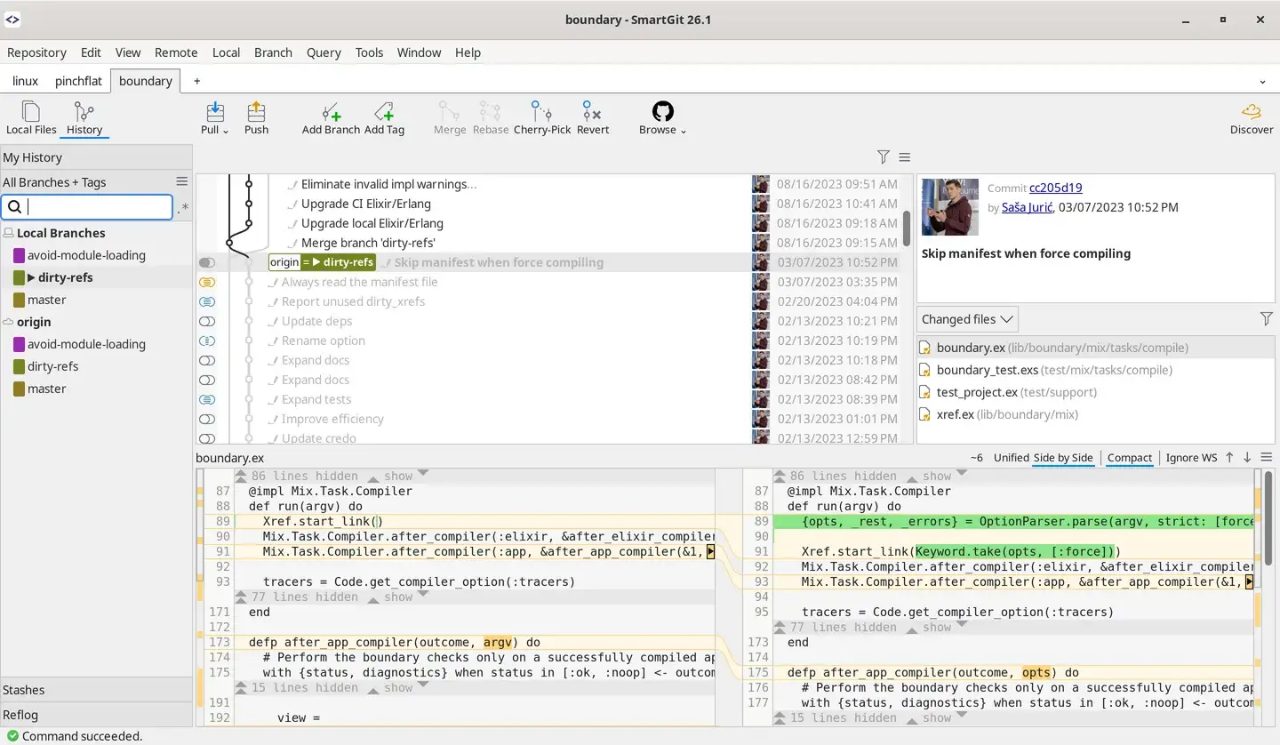
- Branch graph with filters, file logs and blame
- Three-pane Conflict Solver
- Commit splitting, reordering and squashing
Pros
- Free for hobby, student and open-source use
- A Linux build alongside Mac and Windows
Cons
- Crowded interface with a steep start
- Not known for speed on big repositories
- Choose if:
- You want a full desktop client on Linux for non-commercial projects
SmartGit is a graphical Git client from syntevo for Windows, macOS and Linux. It shows history and branches as a graph, and supports clean-up operations such as splitting, reordering and squashing commits, a built-in conflict solver, Git-Flow, and pull requests and review comments for GitHub, GitLab, Bitbucket and Azure DevOps. It is free for hobby use, students and qualifying open-source or charity work with registration, and needs a paid subscription or a perpetual license for professional use.
What users say
Evidence ↓The only user quote found is a favorable testimonial the vendor chose for its own home page; no independent practitioner views were read, and a directory page notes a possible learning curve for people used to the command line, which is generated text rather than user reports.
Rankings and alternatives
- Git GUI clients #5 of 10 Free for hobby projects, deep for professionals
- Fork #1 Best for most Mac and Windows developers
- Sublime Merge #2 Fast on huge repositories, and the pick for Linux
- GitKraken Desktop #3 Most visual graph, on every platform



Git GUI clients scores
Evaluated Nov 17, 2026 Evidence ↓- Seeing history and branches 5
5/5 means: A clear, fast graph of all branches with history search or filters, file history, blame and comparison of any two commits, all in the app.
The Log window shows a graph of all branches with filters, file logs, blame and comparison of any two commits.
- Rewriting commits and undoing mistakes 4
4/5 means: A full visual interactive rebase (reorder, squash, reword, edit and drop), but undo is limited or the editing is clumsy.
Split, reorder, squash and rewrite commits, plus a full interactive rebase; the tools are thorough but spread across several windows.
- Resolving merge conflicts 5
5/5 means: A built-in merge editor that shows both sides and an editable result, lets you take changes piece by piece, and finishes the merge or rebase from the app.
The built-in Conflict Solver shows both sides and the merged result in three panes, with per-change choices, and finishes the merge from the app.
- Easy for someone new to Git 2
2/5 means: Usable for basics, but crowded screens, keyboard-only controls or an unusual model make a newcomer's first weeks hard.
Powerful but dense: many panes, Git terminology throughout and a settings-heavy setup, so newcomers often find the learning curve steep.
- Speed on large repositories 3
3/5 means: Acceptable on most repositories, with some lag or documented limits on very large ones.
A Java-based app that copes with ordinary and fairly large repositories but is not known for speed.
- Everyday Git tools beyond committing 4
4/5 means: Six of the eight.
Hunk staging, stashes, cherry-pick, lost-commit recovery from the reflog, submodules and Git LFS; worktree and bisect support were not confirmed.
- Cost for work use · counts half 3
3/5 means: $101 to $250 over three years.
Free only for non-commercial, educational and open-source use; work use starts at $5 per user per month, about $180 over three years.
- Runs on Mac, Windows and Linux · counts half 5
5/5 means: macOS, Windows and Linux officially.
Windows, macOS and Linux, on up to five machines per license.
Pricing
- Hobby (free) Free Personal, non-commercial use with free registration; full features except enterprise integrations for self-hosted GitHub, GitLab, Bitbucket and Azure DevOps. A reminder appears at most once every seven days.
- Students and education (free) Free Students and employees of public educational institutions; needs an educational email address.
- Open source and charities (free) Free Qualifying non-commercial work, verified per use case.
- Commercial subscription $5.00 /month per seat Listed as "from $5/user/month"; the yearly price was not readable. Renews automatically and stops working if renewal fails or is cancelled. Each user may use the license on up to five machines.
- Commercial perpetual Contact sales One payment with 1, 2 or 3 years of updates and 90 days to 3 years of email support. The exact price was not readable (configurator). The version you have keeps working after the update period; newer versions need a discounted upgrade license.
Prices checked Nov 17, 2026.
Evidence and sources
What users say
Summary 2 quotes
-
Smart Git is the best Git client I've ever used. It just works!
JP, user quoted on the vendor's home page · smartgit.dev · checked -
May have a learning curve for users accustomed to command-line Git or other GUIs
toolradar.com/tools/smartgit · published · checked
Git GUI clients scores
Seeing history and branches 1 quote
-
Clean Commit History tools (split, rewrite, reorder, squash commits)
toolradar.com/tools/smartgit · published · checked
Rewriting commits and undoing mistakes 1 quote
-
Clean Commit History tools (split, rewrite, reorder, squash commits)
toolradar.com/tools/smartgit · published · checked
Resolving merge conflicts 1 quote
-
Conflict Solver with intuitive display and operations
toolradar.com/tools/smartgit · published · checked
Easy for someone new to Git 1 quote
-
May have a learning curve for users accustomed to command-line Git or other GUIs
toolradar.com/tools/smartgit · published · checked
Everyday Git tools beyond committing 1 quote
-
Clean Commit History tools (split, rewrite, reorder, squash commits)
toolradar.com/tools/smartgit · published · checked
Cost for work use 3 quotes
-
From $5/user/month or perpetual licensing
smartgit.dev/pricing · checked -
Personal, non-commercial use
smartgit.dev/pricing · checked -
SmartGit can be used free of charge by open-source developers, employees and students of public academic institutions and employees of public charitables organizations primarily targeting philanthropy, health research, education or social well-being.
smartgit.dev/pricing · checked
Runs on Mac, Windows and Linux 2 quotes
-
Each user can use their license on up to five machines.
smartgit.dev/pricing · checked -
Get SmartGit for Windows, macOS, or Linux with just a few clicks.
smartgit.dev · checked
Facts
Runs on 1 quote
-
Get SmartGit for Windows, macOS, or Linux with just a few clicks.
smartgit.dev · checked
More from the sources
Pricing 2 quotes
-
You can purchase 1, 2 or 3 years of updates. This means you can use any SmartGit version which we release until the end of your ordered update period, as long as you like (even after the update period ended)
docs.smartgit.dev/latest/how-tos/licensing/licensing · checked -
SmartGit stops working, if renewal fails or has been cancelled
docs.smartgit.dev/latest/how-tos/licensing/licensing · checked
Features 2 quotes
-
Open a local Git repo or clone from GitHub, GitLab, Bitbucket, or Azure DevOps.
smartgit.dev · checked -
SmartGit integrates seamlessly with popular platforms like GitHub, Azure DevOps, Bitbucket, and GitLab, allowing users to create and resolve pull requests and review comments directly within the application.
toolradar.com/tools/smartgit · published · checked
What users say 1 quote
-
SmartGit: 4.3 from 3 reviews on SourceForge, last checked March 19, 2026.
toolradar.com/tools/smartgit · published · checked
Pricing
smartgit.dev/pricing · checked