
Atlassian Sourcetree
Free Git GUI from Atlassian for macOS and Windows, with Mercurial support
Our verdict
#10 of 10 in Git GUI clients · Free and full-featured, but showing its age
What it does
- Branch graph with commit search
- Interactive rebase, Git Flow and Git LFS
- Mercurial repositories as well as Git
Pros
- Free with no feature limits
Cons
- Slow on large repositories
- Dated, cluttered interface
- Needs an external tool to combine conflicting changes
- Choose if:
- You still have Mercurial repositories to manage
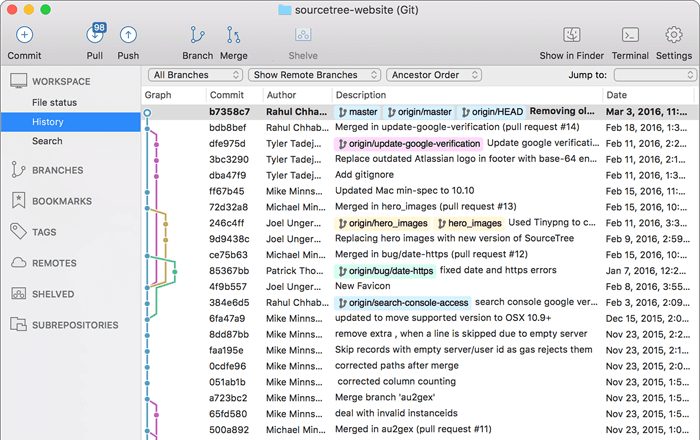
Sourcetree is a free desktop Git client from Atlassian that shows branches, history and diffs in a graphical interface and handles commits, stashing, cherry-picking, interactive rebase, Git LFS, Git Flow and submodules, plus Mercurial repositories. It is aimed at beginners and experienced developers alike and runs on macOS and Windows; there is no Linux build. It is closed-source freeware, with a separate Windows enterprise deployment edition.
What users say
Evidence ↓Reviewers on PeerSpot (a small, self-selected sample spanning 2016 to 2026) credit Sourcetree with a stable tool, a useful branch graph and help with complex merges, and one finds its interface easy to use, while another says functionality is not always easy to find. Performance is the most repeated complaint, and one reviewer prefers the command line for everyday work.
Rankings and alternatives
- Git GUI clients #10 of 10 Free and full-featured, but showing its age
- Fork #1 Best for most Mac and Windows developers
- Sublime Merge #2 Fast on huge repositories, and the pick for Linux
- GitKraken Desktop #3 Most visual graph, on every platform



Git GUI clients scores
Evaluated Nov 17, 2026 Evidence ↓- Seeing history and branches 4
4/5 means: A clear graph of all branches plus most of history search, file history, blame and commit comparison.
A branch graph with commit search, file logs and blame, though the dense, dated layout makes it harder to read than newer clients.
- Rewriting commits and undoing mistakes 4
4/5 means: A full visual interactive rebase (reorder, squash, reword, edit and drop), but undo is limited or the editing is clumsy.
An interactive rebase dialog for reordering, squashing, rewording and deleting commits; there is no general undo or reflog view.
- Resolving merge conflicts 2
2/5 means: The app lists conflicted files and lets you finish the operation, but you resolve the contents in an editor or external tool, at most taking one whole side of a file in the app.
It marks conflicted files and offers whole-file "mine" or "theirs" choices; combining changes opens an external merge tool.
- Easy for someone new to Git 2
2/5 means: Usable for basics, but crowded screens, keyboard-only controls or an unusual model make a newcomer's first weeks hard.
Free and full-featured, but the crowded interface and the number of options overwhelm newcomers, and functions are not always easy to find.
- Speed on large repositories 2
2/5 means: Fine on small repositories, but slowness or heavy memory use on large ones is a common complaint.
Slowness, especially on large repositories, is the most repeated complaint.
- Everyday Git tools beyond committing 3
3/5 means: Four or five of the eight.
Hunk and line staging, stashes, cherry-pick, submodules and Git LFS; no reflog view, worktrees or bisect.
- Cost for work use · counts half 5
5/5 means: Free for commercial use.
Free.
- Runs on Mac, Windows and Linux · counts half 3
3/5 means: macOS and Windows, with no Linux build.
Windows and macOS; no Linux build.
Pricing
- Sourcetree Free Described by the vendor as a free Git client. Whether an Atlassian account is required to install or use it was not checked.
Prices checked Nov 17, 2026.
Evidence and sources
What users say
Summary 5 quotes
-
The main issue for improving Atlassian SourceTree is performance.
reviewer2845986, dev op engineer at a retailer with 11-50 employees (PeerSpot reviewer) · peerspot.com/products/atlassian-sourcetree-pros-and-cons · published · checked -
Atlassian SourceTree significantly reduces time for complex file change merges, enabling teams to resolve repository issues effectively. It is recognized as a stable tool with valuable features like the branches' graph for better management.
peerspot.com/products/atlassian-sourcetree-pros-and-cons · checked -
The UI can be improved because it is not always so easy to find the functionality you are looking for.
it_user448362, Software Developer at a tech company with 501-1,000 employees (PeerSpot reviewer) · peerspot.com/products/atlassian-sourcetree-pros-and-cons · published · checked -
The interface is very good and is easy to use. It tells you when you've committed, when you've uploaded, and gives you the differences.
reviewer1252938, Dynamic Engineering Manager at a computer software company with 10,001+ employees (PeerSpot reviewer) · peerspot.com/products/atlassian-sourcetree-pros-and-cons · published · checked -
For everyday use, I am more comfortable using the command line interface, rather than using SourceTree.
reviewer1296141, Program Manager/Engineer at a government with 10,001+ employees (PeerSpot reviewer) · peerspot.com/products/atlassian-sourcetree-pros-and-cons · published · checked
Git GUI clients scores
Seeing history and branches 1 quote
-
Search for commits, file changes, and branches right within Sourcetree.
sourcetreeapp.com · checked
Rewriting commits and undoing mistakes 1 quote
-
Get clean and clear commits with Sourcetree's interactive rebase tool.
sourcetreeapp.com · checked
Resolving merge conflicts 1 quote
-
Atlassian SourceTree significantly reduces time for complex file change merges, enabling teams to resolve repository issues effectively. It is recognized as a stable tool with valuable features like the branches' graph for better management.
peerspot.com/products/atlassian-sourcetree-pros-and-cons · checked
Easy for someone new to Git 2 quotes
-
The UI can be improved because it is not always so easy to find the functionality you are looking for.
it_user448362, Software Developer at a tech company with 501-1,000 employees (PeerSpot reviewer) · peerspot.com/products/atlassian-sourcetree-pros-and-cons · published · checked -
Despite its user-friendly interface, the sheer number of features can overwhelm new users.
graphite.com/guides/sourcetree · checked
Speed on large repositories 2 quotes
-
The main issue for improving Atlassian SourceTree is performance.
reviewer2845986, dev op engineer at a retailer with 11-50 employees (PeerSpot reviewer) · peerspot.com/products/atlassian-sourcetree-pros-and-cons · published · checked -
Some users report that SourceTree can be slow or laggy, particularly with larger repositories.
graphite.com/guides/sourcetree · checked
Everyday Git tools beyond committing 3 quotes
-
Stage and discard changes by the file, hunk or line.
sourcetreeapp.com · checked -
Review changesets, stash, cherry-pick between branches and more.
sourcetreeapp.com · checked -
Sourcetree supports Git LFS, allowing teams to track large assets in one single place.
sourcetreeapp.com · checked
Cost for work use 1 quote
-
A free Git client for Windows and Mac
sourcetreeapp.com · checked
Runs on Mac, Windows and Linux 1 quote
-
A free Git client for Windows and Mac
sourcetreeapp.com · checked
Facts
Runs on 1 quote
-
A free Git client for Windows and Mac
sourcetreeapp.com · checked
More from the sources
Features 3 quotes
-
Smart branching with Sourcetree and Git-flow, keeping repositories clean and development efficient.
sourcetreeapp.com · checked -
A fully-featured GUI that offers an efficient, consistent development process right out of the box. Works with Git and Mercurial.
sourcetreeapp.com · checked -
While it does offer some level of GitLab support, it's not as deeply integrated as it is with other Atlassian products.
graphite.com/guides/sourcetree · checked
Pricing
sourcetreeapp.com · checked