10 best AI agent frameworks for developers
Most agent frameworks look the same in a quickstart: define a tool, call a model, print the answer. They split apart when an agent has to run for an hour, stop for a manager’s approval, survive a deploy halfway through, and then show you why it refunded the wrong order. For that kind of production agent, LangGraph is the best AI agent framework because it saves each step’s state, so a paused or crashed run can pick up where it stopped. The other nine trade some of that control for a smaller API, a different language, or tighter integration with one model provider.
- Long-running agents in production, Python or TypeScript: LangGraph, with checkpoints and human approval steps built around saved state.
- Python teams that want less framework: Pydantic AI. Typed, plain Python, and it works the same with any model provider.
- TypeScript teams: Mastra, or the Vercel AI SDK when the agent is one feature inside a web app.
- .NET shops and anyone leaving AutoGen: Microsoft Agent Framework.
What actually separates them
Every framework here can call a model in a loop and run tools. Three things decide which one you’ll still be happy with in a year.
Control over state. A chatbot answers and forgets. A production agent has state: where it is in a multi-step task, what it has already done, what it’s waiting for. The stronger frameworks let you draw that path explicitly (a graph or workflow of steps) and save a checkpoint after each step, so a crashed or paused run resumes instead of starting over. Pausing for a person’s approval, usually called human-in-the-loop, depends on the same saved state. The provider SDKs from OpenAI and Anthropic mostly leave this to you.
Lock-in. All ten libraries are free to use, but several are built around one company’s models, and several make their easiest production path a paid hosted platform: managed deployment, hosted checkpoints, team tracing. In this list that’s true of LangGraph (LangSmith), CrewAI (AMP), Mastra (Mastra Platform), Google’s ADK (Agent Runtime), and LlamaIndex (LlamaParse). You can run all of them on your own servers; the platform is what you pay for when you don’t want to.
Where your traces go. Tracing records every model call and tool call so you can see why an agent did something. OpenTelemetry is the open standard most tracing backends accept, and frameworks that export it let you keep traces on your own infrastructure. Two frameworks send data out by default. The OpenAI Agents SDK sends traces, including model inputs and outputs, to OpenAI’s dashboard unless you turn it off. CrewAI sends anonymous usage telemetry (agent roles and tool names among it) to CrewAI unless you set an environment variable. If you’re picking a tracing backend too, the LLM observability tools ranking covers that choice.
Language narrows the list fast: three of the ten work in only one language, and LlamaIndex’s TypeScript support is a separate port.
| Framework | Languages | License |
|---|---|---|
| LangGraph | Python, TypeScript | MIT |
| Pydantic AI | Python | MIT |
| Mastra | TypeScript | Apache 2.0, team features under an enterprise license |
| Microsoft Agent Framework | .NET, Python, Go in preview | MIT |
| Vercel AI SDK | TypeScript | Apache 2.0 |
| CrewAI | Python | MIT |
| Google ADK | Python, TypeScript, Go, Java | Apache 2.0 |
| LlamaIndex | Python, separate TypeScript port | MIT |
| OpenAI Agents SDK | Python, TypeScript | MIT |
| Claude Agent SDK | Python, TypeScript | Anthropic’s Commercial Terms |
LangGraph
Best for long-running production agents
#1 4.5/5
LangGraph is a low-level framework from the LangChain team. You describe the agent as a graph: nodes are steps (a model call, a tool, plain code), edges decide what runs next, and a shared state object travels through it. That’s more typing than a one-line agent constructor, and it’s the reason teams pick it. Every branch, retry, and approval step is in code you can read.
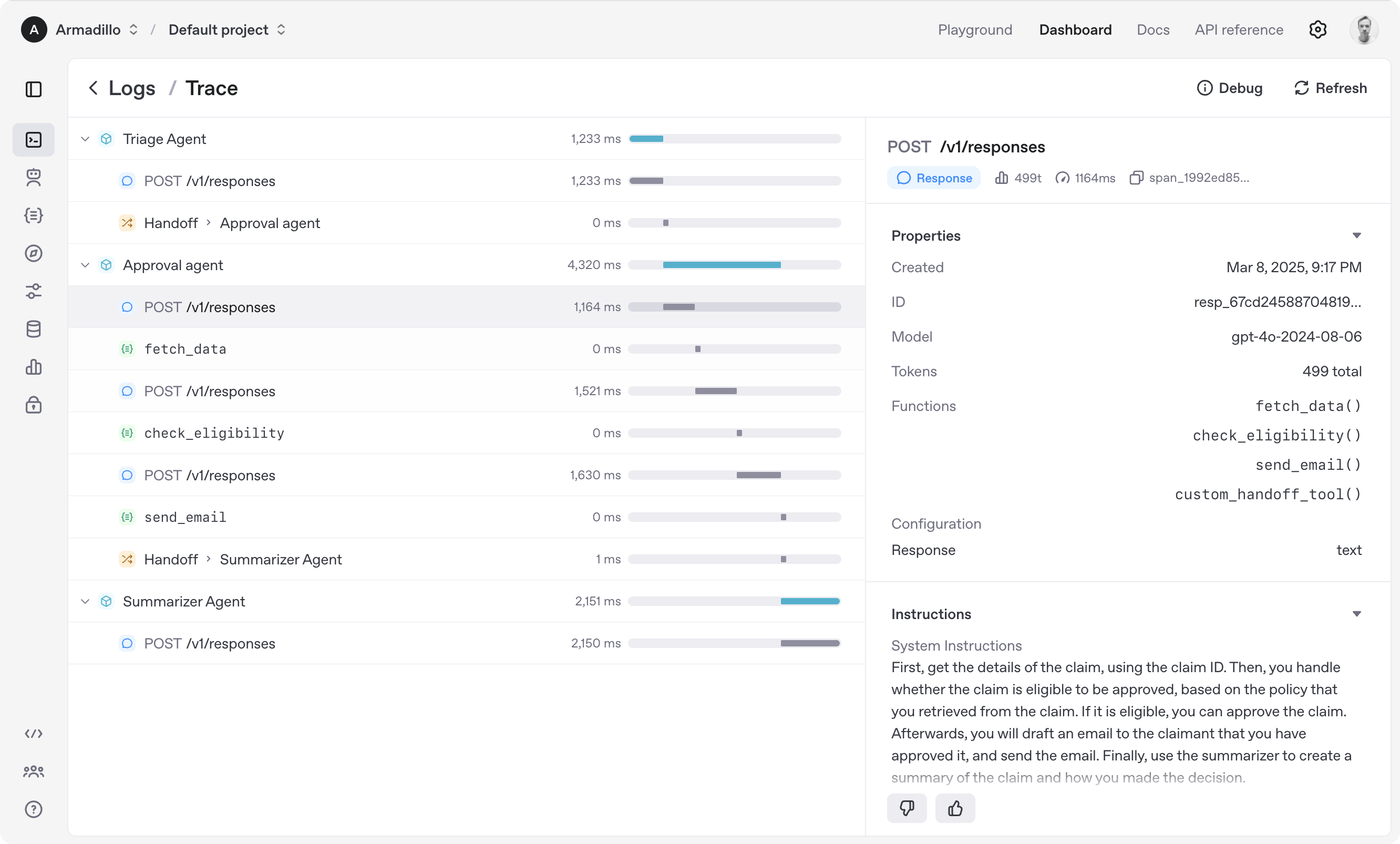
The feature that makes it the top pick is the checkpointer. Attach one (Postgres and SQLite versions exist) and LangGraph saves the state after every step. An agent can stop mid-task to ask a person, wait a day, and continue. A pod can die during a deploy and the run resumes from its last checkpoint. In the Studio debugger you can rewind a run to an earlier checkpoint, edit the state, and replay from there, which is how you find out why step seven went wrong without rerunning steps one to six. LangGraph has also run in production at companies like Klarna, Replit, and Elastic for longer than most of this list has existed.
The costs are real. LangGraph takes days to learn, not an afternoon, and simple agents come out verbose. The best debugging experience, LangSmith tracing, is a hosted service: free for one person, priced per seat for a team, and self-hosted only on an Enterprise contract. Studio’s interface is hosted by LangSmith too, though its backend runs on your machine and no traces are sent if you set LANGSMITH_TRACING=false. Managed deployment, cron jobs, and an HTTP API for your agents come with the paid LangSmith Agent Server; on the free library you run your own database, scaling, and retries.
What it does
- Agents as explicit graphs of steps with shared state
- Checkpoints after every step, with resume after a pause or a crash
- Human approval steps that can wait indefinitely
- Studio debugger that rewinds and replays runs from a saved checkpoint
- Python and TypeScript libraries
Pros
- The most control over each step and the agent's state
- Longest record of production use among agent frameworks
- Works with any model provider, including local models
- Largest set of integrations through LangChain
Cons
- Steep learning curve, and simple agents take a lot of code
- Team tracing in LangSmith is billed per seat
- Managed deployment and hosted checkpoints require a paid LangSmith plan
- Self-hosting LangSmith requires an Enterprise contract
- Skip if:
- You want a single tool-calling agent running by this afternoon

Pydantic AI
Typed Python agents on any model
#2 4.3/5
If you’ve used FastAPI, Pydantic AI will feel familiar, and that’s most of its appeal. It comes from the team behind Pydantic, and agents are ordinary Python with typed dependencies and typed, validated outputs. When the model returns JSON that doesn’t fit your schema, the agent retries instead of passing garbage downstream, and your type checker catches many mistakes before you run anything. Of the Python frameworks here, it’s the one I’d hand to a team that dislikes heavy abstractions.
It also treats every model provider the same. OpenAI, Anthropic, Gemini, Bedrock, Groq, Mistral, Ollama, and others are a model string apart, and a fallback model can take over when one provider fails. Traces go out as standard OpenTelemetry to whatever backend you run. Pydantic’s own Logfire is a hosted viewer you can skip, and nothing goes to it without a token.
Unlike LangGraph, Pydantic AI leaves crash recovery to an outside engine. It doesn’t ship its own checkpointing database. Instead it plugs into durable execution engines (Temporal, DBOS, Prefect, Restate, and several more): the engine records each model call and tool call, and after a crash it replays the finished ones and retries the one in flight. That’s sturdy, but you operate the engine. Human approval of tool calls is built in. Graph workflows and step snapshots without an engine come in separate packages from the same team, Pydantic Graph and Pydantic AI Harness.
What it does
- Typed agents with validated, structured outputs
- Model switching by string, with fallback between providers
- Durable runs through Temporal, DBOS, Prefect, and other engines
- Human approval of tool calls
- OpenTelemetry tracing to any backend
Pros
- Plain Python that type checkers understand
- Provider-neutral, including local models
- A stated promise of no breaking changes within a major version
- Sends traces to Logfire only when you add a token
Cons
- Python only
- Crash recovery needs an engine you run, such as Temporal
- Graphs and step snapshots live in separate packages
- Smaller community than LangChain's
- Choose if:
- Your team already uses Pydantic models and type checking throughout

Mastra
The all-in-one TypeScript pick
#3 4.1/5
Mastra saves a TypeScript team from stitching together a separate agent library, workflow engine, and debugger. Agents, graph workflows (written as .then(), .branch(), and .parallel() chains), memory, evals, and an MCP client and server come in one package. MCP is the standard way to plug tools into an agent. Run mastra dev and Studio opens locally, where you can chat with agents, run workflows step by step, and read traces, all without an account.
Workflows can suspend, for a person’s approval or an outside event, and resume later. Mastra writes a snapshot to storage you configure (LibSQL or Postgres), so a paused run survives restarts and deploys. Model choice is a provider/model string across dozens of providers, with fallback lists, and traces export to OpenTelemetry backends, Langfuse, or Datadog. Traces go to the hosted Mastra Platform only if you set its access token.
Two things to check before committing. Most of the code is Apache 2.0, but anything in an ee/ folder, such as Studio’s role-based access and editor, needs an enterprise license in production. And Mastra ships as many packages released separately, so upgrades touch several versions at once. There’s no Python version, so mixed-language teams usually end up on LangGraph instead.
What it does
- Agents and graph workflows in TypeScript
- Suspend and resume with snapshots in your own database
- Local Studio for running agents and reading traces
- Model routing across dozens of providers, with fallbacks
- MCP client and server
Pros
- Everything a production agent needs in one TypeScript package
- Free local debugger with no account
- Provider-neutral model routing
Cons
- TypeScript only
- Studio's access controls and editor need an enterprise license in production
- Many separately versioned packages to upgrade
- Choose if:
- Your agents live in a Node or Next.js codebase and you want workflows, memory, and a debugger without stitching libraries together
Microsoft Agent Framework
For .NET shops and AutoGen users
#4 3.9/5
 (opens full size in a new tab)
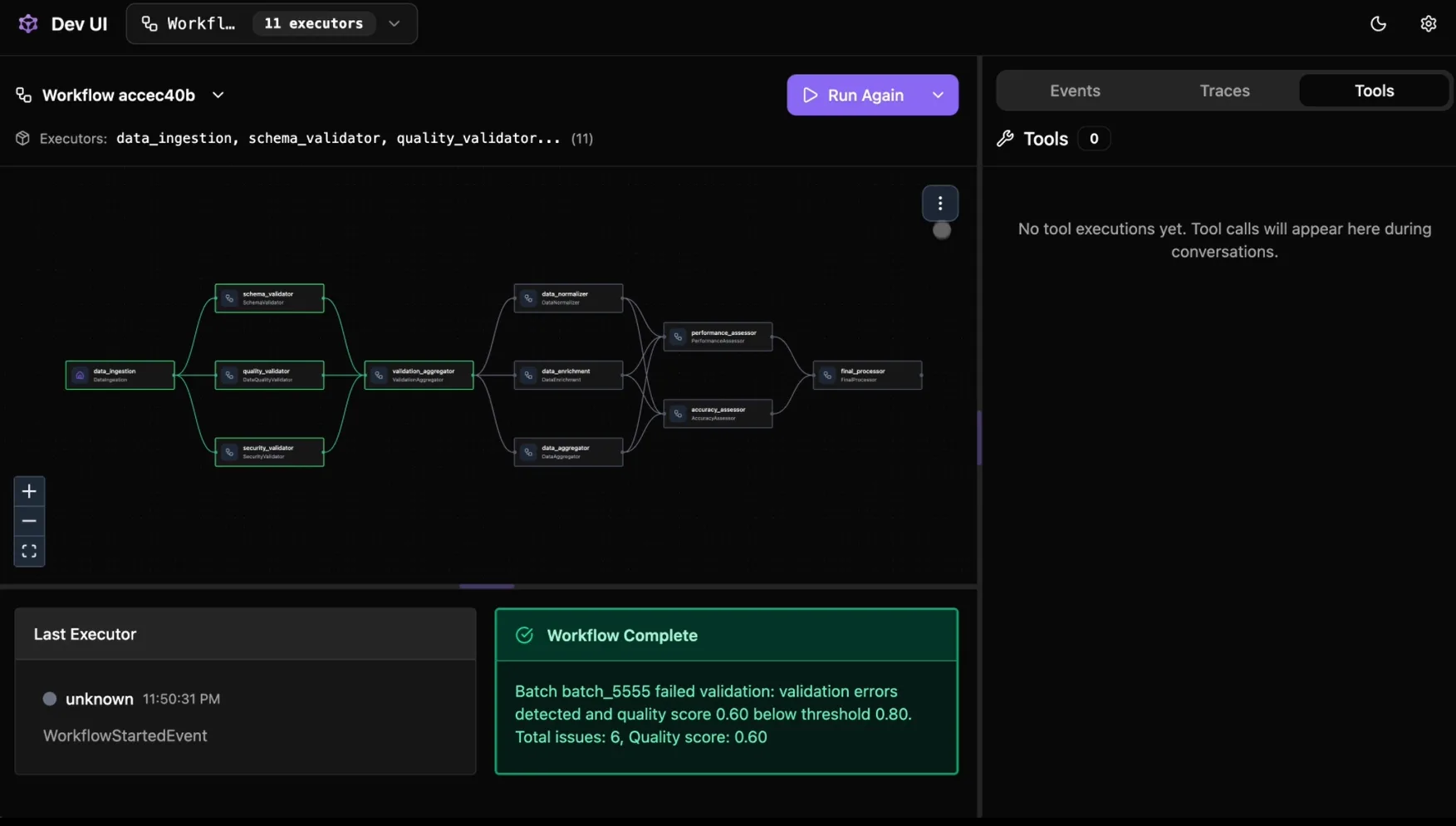
Microsoft Agent Framework is the successor to both AutoGen and Semantic Kernel, built by the same teams. It’s the first choice here for C# developers, since its .NET and Python versions share one design and both are stable. A Go version is in preview.
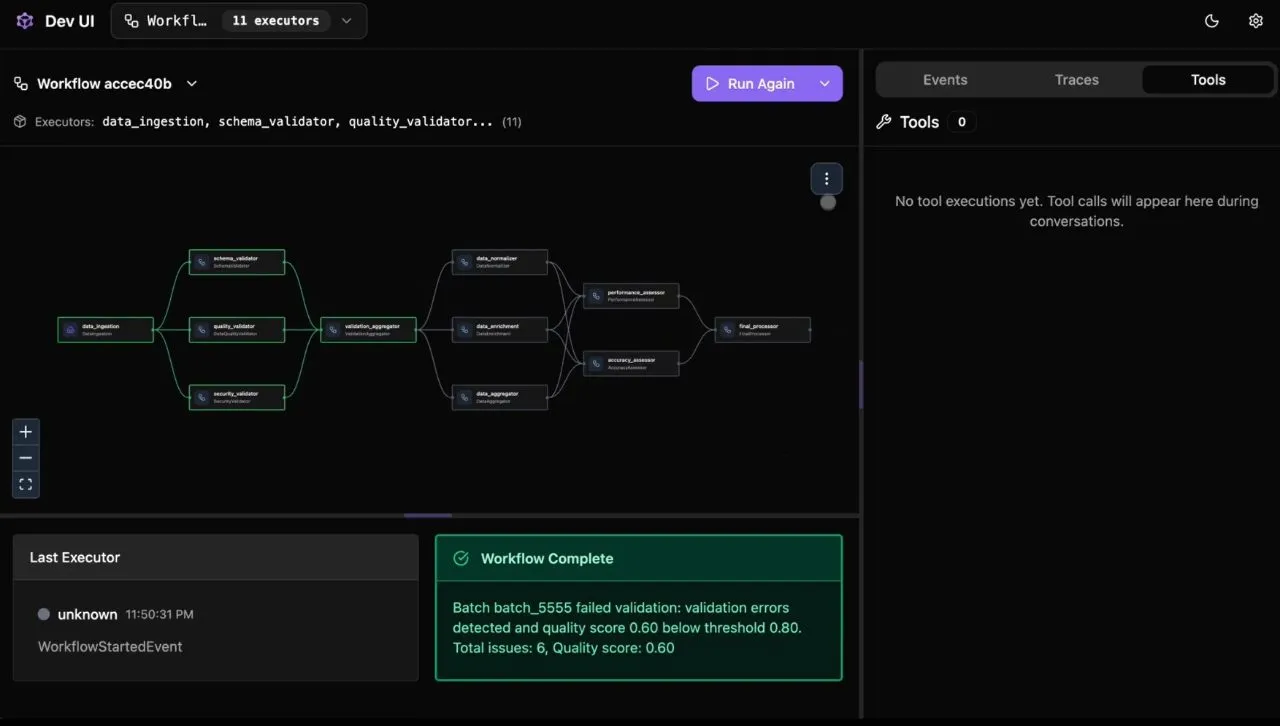
Plain agents handle open-ended conversations. For a process with defined steps, graph workflows add branching, parallel steps, checkpoints, and human approvals, so a long run survives interruptions. The multi-agent patterns that came out of AutoGen and Microsoft Research are built in: sequential, concurrent, handoff (one agent passing the conversation to another), group chat, and Magentic-One. It also speaks A2A, a protocol for agents built in different frameworks to work together.
It isn’t tied to Azure. Connectors cover OpenAI, Anthropic, Bedrock, Gemini, and Ollama as well as Azure OpenAI and Foundry. Traces follow the OpenTelemetry conventions for AI, and nothing is exported until you add an exporter. The caveat is a short track record: some pieces, such as the DevUI debugger and Foundry hosting, are marked preview rather than stable. Many examples also assume an Azure setup.
What it does
- Stable .NET and Python SDKs with one design
- Graph workflows with checkpoints and human approvals
- Sequential, concurrent, handoff, group chat, and Magentic-One patterns
- Connectors for Azure, OpenAI, Anthropic, Bedrock, Gemini, and Ollama
- OpenTelemetry tracing and a local DevUI debugger
Pros
- First-class .NET support
- Migration guides from AutoGen and Semantic Kernel
- Wide set of multi-agent patterns, plus A2A
- Exports no telemetry until you configure it
Cons
- Short track record, with some debugging and hosting pieces in preview
- Many examples assume Azure or Foundry
- No TypeScript version
- Choose if:
- Your codebase is C#, or you have AutoGen or Semantic Kernel code to move

Vercel AI SDK
Agents inside a TypeScript web app
#5 3.8/5
The Vercel AI SDK is one of the most-downloaded TypeScript AI libraries, and most of those installs aren’t agents at all. They’re chat features, text generation, and streaming UIs in React, Next.js, Svelte, and Vue apps. It fits best when the agent is one feature of a web product and you want the thinnest layer between your code and the model.
Its agent class runs a tool-calling loop you shape with stop conditions and a hook that runs before each step. For anything more structured, you write the flow yourself in plain TypeScript, which many developers prefer to a framework’s workflow syntax. Its provider support is among the widest here. One caution for privacy-minded teams: the default model strings route through Vercel’s hosted AI Gateway, which needs a Vercel account. Install the provider packages, such as @ai-sdk/anthropic, and calls go straight to the provider.
The standard agent runs in memory, so a crash loses its progress. Durable, resumable agents need a separate package built on Vercel’s Workflow DevKit. Multi-agent support amounts to calling one agent from another as a tool. Tracing exports to OpenTelemetry once you register it, and the DevTools viewer is for local development only. Each major version has also reshaped parts of the agent API, so upgrades take work.
What it does
- Tool-calling agent loop with stop conditions and per-step hooks
- Streaming helpers for React, Next.js, Svelte, and Vue
- Durable agents through a separate workflow package
- OpenTelemetry tracing and a local DevTools viewer
Pros
- Very wide model provider support
- Thin layer that stays close to plain TypeScript
- Huge community and examples
Cons
- In-memory agents lose progress on a crash unless you add the workflow package
- Few multi-agent patterns
- Default model strings route through Vercel's hosted gateway
- Major versions reshape the agent API
- Skip if:
- You don't want a separate workflow package, and your agents must survive restarts

CrewAI
Fastest route to a multi-agent prototype
#6 3.7/5
 (opens full size in a new tab)
CrewAI is one of the most-starred agent frameworks on GitHub, and the reason is how quickly it turns an idea into agents that work together. You define agents by role, goal, and backstory (“senior researcher”, “editor”), give them tasks, and a crew runs them in sequence or under a manager agent. For research and content pipelines that map onto a team of people, nothing on the list gets a multi-agent demo running faster.
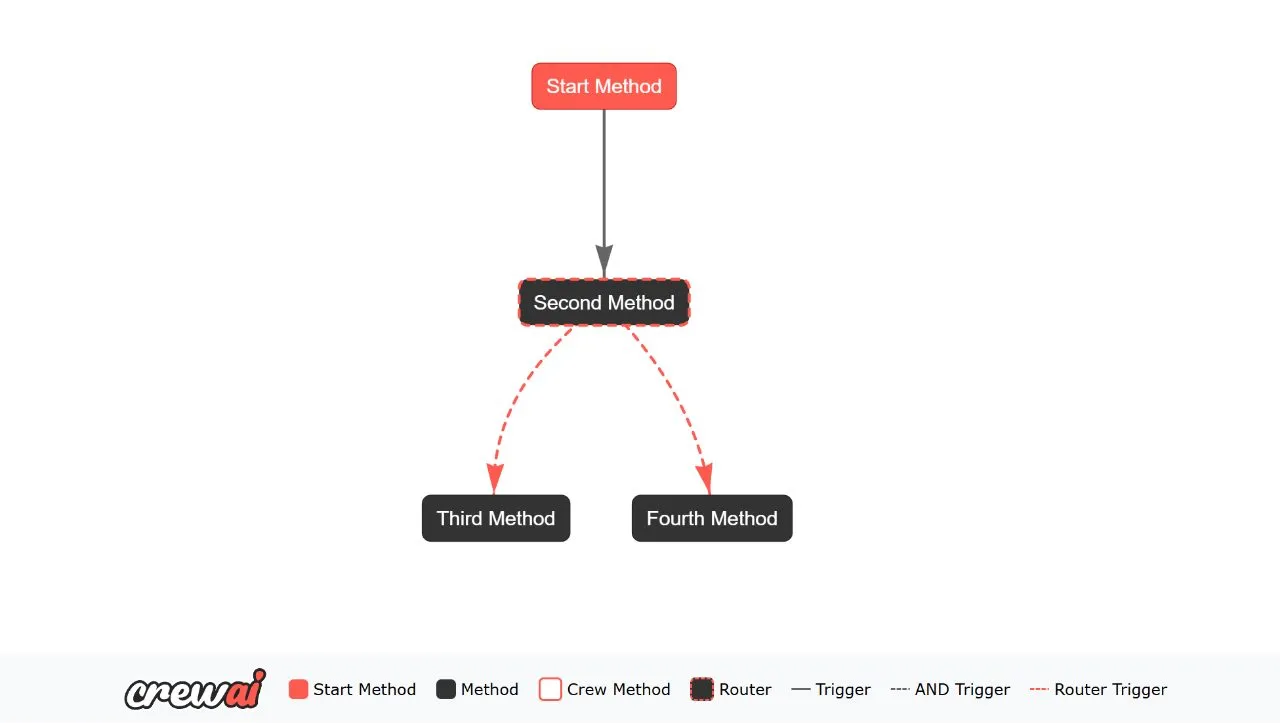
Crews become harder to steer and debug as they grow because they decide so much on their own, and logging from inside a task is unreliable. CrewAI’s answer is Flows: explicit Python steps wired with decorators, routers for branching, state saved to SQLite (or your own store) and resumable by ID, and a decorator for human feedback. Flows close much of the gap with LangGraph for fairly linear processes, and a Flow can run crews as steps.
Two things a privacy-minded team should know. Anonymous telemetry is on by default and includes agent roles and tool names; CREWAI_DISABLE_TELEMETRY=true turns it off. And tracing is mainly a feature of CrewAI’s hosted AMP platform; for traces in your own backend, you rely on third-party instrumentation from tools such as Langfuse and Phoenix.
What it does
- Role-based crews that run in sequence or under a manager agent
- Flows with explicit steps, routing, and saved state
- Human feedback steps in Flows
- MCP and A2A support
Pros
- Quickest way to a working multi-agent system
- Easy to explain to people who don't write code
- Large community and course material
- Works with the major providers and local models
Cons
- Crews are hard to debug as they grow
- Usage telemetry is on by default
- Tracing outside the hosted platform needs third-party tools
- Python only
- Choose if:
- Your process maps onto roles, like researcher, writer, and reviewer, and you need a demo this week
Google Agent Development Kit
Gemini and Google Cloud teams
#7 3.7/5
 (opens full size in a new tab)
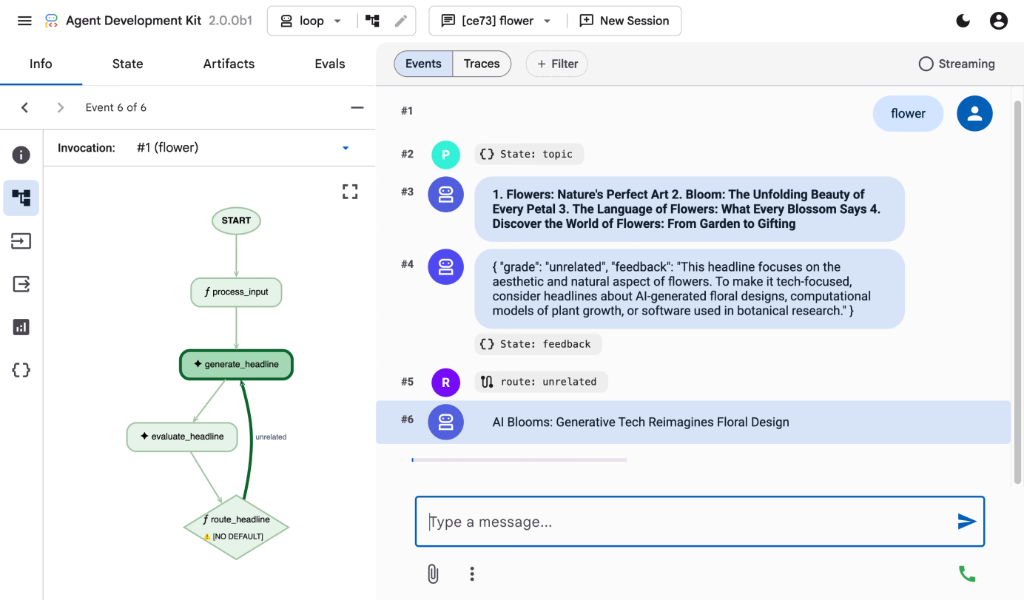
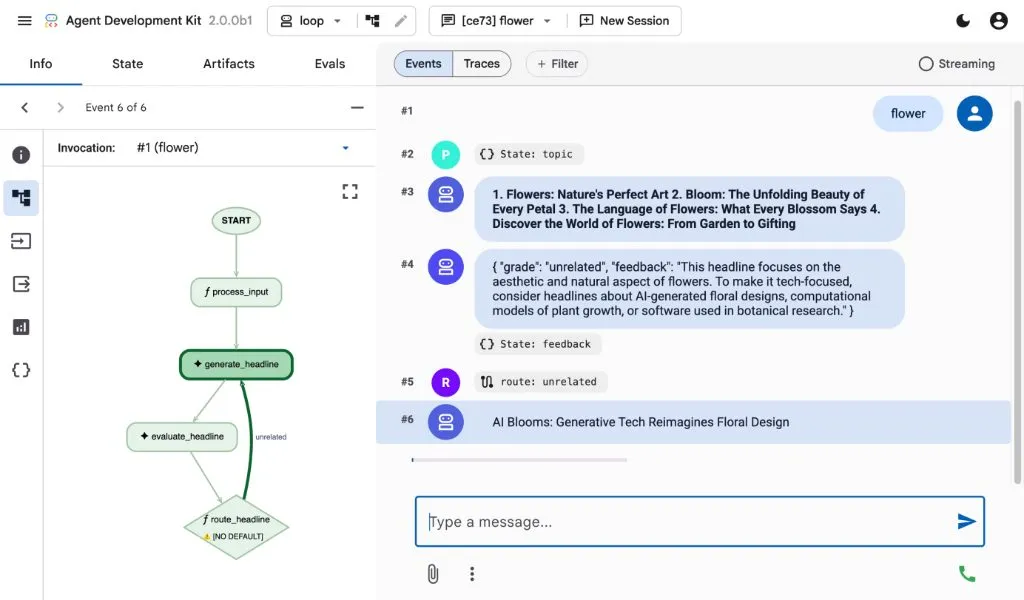
Google’s Agent Development Kit has the widest language support on this list: Python, TypeScript, Go, and Java. Its current version rebuilt the core around a graph engine where agents, tools, and functions are nodes. That engine handles routing, loops, retries, state, and human approvals. The adk web dev UI is one of the better free debuggers here. It shows the workflow graph next to the event stream, state, and traces, and it runs evals.
The multi-agent side is strong. You can nest sub-agents, delegate tasks between agents, and connect to agents in other frameworks over A2A, the protocol Google started. ADK is tuned for Gemini, though. Other models go through a LiteLLM wrapper, and Google’s hosted Agent Runtime, billed by compute time, is the easy deployment target. You can also ship a Docker container anywhere.
The rebuild makes upgrades risky. Moving from the previous major version broke custom session stores and silently ignored some custom agent code, so teams with older ADK agents had real migration work. If you’re on Gemini and Google Cloud, it’s a natural fit; elsewhere, LangGraph does the same graph job with a longer track record.
What it does
- Graph workflows with routing, loops, retries, and human approvals
- Sub-agents, task delegation, and A2A
- Local dev UI with graph view, state, traces, and evals
- Python, TypeScript, Go, and Java editions
Pros
- Widest language support
- Strong free debugger
- Rich multi-agent patterns
Cons
- Tuned for Gemini; other models go through a wrapper
- The last major upgrade broke existing agents in places
- Easiest deployment path is Google Cloud
- Choose if:
- You build on Gemini, or your team writes Go or Java
LlamaIndex
Agents built around documents
#8 3.5/5
LlamaIndex made its name in retrieval: parsing, chunking, and searching your documents so a model can answer from them. Its Agent Workflows library is a capable agent layer on top. Steps are async Python functions that pass events to each other, with branching, loops, and parallel steps. State can be saved to a file or database and resumed, and a step can wait for human review. A separate server package turns a workflow into a REST API with streaming.
The risk is that the framework is no longer LlamaIndex’s main focus. The company now puts its main effort into LlamaParse, its paid service for parsing documents and extracting data from them, and keeps the framework available as an open toolkit. Its agent layer is pitched at document agents (invoices, contracts, and claims) more than at general ones. API changes between minor releases have also broken code in the past. If your agent’s job is mostly reading and extracting from documents, the 300-plus integration packages and the parsing tools make it worth a look. For general agents, the higher-ranked frameworks are a safer bet.
What it does
- Event-driven workflows with branching, loops, and parallel steps
- Saved state with resume from a file or database
- Server package that exposes workflows as a REST API
- Over 300 integration packages for models, embeddings, and vector stores
Pros
- Strong retrieval and document tooling
- Plain Python with no workflow language to learn
- Works with the major model providers
Cons
- The company's focus has moved to its paid parsing service
- APIs have broken between minor releases
- TypeScript version is a separate port
- Choose if:
- Your agents mostly read, parse, and extract from documents

OpenAI Agents SDK
Simplest start on OpenAI models
#9 3.2/5
 (opens full size in a new tab)
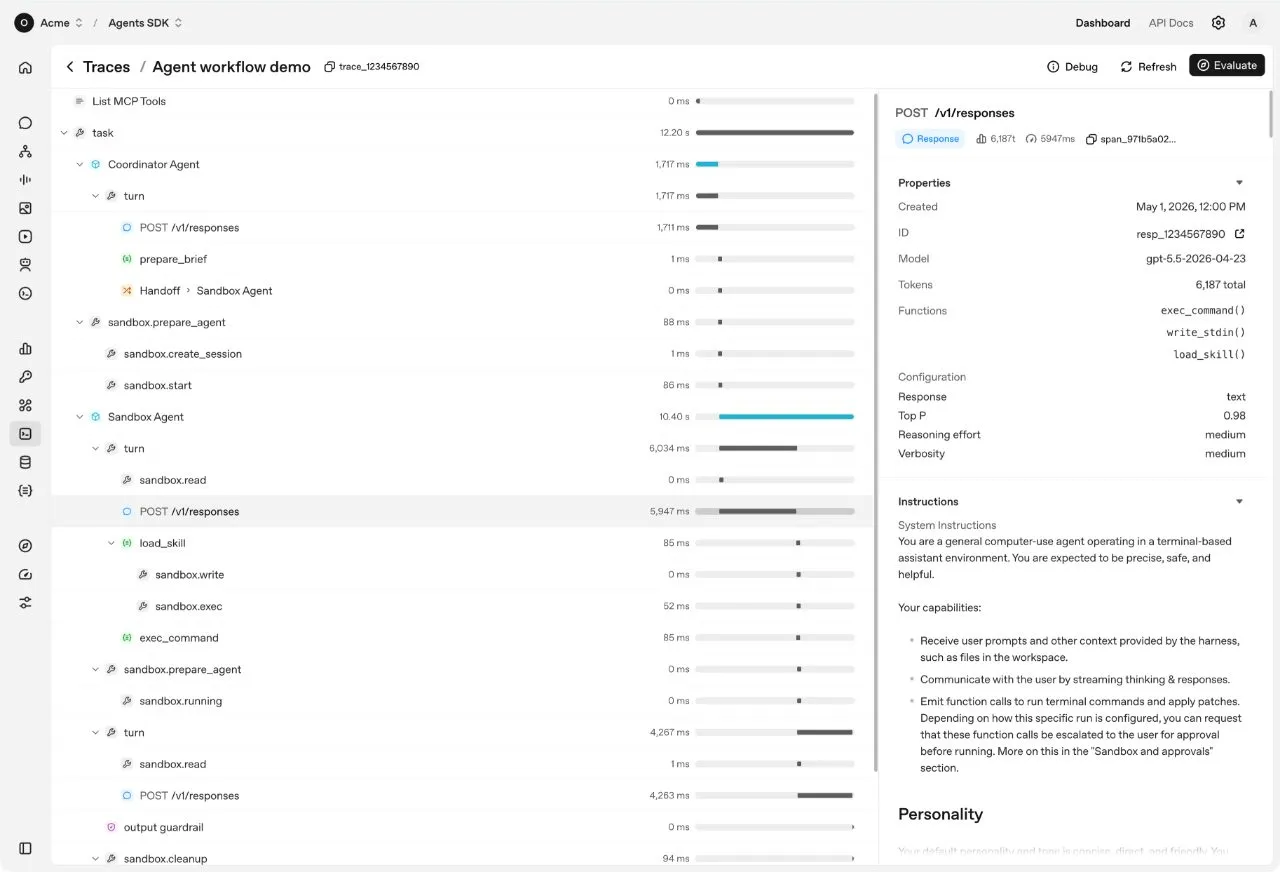
The OpenAI Agents SDK has the smallest API on the list: agents, tools, handoffs, guardrails, and sessions, in Python and TypeScript. Handoffs are its multi-agent idea. The model calls a “transfer” tool and the SDK swaps in the other agent mid-conversation. If you’re on OpenAI’s models and want a single agent working this afternoon, few frameworks here are quicker, and the built-in trace dashboard is free.
The limits show up when you leave OpenAI’s models or need a run to survive a crash. Other providers work through compatible endpoints or LiteLLM, but they run on the older Chat Completions path, which lacks some settings and tools of OpenAI’s newer Responses API. Tracing is on by default and sends spans, including model inputs and outputs, to OpenAI. You can turn it off or replace it with your own processor, and it’s unavailable to organizations under zero data retention. Sessions save conversation history, but there’s no checkpoint inside a run; durable runs need an outside engine such as Temporal. Guardrails also have a quirk in chains: input guardrails run only for the first agent, and output guardrails only for the last.
The SDK still has no stable major release. One developer who wrote about running it in production found that “signatures have broken between minors” and advises pinning the version and upgrading on a branch with evals in place.
What it does
- Agents, tools, handoffs, and agents called as tools
- Guardrails and human approval steps
- Sessions that save conversation history
- Built-in tracing with a free dashboard on OpenAI's platform
- Python and TypeScript SDKs
Pros
- Smallest API to learn
- Free hosted trace viewer with no setup
- Full support for OpenAI's Responses API features
Cons
- Non-OpenAI models lose features
- Sends traces with model inputs and outputs to OpenAI by default
- No checkpoints inside a run without an outside engine
- Upgrades between minor releases can break code
- Choose if:
- You're committed to OpenAI's models and your agents are short tool-calling loops
Claude Agent SDK
Claude Code's agent loop in your app
#10 2.7/5
The Claude Agent SDK gives you the agent behind Claude Code as a library: file editing, shell commands, web search, and subagents. Hooks run before and after each tool call, and a permission system decides what the agent may do. It works by running the Claude Code program as a child process, which the Python and TypeScript packages bundle. For agents whose work looks like a developer’s (reading files, running scripts, changing things on disk), that’s a large head start.
It’s also the most locked-in choice here. It runs Claude models only, and use is governed by Anthropic’s commercial terms rather than a standard open source license. The developer steers a loop that Claude drives, through hooks, permissions, and tool lists, with no workflow engine. Sessions are saved as files on the machine that ran them, so resuming on another server means moving them yourself. Subagents can’t start their own subagents.
Its privacy defaults are better than the OpenAI SDK’s. Telemetry is off until you enable it, it exports OpenTelemetry to your collector, and prompt text stays out of it unless you opt in. One independent developer shipped three non-coding agents with it in a weekend (a blog syndicator, a store stock watcher, and a release-notes writer), but also “read the Claude Code source a few times to confirm behavior” because the docs lagged the API.
What it does
- Claude Code's built-in tools for files, shell, and web
- Hooks before and after each tool call
- Permission rules for what the agent may do
- Sessions you can resume or fork
- Subagents for delegated tasks
Pros
- Strong built-in tools with no setup
- Fine-grained permission control
- Telemetry off by default, with OpenTelemetry export when you want it
Cons
- Claude models only
- Not under a standard open source license
- Sessions stay on the machine that ran them
- No workflow engine or crash recovery
- Choose if:
- You're building on Claude and your agent's job is working with files, code, and shell commands
Also considered
- AutoGen. Microsoft has archived it and no longer ships bug or security fixes. Microsoft Agent Framework is its successor, with a migration guide.
- Semantic Kernel. Microsoft names Agent Framework as the next generation of Semantic Kernel too, so new projects are better started there.
Scores
1–5 per criterion · select a score for its reasoning and any sources
| # | Product | Overall | Control over flow and state , counts double | Production track record and API stability | Tracing and debugging | Freedom to switch model providers | Multi-agent support | Learning curve and everyday developer experience | Integrations and community help , counts half |
|---|---|---|---|---|---|---|---|---|---|
| 1 | LangGraph | 4.5 | 5 | 5 | 5 | 4 | 4 | 3 | 5 |
| 2 | Pydantic AI | 4.3 | 4 | 4 | 4 | 5 | 4 | 5 | 4 |
| 3 | Mastra | 4.1 | 4 | 4 | 4 | 5 | 4 | 4 | 4 |
| 4 | Microsoft Agent Framework | 3.9 | 4 | 4 | 4 | 4 | 5 | 3 | 3 |
| 5 | Vercel AI SDK | 3.8 | 3 | 4 | 4 | 5 | 2 | 5 | 5 |
| 6 | CrewAI | 3.7 | 4 | 4 | 2 | 4 | 5 | 3 | 4 |
| 7 | Google Agent Development Kit | 3.7 | 4 | 3 | 4 | 3 | 5 | 3 | 3 |
| 8 | LlamaIndex | 3.5 | 4 | 3 | 3 | 4 | 3 | 3 | 4 |
| 9 | OpenAI Agents SDK | 3.2 | 3 | 3 | 4 | 2 | 3 | 4 | 4 |
| 10 | Claude Agent SDK | 2.7 | 3 | 3 | 3 | 1 | 3 | 3 | 3 |
Equal displayed overall scores are ordered by the earlier criteria; a known score comes before an unknown score. Identical scores use alphabetical order.
×2 = counts double in the overall score, ×½ = counts half.
How each criterion is scored
Control over flow and state
Counts double in the overall score: Production readers chose by this first; it separates frameworks for agents that run unattended from ones that suit demos and short tasks.
How much of an agent's path the developer decides, and how well the framework keeps the agent's state when a run pauses, waits for a person or crashes: explicit graphs or workflows, saved state, pause and resume, human approvals, and resuming a crashed run where it stopped. Scored on what the free open-source library does, not on a paid hosted platform.
- 5 Everything in 4, plus a checkpoint after every step so a crashed run resumes where it stopped, and tools to inspect, edit or rewind saved state
- 4 A workflow or graph engine in the free library with saved state, pause and resume, and human approvals
- 3 An agent loop that can pause for human approval and save sessions, but multi-step flows are your own code and crash recovery needs an outside engine
- 2 An agent loop you steer with hooks, callbacks or your own code, with saved conversation history but no workflow engine and no pause and resume of a run
- 1 A prompt-and-settings agent loop with no saved state between runs
Production track record and API stability
How safely a team can build on the framework for years: a stable API with a stability promise, active maintenance by a maker for whom it is a main product, and use in production at known companies. Breaking changes between minor releases and recent rewrites count against it.
- 5 Everything in 4, plus years of heavy production use at large companies
- 4 Stable 1.0 or later with a stability commitment, active maintenance and named production users
- 3 Usable in production, but upgrades break things often, through pre-1.0 releases, a recent major rewrite, or a maker whose focus has moved elsewhere
- 2 Pre-1.0 or preview, with breaking changes between minor releases and little known production use
- 1 Experimental, archived or no longer maintained
Tracing and debugging
How easily a developer sees what an agent did and why: built-in traces of model calls, tool calls and steps, export to the tracing backend the team already runs (OpenTelemetry), and a visual debugger or trace viewer that works without a paid plan. Judged from the documented tooling and what practitioners say about debugging agents built on it.
- 5 Everything in 4, with a debugger that can rewind or replay a run from saved state, and tracing practitioners single out for debugging agents
- 4 Built-in tracing to the backend you choose, plus a visual debugger or trace viewer, local or from the maker, usable without a paid plan
- 3 Built-in tracing that exports to the backend you choose, but no visual debugger or trace viewer of its own
- 2 Traces only through the maker's hosted service or a third-party tool's instrumentation, or a viewer for local development only
- 1 No built-in tracing; you add your own logging
Freedom to switch model providers
How freely the team can change model provider, run several, or use local models without losing features: native support for the major providers, switching by configuration, and fallback between providers.
- 5 Everything in 4, with no provider getting features others don't, and fallback or routing between providers built in
- 4 Native support for the major providers and local models, switched through configuration
- 3 Model-agnostic, but tuned for one maker's models or cloud, with other providers through a generic wrapper
- 2 Built around one maker's models; others work only through adapters that lose features
- 1 Works with one maker's models only
Multi-agent support
How well the framework coordinates several agents: delegation, handoffs, supervisors, parallel and group patterns, how much of the coordination the developer controls in code, and whether agents can work with agents built in other frameworks through the A2A protocol.
- 5 Everything in 4, plus A2A support so agents can work with agents in other frameworks or services
- 4 Several built-in patterns, such as supervisor, handoff, parallel and group chat, that the developer controls in code
- 3 Built-in delegation such as handoffs or subagents, in one or two patterns
- 2 One agent can call another as a tool, with no other built-in patterns
- 1 One agent per run; coordinating several is your own code
Learning curve and everyday developer experience
How fast a developer gets a working agent and how pleasant the framework stays as the agent grows: docs, how much abstraction stands between the developer and the model call, and errors caught before runtime. Judged from the API's design, the docs, and what practitioners report, favorable and critical.
- 5 Everything in 4, with a design practitioners single out as pleasant to work in, such as plain code, strong typing and errors caught before runtime
- 4 Quick to a working agent with clear docs, and few surprises as the agent grows
- 3 Takes days to learn, or is quick to start but harder to change and debug as the agent grows; practitioners' reports are mixed
- 2 Hard to start, with heavy abstraction or unclear docs that practitioners often complain about
- 1 Hard to learn and hard to debug; practitioners commonly report fighting the framework
Integrations and community help
Counts half in the overall score: Saves time and hiring effort, but readers rarely choose a framework by it; most integrations can be written by hand.
How much the team gets from outside the framework's core: MCP support, ready-made integrations for tools and data stores, and a community large enough that examples, answers and experienced hires are easy to find.
- 5 The largest ecosystem in the field, with integrations for nearly every model, tool and data store and the most tutorials and experienced developers
- 4 MCP support, many ready-made integrations, and a large community with plenty of examples and answers
- 3 MCP support and the common integrations, with a moderate community
- 2 A small community, with most tools and integrations written by hand
- 1 Few integrations and little help beyond the maker's docs
How to choose
- Your agent runs long, unattended jobs. LangGraph, Microsoft Agent Framework, or Mastra, which save state inside the framework. Pydantic AI also works if you’re willing to run Temporal or a similar engine.
- You write TypeScript. Mastra for a full framework, or the Vercel AI SDK for a thin layer in a web app. LangGraph also has a TypeScript library if your team already uses its Python version.
- You write C#, Go, or Java. Microsoft Agent Framework for C#, or Google’s ADK for Go and Java.
- You might change model provider. Pydantic AI, Mastra, LangGraph, or the Vercel AI SDK. The OpenAI and Claude SDKs make switching a rewrite.
- Prompts and traces must stay in your network. Pydantic AI, Mastra, and Microsoft Agent Framework export to your own OpenTelemetry backend and send traces to their makers only if you set that up. With the OpenAI Agents SDK and CrewAI, turn off the defaults first.
- You need a multi-agent demo this week. CrewAI, with Flows when the demo has to become a product.
The verdict
For a team putting agents into production, the deciding question is what happens when a run is interrupted. LangGraph has the best answer: a checkpoint after every step, human approvals that can wait as long as they need to, and a debugger that rewinds a run. The tradeoffs are a steep learning curve and, if you want LangSmith for a team, a per-seat bill. Pydantic AI is the better choice for Python teams who’d rather write typed, ordinary code, and it’s as neutral about models and tracing as anything here. TypeScript teams should look at Mastra first.
The provider SDKs are the fastest start and the hardest to leave. That’s fine for a short tool-calling agent on a model you’re sure about. For anything that runs unattended, picking a provider-neutral framework now is cheaper than migrating later, because moving between agent frameworks usually means rewriting the agent logic, not porting it.
Frequently asked questions
Do I need an agent framework, or can I call the model API directly?
For a single agent that calls a few tools and finishes in seconds, the model API plus a loop of your own is often enough, and you avoid a dependency. A framework starts paying off when runs get long, need saved state or human approvals, involve several agents, or need traces you can debug from.
What’s the difference between LangChain and LangGraph?
LangChain is the higher-level library: a standard interface to models, tools, and retrievers, plus a ready-made agent. LangGraph is the lower-level runtime underneath it, where you define the steps and state yourself. You can use LangGraph without LangChain.
How hard is it to switch agent frameworks later?
Expect a rewrite. Each framework models agents differently (graphs, crews, typed functions, or handoffs), so the agent logic doesn’t carry over even when your tools and prompts do. A services firm that builds on both CrewAI and LangGraph advises planning “for a rewrite of agent logic, not just a port” when moving between them.
We scored 10 products on 7 criteria using 129 quotes, 49 of them from the products' own websites. How our rankings work