Best genealogy software for desktop

Only two desktop programs can keep your tree in step with an Ancestry tree: RootsMagic and Family Tree Maker. That one fact settles more of this decision than any feature list, because so many family trees now start on a website (Ancestry, FamilySearch or MyHeritage) and the desktop program’s first job is to hold a copy you control. It should also help you record where every fact came from, so you can explain your research when a cousin asks “says who?” twenty years from now.
For most people that makes RootsMagic the pick. It runs natively on Windows and Mac, syncs with Ancestry and FamilySearch, formats citations properly, and costs $39.95 once, with a free edition to try first. If you’re on Windows and care more about sourcing and charts than about Ancestry, Family Historian is the deeper program. If you won’t pay anything, Legacy Family Tree (Windows) and Gramps (Windows, Mac and Linux) are both free in full, and on a Mac that isn’t tied to Ancestry, MacFamilyTree is the nicest app to spend evenings in.
| Program | Runs on | Online tree it works with | Full version |
|---|---|---|---|
| RootsMagic | Windows, Mac | Ancestry, FamilySearch | $39.95 (free Essentials edition) |
| Family Historian | Windows | FamilySearch | $69.95, or $32.15 a year |
| Legacy Family Tree | Windows | FamilySearch | Free |
| Family Tree Maker | Windows, Mac | Ancestry, plus FamilySearch downloads | £79.95 in the UK |
| MacFamilyTree | Mac | FamilySearch, plus iCloud between your devices | $69.99 list, often half that |
| Gramps | Windows, Mac, Linux | None yet (FamilySearch in beta) | Free |
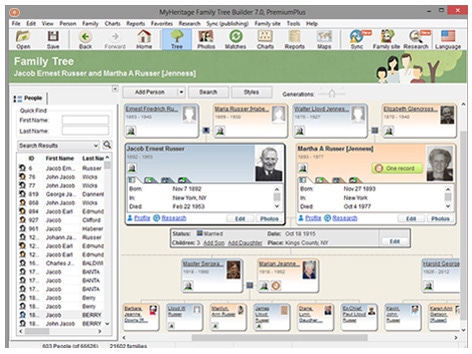
| Family Tree Builder | Windows | MyHeritage | Free |
| Heredis | Windows, Mac | Links people to FamilySearch only | $39.99 Windows, $69.99 Mac |
Every program here keeps the tree in a file on your computer and imports and exports GEDCOM, the standard family tree exchange format, so none of them traps you completely; the differences are in how much survives the trip.
1–5 per criterion · select a score for its reasoning and any sources
| # | Product | Overall | Sources and citations | Ease of use | Online tree sync and hints | Charts, reports and books | Data portability | Price , counts half | Active development , counts half |
|---|---|---|---|---|---|---|---|---|---|
| 1 | RootsMagic | 4.4 | 5 | 4 | 5 | 4 | 4 | 4 | 5 |
| 2 | Family Historian | 4.3 | 5 | 3 | 4 | 5 | 5 | 3 | 5 |
| 3 | Legacy Family Tree | 3.8 | 5 | 2 | 4 | 5 | 3 | 5 | 3 |
| 4 | Family Tree Maker | 3.8 | 4 | 4 | 5 | 4 | 3 | 2 | 4 |
| 5 | MacFamilyTree | 3.8 | 3 | 5 | 3 | 5 | 3 | 3 | 4 |
| 6 | Gramps | 3.6 | 4 | 2 | 2 | 4 | 5 | 5 | 4 |
| 7 | MyHeritage Family Tree Builder | 3.3 | 3 | 4 | 3 | 3 | 3 | 5 | 2 |
| 8 | Heredis | 3.2 | 3 | 3 | 2 | 4 | 3 | 3 | 5 |








Equal displayed overall scores are ordered by the earlier criteria; a known score comes before an unknown score. Identical scores use alphabetical order.
×2 = counts double in the overall score, ×½ = counts half.
How each criterion is scored
Sources and citations
How well the program records where each fact came from, so a tree can be checked and defended years later: source and repository records, citations attached to individual facts and events, templates that format citations to a recognized standard such as Evidence Explained, quality or confidence ratings, and research logs or to-do lists. Judged from the documented feature set of the edition a reader would use, experienced genealogists' and reviewers' accounts of entering and reusing sources, and knowledge of how each program stores citations.
- 5 Among the best available, with fact-level citations, formatted templates, flexible source types and research logs or tasks that serious researchers praise
- 4 Thorough fact-level citations with templates or a strong source model, and one notable gap such as missing research logs or awkward templates
- 3 Fact-level citations with sound source records, but few templates and little research planning
- 2 Basic source records and citations, but clumsy to attach to individual facts and no templates or research tools
- 1 Little more than free-text notes; facts can't carry proper citations
Ease of use
How quickly someone new to genealogy software can add people, families, events and sources and find their way around, and how pleasant the program is in daily use: clear layout, navigation, how many windows editing takes, and the quality of help. Judged from reviewers' and users' accounts of learning the program and knowledge of its interface.
- 5 The easiest and most pleasant to use, with a clear, modern interface that newcomers and long-time users both praise
- 4 Approachable; most newcomers build a tree without help and find most tools
- 3 A real learning curve of a few sessions; capable once learned
- 2 Learnable, but its interface fights newcomers, with dated design, many pop-up windows or unclear ways to add relatives
- 1 Confusing enough that many newcomers give up before entering a family
Online tree sync and hints
How well the program connects a local tree to the big online services: two-way sync or matching with an Ancestry, FamilySearch or MyHeritage tree, record hints shown inside the program, and how many of those services it works with. Judged from the vendor's documentation and reviewers' accounts. Features in beta count only as a caveat in the rationale.
- 5 Two-way sync with Ancestry and FamilySearch trees plus record hints from several sites
- 4 Two-way sync with one major online tree plus record hints from several sites
- 3 Two-way sync or matching with one online tree service, with hints from that service only
- 2 Searches or links to record websites, but doesn't exchange data with any online tree
- 1 No connection to online trees or record sites
Charts, reports and books
What the program can turn a tree into: the range and look of charts, narrative and list reports, family history books, and web pages, and how far they can be customized. Judged from the documented output and reviewers' views of its quality.
- 5 A very wide, highly customizable range of charts, reports and books that reviewers single out
- 4 A wide range of charts and reports plus a book or website tool, with one weakness such as basic-looking charts
- 3 A good set of charts and reports, but plain-looking or hard to customize, or no book tool
- 2 The standard pedigree and family group charts and a few reports, with little customization
- 1 A handful of basic charts and reports
Data portability
Whether a family historian can keep and move decades of work: GEDCOM import and export (including GEDCOM 7), how much is lost in export (source details, media links, custom facts), whether the native file is an open or documented format, and imports from other programs' own files. Judged from vendor documentation, reviewers' reports of transfers, and knowledge of each program's file format.
- 5 An open native format (GEDCOM itself or open-source code and files) with careful export of sources and media
- 4 Clean GEDCOM exchange or a documented native database, plus direct import of other programs' files or an export option that keeps source detail
- 3 Standard GEDCOM import and export with the usual losses of program-specific data in a proprietary file
- 2 GEDCOM export that loses notable data, or a closed format with no other way out
- 1 No usable export; data is locked in
Price
Counts half in the overall score: Most of these programs cost less than a year of an online records subscription, so price separates them less than what they do.
What the full program costs a home user, counting a needed edition upgrade but not optional add-ons. Free programs score highest; a subscription is judged by what it costs over a few years against a one-time licence.
- 5 Every feature free
- 4 Under $50 one-time, or a free edition plus an inexpensive full version
- 3 About $50 to $75 one-time, or a modest subscription with a one-time option in that range
- 2 About $75 to $100 one-time
- 1 Over $100 one-time, or a required subscription costing more than that over three years
Active development
Counts half in the overall score: It matters to anyone keeping a tree for decades, but a program's data stays portable, so it counts less than what the program does today.
How likely the program is to keep working on new operating systems and with online services for years: how recent its last major release is, how often it is updated, and whether the developer is adding features or only maintaining it. Judged from release histories and vendors' statements.
- 5 A major release within the last year and frequent updates adding features
- 4 A major release within about two years and regular updates
- 3 Maintained with fixes, but no major release in about two years and few new features
- 2 Only occasional fixes, with shrinking platform support or a vendor that has signaled little future
- 1 Discontinued or no longer updated
RootsMagic
Best all-round pick for Windows and Mac
#1 4.4/5
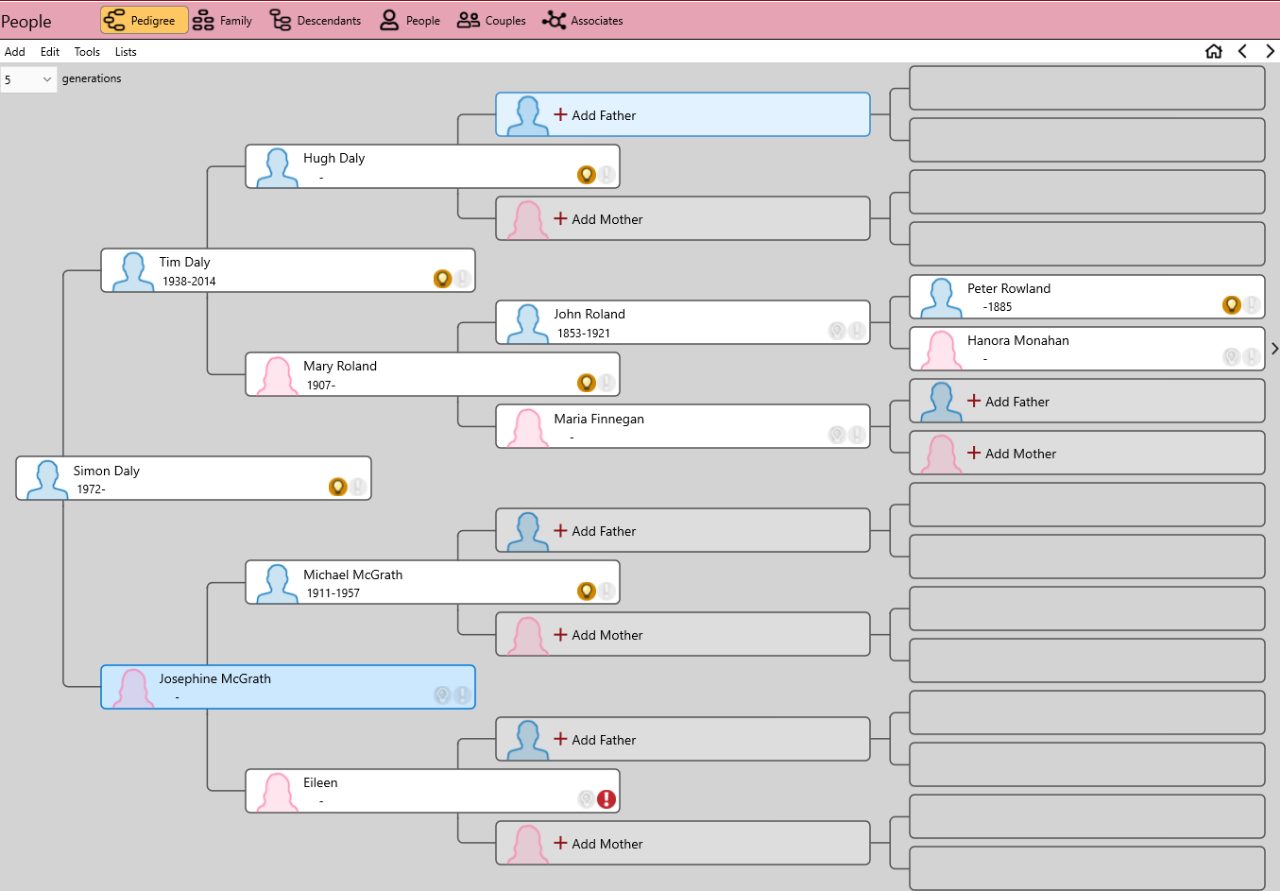
RootsMagic is the program to get if your tree is on Ancestry and you also want to cite sources properly. TreeShare keeps a RootsMagic file and an Ancestry tree matched in both directions and pulls in Ancestry’s hints; the FamilySearch connection downloads people and shares changes back; and WebHints flag possible records from Ancestry, FamilySearch, MyHeritage and Findmypast. The hints from paid sites only open records if you subscribe to that site. FamilySearch is free with an account.
The sourcing is where it beats Family Tree Maker, its only rival for Ancestry sync. Source templates follow Evidence Explained, the style guide most American genealogists cite by, and citations attach to any individual fact. Research tasks and logs keep track of what you’ve already searched. Professional genealogist Claire Bradley found the built-in templates “very American-focused”, and building her own for Irish records was slow going, so researchers working mainly in British or Irish records should expect some setup. Version 12 simplifies citation entry and adds a new tree screen.
The free RootsMagic Essentials edition has no time limit, but leaves out much of what makes RootsMagic worth choosing: no TreeShare, no research logs, no narrative reports, no maps, and several views and editing screens switched off. Budget for the full version.
The weak spots are cosmetic: no photo editing and charts that look plain next to Family Historian’s or MacFamilyTree’s. RootsMagic also imports Family Tree Maker, Legacy and PAF files directly, not just GEDCOM, which makes it the easiest program here to move into.
What it does
- Two-way sync with an Ancestry tree (TreeShare) and with FamilySearch
- Record hints from Ancestry, FamilySearch, MyHeritage and Findmypast
- Source templates based on Evidence Explained, plus research tasks and logs
- Direct import of other programs' own files, not just GEDCOM
- DNA match records with Leeds Method clustering
Pros
- The only program that pairs Ancestry sync with rigorous sourcing
- Native on Windows and Mac, including Apple silicon
- $39.95 once, with no subscription
Cons
- The free Essentials edition leaves out most of what makes it worth having
- Plain-looking charts and no photo editing
- Built-in source templates lean American
- Skip if:
- You only use FamilySearch and want the deepest sourcing tools on Windows
Family Historian
Deepest sourcing and charts on Windows
#2 4.3/5
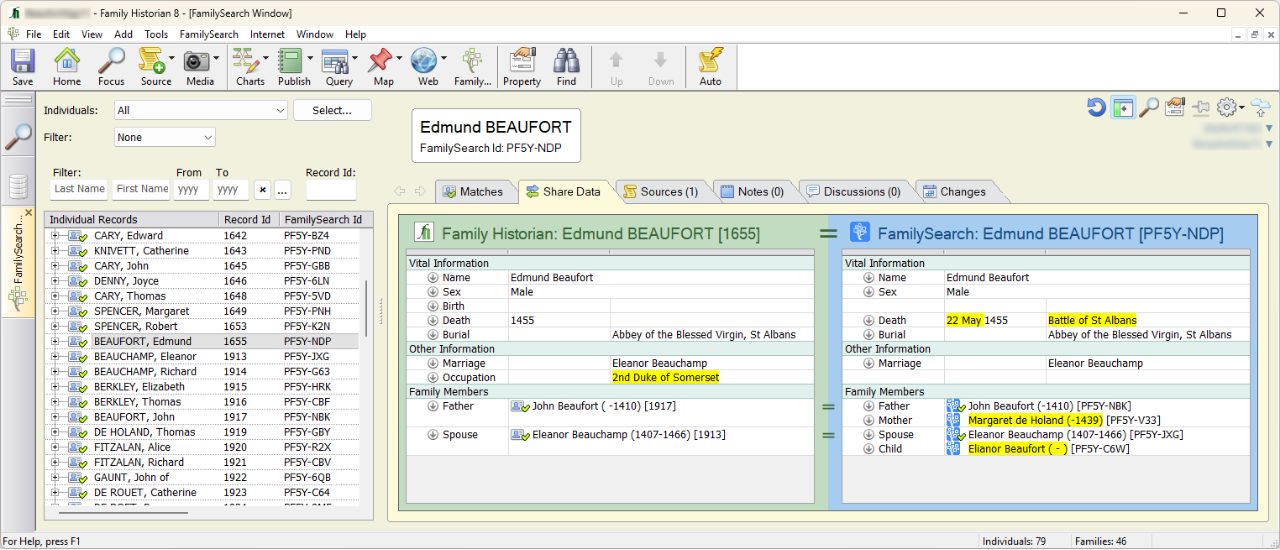
Family Historian is the strongest choice here for detailed research on Windows. Its source tools are the best here: citations on every fact, templated, generic or (new in version 8) free-form sources, and citations you can customize down to the bibliography entry. Its charts can be dragged, filtered and restyled almost endlessly, and the book tool combines them with your own writing.
It also stores your project as GEDCOM, which matters more than it sounds. Most programs keep a private database and export GEDCOM on the side; Family Historian’s file is the standard format, and version 8 adds an export option that writes full citation details into standard GEDCOM fields so another program can read them. If you worry about what happens to your work in 2045, this is the most reassuring answer on the list.
Version 8 fixed its biggest gap. It now matches people with FamilySearch trees, shows the differences, updates in either direction, and offers FamilySearch record hints, on top of the Findmypast and MyHeritage hints it already had. There’s still no Ancestry connection, so an Ancestry-first family historian is better served by RootsMagic. Version 8 also adds a free read-only phone app (in beta) and an optional AI Connector that lets an assistant such as Claude read and edit your project, with every change undoable.
The cost is a learning curve. It does so much that newcomers can get lost, and it’s Windows-only: Mac owners need Parallels or CrossOver. Pricing now comes two ways, $69.95 for a perpetual version 8 license or $32.15 a year for a subscription that includes every new release. Over three years the subscription costs about $96, so buy outright unless you’re testing the waters.
What it does
- Templated, generic and free-form sources, with fully customizable citations
- Two-way matching and record hints with FamilySearch trees
- Highly customizable diagrams, dozens of reports and a book tool
- Projects stored as GEDCOM, with an export that keeps citation details
- Free read-only mobile app (beta) and optional AI Connector
Pros
- The strongest source and citation tools here
- The most future-proof file format among the paid programs
- Charts and books you can shape exactly as you want
Cons
- A significant learning curve
- Windows only
- No Ancestry sync
- Choose if:
- You research mainly in British records and want your citations formatted your way
Legacy Family Tree
Free, deep and dated, for Windows
#3 3.8/5
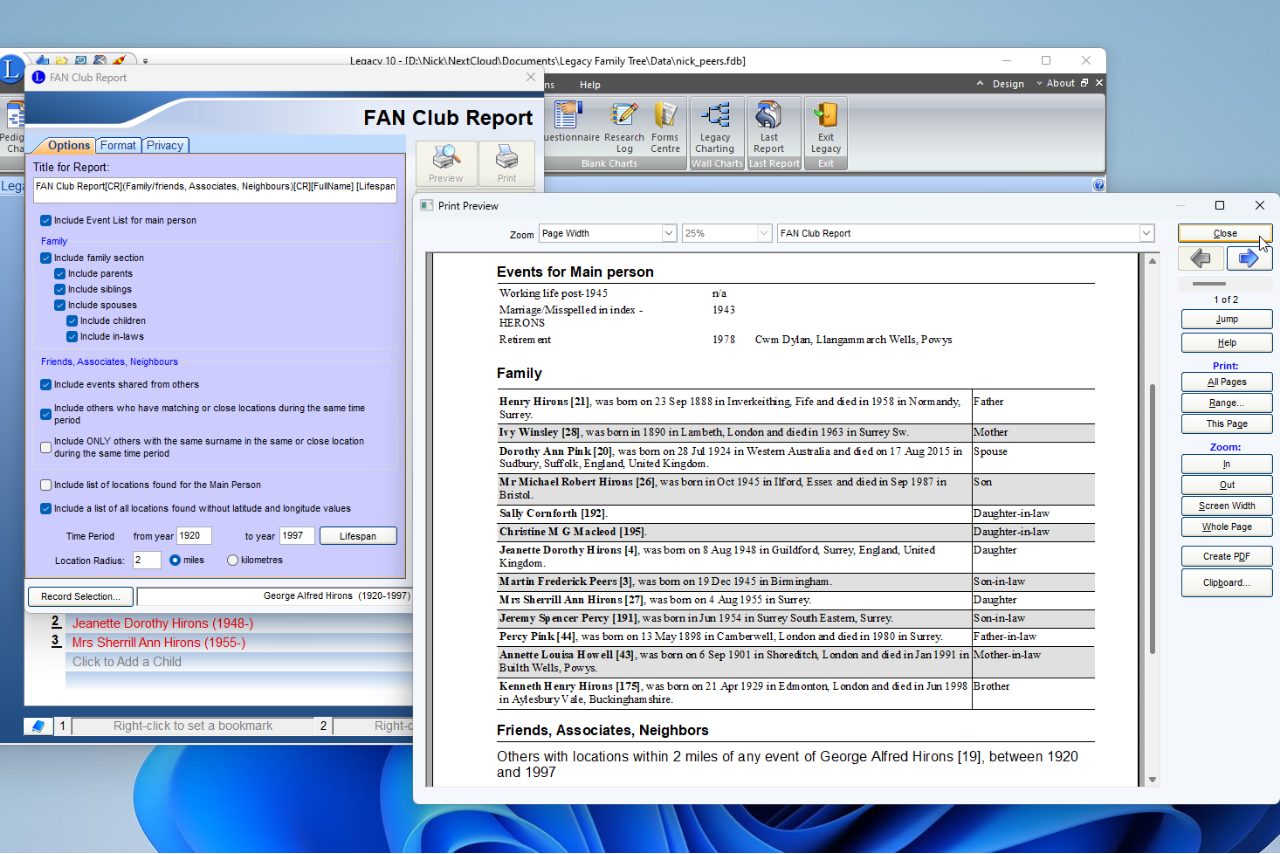
Legacy Family Tree used to sell a paid Deluxe edition; with version 10 its owner, MyHeritage, made every feature free. For no money at all, you get a lot: SourceWriter formats Evidence Explained style footnotes and bibliographies from templates you fill in, there are more than 100 charts and reports, and a publishing center binds them into an indexed book. Research aids such as the to-do list, color coding and the chronology view round it out.
It connects to FamilySearch (switched off until you enable it) and checks Findmypast, FamilySearch, GenealogyBank and MyHeritage for possible records. It has no Ancestry link.
Two things hold it back. The interface looks like it was designed for Windows XP, and editing one person can mean a stack of pop-up windows; it’s the least friendly of these programs after Gramps. And its future is uncertain: it hasn’t had an update in more than a year, version 10 added little, so there is little sign of where development goes next. It runs only on Windows (Mac support means Windows on an Intel Mac).
If you’re a Windows user who wants serious sourcing for nothing, start here. Just export a GEDCOM backup now and then.
What it does
- SourceWriter templates that format footnotes, endnotes and bibliographies
- 100+ charts and reports and a book publishing center
- Two-way FamilySearch tools and record hints from four sites
- To-do lists, color coding, hashtags and a chronology view
Pros
- Every feature free
- Sourcing and reports on a par with paid programs
Cons
- Dated, cluttered interface with many pop-up windows
- Few new features since 2024, so its future is in doubt
- Windows only, with weak mapping
- Skip if:
- You want a program that's pleasant to use from day one
Family Tree Maker
Smoothest Ancestry sync, at a price
#4 3.8/5
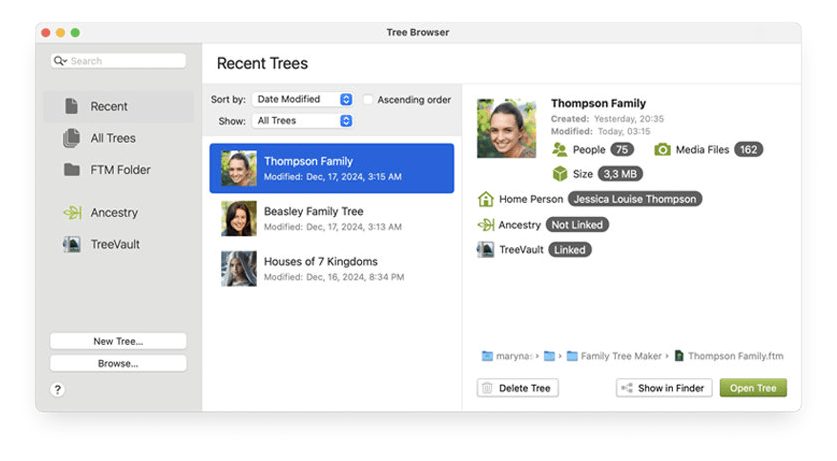
Family Tree Maker is the name most people know, and for an Ancestry user who wants things simple it’s the most polished way to work. Its sync keeps a local tree and an Ancestry tree matched, it pulls Ancestry and FamilySearch hints into the people index, and the layout is easy to learn. Photo Darkroom repairs faded photos, and Turn Back Time can undo up to 5,000 changes, a feature worth having before you merge two big trees.
Against RootsMagic, the trade is ease and extras for money and research depth. Family Tree Maker costs about twice as much (£79.95 in the UK; a US download upgrade normally runs $80) and its sourcing has fewer research-planning tools. Its extras depend on TreeVault, a subscription after a free first year (£20 a year in the UK): that’s what powers the cloud backup, the FTM Connect app relatives use to view your tree and leave corrections, and Next of Kin, which hands your tree and license to a successor you name. If those appeal, Family Tree Maker is worth the premium. If you just want Ancestry sync and proper citations, RootsMagic does it for less.
FTM 2024, the current edition, runs on Windows 10 or later and macOS 11 or later.
What it does
- Two-way sync with an Ancestry tree
- Ancestry and FamilySearch hints, and FamilySearch branch downloads
- Photo Darkroom repair tools and Turn Back Time undo
- Optional TreeVault backup, mobile viewer and successor service
Pros
- The easiest program for keeping an Ancestry tree on your computer
- Native on Windows and Mac
Cons
- The most expensive program here
- Its mobile and cloud extras need a TreeVault subscription
- Fewer research tools than RootsMagic
- Choose if:
- You want relatives to view and correct your tree on their phones
MacFamilyTree
The most enjoyable to use, Mac only
#5 3.8/5

MacFamilyTree feels at home on a Mac, with an interface that makes browsing your family history a pleasure. Charts range from fan and hourglass layouts to timelines and diagrams of family relationships, the interactive tree and 3D virtual globe are the most enjoyable ways to browse a family in any of these programs, and the photo tools will even colorize old pictures.
It works with FamilySearch better than most programs, and CloudTree syncs your trees between Macs, iPhones and iPads over iCloud at no extra cost; you can even invite relatives to edit the same tree. There’s no Ancestry or MyHeritage link, and the iPhone and iPad app, MobileFamilyTree, is a separate purchase.
Sourcing is the gap. You can cite sources on facts and use a template-driven source view, but it lacks the research logs and formatted-citation depth of RootsMagic or Family Historian. The list price is $69.99, with a current discount to $34.99. For a Mac user who isn’t on Ancestry and enjoys the visual side of family history, it’s the pick; for an Ancestry user on a Mac, RootsMagic is.
What it does
- Interactive tree, 3D virtual globe and a wide range of charts
- FamilySearch search and comparison inside the app
- Free CloudTree sync and sharing over iCloud
- Photo repair and colorizing
Pros
- The most pleasant interface here
- Beautiful charts, books and websites
Cons
- Mac only, with the iPhone and iPad app sold separately
- Lighter sourcing than research-focused programs
- No Ancestry or MyHeritage connection
Gramps
Free and open source, on every system
#6 3.6/5
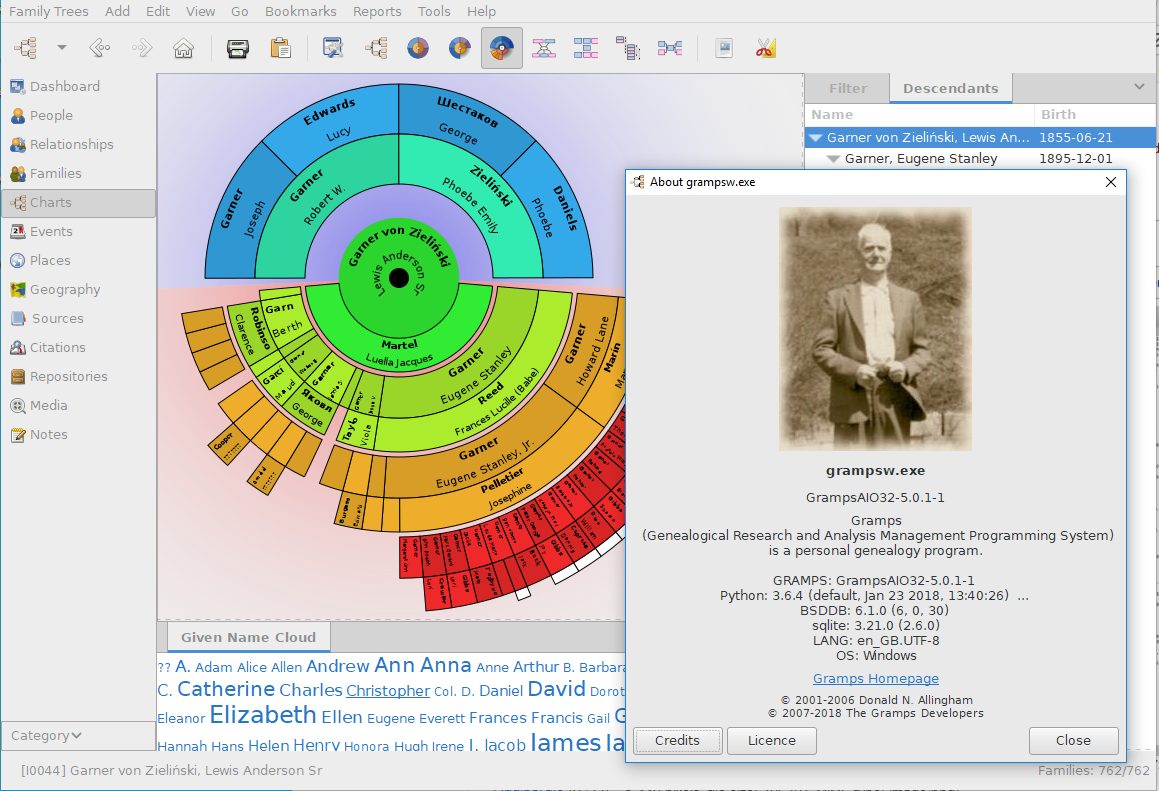
Gramps is free, open source and the only program here that runs on Linux as well as Windows and Mac. It organizes research in detail: events are the center of everything, citations can carry a confidence rating, and sources, the archives that hold them, places and media each have their own records. It produces dozens of reports in several formats, fan charts and relationship graphs, and a static website of your tree. Because the code and its XML format are open, nobody can ever lock your data away.
Getting started is the hard part. Gramps thinks in families and events rather than people on a chart, and one newcomer on Reddit spent an hour unable to “even marry my own wife in it”. Expect to read the manual. There’s also no online sync in the current release; FamilySearch integration is in public beta for the next version, and should be kept away from your main tree while it is still being tested. Gramps Web, a separate self-hosted web app, can share the same data with relatives in a browser if you’re comfortable running a server.
Pick Gramps if you’re on Linux, if open source matters to you, or if you’re methodical enough that its model feels like a feature. Windows users who just want free should try Legacy first.
What it does
- Event-centered records of people, sources, citations, places and media
- Reports in several formats, fan charts, relationship graphs and a website export
- A large library of community add-ons
- Optional Gramps Web for sharing in a browser
Pros
- Free, open source and on Windows, Mac and Linux
- Open data format that can't trap your work
Cons
- The steepest learning curve here
- No online tree sync in the stable release
MyHeritage Family Tree Builder
For MyHeritage members on Windows
#7 3.3/5
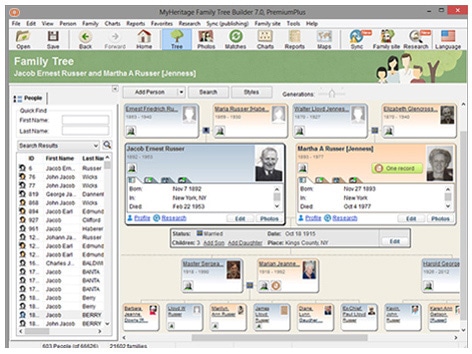
Family Tree Builder is MyHeritage’s free desktop program, and it exists mainly to sync with a MyHeritage family site. Changes flow both ways between the desktop, the website and MyHeritage’s phone app, and MyHeritage’s Smart Matches and record matches show up on your computer. It’s easy to start with, tags faces in photos, and comes in more than 40 languages, which matters for families spread across countries.
It’s now Windows-only. MyHeritage stopped supporting the Mac version, and existing Mac copies can no longer sync once a macOS Sequoia security update is installed. The basic family site is free; MyHeritage’s paid plans unlock more of the matching and records. Its sourcing and reports cover the basics. If your tree and DNA matches already live on MyHeritage, it’s the only program here that connects to them; otherwise, choose something else.
Pros
- Free, with two-way MyHeritage sync
- Easy to learn, in more than 40 languages
Cons
- Windows only now
- Little reason to use it without a MyHeritage tree
Heredis
For European research, on Windows or Mac
#8 3.2/5
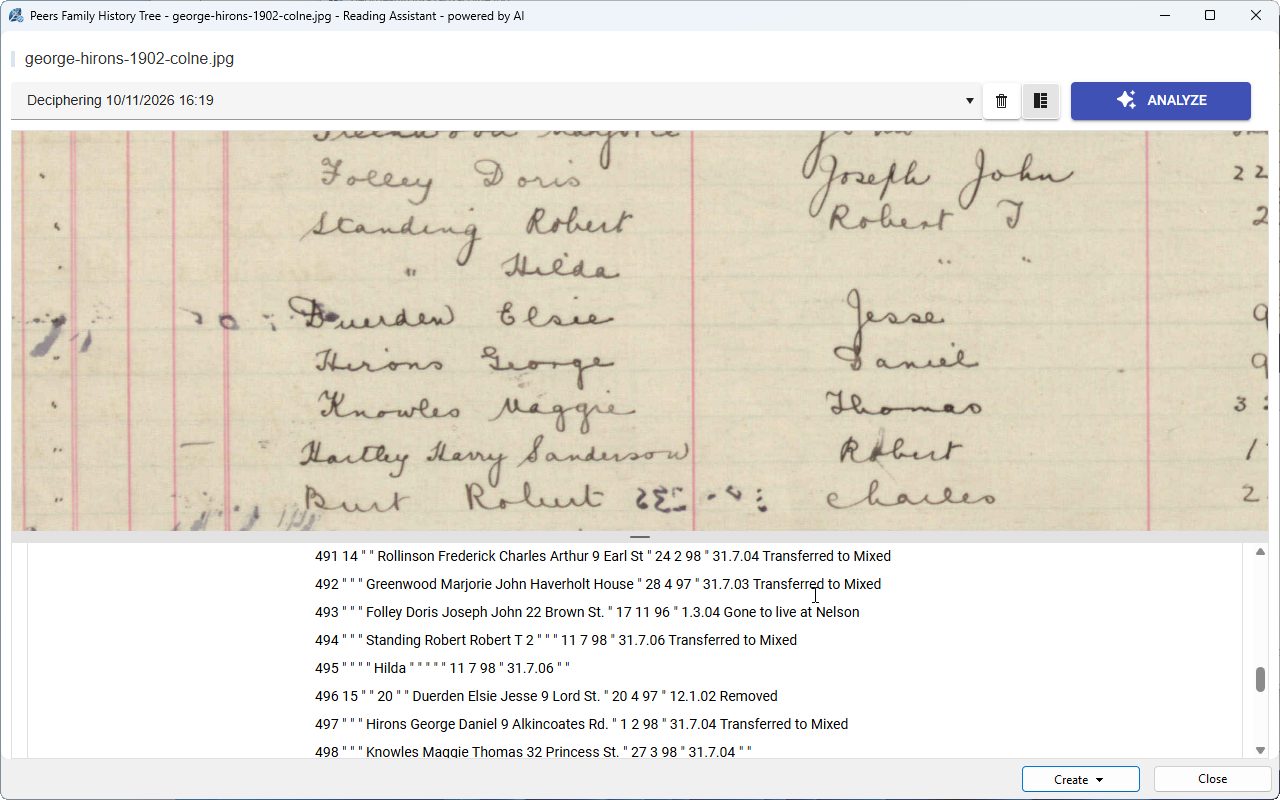
Heredis is a French program with English, German and Spanish editions, and its strengths lean European: searches into European archives, books such as a “families from my village” history, and good place tools. Heredis 2027 adds an AI Reading Assistant that transcribes handwritten documents, including old census pages, at one paid token per document (three are included; 20 more cost $9.99).
The downside is ongoing cost. A new version comes out every year at $29.99 and up for an upgrade, the Mac edition costs $69.99 against $39.99 on Windows, and the phone app has to be bought again for each release. Its FamilySearch link only connects people to their FamilySearch entries; you can’t exchange facts or records with it. English-speaking researchers working mostly in British or American records will get more from RootsMagic.
Pros
- AI transcription of handwritten documents
- Strong book and sheet tools
Cons
- Yearly paid versions and a mobile app bought per release
- No data exchange with FamilySearch or other online trees
Also considered
- Ancestral Quest syncs with the FamilySearch Family Tree, which is its main reason to exist, and costs $34.95 with a free Basics edition. RootsMagic, Legacy and Family Historian 8 now do that too and each adds more, such as RootsMagic’s Ancestry sync. Pick Ancestral Quest only if you want NetFam, which lets several people edit one database over the internet.
- Reunion has been a Mac favorite since 1988 and reached version 14 in 2024, but it searches record websites rather than syncing with any online tree. MacFamilyTree covers the same Mac reader with FamilySearch integration and free iCloud sharing.
How to choose
- Your tree is on Ancestry: RootsMagic, or Family Tree Maker if you’ll pay more for the easier interface and the TreeVault extras.
- You cite everything and use Windows: Family Historian. Legacy if it has to be free.
- You’re on a Mac: RootsMagic if you use Ancestry, MacFamilyTree if you don’t.
- You won’t pay: Legacy on Windows, Gramps on Mac or Linux.
- Your tree is on MyHeritage: Family Tree Builder, on Windows.
- You mainly use FamilySearch: RootsMagic, Family Historian, Legacy and MacFamilyTree all work with it; choose among them on platform and sourcing.
The verdict
Which online service holds your tree narrows the field before features do. Ancestry users have two choices, and RootsMagic is the better one for most: it costs about half as much as Family Tree Maker, matches it on sync, and beats it on citations, research logs and the ease of moving in from another program. Family Tree Maker earns its premium only if you want its photo tools, a gentler interface, or the TreeVault services that let relatives see your tree on their phones.
If you’re on Windows and Ancestry isn’t central, Family Historian is the strongest choice for detailed sourcing and customizable charts; version 8 closed its FamilySearch gap and its GEDCOM-based file is the safest long-term home on the list. Legacy gives you most of that sourcing power free, at the cost of an old interface and an uncertain future. Gramps is the free choice everywhere else, provided you’re patient. And on a Mac, MacFamilyTree is the one you’ll enjoy opening, as long as you can live with lighter sourcing.
Frequently asked questions
Can’t I just download my tree from Ancestry instead?
You can export a GEDCOM file of an Ancestry tree from the tree’s settings, but it’s a one-off snapshot and leaves your photos and attached records behind. RootsMagic and Family Tree Maker download the media too, and keep the two copies matched afterwards.
Will I lose data moving between programs?
Some. GEDCOM carries people, events, notes and sources, but each program’s extras (citation templates, custom facts, media links and formatting) often arrive damaged or flattened. RootsMagic reduces the problem by reading several rival programs’ own files directly, and Family Historian 8 can export full citation details in standard GEDCOM fields. Check a few people carefully after any move.
Do I need a subscription?
Not for the programs, apart from Family Historian’s optional subscription and Family Tree Maker’s optional TreeVault. Record hints from Ancestry, MyHeritage or Findmypast only open the records if you subscribe to that site; FamilySearch is free with an account.
We scored 8 products on 7 criteria using 74 quotes, 34 of them from the products' own websites. How our rankings work