Ham radio logging software, ranked
A logging program used to be a tidier paper log. Now its main job is getting your contacts confirmed. Every QSO (a completed contact) you log should go out to Logbook of the World (LoTW, the ARRL’s confirmation system and the one its DXCC award accepts), and usually to QRZ Logbook, eQSL and Club Log as well, then come back marked confirmed when the other station uploads too. The logger that does all of that without you remembering to click anything is the one you’ll keep using.
For most hams logging from a Windows PC, the best place to start is Log4OM. It’s free, it sends every contact to all four services the moment you log it, and it logs FT8 contacts straight from WSJT-X. If its crowded screen puts you off, N3FJP’s Amateur Contact Log is the easiest Windows logger to learn, for a one-time $39.99. Away from Windows the answer changes: MacLoggerDX on a Mac, Wavelog if you’re happy to host a web log yourself, and HAMRS for park and summit activations. Contesters usually run N1MM Logger+ for contests and keep a separate everyday log.
For LoTW uploads, you’ll need TQSL (TrustedQSL), the free ARRL program that holds your callsign certificate. Install it and get your certificate before setting up uploads in your main logger. All the loggers below read and write ADIF, the standard log file format, so you can move your contacts when you change programs.
Picks by situation



Key facts
10 productsLicenses, requirements, and starting prices. Prices as of November 2026.
- License
- Freeware
- Runs on
- Windows (64-bit)
- Needs
- TrustedQSL (TQSL) for LoTW uploads
- Price
- Free plan
- License
- Freeware
- Runs on
- Windows
- Needs
- TrustedQSL (TQSL) for LoTW uploads
- Price
- Free plan
- License
- Proprietary
- Runs on
- macOS 12 or later (Apple silicon and Intel)
- Needs
- Unknown
- Price
- From $95.00 one-time
- License
- MIT, open source
- Runs on
- Web (self-hosted)
- Docker
- Needs
- PHP 8.2 or later
- MySQL 8 or MariaDB 10.11 or later
- WLGate with FLrig or Hamlib for radio control and WSJT-X logging
- Price
- Free plan
- License
- Proprietary
- Runs on
- Windows
- Needs
- TrustedQSL (TQSL) for LoTW uploads
- Price
- From $99.95 one-time
- License
- Proprietary
- Runs on
- Windows 7 through 11
- Needs
- Unknown
- Price
- From $39.99 one-time
- License
- Unknown
- Runs on
- iOS
- Android
- Windows
- macOS
- Linux
- Needs
- Unknown
- Price
- From $1.99 one-time
- License
- Freeware
- Runs on
- Windows
- Needs
- Unknown
- Price
- Free plan
- License
- Unknown
- Runs on
- Web
- Needs
- Unknown
- Price
- From a free plan or $35.95/year
- License
- Freeware
- Runs on
- Windows
- Needs
- Unknown
- Price
- Free plan



Start with your computer, then how you operate
Most of the strongest loggers run only on Windows, so your computer settles a lot before features do. On a Windows PC you have the whole list. On a Mac, MacLoggerDX is the full-strength choice. On Linux, or if you want one log you can open from any device, Wavelog is the pick, as long as you’re comfortable running it on a home server, a Raspberry Pi or a web host.
The second question is whether all your operating happens at home. Many operators end up with two programs: a main logbook at home, plus a contest logger like N1MM Logger+ or a field logger like HAMRS. That works fine. The second program exports an ADIF file, the main logbook imports it, and the main logbook handles the uploads and award tracking. Pick the main logbook for confirmations and awards; pick the second one for speed in the moment.
Log4OM
Free all-rounder for Windows
#1 4.1/5
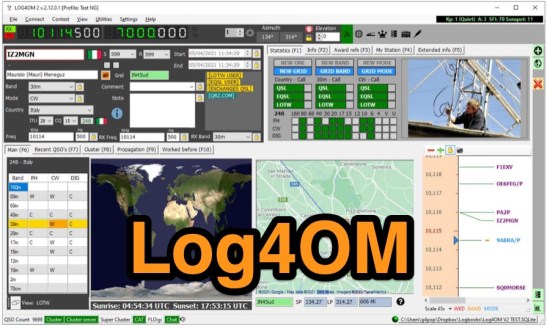
Log4OM (its current version is often written Log4OM 2) is the logger to try first if you’re on Windows and don’t want to pay. Once you’ve entered your logins, each contact goes to LoTW, eQSL, QRZ Logbook, Club Log and HRDLog as soon as you save it, and LoTW and eQSL confirmations flow back into the log on their own.
The rest of the feature list is long for a free program. It tracks more than 40 awards that you can configure, including IOTA, SOTA, POTA and WWFF references. It logs automatically from WSJT-X, JTDX and JTAlert, programs for digital modes such as FT8, and can show the stations they decode. Radio control runs through OmniRig, Hamlib or CAT4OM, which let the PC read and set your radio’s frequency and mode and together cover most current radios.
The price you pay is clutter. Lots of panels compete for space on the main screen, making it harder to find the controls you need. Plan on an evening of setup, and use the free user guide. If you want a calmer screen and don’t mind paying, N3FJP’s logger is simpler; if you chase DXCC seriously, DXLab Suite goes deeper.
What it does
- Uploads each contact to LoTW, eQSL, QRZ Logbook, Club Log and HRDLog as you log it
- Logs FT8 and FT4 from WSJT-X or JTDX and shows their decodes
- Tracks more than 40 configurable awards, including POTA, SOTA and IOTA
- Radio control through OmniRig, Hamlib or CAT4OM
Pros
- Free with no paid tier
- Confirmations stay current without manual uploads
- Actively developed, with frequent releases
Cons
- Busy main screen that takes time to learn
- Runs only on 64-bit Windows
- Skip if:
- You're on a Mac or Linux and don't want to run Windows
DXLab Suite
Deepest free toolkit for DXCC chasers
#2 3.9/5
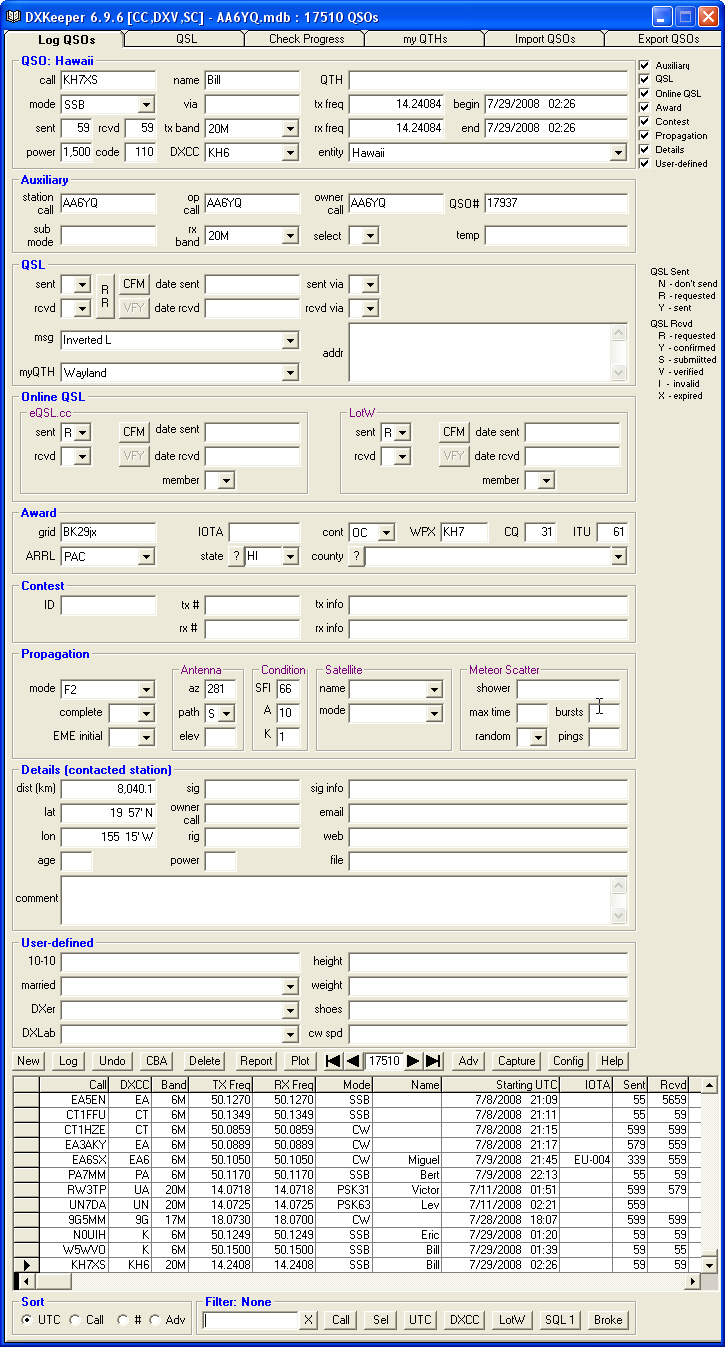
DXLab Suite is for operators whose main goal is working and confirming new countries. It’s not one program but eight free ones that find each other and work together: DXKeeper is the logbook, Commander controls up to four radios (more than 100 models), SpotCollector gathers reports of stations on the air from DX clusters and the Reverse Beacon Network, and DXView draws the maps. You install the parts you need and add others later.
Where it pulls ahead of Log4OM is the DXCC workflow. DXKeeper syncs with LoTW, Club Log, eQSL and QRZ in both directions and can upload each contact to LoTW as you log it. It tracks about 30 awards against your LoTW, eQSL and paper confirmations, highlights spots for stations you still need, and prepares the paperwork for a DXCC submission. It works directly with WSJT-X, and SpotCollector shows decoded stations colored by whether you need them. DXKeeper is also one of the two most common loggers among Club Log users on the DXCC Honor Roll, for operators who have worked nearly every country.
The cost is setup. Several cooperating programs mean more settings than a single-window logger, and the suite rewards reading its documentation. That documentation is excellent, and the developer, Dave Bernstein, AA6YQ, answers questions on the DXLab support group himself. If you only want a log that uploads to LoTW, Log4OM gets you there faster.
What it does
- DXKeeper logbook with two-way LoTW, Club Log, eQSL and QRZ sync
- Award tracking and DXCC submission paperwork
- Commander radio control for more than 100 models, up to four radios
- SpotCollector spot gathering with needed stations flagged
Pros
- Free, with the most complete DXCC workflow here
- Thorough documentation and fast answers from the developer
- Install only the parts you need
Cons
- Long setup across several programs
- Windows only
- No commercial use allowed
- Choose if:
- You're working toward DXCC Honor Roll and want every needed spot flagged
MacLoggerDX
The Mac logger
#3 3.9/5
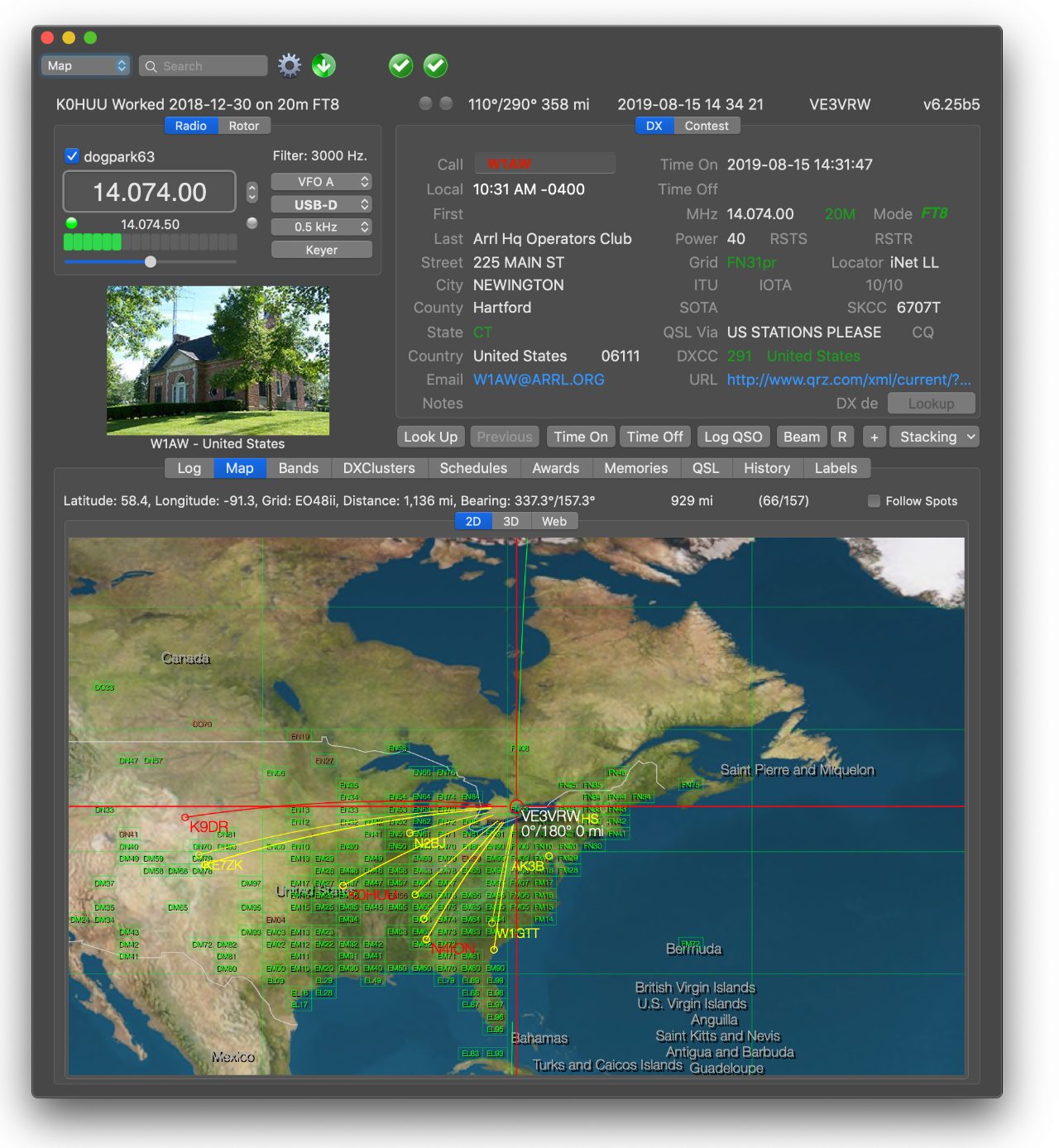
MacLoggerDX is the full-featured logger for Mac owners, and the one to buy if you don’t want to run Windows at all. It’s a native app for Apple silicon and Intel Macs on macOS 12 or later, and it does what the top Windows loggers do. It uploads each contact to Club Log, QRZ Logbook, LoTW, HRDLog and eQSL, pulls confirmations back from LoTW, QRZ and eQSL, and logs directly from WSJT-X, JTDX and JS8Call, coloring their decoded stations by whether you’ve worked or confirmed them.
It controls more than a hundred radios and many antenna rotators, tunes to spots you click, and draws DX cluster spots on 2D and 3D maps. For portable work it looks up POTA and SOTA references and decodes them from spots, though there’s no iPhone or iPad version. Registration costs about $95 and includes two years of email support. Before paying, you can run the demo for 15 minutes at a time as often as you like, which is enough to check that your radio connects.
If that’s more than you want to spend, QLog (under “Also considered” below) is a free desktop logger that also runs on macOS, and Wavelog runs in any browser.
What it does
- Uploads to Club Log, QRZ Logbook, LoTW, HRDLog and eQSL, with confirmations from LoTW, QRZ and eQSL
- Logs from WSJT-X, JTDX and JS8Call
- Controls more than a hundred radios and many rotators
- Maps DX cluster spots in 2D and 3D
Pros
- A native Mac app, no Windows needed
- Confirmation uploads as complete as the best Windows loggers
- Unlimited 15-minute demo to test with your radio
Cons
- Costs more than most Windows loggers, several of which are free
- Mac only, with no iPad version
Wavelog
Self-hosted web log for any device
#4 3.9/5
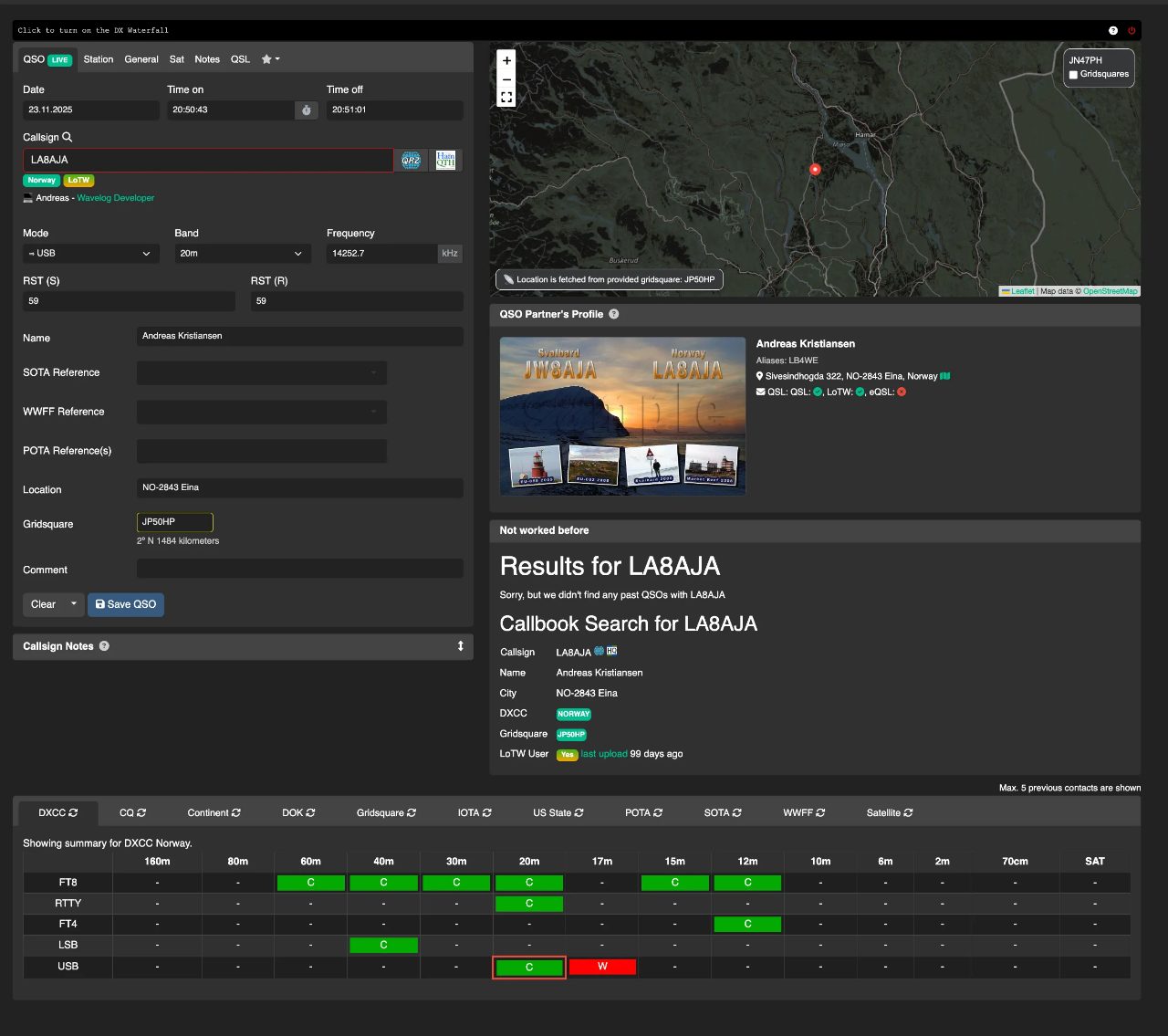
Wavelog is a free, open-source logbook that runs as a website you host yourself. You install it once on a Linux server, a Raspberry Pi, a Docker setup or rented web hosting, then open your log from any browser: the shack PC, a laptop, or your phone. That makes it the best answer here for Linux users and for anyone logging from more than one station, since one logbook can hold several station locations and switch between them.
It syncs with LoTW, eQSL, QRZ and HRDLog and marks LoTW and eQSL confirmations automatically. It tracks more than 20 awards, including POTA, SOTA and WWFF, shows station reports with filters, and has a contest logger that several operators can use at once. Logging from WSJT-X and reading your radio’s frequency both go through WLGate, a small companion app for Windows, Mac and Linux that needs FLrig or Hamlib running.
The tradeoffs come with self-hosting. You’re the one who updates it and backs up its database. And in the field it needs a connection to your server, which a park with one bar of signal doesn’t give you; pair it with a field logger for activations. If running a server sounds like a chore rather than a hobby, a desktop logger is the easier path.
What it does
- Web logbook you open from any browser, including phones
- Syncs with LoTW, eQSL, QRZ and HRDLog
- More than 20 awards, including POTA, SOTA and WWFF
- Club station mode and a multi-operator contest logger
Pros
- Free and open source (MIT license)
- One log for several stations and devices
- Under active development by an established team
Cons
- You must host it, update it and back it up yourself
- Needs a connection to your server, which is awkward in the field
- WSJT-X logging and radio control need the WLGate companion app
Ham Radio Deluxe
Paid suite with rig control and satellites
#5 3.8/5
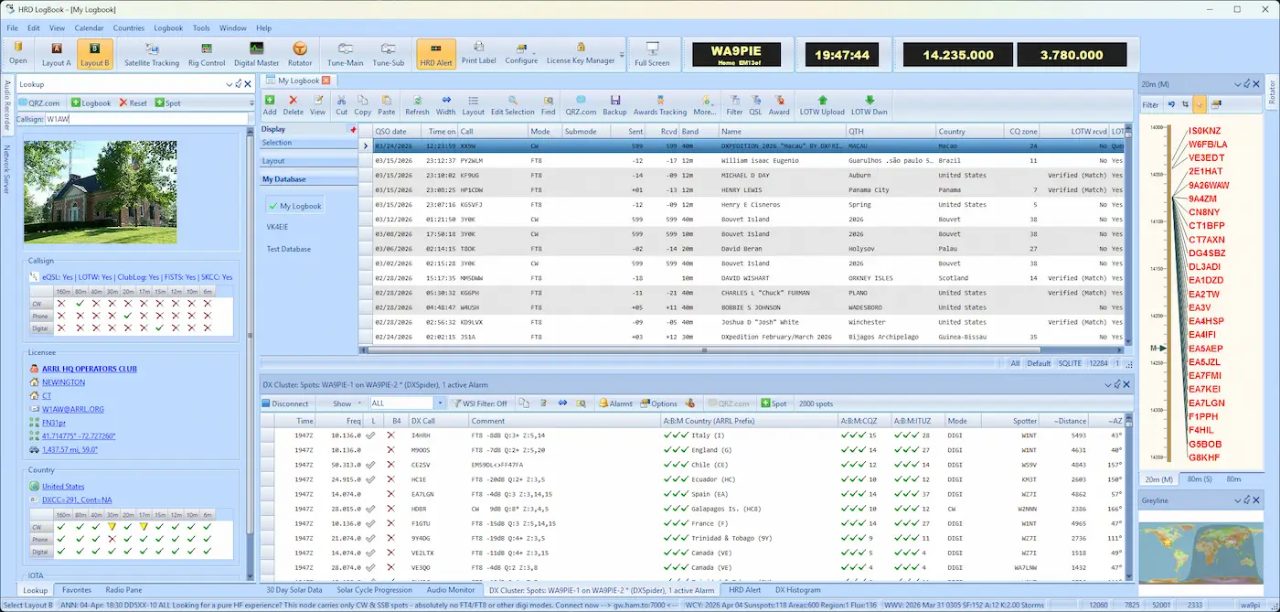
Ham Radio Deluxe (HRD) is the one to choose if you want a single Windows suite from one company, with paid support behind it. Its Logbook is one of five parts, alongside Rig Control (more than 180 radios), the DM-780 digital-modes program, Satellite Tracking and Rotator Control. The Logbook covers the main logging jobs: one-click LoTW upload and download, automatic sync with eQSL, Club Log, QRZ Logbook and HRDLog, FT8 contacts logged automatically from WSJT-X or JTDX, and more than 200 awards with DX spots colored by what you still need. Its satellite tracking program is excellent.
The pricing needs reading carefully. A license costs $99.95, works forever on up to five computers, and includes a year of new features and technical support. After that, bug fixes keep coming, but features released later stay switched off until you buy a $49.95 renewal, and so does control of radios that HRD adds support for in newer releases. If you plan to buy a new radio in a few years, budget for a renewal then. There’s a 30-day free trial.
The logbook is also crowded and not quick to learn; one buyer wrote that it’s “not the easiest program to master (I still haven’t after several years)”. For logging and confirmations alone, Log4OM matches it for free. HRD earns its price when you’ll use the integrated rig control, digital modes and satellite tools, and want someone to call when they misbehave.
What it does
- Logbook, Rig Control, DM-780 digital modes, Satellite Tracking and Rotator Control in one suite
- One-click LoTW upload and download, automatic eQSL, Club Log and QRZ sync
- More than 200 awards across 16 programs
- Automatic logging from WSJT-X, JTDX and JTAlert
Pros
- Everything from one vendor, with paid technical support
- Satellite tracking alongside your logbook
- Perpetual license on up to five computers
Cons
- $99.95, with a $49.95 yearly renewal for new features, support and newly added radios
- Busy logbook that takes a long time to master
- Windows only
- Skip if:
- You only need a log that uploads to LoTW and QRZ, which free programs do as well
N3FJP's Amateur Contact Log
Easiest Windows logger to learn
#6 3.7/5
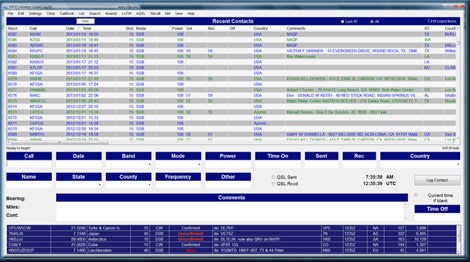
N3FJP’s Amateur Contact Log, usually called ACLog, is the logger to pick when you want the simplest screen and don’t mind paying a little. It’s one tidy window of fields and recent contacts, clean and easy to use. It’s also widely used: after LoTW itself, it’s the most common source of logs uploaded to Club Log.
It covers what most operators need. It signs and uploads contacts to LoTW and downloads your LoTW confirmations, uploads directly to eQSL, QRZ and Club Log, and tracks Worked All States, counties, DXCC, VUCC, grids and zones. It controls most Elecraft, Icom, Kenwood, Ten-Tec and Yaesu radios and logs from WSJT-X, Fldigi and JTAlert. Compared with Log4OM, it has fewer awards and less automation of confirmations from services other than LoTW, in exchange for a screen you’ll understand on day one.
ACLog costs $39.99 once after a fully working 45-day trial. For $59.99 the N3FJP Software Package adds the author’s separate loggers for Field Day, Winter Field Day, many state QSO parties and other contests, which clubs often network together for multi-station events. That package makes N3FJP the natural choice for a US club that wants every member on the same software.
What it does
- Signs and uploads to LoTW and downloads LoTW confirmations
- Uploads to eQSL, QRZ and Club Log
- Tracks Worked All States, counties, DXCC, VUCC, grids and zones
- Optional package of contest and Field Day loggers
Pros
- The clearest screen of any Windows logger here
- Low one-time price with a full 45-day trial
- Contest package that clubs already use for Field Day
Cons
- Costs money where Log4OM is free
- Fewer awards than Log4OM, DXLab or HRD
- Windows only
- Choose if:
- You run Field Day with a club that already uses N3FJP's contest programs
HAMRS
Best for POTA and field days
#7 3.6/5
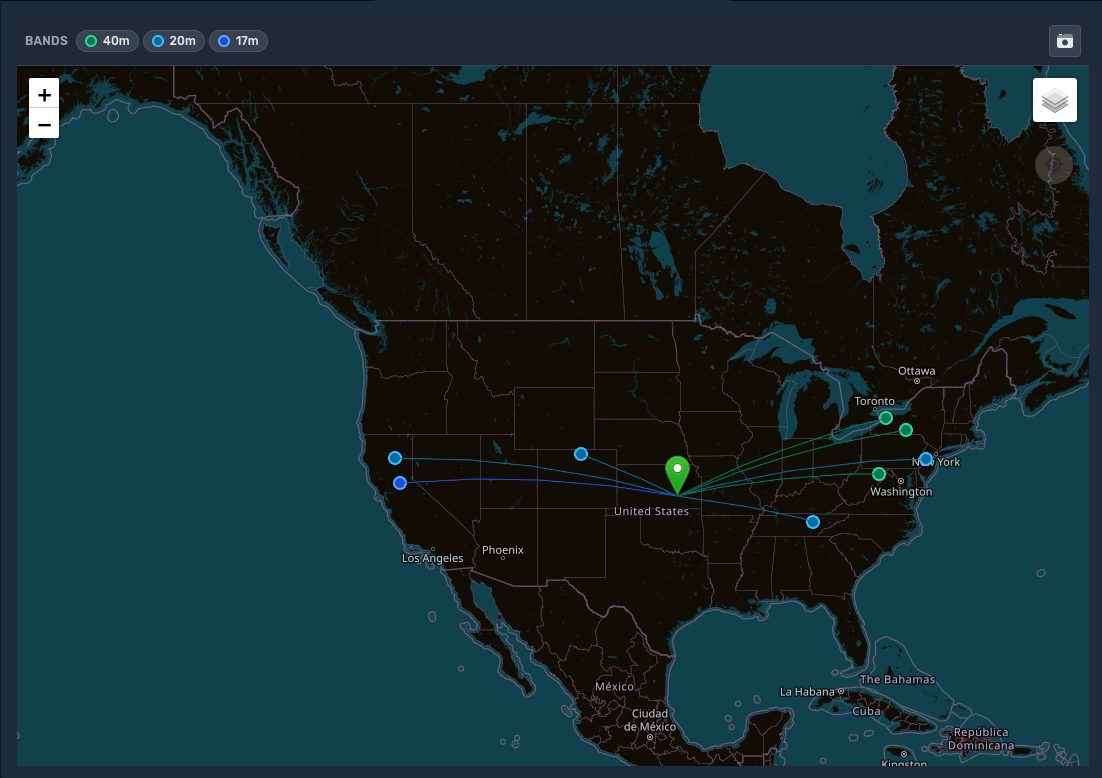
HAMRS is built for one situation: logging at a park, on a summit or at Field Day, often with no signal. It runs on iPhone, iPad, Android, Windows, Mac and Linux, works offline with built-in park and US callsign databases, and has templates for POTA, SOTA, Field Day and Winter Field Day. It shows live POTA and SOTA spots with alerts, controls your radio through Hamlib or FLRIG, logs from WSJT-X, and exports logs the POTA site accepts. It’s one of the friendliest loggers here for a newcomer.
On iPhone and iPad the app (sold as HAMRS Pro) costs $1.99, and keeping logs in step between your phone, tablet and computer is an optional sync subscription at $1.99 a month or $19.99 a year. Without sync, you move logs between devices with ADIF files.
What HAMRS doesn’t do is run your home station’s paperwork. It uploads only to QRZ Logbook, so for LoTW you sign the exported file with TQSL or import it into a main logger. It tracks no awards, beyond showing parks you’ve already worked. Most activators use it alongside a home logbook rather than instead of one. Ham2K PoLo, under “Also considered,” is a free alternative if you log only on a phone.
What it does
- Offline logging with bundled park and US callsign data
- POTA and SOTA spots with alerts
- Templates for POTA, SOTA, Field Day and Winter Field Day
- Hamlib and FLRIG radio control and WSJT-X logging
Pros
- Runs on iOS, Android, Windows, Mac and Linux
- Simple enough for a first activation
- Exports ready for the POTA site
Cons
- Uploads only to QRZ Logbook; LoTW takes an extra step
- No award tracking for DXCC or WAS
- Syncing between devices is a paid subscription
- Skip if:
- You want one program to run your home station's awards and confirmations
Logger32
Free, configurable DX logbook
#8 3.3/5
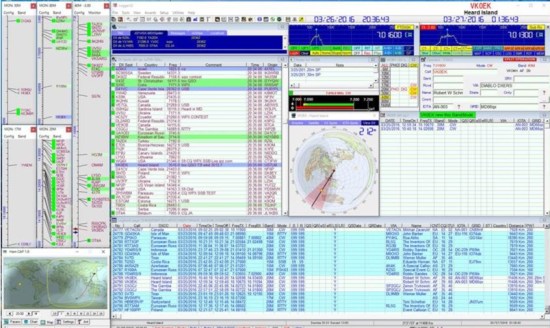
Logger32 is a free Windows logbook by Bob Furzer, K4CY, built to be configured exactly how you want it. It has long been a favorite of top DXers: on Club Log’s software chart it’s the most common logger among DXCC Honor Roll members. It controls many radios and antenna rotators, tunes to spots, tracks awards against your confirmations, and in version 4 works with WSJT-X and JTDX.
It takes a long time to get comfortable with. The interface is dense and dated, setting it up is a project, and automating LoTW and eQSL takes more work than in Log4OM or DXLab. It’s not a contest logger. If you like building your own setup, it rewards the effort; most new DXers will get there faster with DXLab Suite, whose documentation and support are easier to lean on.
What it does
- Highly configurable logbook with radio and rotator control
- Award tracking against confirmations
- DX cluster spots and WSJT-X integration
Pros
- Free
- Long track record with serious DXers
Cons
- Dense, dated interface and a long setup
- LoTW and eQSL automation takes extra setup
- Not meant for contests
QRZ Logbook
No-install web log for getting started
#9 2.7/5
QRZ Logbook is the free web logbook that comes with a QRZ.com account, and it’s where a lot of new hams start: it’s the most common log among Club Log users with under three years on the air. There’s nothing to install. You type contacts in a browser, and a contact is confirmed when the other station logs it in QRZ too. You can also import your LoTW confirmations so QRZ shows them.
It’s fine for your first few dozen contacts, but know its limits before your log grows. QRZ confirmations count toward QRZ’s own awards, not the ARRL’s DXCC, which accepts LoTW and paper QSL cards. You type every contact by hand, with no link to your radio or WSJT-X. And a free account can’t easily export its whole log: you export up to 200 entries at a time. QRZ’s paid XML Logbook Data subscription ($35.95 a year) adds callsign lookups inside other logging programs and logbook integration with them.
The better long-term setup is a desktop logger that uploads to QRZ for you, so you keep the QRZ confirmations and own a complete copy of your log.
What it does
- Free web logbook with a QRZ.com account
- Confirms contacts with other QRZ users automatically
- Imports LoTW confirmations
Pros
- Nothing to install; works on any device with a browser
- Easy start for a newly licensed operator
Cons
- Every contact typed by hand, with no radio or WSJT-X link
- Free accounts export the log only 200 entries at a time
- QRZ confirmations don't count for the ARRL's DXCC
N1MM Logger+
Contest logger to run beside your main log
#10 2.7/5
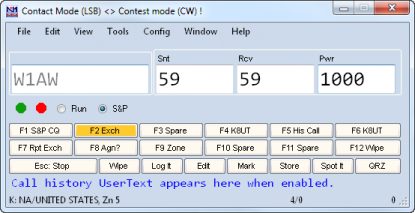
N1MM Logger+ is free, Windows-only, and the program most serious contesters use. It isn’t an everyday logbook, though: it doesn’t upload to LoTW or track awards, so its contacts go into your main logger as an ADIF file after the contest. For the contest itself, nothing else here comes close.
It supports all major and many minor contests, with fields for the information each contest requires, duplicate-contact warnings and scoring built in. Its Enter Sends Message mode lets you work a run of stations with the Enter key alone, and it handles two-radio operation (SO2R), networked multi-operator stations, FT8 and FT4 contests through WSJT-X, and Cabrillo export for submitting your log. Log4OM and Ham Radio Deluxe can both pick up contacts from N1MM as you make them, which saves the import step. Expect a learning curve; practice in a small contest before a big weekend.
What it does
- Exchanges, dupe checks and scoring for all major and many minor contests
- Enter Sends Message keyboard operation
- SO2R and networked multi-operator support
- Cabrillo export
Pros
- Free
- The standard tool among serious contesters
Cons
- Not an everyday log: no LoTW uploads or award tracking
- Steep start for a first-time contester
- Windows only
How the loggers compare
1–5 per criterion · select a score for its reasoning and any sources
| # | Product | Overall | Confirmation services , counts double | FT8 and WSJT-X logging | Award tracking | Ease of setup and daily use | Radio control | Cost | Portable and POTA logging | Platforms , counts half | Contest logging , counts half |
|---|---|---|---|---|---|---|---|---|---|---|---|
| 1 | Log4OM | 4.1 | 5 | 5 | 5 | 3 | 4 | 5 | 3 | 1 | 3 |
| 2 | DXLab Suite | 3.9 | 5 | 5 | 5 | 2 | 5 | 5 | 2 | 1 | 2 |
| 3 | MacLoggerDX | 3.9 | 5 | 5 | 4 | 4 | 5 | 2 | 3 | 1 | 3 |
| 4 | Wavelog | 3.9 | 5 | 3 | 4 | 3 | 3 | 5 | 3 | 4 | 4 |
| 5 | Ham Radio Deluxe | 3.8 | 5 | 4 | 5 | 3 | 5 | 2 | 3 | 1 | 3 |
| 6 | N3FJP's Amateur Contact Log | 3.7 | 4 | 4 | 4 | 5 | 4 | 3 | 3 | 1 | 4 |
| 7 | HAMRS | 3.6 | 2 | 4 | 2 | 5 | 4 | 4 | 5 | 5 | 3 |
| 8 | Logger32 | 3.3 | 3 | 4 | 4 | 2 | 5 | 5 | 2 | 1 | 2 |
| 9 | QRZ Logbook | 2.7 | 3 | 2 | 3 | 4 | 1 | 4 | 2 | 4 | 1 |
| 10 | N1MM Logger+ | 2.7 | 1 | 4 | 1 | 2 | 5 | 5 | 2 | 1 | 5 |
Equal displayed overall scores are ordered by the earlier criteria; a known score comes before an unknown score. Identical scores use alphabetical order.
×2 = counts double in the overall score, ×½ = counts half.
How each criterion is scored
Confirmation services
Counts double in the overall score: Getting contacts confirmed is the reason most operators keep an electronic log at all, so it outweighs any single convenience.
How well the logger gets contacts confirmed through the four services operators use most: ARRL Logbook of the World (LoTW), eQSL, QRZ Logbook and Club Log. Counts uploads the logger makes itself, whether they happen automatically as you log, and whether it downloads confirmations back into the log. LoTW signing through the ARRL's TQSL utility counts as built in, since every logger needs it.
- 5 Uploads to all four automatically or in one step, and downloads LoTW and eQSL confirmations into the log
- 4 Uploads to all four, with some steps manual or confirmations downloaded from LoTW only
- 3 Uploads to two or three services, or confirmations download from only part of them
- 2 Uploads to one service, with confirmations reaching others only through it
- 1 No direct uploads; contacts leave only as an exported ADIF file
FT8 and WSJT-X logging
How contacts made in WSJT-X, JTDX and similar digital-mode programs reach the log, and whether the logger sends worked and needed information back while you operate. FT8 is the most used mode on the HF bands, so this decides daily convenience for many readers.
- 5 Logs automatically and also reads decodes or marks needed and worked stations while you operate
- 4 Logs automatically from WSJT-X and JTDX with no extra app
- 3 Logs automatically from WSJT-X through a separate companion app
- 2 Imports ADIF files or relies on another program to forward contacts
- 1 No way to log digital contacts other than typing them in
Award tracking
How well the logger tracks progress toward awards such as DXCC, Worked All States, WAZ, IOTA and VUCC, by band and mode, against confirmations from LoTW, eQSL and paper QSLs.
- 5 Dozens of awards against confirmations, with needed spots flagged or award submissions prepared
- 4 The major awards by band and mode against LoTW and QSL confirmations
- 3 A few major awards, or awards tracked by a separate service
- 2 Worked-before or simple counts only
- 1 No award tracking
Ease of setup and daily use
Judged from what reviewers and many users agree on, the program's documentation and its own setup requirements: how long it takes a licensed operator to get logging with confirmations working, and how clear the screen is once it is running.
- 5 Logging within minutes, with an interface newcomers find simple
- 4 Short setup and a clear interface
- 3 Works after a moderate setup, but the interface is busy or the hosting takes effort
- 2 Long setup and a steep learning curve; rewards study of its documentation
- 1 Hard to install and confusing to use even after setup
Radio control
Whether the logger reads frequency and mode from the radio and can tune it, for example to a clicked DX spot, and how many radios that covers.
- 5 Built-in control of more than 100 radio models with click-to-tune, several radios or rotators
- 4 Built-in or Hamlib-based control of most current radios, with click-to-tune
- 3 Radio control through a companion app plus FLrig or Hamlib
- 2 Reads frequency from a few radios only
- 1 No radio control
Cost
What an operator pays to log, confirm and keep the program current for several years, including any subscription needed for the features this rubric scores.
- 5 Free with every feature
- 4 Free core, with small optional payments for extras such as sync or another platform
- 3 A one-time payment under $60
- 2 About $100 up front, or recurring payments for new features and support
- 1 Recurring subscription required to keep logging
Portable and POTA logging
How well the logger suits operating away from home, such as Parks on the Air and Summits on the Air: park and summit reference fields, logging offline on a phone, tablet or laptop, POTA and SOTA spots, and exports the POTA and SOTA sites accept.
- 5 Built for the field on phones, tablets and laptops, offline, with references, spots and POTA-ready exports
- 4 Offline field logging with references, spots and ready exports, on a laptop or one mobile platform
- 3 Park and summit references with spots or exports, on a laptop
- 2 Reference fields only, on a home-station program or a connection-bound web page
- 1 Not usable away from a home computer
Platforms
Counts half in the overall score: Most operators log on a Windows PC, so platform support decides the choice only for Mac, Linux and mobile users, who get their own advice in the text.
Which computers and devices the logger runs on: Windows, macOS, Linux, phones and tablets, or any browser.
- 5 Native apps for Windows, macOS, Linux, iOS and Android
- 4 Any device with a web browser, or desktop plus one mobile platform
- 3 Windows, macOS and Linux
- 2 Two desktop operating systems
- 1 One desktop operating system
Contest logging
Counts half in the overall score: Serious contesters usually run a dedicated contest logger beside their everyday log, so contest features matter less to the choice of a main logbook.
Support for radio contests: exchanges and dupe checking for many contests, scoring, multi-operator networking and Cabrillo log export for submission.
- 5 Hundreds of contests, keyboard-driven operation, two-radio (SO2R) and multi-operator support
- 4 Dedicated contest logging for many events, networked for several operators
- 3 A basic contest mode or a few event templates with Cabrillo export
- 2 A dupe check or Cabrillo export, but no contest exchanges
- 1 No contest features
Also considered
- QLog is the one to look at if you want a desktop program on Linux or a free one on a Mac. It’s free and open source, runs on Linux, Windows and macOS, and connects to LoTW, eQSL, QRZ, Club Log and WSJT-X, with award tracking and radio control. Its contest support is basic.
- CQRLOG runs only on Linux; QLog covers the same ground and also runs on Windows and Mac.
- Ham2K PoLo is a free, open-source logger for Android and iOS that handles POTA, SOTA, WWFF and Field Day. Choose it over HAMRS if you log only on your phone and don’t need a desktop version or radio control.
Which one to install tonight
If you’re on Windows and want one program that does it all for free, install Log4OM, add TQSL, and set up the four upload services before your next session; the logger can then handle routine confirmation uploads for you. If that screen overwhelms you after an evening, switch to N3FJP’s ACLog: your ADIF export carries everything across, and $39.99 buys you the simplest daily routine here.
Serious DXers should give DXLab Suite the weekend it asks for, because its needed-spot flags and DXCC paperwork save more time later than the setup costs. Mac owners should try the MacLoggerDX demo with their radio before paying. Linux users and multi-station operators should choose between Wavelog, if they’ll host a web log, and QLog, if they want a desktop app. Ham Radio Deluxe makes sense when you want its rig control, digital modes and satellite tools from one company with support, and you accept the renewal costs.
Activators and contesters usually need a second program rather than a different main one: HAMRS (or Ham2K PoLo) in the field, N1MM Logger+ for contests, each feeding the logbook that holds your confirmations. QRZ Logbook is a fine first step, but move to a desktop logger once you want awards that count toward DXCC.
Frequently asked questions
Isn’t WSJT-X’s own log enough for FT8?
It’s enough to keep a record, not to get confirmations. WSJT-X saves your contacts to an ADIF file, but it doesn’t upload them to LoTW, QRZ or Club Log or track awards. Connect WSJT-X to Log4OM, DXLab, MacLoggerDX, HRD or N3FJP and every FT8 contact is logged and uploaded as you make it.
Do I need a paid QRZ subscription?
Not to log or confirm contacts. QRZ’s XML Logbook Data subscription ($35.95 a year) adds full callsign lookups inside programs like Log4OM and HRD, which fill in a station’s name, location and grid as you type the call, and integration between other loggers and your QRZ Logbook. Free lookup services such as HamQTH cover the basics.
We scored 10 products on 9 criteria using 112 quotes, 76 of them from the products' own websites. How our rankings work