
Basecamp
Calm, communication-first hosted project management from 37signals, with a flat price for unlimited users.
Our verdict
#6 of 10 in Project management software for small teams · Flat price, communication first
What it does
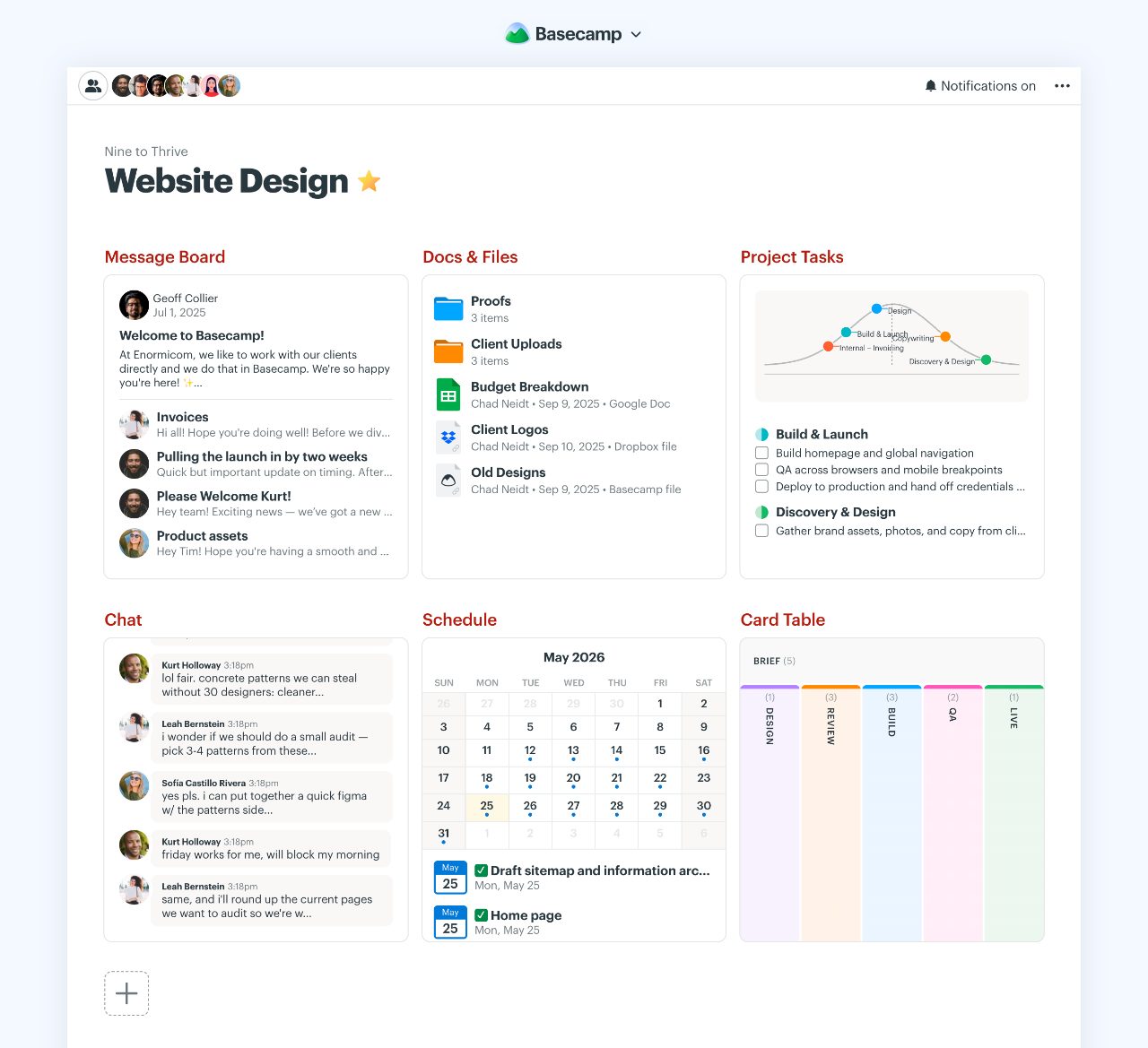
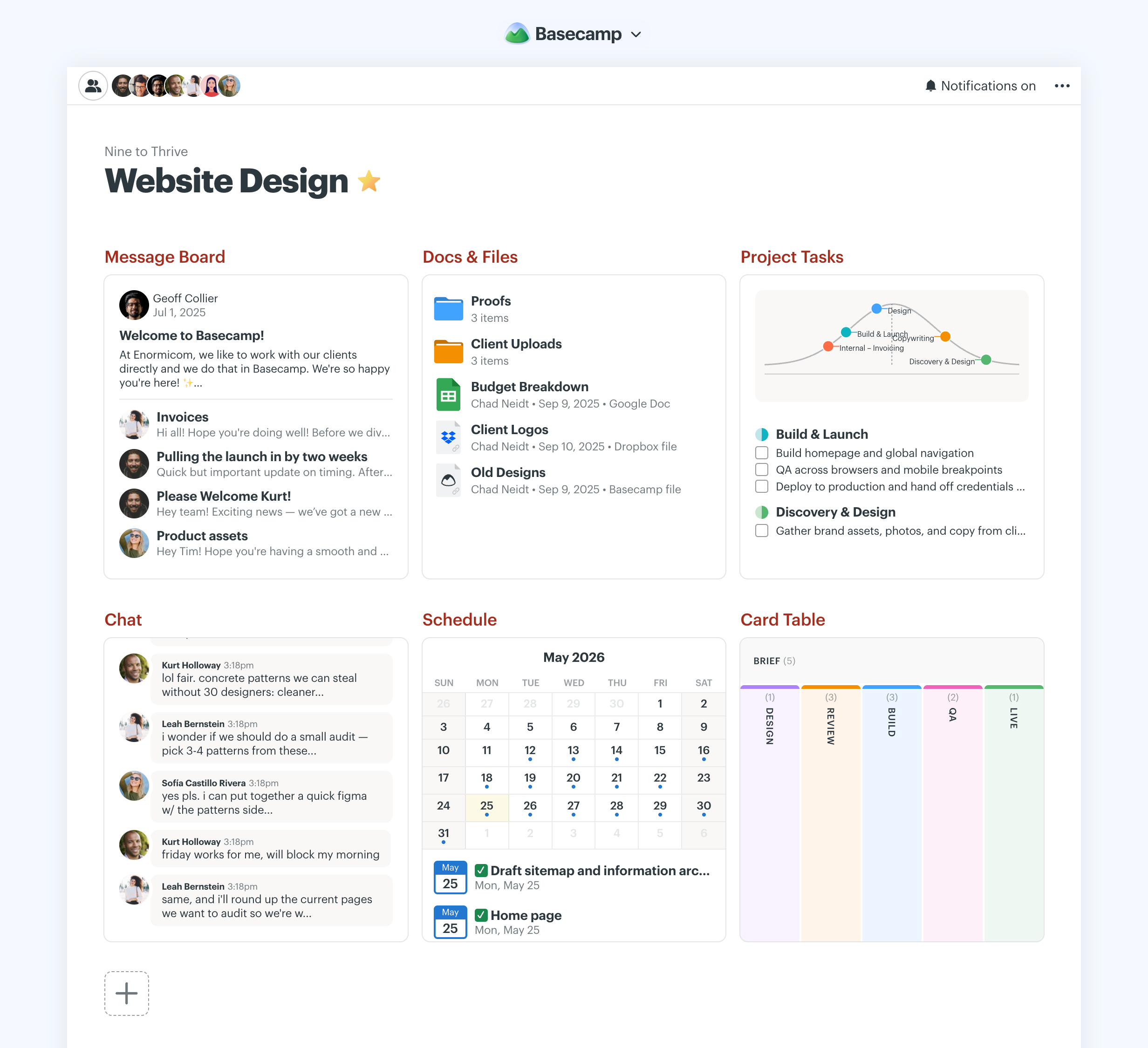
- Message boards, Campfire chat, to-dos, Card Table and schedules in every project
- Automatic check-ins and Hill Charts
- Client mode that hides internal work
Pros
- Calm, simple interface people adopt quickly
- Chat, announcements, and docs replace other apps
- One flat price for any number of people on Pro Unlimited
Cons
- No Gantt chart or task dependencies
- No built-in automation rules
- Smaller packages cap projects, and clients count as users
- Choose if:
- Your team of 20 or more wants everyone, clients included, on one flat bill
Basecamp is a hosted project management and team communication service from 37signals (Basecamp, LLC), in its fifth major version since 2026. Each project is a page of tools, including to-do lists with subtasks, Card Table (kanban), a calendar, message boards, Campfire chat, docs and files, automatic check-ins and Hill Charts, plus a cross-project Lineup timeline and client access. It aims at small and mid-size teams that want simplicity over customization, so it has no Gantt charts, task dependencies or custom fields. Pricing is by capped package with no per-user fees, from a free single project up to a flat unlimited-user plan. It runs in the browser and on mobile apps, and is only sold as a subscription.
What users say
Evidence ↓Reviewers and the user summaries they cite agree that Basecamp is simple, quick to learn and strong for team communication, and that it is limited for complex projects, with no Gantt, dependencies, custom fields or built-in automation (some of which BC5 has since addressed with subtasks). The cost for small teams draws criticism in older per-user reviews. A Trustpilot sample of 41 ratings averages 2.1 out of 5, so satisfaction is not uniform. The sources are two affiliate-funded review sites, so the views are reviewers' accounts, not a broad user survey.
Rankings and alternatives






Free project management software scores
Evaluated Nov 17, 2026 Evidence ↓- Easy for the whole group · counts double 5
5/5 means: New members get going within minutes and keep using it, with almost no setup
Reviewers agree Basecamp is simple and quick to learn, with a fixed set of project tools and almost no setup; Fit Small Business scored its ease of use perfectly. The free project uses the same tools, so a new member is productive within minutes.
- People on the free plan 2
2/5 means: Three or four people
The free Personal plan invites up to 3 people.
- Room on the free plan · counts double 1
1/5 means: One project, or a cap of a few hundred items across the whole account
The free plan is one project with 1 GB of storage, which a group running more than one piece of work outgrows at once.
- Planning views on the free plan 2
2/5 means: Lists or tables and boards plus a calendar, but no timeline
A project has to-do lists, a Kanban-style card table and a schedule (calendar), but no Gantt chart or dependencies; the Lineup timeline plots whole projects, which a single free project doesn't use.
- Docs and discussion 5
5/5 means: Comments, docs, chat and a message board or announcements, all built in
Each project has a message board, to-dos, docs and files, a chat room and a schedule, so comments, docs, chat and announcements are all built in.
- Clients and outsiders 2
2/5 means: Outsiders can join only as full members, counting toward any member cap and seeing what members see
Outside collaborators and clients can be added, but every person counts toward the user limit on capped packages, so on the free plan a client takes one of the 3 places.
- First paid step · counts half 4
4/5 means: $5.01 to $9 per person a month
The Freelancer package is $29 a month for up to 5 users and 3 projects, which divided across 5 people is $29 / 5 = $5.80 per person a month; the pricing page doesn't say whether $29 is the monthly or annual-equivalent price.
- Software project workflow · counts half 1
1/5 means: No sprints and no code-hosting integration on the free plan
Basecamp has no sprints, backlog or code-hosting integration of its own.
Project management software for small teams scores
Evaluated Nov 17, 2026 Evidence ↓- Easy for the whole team · counts double 5
5/5 means: New members get going within minutes and keep using it, with almost no setup and a clean, fast interface
Reviewers and user summaries agree it is simple and quick to learn (Fit Small Business gave ease of use 5/5, EXPERTE configuration and usage 8/10), with fixed project tools and almost no setup. A Trustpilot sample of 41 ratings averages 2.1/5, so satisfaction is not universal, and the reviews pre-date Basecamp 5.
- Planning views 3
3/5 means: Lists, boards and a timeline of some kind, but no task dependencies on it
Lists with subtasks, Card Table (kanban), a calendar, and the Lineup, a timeline of projects (not of tasks), which counts as a timeline of some kind. There are no task dependencies and no Gantt chart, so it stops at 3.
- Price per person 4
4/5 means: $9.01 to $11 per person a month
A 6-person team fits Pro at $79/mo, which is $13.17 per person (level 3). A 25-person team needs Pro Unlimited at $199/mo billed annually, which is $7.96 per person (level 5). The two average about $10.57, so level 4. Basecamp has no Gantt, so the cheapest plan that holds the team was used. The pricing page does not say whether $79 is a monthly or an annual-equivalent price.
- Team communication and docs 5
5/5 means: Comments, docs, real-time chat and a message board or announcements, all built in
Comments, message boards, Campfire chat, Pings, docs and files, and automatic check-ins are all built in and included on every package.
- Free plan for a team 2
2/5 means: Free for a few people, or with a cap a working team outgrows within weeks, such as one project or a block limit
The free plan allows 3 users, one project and 1 GB, so a working team outgrows it quickly. Per the vendor, the free list does not include a lasting multi-project timeline.
- Automation on the paid plan 1
1/5 means: No built-in automation rules; automating needs Zapier or a similar service
No built-in automation rules per the EXPERTE review (pre-BC5, but the vendor pages list none); automating needs Zapier or the API. Recurring to-dos and automatic check-ins exist, but are not a rule builder.
- Reporting and workload 2
2/5 means: One of dashboards or charts, a workload view, and built-in time tracking
Reports, activity views and Hill Charts show progress, but there is no workload view. Time tracking exists only from Pro Plus up, so not on the Pro plan a 6-person team uses, though it is on Pro Unlimited. Treated as one of the three at best. Reviewers call reporting limited.
- Clients and contractors 3
3/5 means: Free outside collaborators, but with a tight limit, such as one board, a small count, or counting against a user cap
Clients and outside collaborators can work in specified projects, and Client mode hides unfinished work, but every outside person counts toward the user cap (10 on Pro) unless the team is on Pro Unlimited.
- Software team workflow · counts half 1
1/5 means: No sprints and no code-hosting integration
No sprints or backlog; Card Table is a general kanban. A GitHub or GitLab integration was not found on the pages read, so this rests on product knowledge.
Pricing
- Personal (Free) Free One project, up to 3 users, 1 GB storage; no credit card needed. Cannot downgrade from a paid package back to free.
- Freelancer $29.00 /month Up to 3 active projects, 10 GB, up to 5 users, no per-user fees. No multiple tools per project, templates or time tracking. The page lists annual billing as a feature but does not say whether $29 is the monthly or annual-equivalent price. 30-day free trial.
- Pro $79.00 /month Up to 8 active projects, 25 GB, up to 10 users, no per-user fees. Adds multiple tools per project and templates. No time tracking. Billing term (monthly or annual) not stated on the pricing page.
- Pro Plus $99.00 /month Up to 12 active projects, 100 GB, up to 15 users, no per-user fees. Adds time tracking. Billing term not stated on the pricing page.
- Pro Unlimited (annual) $199.00 /month Billed annually, so $2,388 a year upfront ($199 x 12). Unlimited projects and users, 1 TB storage (extra 1 TB $50/month), enhanced admin controls, priority support, personal onboarding. Invoice, check or wire available.
- Pro Unlimited (monthly) $329.00 /month Same plan billed monthly; $3,948 over 12 months. Every person added, including clients and guests, counts toward user caps on the lower packages.
Prices checked Nov 17, 2026.
Evidence and sources
What users say
Summary 6 quotes
-
Basecamp has deliberately limited its features to offer small teams an intuitive project hub that is not overloaded with options. This is sufficient for simple projects, but is limiting for more complex projects.
Martin Gschwentner, reviewer at EXPERTE.com · experte.com/project-management/basecamp · checked -
Many customers describe Basecamp as intuitive and simple to use. New users reportedly get up to speed quickly.
experte.com/project-management/basecamp · checked -
Some users miss advanced project management features like Gantt charts, subtasks, or time tracking. Additional tools are required to fill these gaps.
experte.com/project-management/basecamp · checked -
We analyzed the reviews and ratings from various portals and found 41 ratings with an overall rating of 2.1 out of 5 .
experte.com/project-management/basecamp · checked -
Our Basecamp project management software review scored perfectly on ease of use mainly because the platform has a straightforward, clean interface. It helps that the features are simple and not overwhelming, so it’s easy to navigate.
Sam Dadofalza, reviewer at Fit Small Business · fitsmallbusiness.com/basecamp-review · published · checked -
While large teams appreciated unlimited users, small businesses noted that the subscription fee can become expensive when you add team members to the account.
Sam Dadofalza, reviewer at Fit Small Business · fitsmallbusiness.com/basecamp-review · published · checked
Free project management software scores
Easy for the whole group 3 quotes
-
Many customers describe Basecamp as intuitive and simple to use. New users reportedly get up to speed quickly.
experte.com/project-management/basecamp · checked -
Our Basecamp project management software review scored perfectly on ease of use mainly because the platform has a straightforward, clean interface. It helps that the features are simple and not overwhelming, so it’s easy to navigate.
Sam Dadofalza, reviewer at Fit Small Business · fitsmallbusiness.com/basecamp-review · published · checked -
Basecamp has deliberately limited its features to offer small teams an intuitive project hub that is not overloaded with options. This is sufficient for simple projects, but is limiting for more complex projects.
Martin Gschwentner, reviewer at EXPERTE.com · experte.com/project-management/basecamp · checked
People on the free plan 1 quote
-
One project, free forever. Invite up to 3 people. Limited, but plenty for personal use.
basecamp.com/pricing · checked
Room on the free plan 1 quote
-
One project, free forever. Invite up to 3 people. Limited, but plenty for personal use.
basecamp.com/pricing · checked
Planning views on the free plan 3 quotes
-
Message Boards for internal announcements To-dos for tracking work and accountability Card Tables is our take on Kanban for process tracking Chats & Pings for group chat and direct messaging Scheduling for deadlines, milestones, and events Docs & Files for storing assets Reports & Automatic Check-ins for staying up on things
basecamp.com/pricing · checked -
Advanced views, such as tables, Gantt charts, mind maps, or milestones, aren't supported at all. There is a timeline view, but only for the entire project and not for individual tasks.
experte.com/project-management/basecamp · checked -
The software solution lacks advanced project monitoring capabilities, such as Gantt charts, milestones and dependencies, and workload views.
fitsmallbusiness.com/basecamp-review · published · checked
Docs and discussion 1 quote
-
Message Boards for internal announcements To-dos for tracking work and accountability Card Tables is our take on Kanban for process tracking Chats & Pings for group chat and direct messaging Scheduling for deadlines, milestones, and events Docs & Files for storing assets Reports & Automatic Check-ins for staying up on things
basecamp.com/pricing · checked
Clients and outsiders 3 quotes
-
Yes, every person you add is counted, but Pro Unlimited includes unlimited users. So you can invite as many people as you’d like to that account.
basecamp.com/pricing · checked -
One project, free forever. Invite up to 3 people. Limited, but plenty for personal use.
basecamp.com/pricing · checked -
Outside collaborators: It's also possible to add those who don't work at your company. They can collaborate on specific projects, but not create them, add new members, or act as admins. Clients: Clients only have access to specified projects. You can also hide certain aspects of the projects from them, such as unfinished tasks.
experte.com/project-management/basecamp · checked
First paid step 1 quote
-
Freelancer $29/mo · 3 projects 10 GB storage Includes up to 5 users
basecamp.com/pricing · checked
Software project workflow 2 quotes
-
You can't personalize your tasks with custom fields, set up dependencies, or create time-saving automations.
Martin Gschwentner, reviewer at EXPERTE.com · experte.com/project-management/basecamp · checked -
The software solution lacks advanced project monitoring capabilities, such as Gantt charts, milestones and dependencies, and workload views.
fitsmallbusiness.com/basecamp-review · published · checked
Project management software for small teams scores
Easy for the whole team 4 quotes
-
Many customers describe Basecamp as intuitive and simple to use. New users reportedly get up to speed quickly.
experte.com/project-management/basecamp · checked -
Our Basecamp project management software review scored perfectly on ease of use mainly because the platform has a straightforward, clean interface. It helps that the features are simple and not overwhelming, so it’s easy to navigate.
Sam Dadofalza, reviewer at Fit Small Business · fitsmallbusiness.com/basecamp-review · published · checked -
Basecamp has deliberately limited its features to offer small teams an intuitive project hub that is not overloaded with options. This is sufficient for simple projects, but is limiting for more complex projects.
Martin Gschwentner, reviewer at EXPERTE.com · experte.com/project-management/basecamp · checked -
We analyzed the reviews and ratings from various portals and found 41 ratings with an overall rating of 2.1 out of 5 .
experte.com/project-management/basecamp · checked
Planning views 4 quotes
-
Make a list, or ten lists. Assign items, set due dates, attach files, even create subtasks.
basecamp.com/features · checked -
Want to see every project plotted on a timeline based on start and end dates? Then you want The Lineup. See overlaps, see beginnings and ends, see who’s on what, even see key dates superimposed over everything.
basecamp.com/features · checked -
You can't personalize your tasks with custom fields, set up dependencies, or create time-saving automations.
Martin Gschwentner, reviewer at EXPERTE.com · experte.com/project-management/basecamp · checked -
Advanced views, such as tables, Gantt charts, mind maps, or milestones, aren't supported at all. There is a timeline view, but only for the entire project and not for individual tasks.
experte.com/project-management/basecamp · checked
Price per person 2 quotes
-
Freelancer $29/mo · 3 projects 10 GB storage Includes up to 5 users
basecamp.com/pricing · checked -
Pro Unlimited, $199/mo, billed annually Top-of-the-line for those who want the best. $329/mo if billed monthly.
basecamp.com/pricing · checked
Team communication and docs 2 quotes
-
Message Boards for internal announcements To-dos for tracking work and accountability Card Tables is our take on Kanban for process tracking Chats & Pings for group chat and direct messaging Scheduling for deadlines, milestones, and events Docs & Files for storing assets Reports & Automatic Check-ins for staying up on things
basecamp.com/pricing · checked -
Outside collaborators: It's also possible to add those who don't work at your company. They can collaborate on specific projects, but not create them, add new members, or act as admins. Clients: Clients only have access to specified projects. You can also hide certain aspects of the projects from them, such as unfinished tasks.
experte.com/project-management/basecamp · checked
Free plan for a team 1 quote
-
One project, free forever. Invite up to 3 people. Limited, but plenty for personal use.
basecamp.com/pricing · checked
Automation on the paid plan 3 quotes
-
The lack of built-in automation features is especially disappointing. Most of Basecamp’s competitors offer ways to save time and streamline processes through custom automations. With Basecamp, however, any automation requires external integrations, like those provided by Zapier.
Martin Gschwentner, reviewer at EXPERTE.com · experte.com/project-management/basecamp · checked -
Connect other services with the Basecamp API, add 3rd party integrations, work from the command line (CLI), or invite your favorite AI agent.
basecamp.com/features · checked -
You can also set up recurring To-dos. This way, tasks that occur regularly, such as newsletters or weekly meetings, can be automatically added to the appropriate lists and calendars.
experte.com/project-management/basecamp · checked
Reporting and workload 2 quotes
-
Multiple tools per project Add multiple message boards, chat rooms, card tables, or other tools to a single project. , and templates
basecamp.com/pricing · checked -
The lack of built-in automation features is especially disappointing. Most of Basecamp’s competitors offer ways to save time and streamline processes through custom automations. With Basecamp, however, any automation requires external integrations, like those provided by Zapier.
Martin Gschwentner, reviewer at EXPERTE.com · experte.com/project-management/basecamp · checked
Clients and contractors 3 quotes
-
Yes, every person you add is counted, but Pro Unlimited includes unlimited users. So you can invite as many people as you’d like to that account.
basecamp.com/pricing · checked -
Working with a client? Basecamp’s Client mode lets you decide what they should — and shouldn’t — see, project by project. Hide unfinished work, keep conversations on the record, and collaborate together.
basecamp.com/features · checked -
Outside collaborators: It's also possible to add those who don't work at your company. They can collaborate on specific projects, but not create them, add new members, or act as admins. Clients: Clients only have access to specified projects. You can also hide certain aspects of the projects from them, such as unfinished tasks.
experte.com/project-management/basecamp · checked
Software team workflow 1 quote
-
Although it natively integrates with over 80 third-party platforms, popular productivity and customer relationship management (CRM) apps aren’t included in its catalog.
fitsmallbusiness.com/basecamp-review · published · checked
Facts
Runs on 1 quote
-
20 years ago we were in the same boat. We needed something capable, but also straightforward, easy, and reliable. Nothing fit. So we invented Basecamp, and have been improving it ever since. In software, longevity like this isn’t luck — it’s proof it works. And in 2026 we released the all-new Basecamp 5, packing decades of experience into our best version yet.
basecamp.com · checked
Users 1 quote
-
84 million accounts
basecamp.com · checked
More from the sources
Features 1 quote
-
Hill Charts: See the progress of projects and determine whether or not your team is on track. The Hill Chart has two phases: the uphill, which depicts the time period your team is trying to determine the best solutions for a project, and the downhill, which illustrates executing the solutions.
fitsmallbusiness.com/basecamp-review · published · checked
Pricing
basecamp.com/pricing · checked