
Jira
Atlassian's hosted work-tracking and project management service, with boards, lists, timelines and calendars, aimed at software teams and now at business teams too.
Our verdict
#3 of 10 in Project management software for small teams · Free for up to 10, built for software
What it does
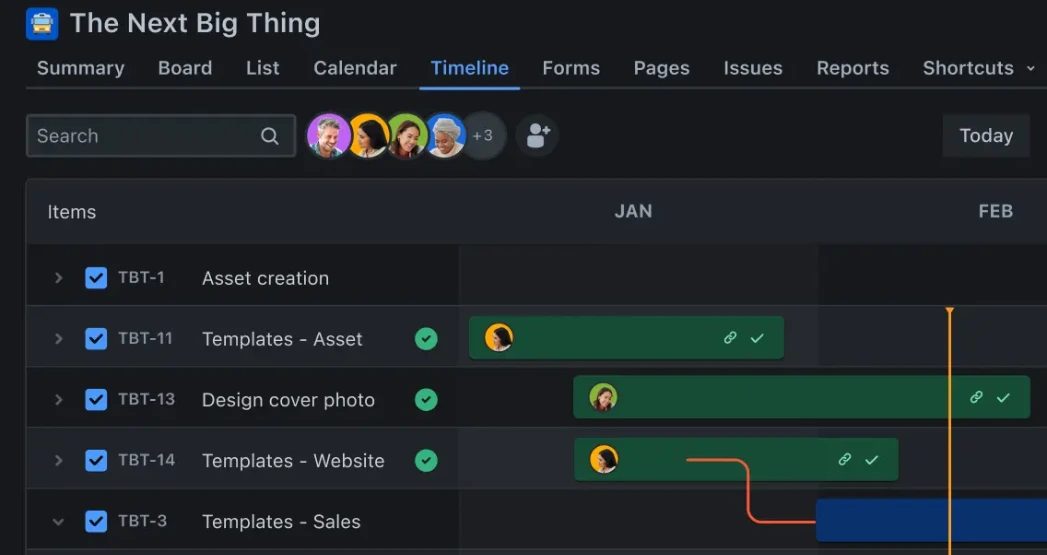
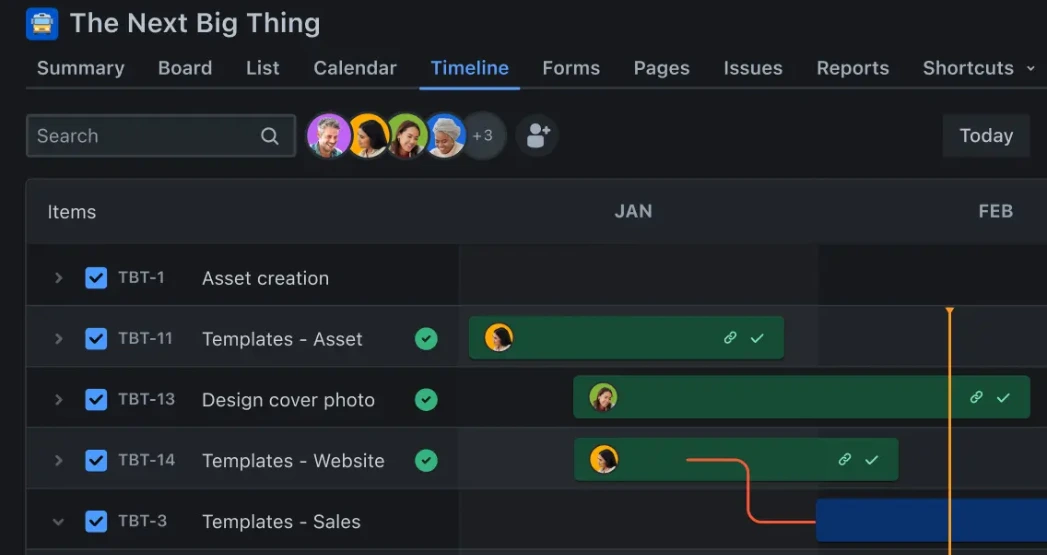
- Board, list, timeline, calendar, and backlog on every plan
- Sprints, Scrum and Kanban boards, and GitHub, GitLab, and Bitbucket integrations
- Cross-project plans and dependencies on Premium
Pros
- Free for up to 10 users, timeline included
- One of the lowest per-user prices once you pay
- Thousands of add-ons in the Atlassian Marketplace
Cons
- Heavy going for non-technical teams
- On Free, everyone is an admin and there are no permissions
- Docs and single sign-on cost extra
- Choose if:
- Your team of 10 or fewer ships software and wants to pay nothing for now
Jira Cloud is Atlassian’s hosted issue-tracking and project management service. It began as a bug tracker for software teams and, since Jira Work Management was merged into it in 2024, also covers business teams such as marketing and operations, with board, list, timeline, calendar and backlog views, forms, custom fields and workflows, no-code automation and an AI assistant (Rovo) on paid plans. A free plan covers up to 10 users; paid plans are billed per user. Cross-project plans and dependencies are a Premium feature, and enforced single sign-on needs the separately sold Atlassian Guard. It is proprietary software; the self-managed Data Center edition is no longer sold to new customers.
What users say
Evidence ↓One independent 2026 review (project-management.com) praises Jira's sprint planning, backlog and bug tracking for IT and agile teams but calls it not the easiest platform to learn, says new users find it overwhelming and that non-technical marketing and business users have a steeper adjustment, and suggests lighter tools for small teams with simple task lists. A marketing executive quoted on Atlassian's own page says sprints work for marketing teams too; that is a vendor-selected testimonial. Review sites such as Capterra could not be read, so how widely these views are shared is not measured here.
Rankings and alternatives






Free project management software scores
Evaluated Nov 17, 2026 Evidence ↓- Easy for the whole group · counts double 2
2/5 means: Usable after real setup work, with frequent complaints about complexity, clutter or jargon
One independent review says new users find Jira overwhelming and non-technical marketing and business users adjust more slowly; Free also gives everyone admin rights, so a mixed group has no guardrails. Atlassian's community champion says Free is a good way to learn and templates help, but that is vendor-affiliated. Rests on one reviewer plus general knowledge; Capterra and G2 were not read.
- People on the free plan 4
4/5 means: Ten to nineteen people
Free allows up to 10 users, and the site moves to a Standard trial past that.
- Room on the free plan · counts double 4
4/5 means: Unlimited projects and tasks, with a storage or feature cap most small groups won't hit for months
Unlimited projects and work items, but 2 GB storage and 100 emails a day for the whole site; storage is the cap a group with attachments could reach.
- Planning views on the free plan 4
4/5 means: A timeline or Gantt chart with task dependencies, fully on the free plan
Free has list, board, backlog, calendar and timeline with dependencies, but dependencies are single-project; cross-project plans are Premium, so level 5 is not met.
- Docs and discussion 2
2/5 means: Comments plus project-level updates, messages or a simple description page
Comments and project-level description and status updates are built in; docs and wiki need Confluence, and there is no chat. Based mostly on general knowledge of the product.
- Clients and outsiders 2
2/5 means: Outsiders can join only as full members, counting toward any member cap and seeing what members see
Anonymous access is not available on Free, which rules out public or read-only links. Atlassian says guests use no paid seat, but the plan check marks could not be read, so whether Free has named guests is unconfirmed; without them outsiders must be members within the 10 seats.
- First paid step · counts half 4
4/5 means: $5.01 to $9 per person a month
Standard at $8.48 per user per month on the pricing page gives about $8.48 for 5 people; the page did not show whether that is monthly or annual billing, and a review's $9.05 annual rate would fall at level 3. No seat minimum was found.
- Software project workflow · counts half 4
4/5 means: Sprints and a backlog plus a code integration that moves tasks when pull requests open or merge
Free has Scrum and Kanban boards, sprints and a backlog, and Atlassian's GitHub, GitLab and Bitbucket integrations link branches, commits and pull requests to work items on any plan; an automation rule or smart commit can move an item when a pull request merges, though Free's small automation allowance limits how many such moves run. It is built for software teams but lacks Linear's triage-first issue flow, so it stops at 4.
Project management software for small teams scores
Evaluated Nov 17, 2026 Evidence ↓- Easy for the whole team · counts double 2
2/5 means: Usable after real setup work and training, with frequent complaints about complexity or clutter
The one independent review read says new users find the interface overwhelming, non-technical marketing and business users adjust more slowly than developers, and admins should expect setup, training and governance work; Jira improves once workflows are set up. Based on a single reviewer plus general knowledge, since Capterra and G2 could not be read.
- Planning views 5
5/5 means: All of that plus a timeline or roadmap that shows several projects together
Board, list, backlog, timeline and calendar views are on every plan, with dependencies on the timeline within a project (Standard) and cross-project plans and dependencies on Premium, which is bought without sales.
- Price per person 5
5/5 means: $9 or less per person a month
Standard has a timeline. At the $8.48 per user per month shown on Atlassian's pricing page, 6 people cost $50.88 and 25 people $212.00 a month, which is $8.48 each; it is not clear that figure is the annual rate, and annual is advertised at up to 17% less. Using the review's $9.05 annual rate instead, 6 people cost $54.30 and 25 people $226.25, which is $9.05 each and drops this to level 4, so the level does not hold on both rates. Annual billing is charged by user-count tier, so real per-person cost may differ slightly. No seat minimum is documented.
- Team communication and docs 2
2/5 means: Task comments plus project-level status updates or conversations
Jira has task comments and goal and project status updates; docs need Confluence, which is a separate purchase, and there is no built-in chat or message board. Based on the evidence on status updates and general knowledge of the product.
- Free plan for a team 4
4/5 means: Free for 10 or more people with a timeline, but with a tight cap on items, storage or feature uses
Free for up to 10 users with board, list, timeline and calendar views, but with 2 GB storage, 150 automation steps a month for the whole site, a 100-emails-a-day cap, every user an admin and no permission settings, and a move to a Standard trial past 10 users.
- Automation on the paid plan 4
4/5 means: A rule builder with 2,000 to 10,000 runs a month
Standard includes 400 automation steps per user per month, so 4,000 for 10 people, from a no-code rule builder. Atlassian counts steps (actions), which may be more than rule runs, so the true run count could be lower but is likely still above 2,000.
- Reporting and workload 5
5/5 means: All three on plans bought without talking to sales
Custom dashboards and reports are on every plan, capacity planning exists in Jira, and time logging is built in to issues. The plan that carries capacity planning and the workload view was not confirmed from the page text, but Standard and Premium are both bought without sales.
- Clients and contractors 4
4/5 means: Free outside collaborators who can comment and work on tasks, with generous limits
Atlassian says outside guests can collaborate on work at no extra cost and without using a paid seat, and anonymous access starts at Standard; guests can comment and work on items in the spaces they are given, but which plan includes guests and its limits were not confirmed from the page text.
- Software team workflow · counts half 5
5/5 means: Built for software teams, with cycles or sprints, a backlog, triage, and code integrations that keep issues in step with pull requests
Jira is built for software teams, with Scrum and Kanban boards, a backlog, sprints and GitHub, GitLab and Bitbucket integrations that link and update issues; the reviewer rates it the best tool she has used for sprint planning, backlog and bug tracking.
Pricing
- Free Free Up to 10 users, 2 GB of storage, 150 automation steps per month for the whole site, up to 100 emails a day, community support. Every user is an admin; permission settings need a paid plan. Past 10 users the site is moved to a 7-day Standard trial.
- Standard $8.48 /month per seat US$8.48 per user per month is what Atlassian's pricing page showed; the page text did not show which billing toggle was selected, and a third-party review lists US$9.05 on annual billing. Monthly pricing is progressive (volume discounts by seat band), and annual billing is charged at the tier nearest the user count, with up to 17% off. Monthly bills use the highest seat count in the cycle. 250 GB storage, 400 automation steps per user per month, permissions, guest and anonymous access, 2-hour response for critical support issues. Timeline and dependencies work within a single project.
- Premium $15.56 /month per seat US$15.56 per user per month as shown on the pricing page, same billing caveat as Standard; a third-party review lists US$18.30 on annual billing. Adds cross-project plans and dependencies, approvals, unlimited storage, 750 automation steps per user per month, a 99.9% uptime SLA and 1-hour critical support response.
- Enterprise Contact sales Annual contracts only, quoted by sales. Includes Atlassian Guard Standard, 1,000 automation steps per user per month and a 99.95% uptime SLA.
Prices checked Nov 17, 2026.
Evidence and sources
What users say
Summary 6 quotes
-
Jira is not the easiest project management platform to learn, but its usability improves significantly once teams establish their workflows.
Marianne Sison, reviewer at project-management.com (TechnologyAdvice) · project-management.com/jira-software-review · published · checked -
Non-technical teams, particularly marketing and business users, reported a steeper adjustment period than dev teams.
Marianne Sison, reviewer at project-management.com (TechnologyAdvice) · project-management.com/jira-software-review · published · checked -
I’ve used Jira with IT and Agile teams, and it handles sprint planning, backlog management, and bug tracking better than any project management tool I’ve worked with.
Marianne Sison, reviewer at project-management.com (TechnologyAdvice) · project-management.com/jira-software-review · published · checked -
Small teams or solo users managing simple task lists, where a lighter tool like Trello or Todoist would cover the need
Marianne Sison, reviewer at project-management.com (TechnologyAdvice) · project-management.com/jira-software-review · published · checked -
Marketing teams manage their work as sprints in Jira. Sprints aren't just for technical teams – they're for marketing and business teams too.
Sarah Brown, Vice President of Marketing at ServiceRocket · atlassian.com/software/jira · checked -
Though not actually listed in the highlights, this is THE big one. You can control which 10 users have access to your site for security reasons. BUT, once a user is in there, everyone has the same permissions. All 10 are Administrators. You cannot partition any of those unlimited projects by users. All users have access to all projects and all data.
John Funk, Atlassian Community Champion (volunteer and former Jira admin) · community.atlassian.com/forums/discussion/2883826/using-a-free-jira-account-is-fine-right · published · checked
Free project management software scores
Easy for the whole group 5 quotes
-
Jira is not the easiest project management platform to learn, but its usability improves significantly once teams establish their workflows.
Marianne Sison, reviewer at project-management.com (TechnologyAdvice) · project-management.com/jira-software-review · published · checked -
Non-technical teams, particularly marketing and business users, reported a steeper adjustment period than dev teams.
Marianne Sison, reviewer at project-management.com (TechnologyAdvice) · project-management.com/jira-software-review · published · checked -
Small teams or solo users managing simple task lists, where a lighter tool like Trello or Todoist would cover the need
Marianne Sison, reviewer at project-management.com (TechnologyAdvice) · project-management.com/jira-software-review · published · checked -
Though not actually listed in the highlights, this is THE big one. You can control which 10 users have access to your site for security reasons. BUT, once a user is in there, everyone has the same permissions. All 10 are Administrators. You cannot partition any of those unlimited projects by users. All users have access to all projects and all data.
John Funk, Atlassian Community Champion (volunteer and former Jira admin) · community.atlassian.com/forums/discussion/2883826/using-a-free-jira-account-is-fine-right · published · checked -
If you have a license for either Jira or Jira Service Management, you also get Jira Work Management with space templates made specifically for business teams.
support.atlassian.com/jira-cloud-administration/docs/explore-jira-cloud-plans · checked
People on the free plan 3 quotes
-
Free forever for 10 users
atlassian.com/software/jira/pricing · checked -
Our Free plan lets you try Jira for up to 10 users with 2GB of storage and Community Support.
atlassian.com/software/jira/pricing · checked -
If you’re on the Free plan and exceed the user limit, we’ll automatically upgrade you to a 7-day free trial of the Standard plan.
atlassian.com/software/jira/pricing · checked
Room on the free plan 4 quotes
-
The Free plan includes unlimited projects and work items, Scrum and Kanban boards, backlog management, and the full set of project views.
atlassian.com/software/jira/guides/more/jira-editions · checked -
Our Free plan lets you try Jira for up to 10 users with 2GB of storage and Community Support.
atlassian.com/software/jira/pricing · checked -
On the Free plan, Jira sends up to 100 emails per day across your entire site, counting notifications and automation together, to any recipient.
atlassian.com/software/jira/pricing · checked -
Though not actually listed in the highlights, this is THE big one. You can control which 10 users have access to your site for security reasons. BUT, once a user is in there, everyone has the same permissions. All 10 are Administrators. You cannot partition any of those unlimited projects by users. All users have access to all projects and all data.
John Funk, Atlassian Community Champion (volunteer and former Jira admin) · community.atlassian.com/forums/discussion/2883826/using-a-free-jira-account-is-fine-right · published · checked
Planning views on the free plan 5 quotes
-
Backlog, list, board, timeline, calendar, and summary views
John Funk, Atlassian Community Champion (volunteer) · community.atlassian.com/forums/discussion/2883826/using-a-free-jira-account-is-fine-right · published · checked -
The Free plan includes unlimited projects and work items, Scrum and Kanban boards, backlog management, and the full set of project views.
atlassian.com/software/jira/guides/more/jira-editions · checked -
Dependencies across multiple teams and projects can be visualized in a plan using the pre-configured dependency management view or Dependencies tab.
atlassian.com/software/jira/pricing · checked -
Timeline view allows you to plan work, track progress, and map dependencies at a granular level within a single team or space.
atlassian.com/software/jira/pricing · checked -
Calendar view allows you to manage tasks across schedules to meet your deadlines.
atlassian.com/software/jira/pricing · checked
Docs and discussion 1 quote
-
Bring design, marketing, HR, operations, and engineering into one shared place to plan work, track progress, and move faster together.
atlassian.com/software/jira · checked
Clients and outsiders 4 quotes
-
Invite people outside your organization to collaborate on work as guests, at no extra cost and without using a paid seat.
atlassian.com/software/jira/pricing · checked -
Give people outside your org anonymous access to Jira spaces.
atlassian.com/software/jira/pricing · checked -
Anonymous access lets people outside of your organization view and create work items without logging in. Allow external partners to see work in progress on joint projects or give customers the ability to submit bugs and feature requests.
atlassian.com/software/jira/pricing · checked -
If you change to a Free plan or migrate from Jira Data Center to a Free plan, space permissions are kept in their current state but anonymous access (if you had granted it) is removed.
support.atlassian.com/jira-cloud-administration/docs/what-is-the-free-jira-cloud-plan · checked
First paid step 3 quotes
-
$8.48per user / month
atlassian.com/software/jira/pricing · checked -
subscriptions, we’ll charge you for the tier that most closely matches your user count.
atlassian.com/software/jira/pricing · checked -
The minimum term of service is one month.
atlassian.com/licensing/jira · checked
Software project workflow 3 quotes
-
GitHub, GitLab, and Bitbucket integrations
project-management.com/jira-software-review · published · checked -
The Free plan includes unlimited projects and work items, Scrum and Kanban boards, backlog management, and the full set of project views.
atlassian.com/software/jira/guides/more/jira-editions · checked -
Free plan comes with 150 steps per subscription per month, while Standard plan has 400 steps per user per month. Premium has 750 steps per user per month, and Enterprise has 1,000 steps per user per month.
atlassian.com/software/jira/pricing · checked
Project management software for small teams scores
Easy for the whole team 3 quotes
-
Jira is not the easiest project management platform to learn, but its usability improves significantly once teams establish their workflows.
Marianne Sison, reviewer at project-management.com (TechnologyAdvice) · project-management.com/jira-software-review · published · checked -
Non-technical teams, particularly marketing and business users, reported a steeper adjustment period than dev teams.
Marianne Sison, reviewer at project-management.com (TechnologyAdvice) · project-management.com/jira-software-review · published · checked -
Small teams or solo users managing simple task lists, where a lighter tool like Trello or Todoist would cover the need
Marianne Sison, reviewer at project-management.com (TechnologyAdvice) · project-management.com/jira-software-review · published · checked
Planning views 5 quotes
-
Dependencies across multiple teams and projects can be visualized in a plan using the pre-configured dependency management view or Dependencies tab.
atlassian.com/software/jira/pricing · checked -
Plan and track goals, projects, and dependencies in one place.
atlassian.com/software/jira/pricing · checked -
Stay up-to-date on the work's progress using the view you like: boards, lists, timeline, or calendars.
atlassian.com/software/jira/features · checked -
Timeline view allows you to plan work, track progress, and map dependencies at a granular level within a single team or space.
atlassian.com/software/jira/pricing · checked -
Calendar view allows you to manage tasks across schedules to meet your deadlines.
atlassian.com/software/jira/pricing · checked
Price per person 3 quotes
-
$8.48per user / month
atlassian.com/software/jira/pricing · checked -
subscriptions, we’ll charge you for the tier that most closely matches your user count.
atlassian.com/software/jira/pricing · checked -
We offer volume discounts as you add more seats.
atlassian.com/licensing/jira · checked
Team communication and docs 1 quote
-
Bring design, marketing, HR, operations, and engineering into one shared place to plan work, track progress, and move faster together.
atlassian.com/software/jira · checked
Free plan for a team 7 quotes
-
Free forever for 10 users
atlassian.com/software/jira/pricing · checked -
Our Free plan lets you try Jira for up to 10 users with 2GB of storage and Community Support.
atlassian.com/software/jira/pricing · checked -
Free plan comes with 150 steps per subscription per month, while Standard plan has 400 steps per user per month. Premium has 750 steps per user per month, and Enterprise has 1,000 steps per user per month.
atlassian.com/software/jira/pricing · checked -
In the Free plan, every user is a admin.
atlassian.com/software/jira/pricing · checked -
Permission settings for spaces or work items are only available on paid plans.
atlassian.com/software/jira/pricing · checked -
On the Free plan, Jira sends up to 100 emails per day across your entire site, counting notifications and automation together, to any recipient.
atlassian.com/software/jira/pricing · checked -
If you’re on the Free plan and exceed the user limit, we’ll automatically upgrade you to a 7-day free trial of the Standard plan.
atlassian.com/software/jira/pricing · checked
Automation on the paid plan 1 quote
-
Free plan comes with 150 steps per subscription per month, while Standard plan has 400 steps per user per month. Premium has 750 steps per user per month, and Enterprise has 1,000 steps per user per month.
atlassian.com/software/jira/pricing · checked
Reporting and workload 4 quotes
-
GitHub, GitLab, and Bitbucket integrations
project-management.com/jira-software-review · published · checked -
Plan individual capacity right where your work lives.
atlassian.com/software/jira/pricing · checked -
Build custom reports with 7+ chart types, count tiles, work item lists, and activity streams
atlassian.com/software/jira/pricing · checked -
Reporting requires a Premium plan for advanced functionality
Marianne Sison, reviewer at project-management.com (TechnologyAdvice) · project-management.com/jira-software-review · published · checked
Clients and contractors 2 quotes
-
Invite people outside your organization to collaborate on work as guests, at no extra cost and without using a paid seat.
atlassian.com/software/jira/pricing · checked -
Give people outside your org anonymous access to Jira spaces.
atlassian.com/software/jira/pricing · checked
Software team workflow 2 quotes
-
I’ve used Jira with IT and Agile teams, and it handles sprint planning, backlog management, and bug tracking better than any project management tool I’ve worked with.
Marianne Sison, reviewer at project-management.com (TechnologyAdvice) · project-management.com/jira-software-review · published · checked -
GitHub, GitLab, and Bitbucket integrations
project-management.com/jira-software-review · published · checked
Facts
Runs on 1 quote
-
iOS and Android apps
atlassian.com/software/jira/pricing · checked
Users 1 quote
-
300,000+
atlassian.com/software/jira · checked
More from the sources
Pricing 4 quotes
-
$15.56per user / month
atlassian.com/software/jira/pricing · checked -
Removing seats mid-cycle does not reduce your bill for that period; those seats become available for reassignment until the next billing cycle.
atlassian.com/licensing/jira · checked -
If you have a Free plan and want to try another plan for free, you can try the Standard plan for 14 days and the Premium plan for 30 days.
support.atlassian.com/jira-cloud-administration/docs/explore-jira-cloud-plans · checked -
50% - 100% off discounts are available for nonprofits and social enterprises that are:
atlassian.com/teams/nonprofits/discount-pricing · checked
Features 4 quotes
-
On May 1st 2024, Atlassian announced that Jira Work Management and Jira Software Cloud would be merged into one Jira experience.
atlassian.com/licensing/jira · checked -
Choose from the over 3000+ integrations available in the Atlassian Marketplace.
atlassian.com/software/jira/features · checked -
Create dynamic forms with our drag-and-drop, user-friendly form builder so your teams can collect the data they need.
atlassian.com/software/jira/pricing · checked -
Choose from a wide selection of templates based on your team function or use case. Templates include pre-configured work types, workflows, and other relevant features to help teams get started quickly.
atlassian.com/software/jira/pricing · checked
Limits and known issues 6 quotes
-
Requires Atlassian Guard Standard subscription
atlassian.com/software/jira/pricing · checked -
Some apps might have reduced functionality in Jira Free. This is usually because they utilize features like permissions that can't be changed in Free.
support.atlassian.com/jira-cloud-administration/docs/what-is-the-free-jira-cloud-plan · checked -
If all of your Jira Cloud apps are on the Free plan, you won't have access to audit logs to track events like changes to global permissions on your site.
support.atlassian.com/jira-cloud-administration/docs/what-is-the-free-jira-cloud-plan · checked -
If all of your Jira Cloud apps are on the Free plan, you can't update your site's URL after your site is created.
support.atlassian.com/jira-cloud-administration/docs/what-is-the-free-jira-cloud-plan · checked -
Standard raises file storage to 250 GB and automation to 1,700 rule runs per month.
atlassian.com/software/jira/guides/more/jira-editions · checked -
Rovo AI isn't included on Free—it starts on the paid plans.
atlassian.com/software/jira/guides/more/jira-editions · checked
Pricing
atlassian.com/software/jira/pricing · checked