
monday.com
Visual, board-based work management for teams, sold as hosted seat buckets (monday work management)
Our verdict
#8 of 10 in Project management software for small teams · Colorful boards for repeatable processes
What it does
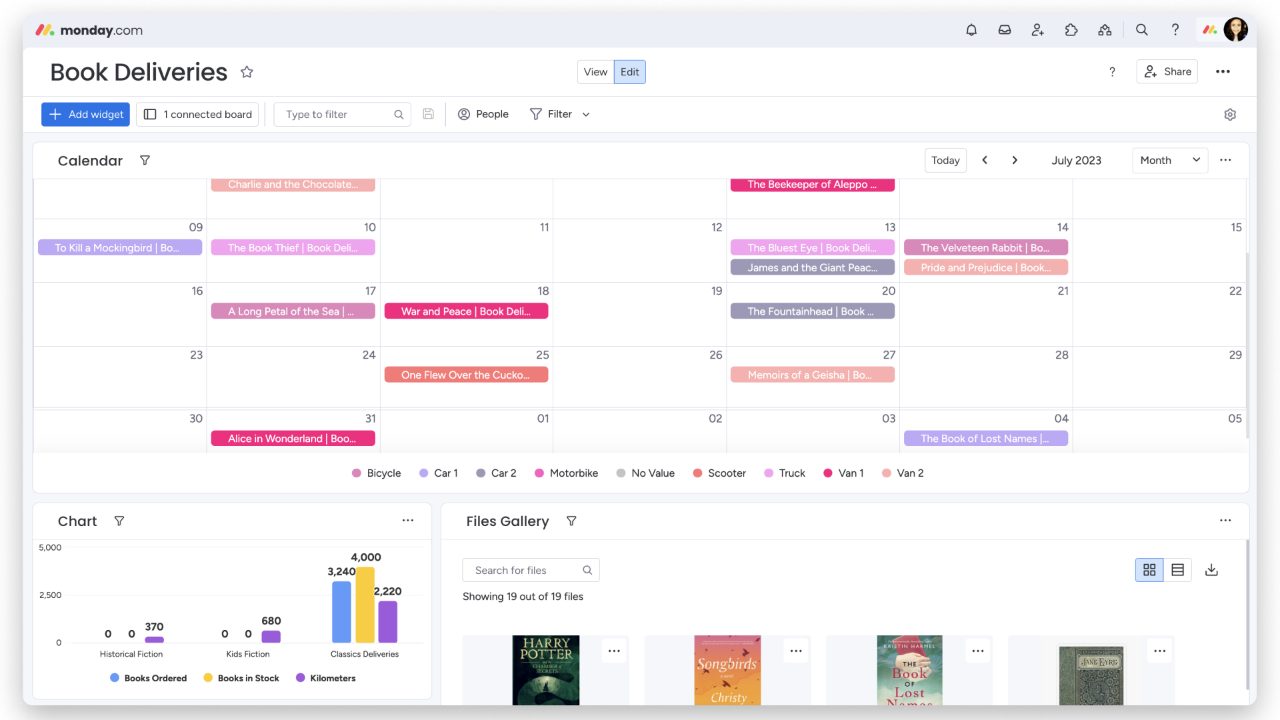
- Boards with color-coded columns, plus timeline, Gantt and calendar views on Standard
- Dashboards that combine several boards
- Time tracking on Pro
Pros
- Visual and friendly for people who think in spreadsheets
- Good at repeatable processes with clear stages
Cons
- Seats sold in blocks of five, so odd team sizes overpay
- Only 250 automation actions a month on Standard
- Free plan covers two seats
- Resource management only on Enterprise
- Choose if:
- Your team is exactly 5, 10 or 15 people and runs the same processes each week
monday.com is a hosted work management platform, now marketed as the monday AI work platform, where teams plan projects and tasks on customizable boards with table, Kanban, calendar, timeline and Gantt views, plus dashboards, automations and integrations. This record covers the monday work management product, not its separate CRM, dev and service products. It runs in the browser with iOS and Android apps and is a proprietary subscription with a free plan limited to 2 seats. Paid plans (Basic, Standard, Pro, Enterprise) are priced per seat but sold in buckets starting at 3 seats and rising in multiples of 5, so a team of 6 buys 10 seats.
What users say
Evidence ↓Reviewers agree the drag-and-drop, visual interface is easy to use, and one found it fast in a trial with occasional lag when creating boards. Both reviewers also flag friction: the breadth of features gives a steeper learning curve for beginners, recurring tasks require automations, and The Digital Project Manager calls it overwhelming for small businesses and solopreneurs. These are two independent editorial reviews, not a sample of users.
Rankings and alternatives






Free project management software scores
Evaluated Nov 17, 2026 Evidence ↓- Easy for the whole group · counts double 4
4/5 means: Most people get going within a day, with few complaints beyond a learning curve for advanced features
Independent reviews call the drag-and-drop boards easy and sign-up quick, with a wizard that builds the first board; the main complaints are that small teams can find the full product overwhelming and that recurring tasks need automations.
- People on the free plan 1
1/5 means: One or two people
The Free plan allows up to two users on the account.
- Room on the free plan · counts double 1
1/5 means: One project, or a cap of a few hundred items across the whole account
Free allows 3 boards and 200 items across the whole account (100 more per successful referral) and 500 MB of storage, which a working group fills quickly.
- Planning views on the free plan 1
1/5 means: A board, list or table only, with no calendar or timeline
Free boards have the table and Kanban views; calendar, timeline and Gantt start on paid plans. Dashboards exist on Free but each reads from one board.
- Docs and discussion 3
3/5 means: Comments plus built-in docs or wiki pages
Items have update threads for comments, and Free includes a few workdocs (the pricing page says up to 3), but no chat or message board.
- Clients and outsiders 1
1/5 means: No way to bring in anyone outside the free plan's small member limit
Free holds two users and its plan list has neither free viewers (Basic) nor guests (Standard), so there's no room to bring in outsiders.
- First paid step · counts half 4
4/5 means: $5.01 to $9 per person a month
Basic lifts the board and item caps at $9 per seat per month billed annually, with a 3-seat minimum and then buckets of 5, so 5 people pay 5 x $9 = $45 a month, $9 each.
- Software project workflow · counts half 1
1/5 means: No sprints and no code-hosting integration on the free plan
The Free plan has no sprints and no integrations, so no code-hosting link.
Project management software for small teams scores
Evaluated Nov 17, 2026 Evidence ↓- Easy for the whole team · counts double 4
4/5 means: Most people get going within a day, with few complaints beyond occasional clutter or a learning curve for advanced features
Reviewers agree the colorful drag-and-drop boards are intuitive, and on Software Advice's user ratings its ease of use sits with Trello and above Asana. One reviewer calls it overwhelming for very small businesses and another saw occasional lag as boards grow, so most teams get going quickly but face a learning curve for automations and advanced columns.
- Planning views 4
4/5 means: Lists, boards and a timeline or Gantt chart with task dependencies
Table, Kanban, calendar and timeline/Gantt views come from Standard, and task dependencies come with Pro's advanced columns; a multi-project portfolio view is Enterprise only, so it does not reach 5. A reviewer also says the Gantt is weak for building a project.
- Price per person 2
2/5 means: $14.01 to $18 per person a month
Cheapest paid plan with a timeline is Standard at $12 per seat per month billed annually, sold in seat buckets (minimum 3, then multiples of 5). A 6-person team buys 10 seats: 10 x $12 = $120, or $20.00 per person. A 25-person team buys 25 seats: 25 x $12 = $300, or $12.00 per person. The average is (20 + 12) / 2 = $16.00, which falls in $14.01 to $18.
- Team communication and docs 3
3/5 means: Comments and updates plus built-in docs or wiki pages
Comments, updates and mentions on items plus built-in Docs (3 on Free, unlimited from Basic); no real-time chat or message board is built in, from product knowledge.
- Free plan for a team 1
1/5 means: No free plan, or a free plan for one or two people only
The free plan allows only 2 seats and 3 boards, and has no timeline or Gantt view.
- Automation on the paid plan 2
2/5 means: Only simple built-in automation, such as buttons or fixed workflow rules, or a rule builder with fewer than 500 runs a month
Standard has a rule builder with only 250 automation actions a month (and 250 integration actions), under the 500 threshold; the 25,000 tier needs Pro.
- Reporting and workload 4
4/5 means: All three, but one only on a sales-quoted plan or as a paid add-on
Dashboards (combining a few boards on Standard) and time tracking (Pro) are bought online, but the workload and resource management tool is listed under Enterprise, which is custom priced.
- Clients and contractors 3
3/5 means: Free outside collaborators, but with a tight limit, such as one board, a small count, or counting against a user cap
Standard allows guests, but every 4 guests count as 1 billed seat, so only 3 are free and more raise the seat tier; unlimited guests need Pro. Guests are billed against the seat bucket.
- Software team workflow · counts half 2
2/5 means: A code-hosting integration or sprint templates, but not both
Work management has GitHub and sprint-style templates through integrations and templates (product knowledge), but sprints, backlog and two-way GitHub sync belong to the separate monday dev product, which is priced separately.
Pricing
- Free Free Up to 2 seats, up to 3 boards, up to 3 Docs (the support page says unlimited Docs), 200+ templates, 8 column types, iOS and Android apps. Support page adds 200 items in total across the account (plus 100 per successful referral), 500 MB storage, and dashboards limited to 1 board each. Views are table, Kanban, files and forms; no calendar, timeline or Gantt. No automations or integrations, no AI features. A third person needs a paid plan (minimum 3 seats). Guests start on Standard; free read-only viewers are listed from Basic.
- Basic $9.00 /month per seat Billed annually ($9 per seat per month; the 10-seat total is $90 per month). Monthly-billed price was not shown on the fetched page. Minimum 3 seats, then buckets in multiples of 5. Unlimited items and free read-only viewers; no guest access, timeline or Gantt, or automations.
- Standard $12.00 /month per seat Billed annually ($12 per seat per month; 10 seats = $120 per month). Billed monthly the 10-seat total is shown as $140 ($14 per seat). Adds timeline and Gantt, calendar view, guest access, 3 workflows, 250 automation actions and 250 integration actions per month. Minimum 3 seats.
- Pro $19.00 /month per seat Billed annually ($19 per seat per month; 10 seats = $190 per month). Billed monthly the 10-seat total is shown as $220 ($22 per seat). Adds private boards and docs, time tracking, advanced views and columns (dependencies, formulas), 20 workflows, 25,000 automation and 25,000 integration actions per month, unlimited guests.
- Enterprise Contact sales Custom price through sales (12-month minimum term). Adds multi-level permissions, enterprise security, portfolio and resource management, up to 250,000 automation and integration actions per month. Teams above 40 seats are sent to sales.
- Nonprofit Program Free For verified nonprofits (checked through Goodstack, for example 501(c)3 proof and EIN in the US). monday.com's nonprofit page advertises 10 free seats, 70% off additional seats and 33% off AI capabilities; the support site describes it as a version of the Pro plan at a discounted or free rate. Requires a monday.com account first.
- AI credits $10.00 /month , extra The pricing page shows 1,000 credits = $10 for Basic (2,000 = $20 on Standard, 3,000 = $30 on Pro) at 10 seats, offset by an equal special monthly discount so the total equals the seat price. Extra credits can be bought as needed; whether the included allotment continues free after the offer is not stated.
Prices checked Nov 17, 2026.
Evidence and sources
What users say
Summary 6 quotes
-
The interface is easy to use, with simple drag and drop timeline and charting mechanics.
Ben Aston, founder of The Digital Project Manager and reviewer · thedigitalprojectmanager.com/tools/monday-review · published · checked -
Small businesses and solopreneurs might find monday.com overwhelming, as their project needs often don't require the extensive features the platform offers.
Ben Aston, founder of The Digital Project Manager and reviewer · thedigitalprojectmanager.com/tools/monday-review · published · checked -
Recurring tasks are considered automations and limited to higher tier plans.
Ben Aston, founder of The Digital Project Manager and reviewer · thedigitalprojectmanager.com/tools/monday-review · published · checked -
Drag-and-drop interface and color-coded charts are easy to use and understand; highly navigable, providing multiple functionalities on one screen; setting up recurring tasks is complicated, requiring the use of automations the user has to configure
Sydney Hoffman, reviewer at SoftwareConnect · softwareconnect.com/reviews/monday-com · published · checked -
Generally fast and responsive; occasionally slow board performance and delayed board interactivity; some slight delay after clicking the “Create board” button; speed issues are usually resolved promptly by Monday.com
Sydney Hoffman, reviewer at SoftwareConnect · softwareconnect.com/reviews/monday-com · published · checked -
Sign-up is a breeze.
Nik Rawlinson, reviewer at ITPro · itpro.com/software/mondaycom-review-work-management-platform-works-best-when-you-pay-for-it · published · checked
Free project management software scores
Easy for the whole group 5 quotes
-
The interface is easy to use, with simple drag and drop timeline and charting mechanics.
Ben Aston, founder of The Digital Project Manager and reviewer · thedigitalprojectmanager.com/tools/monday-review · published · checked -
Drag-and-drop interface and color-coded charts are easy to use and understand; highly navigable, providing multiple functionalities on one screen; setting up recurring tasks is complicated, requiring the use of automations the user has to configure
Sydney Hoffman, reviewer at SoftwareConnect · softwareconnect.com/reviews/monday-com · published · checked -
Sign-up is a breeze.
Nik Rawlinson, reviewer at ITPro · itpro.com/software/mondaycom-review-work-management-platform-works-best-when-you-pay-for-it · published · checked -
Small businesses and solopreneurs might find monday.com overwhelming, as their project needs often don't require the extensive features the platform offers.
Ben Aston, founder of The Digital Project Manager and reviewer · thedigitalprojectmanager.com/tools/monday-review · published · checked -
Recurring tasks are considered automations and limited to higher tier plans.
Ben Aston, founder of The Digital Project Manager and reviewer · thedigitalprojectmanager.com/tools/monday-review · published · checked
People on the free plan 2 quotes
-
This plan allows for up to two users on the account.
support.monday.com/hc/en-us/articles/115005320209-Available-plan-types-on-Work-Management · checked -
Up to 2 seats
monday.com/pricing · checked
Room on the free plan 3 quotes
-
Up to 3 boards
monday.com/pricing · checked -
You can create a total amount of 3 boards in your account and the total amount of items you can create in your account is limited: you start off with 200 items and you can earn an additional 100 items for every person you successfully refer to the platform.
support.monday.com/hc/en-us/articles/115005320209-Available-plan-types-on-Work-Management · checked -
500 MB Storage
support.monday.com/hc/en-us/articles/115005320209-Available-plan-types-on-Work-Management · checked
Planning views on the free plan 3 quotes
-
Table and Kanban only. Other views like Timeline, Gantt, and Calendar require a paid plan.
usecarly.com/blog/monday-free-plan-limits · published · checked -
Timeline & Gantt views See all upcoming work in a visual timeline & use Gantt charts to ensure you're meeting deadlines successfully.
monday.com/pricing · checked -
In the Free plan, you can create as many dashboards and widgets as you’d like. But, each dashboard can contain information from 1 board.
support.monday.com/hc/en-us/articles/115005320209-Available-plan-types-on-Work-Management · checked
Docs and discussion 2 quotes
-
Up to 3 boards
monday.com/pricing · checked -
Unlimited workdocs Workdocs are flexible, multi-media whiteboards where you and your team can record all notes and ideas related to one central topic.
support.monday.com/hc/en-us/articles/115005320209-Available-plan-types-on-Work-Management · checked
Clients and outsiders 2 quotes
-
This plan allows for up to two users on the account.
support.monday.com/hc/en-us/articles/115005320209-Available-plan-types-on-Work-Management · checked -
Guests are included on the Standard plan, and their billing follows a 4:1 ratio—every 4 guests count as 1 billed seat. That means you can invite up to 3 guests for free.
support.monday.com/hc/en-us/articles/360000305419-Pricing-for-guests · checked
First paid step 2 quotes
-
The pricing works per group of seats and not per seat. We call this bucket pricing. Our pricing plans start at a minimum of 3 seats, and then ascend in multiples of 5. If you have a team of 4, for instance, you should choose the 5-seat option. And if you have a team of 6, you will need to select the 10-seat plan.
support.monday.com/hc/en-us/articles/4405633151634-Plans-and-pricing-for-monday-com · checked -
$9 x 10 seats = $90
monday.com/pricing · checked
Software project workflow 1 quote
-
No. Automations and integrations are both unavailable on Free; they start on the Standard plan.
usecarly.com/blog/monday-free-plan-limits · published · checked
Project management software for small teams scores
Easy for the whole team 4 quotes
-
The interface is easy to use, with simple drag and drop timeline and charting mechanics.
Ben Aston, founder of The Digital Project Manager and reviewer · thedigitalprojectmanager.com/tools/monday-review · published · checked -
Small businesses and solopreneurs might find monday.com overwhelming, as their project needs often don't require the extensive features the platform offers.
Ben Aston, founder of The Digital Project Manager and reviewer · thedigitalprojectmanager.com/tools/monday-review · published · checked -
Drag-and-drop interface and color-coded charts are easy to use and understand; highly navigable, providing multiple functionalities on one screen; setting up recurring tasks is complicated, requiring the use of automations the user has to configure
Sydney Hoffman, reviewer at SoftwareConnect · softwareconnect.com/reviews/monday-com · published · checked -
Generally fast and responsive; occasionally slow board performance and delayed board interactivity; some slight delay after clicking the “Create board” button; speed issues are usually resolved promptly by Monday.com
Sydney Hoffman, reviewer at SoftwareConnect · softwareconnect.com/reviews/monday-com · published · checked
Planning views 4 quotes
-
Timeline & Gantt views See all upcoming work in a visual timeline & use Gantt charts to ensure you're meeting deadlines successfully.
monday.com/pricing · checked -
Private boards and docs Private boards and docs are only visible to you and team members you invite. Advanced board views Visualize your data with different types of charts, graphs and diagrams. Time tracking Track and monitor the time spent on each task. Advanced columns Leverage advanced columns to create dynamic dependencies between tasks and perform complex automated calculations across your board's data.
monday.com/pricing · checked -
Resource management Plan and balance your team's workload with tools to assign resources, centralize workforce data, and optimize capacity across projects.
monday.com/pricing · checked -
Small businesses and solopreneurs might find monday.com overwhelming, as their project needs often don't require the extensive features the platform offers.
Ben Aston, founder of The Digital Project Manager and reviewer · thedigitalprojectmanager.com/tools/monday-review · published · checked
Price per person 2 quotes
-
The pricing works per group of seats and not per seat. We call this bucket pricing. Our pricing plans start at a minimum of 3 seats, and then ascend in multiples of 5. If you have a team of 4, for instance, you should choose the 5-seat option. And if you have a team of 6, you will need to select the 10-seat plan.
support.monday.com/hc/en-us/articles/4405633151634-Plans-and-pricing-for-monday-com · checked -
$12 x 10 seats = $120
monday.com/pricing · checked
Team communication and docs 1 quote
-
Up to 3 boards
monday.com/pricing · checked
Free plan for a team 2 quotes
-
Up to 2 seats
monday.com/pricing · checked -
Up to 3 boards
monday.com/pricing · checked
Automation on the paid plan 1 quote
-
Automations (250 actions / month)
monday.com/pricing · checked
Reporting and workload 2 quotes
-
Private boards and docs Private boards and docs are only visible to you and team members you invite. Advanced board views Visualize your data with different types of charts, graphs and diagrams. Time tracking Track and monitor the time spent on each task. Advanced columns Leverage advanced columns to create dynamic dependencies between tasks and perform complex automated calculations across your board's data.
monday.com/pricing · checked -
Resource management Plan and balance your team's workload with tools to assign resources, centralize workforce data, and optimize capacity across projects.
monday.com/pricing · checked
Clients and contractors 1 quote
-
Guests are included on the Standard plan, and their billing follows a 4:1 ratio—every 4 guests count as 1 billed seat. That means you can invite up to 3 guests for free.
support.monday.com/hc/en-us/articles/360000305419-Pricing-for-guests · checked
Facts
License 1 quote
-
is only available on monday AI work platform, and provides the basics to get started with the platform.
support.monday.com/hc/en-us/articles/4405633151634-Plans-and-pricing-for-monday-com · checked
Runs on 1 quote
-
Yes, the platform is available on both IOS and Android devices.
monday.com/pricing · checked
Users 1 quote
-
250,000+ customers worldwide rely on monday.com
monday.com/pricing · checked
More from the sources
Pricing 6 quotes
-
$19 x 10 seats = $190
monday.com/pricing · checked -
A typical 3-person team thrives on ~800–1,200 credits per month. To put that into perspective, 1,000 credits can cover roughly 50 resume screenings, 5 hours of meeting summaries, and hundreds of automated workflow updates. You can track your usage in real-time and purchase more whenever your team needs to scale.
monday.com/pricing · checked -
monday.com has a free plan of monday work management which is ideal for freelancers and individual professionals. In addition, we offer a 14-day free trial of the Pro plan for monday work management, monday CRM and monday dev.
monday.com/pricing · checked -
Manage your entire mission on one intuitive platform. Join our nonprofits program and get 10 free seats.
monday.com/w/nonprofits · checked -
Note: The Nonprofit Program is a version of the Pro Plan, designed for eligible nonprofit organizations, and includes all the same features, at a discounted or free rate.
support.monday.com/hc/en-us/articles/115005320209-Available-plan-types-on-Work-Management · checked -
The monday.com Nonprofit Program offers free and discounted access to monday.com for eligible organizations.
support.monday.com/hc/en-us/articles/19035051855890-How-to-sign-up-for-the-nonprofit-plan · checked
Features 2 quotes
-
monday.com provides a variety of out-of-the-box integrations with other software and tools, enhancing its functionality. These native integrations include popular applications like Google Drive, Slack, Microsoft Teams, and more
Ben Aston, founder of The Digital Project Manager and reviewer · thedigitalprojectmanager.com/tools/monday-review · published · checked -
Supports two-factor authentication; board owners can control who can view and edit specific content; workspace permissions and account permissions for different user types are limited to Enterprise plan
Sydney Hoffman, reviewer at SoftwareConnect · softwareconnect.com/reviews/monday-com · published · checked
Limits and known issues 2 quotes
-
Plans start from 3 users. If you want to sign up more than 40 users, you can request a quote to get an exact price.
monday.com/pricing · checked -
You don't get any on the free plan, which is fair enough, but we think it's a bit stingy that Basic loses out, too.
Nik Rawlinson, reviewer at ITPro · itpro.com/software/mondaycom-review-work-management-platform-works-best-when-you-pay-for-it · published · checked
Pricing
monday.com/pricing · checked