
Wrike
Hosted work management with Gantt charts, dashboards and automation, aimed at growing teams
Our verdict
#9 of 11 in Free project management software · Unlimited people, 200 open tasks
Pros
- No people limit
- Closed tasks free up room
Cons
- No calendar or Gantt chart on the free plan
- Heavy to set up for a small group
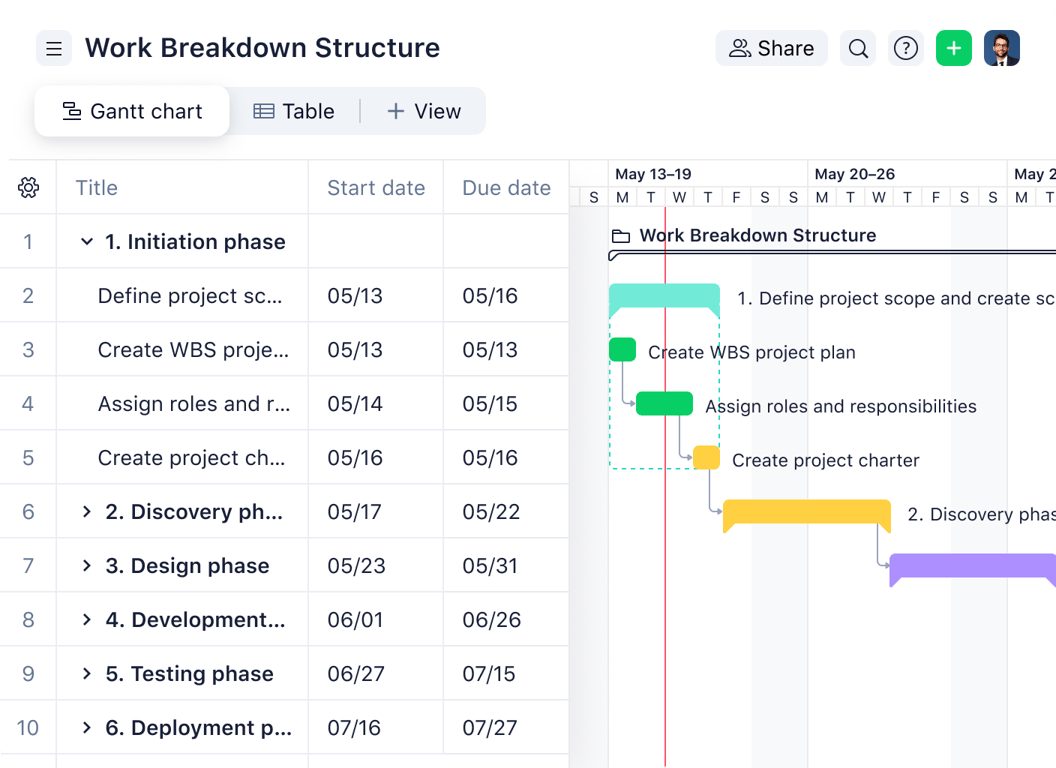
Wrike is a cloud-based work management and project management product for teams. It offers tasks and subtasks, board, table and Gantt views, dashboards, request forms, automation and a growing set of AI features, with desktop and mobile apps. A free plan covers basic task management; paid plans are priced per user, with the Team plan limited to 2 to 15 users and Business to 5 to 200. Wrike positions itself for mid-size and enterprise work, so it suits small teams that want depth and will invest in setup.
What users say
Evidence ↓Reviewers on Software Advice (3,102 reviews, 4.4 overall) praise collaboration, project tracking and customization, and one designer finds the interface easy to scan. The most common complaints are a learning curve for less experienced users (22% negative in the site's sentiment analysis) and email notification overload (27% negative). An editorial review also calls the setup burden heavy for very small teams. The views come from a review aggregator and one incentivized review, not a systematic sample.
Rankings and alternatives







Free project management software scores
Evaluated Nov 17, 2026 Evidence ↓- Easy for the whole group · counts double 3
3/5 means: Fine once someone builds the structure or learns the product's terms, with known snags such as a blank-page start or a crowded interface
Reviewers call it easy to navigate for experienced users, but a review aggregator says less experienced users struggle with a steep learning curve, and Wrike itself recommends help configuring it for new teams.
- People on the free plan 5
5/5 means: Twenty or more, or no limit on members
Wrike's own announcement of the current Free plan gave it unlimited users, and aggregators still list it that way; no current vendor page states a cap.
- Room on the free plan · counts double 3
3/5 means: Room for ongoing work with a cap the group plans around, such as about ten boards or spaces, a cap on open tasks, a record cap per base, or under 100 MB of storage
Free allows 200 active tasks including subtasks and one shared space; finished, cancelled or deleted tasks free up room, so the cap counts open work rather than everything ever created.
- Planning views on the free plan 1
1/5 means: A board, list or table only, with no calendar or timeline
Free lists Table, Board and Chart views; Gantt charts are paid only and no calendar is listed for Free.
- Docs and discussion 1
1/5 means: Comments on tasks only
Tasks have comments and rich descriptions, but Free has no docs, chat or message board of its own; this rests on product knowledge.
- Clients and outsiders unknown
Wrike's pages don't say whether Free offers collaborator or guest roles.
- First paid step · counts half 3
3/5 means: $9.01 to $11 per person a month
Team is $10 per user per month for 2 to 15 users, so 5 people pay $10 each.
- Software project workflow · counts half 1
1/5 means: No sprints and no code-hosting integration on the free plan
Free has no sprints, and the two-way GitHub and Jira syncs are not part of the Free plan's listed integrations.
Project management software for small teams scores
Evaluated Nov 17, 2026 Evidence ↓- Easy for the whole team · counts double 3
3/5 means: Fine once someone builds the structure, with known snags such as a crowded interface, slow screens or a blank-page start
Reviewers find it navigable and customizable once set up, but the aggregator's review analysis shows 22% negative on the learning curve, a reviewer's colleagues needed time to get up to speed, and Wrike itself recommends a consultant for new teams and guided deployment at 20+ users.
- Planning views 4
4/5 means: Lists, boards and a timeline or Gantt chart with task dependencies
Team ($10) has board and table views plus interactive Gantt charts with dependencies; subtasks, folders and cross-tagging are described by a third party. A timeline spanning several projects on Team is likely through folder-level Gantt but was not confirmed, so it stops at 4.
- Price per person 2
2/5 means: $14.01 to $18 per person a month
A 6-person team fits Team at $10 and a 25-person team must buy Business at $25 (seats in blocks of 5, Team capped at 15), averaging (10 + 25) / 2 = $17.50 per person. The vendor page does not say whether the displayed price is annual, and an FAQ says Business is annual only.
- Team communication and docs 2
2/5 means: Task comments plus project-level status updates or conversations
Task comments, @mentions and an inbox are standard, and AI comment summaries are included; no built-in docs or wiki and no real-time chat were confirmed (whiteboards are a $15 add-on). One reviewer mentions built-in message channels, which was not saved as evidence.
- Free plan for a team 2
2/5 means: Free for a few people, or with a cap a working team outgrows within weeks, such as one project or a block limit
A free plan exists with board and table views and the apps, but no Gantt, and a third party says it caps active tasks and storage; the exact caps and any user cap were not found, so the working-team limits are uncertain.
- Automation on the paid plan 3
3/5 means: A rule builder with 500 to 2,000 runs a month
Team has a rule builder with 50 automation actions per month, understood as per user; for a 10-person team that is about 500 runs (10 x 50), right at the 500 floor. If the 50 is per account it would fall to level 2; the unit is unclear in the source.
- Reporting and workload 4
4/5 means: All three, but one only on a sales-quoted plan or as a paid add-on
Shareable dashboards come on Team, while workload charts and time tracking are absent from Team and arrive on Business, which is self-serve only up to 15 users; a 25-person team needs a sales conversation, and advanced BI and budgeting are Pinnacle. Scored as all three available, with part of the set behind sales for larger teams.
- Clients and contractors 1
1/5 means: Every outside person needs a full paid seat
The vendor FAQ says external users are full users and need a paid seat. Free viewers exist, but the page does not say which plan offers them, so on Team an outside collaborator is treated as paid.
- Software team workflow · counts half 2
2/5 means: A code-hosting integration or sprint templates, but not both
A GitHub integration exists (two-way sync is a custom-priced add-on, with only standard integrations on Business), and Wrike has Kanban boards, but native sprints and a backlog were not found. Weighted low by the rubric.
Pricing
- Free Free No user cap is stated on current vendor pages (a 2021 vendor post says unlimited users); one shared space; up to 200 active tasks and subtasks, after which new tasks can't be created until others are completed, cancelled or deleted; 2 GB of storage per a 2021 vendor post. Includes table, board and chart views, email and cloud storage integrations, and web, desktop and mobile apps. No Gantt chart. Automation rules, dependencies, dashboards and API access are not listed for Free.
- Team $10.00 /month per seat 2 to 15 users. Includes interactive Gantt charts, shareable dashboards and AI Essentials. The vendor page does not say if $10 is the annual or the monthly price; its FAQ says only Business and above are annual-only, which suggests Team can be bought monthly, and Software Advice lists it as billed monthly. No nonprofit or education discount was found. Third parties say it has no workload charts or time tracking. 10 users cost 100 USD per month (10 x 10).
- Business $25.00 /month per seat 5 to 200 users, sold in blocks of 5 up to 30 seats. The vendor FAQ says Business and above are annual-only, while Software Advice says billed monthly; unresolved. Adds templates, standard integrations, resource and capacity planning and a starter pack of AI Elite actions. 10 users cost 250 USD per month (3,000 per year); 20 users cost 500 USD per month (6,000 per year). Self-serve purchase stops at 15 users, so 20 seats go through sales.
- Pinnacle Contact sales Contact sales. 5 to unlimited users; advanced resource planning, budgeting, advanced reporting and BI. SSO is listed here by Software Advice.
- Apex Contact sales Contact sales. Adds unlimited whiteboards, Wrike Integrate and two-way sync.
- Wrike Whiteboard $15.00 /month per seat , extra Add-on; included in Apex.
Prices checked Nov 17, 2026.
Evidence and sources
What users say
Summary 6 quotes
-
Computer-proficient users find Wrike user-friendly and appreciate the comprehensive training resources available. However, less experienced users struggle with the steep learning curve and require significant training to utilize the platform fully.
softwareadvice.com/project-management/wrike-profile · checked -
I've worked in many different project management systems and one of the most common headaches is a clunky UI. Wrike is pretty easy to navigate and scan, and the new AI integrations where it can summarize a long thread of complicated feedback has been very helpful during stressful times. It's a very customizable UI with all kinds of views and dashboards
Mac Z., verified reviewer on Software Advice, graphic design, 201-500 employees, daily use for 1-3 years · softwareadvice.com/project-management/wrike-profile · published · checked -
It was also a bit of a challenge for my colleagues to get up to speed at first, and we’re still discovering new features.
Kenneth M., reviewer on Software Advice, 11-50 employees · softwareadvice.com/project-management/wrike-profile · published · checked -
Email notifications 38% Positive 35% Neutral 27% Negative Users appreciate Wrike's integration with email and the instant notifications that keep them informed about task updates and deadlines. However, many users find the notification volume overwhelming and wish for better customization options to manage the influx of alerts.
softwareadvice.com/project-management/wrike-profile · checked -
Configuration burden. Request forms, approval chains, automation rules, and resource management all need setup. A team of five spending a week configuring workflows before shipping anything is a real cost.
AI Indigo Team, reviewer at aiindigo.com · aiindigo.com/blog/wrike-review-2026-enterprise-power-or-overkill-for-small-teams · published · checked -
Because of its ability to edit assets in platform, Wrike is particularly effective for smaller creative groups. Larger groups may encounter problems with the number of email notifications sent.
Anonymous verified user, strategist at a higher-education organization, team of 10 communications and marketing professionals · trustradius.com/reviews/wrike-2024-01-31-12-28-30 · published · checked
Free project management software scores
Easy for the whole group 5 quotes
-
Computer-proficient users find Wrike user-friendly and appreciate the comprehensive training resources available. However, less experienced users struggle with the steep learning curve and require significant training to utilize the platform fully.
softwareadvice.com/project-management/wrike-profile · checked -
I've worked in many different project management systems and one of the most common headaches is a clunky UI. Wrike is pretty easy to navigate and scan, and the new AI integrations where it can summarize a long thread of complicated feedback has been very helpful during stressful times. It's a very customizable UI with all kinds of views and dashboards
Mac Z., verified reviewer on Software Advice, graphic design, 201-500 employees, daily use for 1-3 years · softwareadvice.com/project-management/wrike-profile · published · checked -
It was also a bit of a challenge for my colleagues to get up to speed at first, and we’re still discovering new features.
Kenneth M., reviewer on Software Advice, 11-50 employees · softwareadvice.com/project-management/wrike-profile · published · checked -
Wrike is an intuitive collaboration solution. However, aligning your entire team on a consistent way of working, configuring Wrike, and ensuring long-term adoption can be tricky. Our Professional Services team specializes in understanding and onboarding teams of all sizes, no matter their challenges. We recommend all new teams work with a consultant during onboarding, and insist that teams of 20+ utilize a guided deployment.
wrike.com/price · checked -
Wrike has a learning curve but scores 4.1 out of 5 stars for ease of use based on user reviews.
softwareadvice.com/project-management/wrike-profile · checked
People on the free plan 1 quote
-
Now, you get all of the above with two major enhancements: Unlimited users Subtask management
wrike.com/blog/new-wrike-free-plan · published · checked
Room on the free plan 3 quotes
-
Key limits: Free users can only use one shared space and have a maximum of 200 active tasks/subtasks at a time.
help.wrike.com/hc/en-us/articles/1500004329142-Free · checked -
Keep in mind that your Free account has a limit of 200 active tasks, including subtasks. Once you reach this limit, you won't be able to create new tasks until you complete, cancel, or delete some of your active ones. You'll see a red banner above your workspace as a warning when you're approaching the limit.
help.wrike.com/hc/en-us/articles/1500004329142-Free · checked -
(Note: Active task limitations apply, with a maximum of 200 active tasks.)
wrike.com/blog/new-wrike-free-plan · published · checked
Planning views on the free plan 2 quotes
-
You also get multiple views like Table, Board, and Chart, plus integrations with email and cloud storage.
help.wrike.com/hc/en-us/articles/1500004329142-Free · checked -
Yes, Wrike includes Gantt chart functionality in its paid plans (the Free plan doesn’t offer them). This enables users to visualize project timelines so they can see how various factors are impacting progress. For example, you can see the dependencies a project needs before completion and visualize the steps needed.
softwareadvice.com/project-management/wrike-profile · checked
First paid step 2 quotes
-
Team Intelligent project management $10 user/month No credit card required All of Free, plus: 2 to 15 users
wrike.com/price · checked -
Wrike has four plans. Team is $10.00/user/mo billed monthly. Business is $25.00/user/mo billed monthly. Pinnacle and Apex are custom-priced.
softwareadvice.com/project-management/wrike-profile · checked
Software project workflow 2 quotes
-
Set up two-way syncs between your Wrike account and 22 integrated systems, including Jira, GitHub, and more.
wrike.com/price · checked -
You also get multiple views like Table, Board, and Chart, plus integrations with email and cloud storage.
help.wrike.com/hc/en-us/articles/1500004329142-Free · checked
Project management software for small teams scores
Easy for the whole team 4 quotes
-
Computer-proficient users find Wrike user-friendly and appreciate the comprehensive training resources available. However, less experienced users struggle with the steep learning curve and require significant training to utilize the platform fully.
softwareadvice.com/project-management/wrike-profile · checked -
I've worked in many different project management systems and one of the most common headaches is a clunky UI. Wrike is pretty easy to navigate and scan, and the new AI integrations where it can summarize a long thread of complicated feedback has been very helpful during stressful times. It's a very customizable UI with all kinds of views and dashboards
Mac Z., verified reviewer on Software Advice, graphic design, 201-500 employees, daily use for 1-3 years · softwareadvice.com/project-management/wrike-profile · published · checked -
It was also a bit of a challenge for my colleagues to get up to speed at first, and we’re still discovering new features.
Kenneth M., reviewer on Software Advice, 11-50 employees · softwareadvice.com/project-management/wrike-profile · published · checked -
Wrike is an intuitive collaboration solution. However, aligning your entire team on a consistent way of working, configuring Wrike, and ensuring long-term adoption can be tricky. Our Professional Services team specializes in understanding and onboarding teams of all sizes, no matter their challenges. We recommend all new teams work with a consultant during onboarding, and insist that teams of 20+ utilize a guided deployment.
wrike.com/price · checked
Planning views 4 quotes
-
Team Intelligent project management $10 user/month No credit card required All of Free, plus: 2 to 15 users
wrike.com/price · checked -
Free Essential task management $0 user/ month No credit card required Key features: Web, desktop, and mobile apps Help your team collaborate no matter where they are with Wrike's apps for Windows, Mac, iPhone, and Android.
wrike.com/price · checked -
Enhanced organization: Unlimited projects, tasks, and subtasks combined with folder structures enable teams to create a well-organized workspace. - Increased visibility: Dashboards and cross-tagging provide a holistic view of project progress and help identify interdependencies. - Workflow automation: Access to 50 automation actions per month lets users save time and increase productivity.
softwareadvice.com/project-management/wrike-profile · checked -
Yes, Wrike includes Gantt chart functionality in its paid plans (the Free plan doesn’t offer them). This enables users to visualize project timelines so they can see how various factors are impacting progress. For example, you can see the dependencies a project needs before completion and visualize the steps needed.
softwareadvice.com/project-management/wrike-profile · checked
Price per person 4 quotes
-
Team Intelligent project management $10 user/month No credit card required All of Free, plus: 2 to 15 users
wrike.com/price · checked -
Business Customizable platform to manage your workflows $25 user/month No credit card required All of Team, plus: 5 to 200 users
wrike.com/price · checked -
Wrike is sold in groups of users. For accounts of up to 30 seats, subscriptions are sold in groups of five. For accounts of 30 to 100 seats, subscriptions are sold in groups of 10. For accounts above 100 seats, subscriptions are sold in groups of 25. Wrike Business plans and above are only available as annual subscriptions.
wrike.com/price · checked -
If you’ve completed a trial, you can purchase the Team plan and the Business plan for up to 15 users with no add-ons in the Account section of your workspace. If you need a larger number of users or a wider set of capabilities, you’ll need to contact your Wrike representative.
wrike.com/price · checked
Team communication and docs 1 quote
-
Free Essential task management $0 user/ month No credit card required Key features: Web, desktop, and mobile apps Help your team collaborate no matter where they are with Wrike's apps for Windows, Mac, iPhone, and Android.
wrike.com/price · checked
Free plan for a team 3 quotes
-
Free Essential task management $0 user/ month No credit card required Key features: Web, desktop, and mobile apps Help your team collaborate no matter where they are with Wrike's apps for Windows, Mac, iPhone, and Android.
wrike.com/price · checked -
Task limitations: The Free plan restricts the number of active tasks, which may hinder growth and scalability for expanding teams. - Storage constraints: With a limited amount of storage per account, teams may need to be mindful of file sizes and attachment management. - Little to no intelligence or automation: The free plan offers extremely limited access to AI-powered intelligence tools and workflow automation.
softwareadvice.com/project-management/wrike-profile · checked -
Yes, Wrike includes Gantt chart functionality in its paid plans (the Free plan doesn’t offer them). This enables users to visualize project timelines so they can see how various factors are impacting progress. For example, you can see the dependencies a project needs before completion and visualize the steps needed.
softwareadvice.com/project-management/wrike-profile · checked
Automation on the paid plan 1 quote
-
Enhanced organization: Unlimited projects, tasks, and subtasks combined with folder structures enable teams to create a well-organized workspace. - Increased visibility: Dashboards and cross-tagging provide a holistic view of project progress and help identify interdependencies. - Workflow automation: Access to 50 automation actions per month lets users save time and increase productivity.
softwareadvice.com/project-management/wrike-profile · checked
Reporting and workload 5 quotes
-
Team Intelligent project management $10 user/month No credit card required All of Free, plus: 2 to 15 users
wrike.com/price · checked -
If you’ve completed a trial, you can purchase the Team plan and the Business plan for up to 15 users with no add-ons in the Account section of your workspace. If you need a larger number of users or a wider set of capabilities, you’ll need to contact your Wrike representative.
wrike.com/price · checked -
No resource management: This plan does not include tools for managing resources, such as workload charts, time tracking, and resource assignment.
softwareadvice.com/project-management/wrike-profile · checked -
Business plan includes: 5-200 users AI Elite features Templatize your work Standard integration Resource and capacity planning Workflow customizations
softwareadvice.com/project-management/wrike-profile · checked -
Pinnacle plan includes: 5 to unlimited users Advanced resource and capacity planning Budgeting (track financials) Advanced reporting and BI Single sign-on SSO
softwareadvice.com/project-management/wrike-profile · checked
Clients and contractors 1 quote
-
Full users have more default permissions enabled and can do more in Wrike. Regular users and external users are full users and require a paid-user seat (note that external users are limited to certain access rights). Limited users have fewer permissions and limited access to certain Wrike features. Limited users require a paid user seat at a reduced rate to that of a full user license (as contributors) or may be provisioned into the workspace for free (as viewers).
wrike.com/price · checked
Software team workflow 1 quote
-
Set up two-way syncs between your Wrike account and 22 integrated systems, including Jira, GitHub, and more.
wrike.com/price · checked
Facts
Runs on 1 quote
-
Free Essential task management $0 user/ month No credit card required Key features: Web, desktop, and mobile apps Help your team collaborate no matter where they are with Wrike's apps for Windows, Mac, iPhone, and Android.
wrike.com/price · checked
Users 1 quote
-
TRUSTED BY 20,000+ ORGANIZATIONS WORLDWIDE
wrike.com · checked
More from the sources
Pricing 1 quote
-
Wrike offers five plans: Free, Team, Business, Pinnacle, and Apex.
help.wrike.com/hc/en-us/articles/209605669-Types-of-Plans-in-Wrike · checked
Features 3 quotes
-
All Wrike plans include enterprise-grade security, with higher-level plans adding single sign-on (SSO), two-step verification, advanced user access controls, and more.
softwareadvice.com/project-management/wrike-profile · checked -
Wrike is a cloud-based tool for managing and tracking projects and tasks. It provides teams with a single digital space to collaborate, monitor project progress, automate workflows, and share insights and information.
softwareadvice.com/project-management/wrike-profile · checked -
Wrike works with many well-known cloud storage platforms so that you can continue using your favorite platform but keep all related information together in Wrike.
help.wrike.com/hc/en-us/articles/1500004329142-Free · checked
What users say 1 quote
-
Wrike is extremely easy to use project management software. The platform is fairly intuitive and allows you to start tracking collaborative projects and milestones very quickly.
Michael Graw, freelance reviewer at TechRadar · techradar.com/reviews/wrike · published · checked
Pricing
wrike.com/price · checked