
Obsidian
Markdown note-taking app that links notes in a local folder, with community plugins and themes
Our verdict
#2 of 4 in Markdown editors for desktop · For linked notes on every device
What it does
- Live Preview, Source mode and Reading view
- Links by note name with suggestions, backlinks, a graph view and a tag list
- Tabs that split into side-by-side panes, plus a quick switcher
- Pasted and dropped images saved to a folder you choose, sized by adding a width to the link
- Community themes and plugins, plus CSS snippets
Pros
- Free for personal and work use
- Apps for iPhone, iPad and Android as well as the desktop
- A catalog of community plugins
Cons
- Exports only to PDF as it ships
- No built-in focus or typewriter mode
- Closed source
- Skip if:
- You need built-in export to anything other than PDF.
Rankings and alternatives
- Markdown editors for desktop #2 of 4 For linked notes on every device
- Note-taking apps for Android #7 of 10 A personal knowledge base in plain files
- Google Keep #1 Best for quick notes and lists
- Samsung Notes #2 Galaxy phones and S Pen handwriting
- Microsoft OneNote #3 Long notes you also open on a Windows PC
- Note-taking apps for students #10 of 10 Linked notes stored as plain files
- Google Docs #2 For group projects and Google schools
- Notion #3 For organized typists at college
- Apple Notes #4 If everything you own is Apple






Markdown editors for desktop scores
Evaluated Nov 7, 2026 Evidence ↓- Writing views 3
3/5 means: Three of the five
Live Preview, Source mode and Reading view are documented. No core plugin offers focus mode or typewriter scrolling; community plugins don't count here.
- Export formats 1
1/5 means: One format
The note menu has one export, to PDF. No other export format is documented.
- Images 4
4/5 means: Four of the five
Pasting, dragging files in, a chosen attachment folder and resizing with |640x480 are documented; uploading to an image host is not described.
- Links between notes 5
5/5 means: All five
Wiki links with file suggestions after typing [[, a Backlinks core plugin, a Graph view core plugin and a Tags view that lists tags are all documented.
- Citations 1
1/5 means: No documented citation support
No core plugin or Obsidian-maintained plugin has a citation feature; citation support comes from community plugins, which this criterion doesn't count.
- Working with many files 5
5/5 means: All five
File explorer, vault-wide Search, Quick switcher, tabs and split tab groups are all documented as core features, with no platform exclusions on desktop.
- Themes and plugins 5
5/5 means: As 4, plus plugins that add features, with a catalog of plugins made by other users
Light and dark color schemes, CSS snippets, hundreds of community themes and a catalog of community plugins.
- Platforms 5
5/5 means: Windows, macOS, Linux, iOS and Android
Official apps for Windows, macOS, Linux, Android, and iPhone and iPad.
- Price 5
5/5 means: Free for any use
Free without limits, and the terms let for-profit organizations use it for free; the commercial license is optional and Sync and Publish are paid add-ons.
Android note-taking apps scores
Evaluated Nov 17, 2026 Evidence ↓- Pleasant to use on Android · counts double 3
3/5 means: A decent Android app with clear rough edges, such as slow starts, a learning curve or awkward editing on a phone
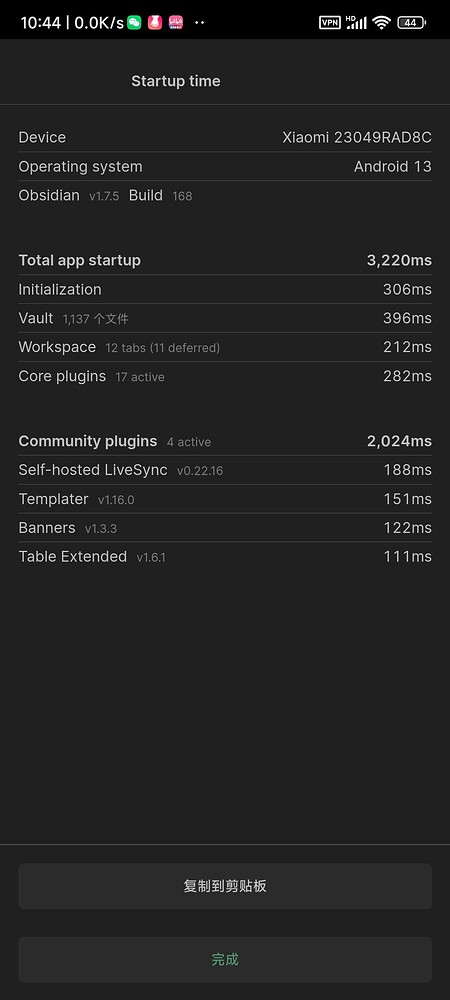
Full-featured Android app, but forum users report multi-second starts that grow with plugins and vault size, and a steep learning curve for newcomers.
- Getting a note down fast 3
3/5 means: A new-note widget or the share menu, but capture is slowed by app startup or missing voice or photo notes
Has a New Note widget, a Quick Settings tile and an audio recorder plugin, but capture is slowed by app startup, and the fast native Quick Capture is iOS-only. Share-sheet saving was not verified.
- Writing and organizing longer notes 5
5/5 means: Among the best for long, structured notes, with a rich editor, a flexible structure and search that reaches text in images or PDFs
Rich Markdown editor, folders, tags, backlinks and graph, attachments, and core search; search of text in images or PDFs needs plugins, so 5 rests partly on knowledge.
- Works on all your devices 3
3/5 means: Apps on most platforms, but syncing a phone and a computer needs a paid plan or a separate sync tool you install and set up yourself
Apps on Windows, Mac, Linux, iOS and Android, but there is no web app, and syncing Android to a computer needs paid Sync or a self-set-up tool such as Syncthing-Fork.
- Cost for one person 4
4/5 means: Free for typical use, with a paid plan for storage, sync or extras some readers will want
The app is free including commercial use; optional Sync costs $48 a year billed annually ($60 monthly).
- Privacy and owning your notes · counts half 4
4/5 means: End-to-end encrypted sync or files you keep, with a full export in an open format
Notes are plain Markdown files on the device and optional Sync is end-to-end encrypted by default; the app itself is closed source, which keeps it below the open-source level.
- Handwriting with a stylus · counts half 2
2/5 means: A basic drawing or sketch tool, or handwriting only through plugins
No core handwriting; the Obsidian team said it has no plans, and stylus drawing depends on community plugins (Excalidraw, Ink) whose Android quality was not verified.
- Works without a connection · counts half 5
5/5 means: Notes are stored on the phone and everything works offline
Vault is stored on the phone, so all notes open, edit and search with no connection.
Student class-notes apps scores
Evaluated Nov 17, 2026 Evidence ↓- Typing class notes · counts double 4
4/5 means: A full typed editor with headings, lists, tables and either equations or a freeform page, with small gaps
Markdown editor with Live Preview, lists, tables, task lists, image paste and built-in LaTeX math (math from general knowledge; help confirms math expressions are in the syntax). Small gaps are no WYSIWYG toolbar by default and Markdown to learn.
- Works on all your devices 3
3/5 means: Apps on most platforms, but syncing a laptop and a phone needs a paid plan or your own setup, or some platforms get a cut-down version
Apps for Windows, Mac, Linux, iOS and Android but no web version, and laptop-phone sync needs paid Sync ($4/month annual, 40% student discount) or a do-it-yourself cloud-folder setup that Obsidian warns can conflict.
- Cost for a student 3
3/5 means: The free plan runs out for many students within a semester, and the plan they'd need costs under about $40 a year
The app is free without limits; Sync with the 40% discount is about $28.80 a year ($48 x 0.6) and only adds convenience, since free DIY sync exists. For the laptop-and-phone student most readers are, the free do-it-yourself route is fiddly on mixed Windows and Android devices, so many pay for Sync at about $28.80 a year after the discount.
- Organizing and finding notes 4
4/5 means: As 3, plus either a richer structure (nested pages, tags, links or databases) or search that reads images, scans or handwriting
Folders, tags, backlinks, graph and core search give strong course structure. Core search reads typed text only; it does not read images or handwriting (PDF/OCR search is plugin territory, from general knowledge).
- Easy to pick up 2
2/5 means: A steep start; most students lean on templates, plugins or tutorials
A reviewer calls the learning curve steep and longer than OneNote, Evernote or Google Keep; a Reddit user disagrees that it is inherently complicated. Students typically need templates, plugins or tutorials.
- Handwriting and marking up slides · counts half 2
2/5 means: A basic drawing tool, or PDF markup only through add-ons
General knowledge, not sourced here. Obsidian shows PDFs built in but has no core stylus ink or PDF annotation; handwriting and PDF highlighting depend on community plugins.
- Group projects 3
3/5 means: Shared editing, but not live, or every classmate needs the same app account, devices or a paid host
Shared vaults are a Sync feature, so every classmate needs a paid Sync account and the app. The pages read do not document live co-editing, and a reviewer calls collaboration limited.
- Recording lectures · counts half 2
2/5 means: Records audio as a separate clip
The core Audio recorder saves a clip and embeds it in the note, with no transcript and no playback tied to what you typed at that moment documented.
- Works without Wi-Fi · counts half 5
5/5 means: Notes are stored on your devices and work offline everywhere you use them
Notes are local files in a vault on each device, so they open and edit offline in every app (local-first storage is stated in the pricing FAQ and by a reviewer).
Pricing
- Obsidian Free Free for personal and commercial use, no sign-up required.
- Sync $4.00 /month per seat , extra Billed annually ($48 per user per year); $5 per user per month when billed monthly. Students, faculty and nonprofit employees get 40% off Sync and Publish. Includes end-to-end encryption, version history and shared vaults. 7-day refund.
- Publish $8.00 /month , extra Per site, billed annually; $10 per month when billed monthly. 40% education discount applies.
Prices checked Nov 17, 2026.
Evidence and sources
Markdown editors for desktop scores
Themes and plugins 1 quote
-
Learn how to extend Obsidian with plugins built by the community.
help.obsidian.md/community-plugins · checked
Platforms 1 quote
-
Obsidian is available for all major desktop and mobile platforms.
help.obsidian.md/install · checked
Price 3 quotes
-
Free without limits.
obsidian.md/pricing · checked -
No. You are not required to pay for a commercial license, however if you are using Obsidian for work in an organization we encourage you to purchase a commercial license
obsidian.md/pricing · checked -
Optional add-on services make it easy to sync and publish your notes.
obsidian.md/pricing · checked
Android note-taking apps scores
Pleasant to use on Android 6 quotes
-
The current obsidian speed makes it so that I almost never use it. When i save links or ideas, i always save them into telegram, then copy them from telegram into obsidian when i get to my laptop.
TheBestPessimist, Obsidian forum user (Pixel 4a, Android 13) · forum.obsidian.md/t/obsidian-android-slow-startup-performance-and-misleading-startup-time-breakdown/95793 · published · checked -
I agree that it needs to improve. The problem is that it tries to load everything monolithically when the editor could be thrown up to start noting right away, just without other features, even as basic as wikilinks.
Andrew1, Obsidian forum user · forum.obsidian.md/t/obsidian-android-slow-startup-performance-and-misleading-startup-time-breakdown/95793 · published · checked -
For quick note-taking, startup speed is extremely important.
lysps, Obsidian forum user · forum.obsidian.md/t/request-to-speed-up-the-startup-speed-of-the-mobile-app/91272 · published · checked -
Startup time depends on volume of vault and number of plugins. To tackle the second, you can try installing AlanG’s Lazy Plugins plugin. The plugins will still need to be loaded when you enter the app but the startup time will be reduced.
Yurcee, Obsidian forum user · forum.obsidian.md/t/request-to-speed-up-the-startup-speed-of-the-mobile-app/91272 · published · checked -
To learn more advanced formatting syntax, such as tables, diagrams, and math expressions, refer to [[Advanced formatting syntax]].
help.obsidian.md/syntax · checked -
🔴 Steep learning curve: Obsidian takes longer to learn and set up than simpler note-taking apps.
Aron Kantor, reviewer at The Business Dive · thebusinessdive.com/obsidian-review · published · checked
Getting a note down fast 4 quotes
-
Available widgets include: - Open Note — Open a specific note - New Note — Create a new note - Search — Launch a search query - Daily Note — Open your daily note - Open Obsidian — Launch the app
obsidian.md/help/android · checked -
Add an Obsidian Quick Settings tile for fast access to the app from your notification shade. Works on your Home Screen and Lock Screen.
obsidian.md/help/android · checked -
Native Quick Capture on iOS 26. Capture notes from the Lock Screen, Control Center, or Shortcuts without waiting for your vault to load.
obsidian.md/changelog/2026-09-02-mobile-v1.14.0 · checked -
The current obsidian speed makes it so that I almost never use it. When i save links or ideas, i always save them into telegram, then copy them from telegram into obsidian when i get to my laptop.
TheBestPessimist, Obsidian forum user (Pixel 4a, Android 13) · forum.obsidian.md/t/obsidian-android-slow-startup-performance-and-misleading-startup-time-breakdown/95793 · published · checked
Writing and organizing longer notes 1 quote
-
Available widgets include: - Open Note — Open a specific note - New Note — Create a new note - Search — Launch a search query - Daily Note — Open your daily note - Open Obsidian — Launch the app
obsidian.md/help/android · checked
Works on all your devices 5 quotes
-
With the device storage option, your data is stored in a shared location on your device. This allows your Obsidian vault to be accessed by other apps and services, such as third-party [[Sync your notes across devices|sync]] tools.
obsidian.md/help/android · checked -
Syncthing is a decentralized file synchronization tool that doesn't rely on cloud storage. It syncs your vault directly between devices over the network or internet.
obsidian.md/help/Getting+started/Sync+your+notes+across+devices · checked -
Google Drive is another popular cloud storage solution. Although it's not officially supported for syncing Obsidian vaults, you can use third-party apps and plugins to sync across devices.
obsidian.md/help/Getting+started/Sync+your+notes+across+devices · checked -
$4 USD Per user, per month, billed annually $5 USD Per user, per month, billed monthly
obsidian.md/pricing · checked -
Besides using Obsidian on your PC (Mac, Windows, and Linux), you can access your notes from mobile devices, including IOS and Android.
Aron Kantor, reviewer at The Business Dive · thebusinessdive.com/obsidian-review · published · checked
Cost for one person 1 quote
-
$4 USD Per user, per month, billed annually $5 USD Per user, per month, billed monthly
obsidian.md/pricing · checked
Privacy and owning your notes 2 quotes
-
End-to-end encryption (default) offers the strongest security but requires you to safely store your encryption password. This guarantees that no one — not even the Obsidian team — can access your notes.
obsidian.md/help/sync/security · checked -
With the device storage option, your data is stored in a shared location on your device. This allows your Obsidian vault to be accessed by other apps and services, such as third-party [[Sync your notes across devices|sync]] tools.
obsidian.md/help/android · checked
Handwriting with a stylus 2 quotes
-
Handwriting is not a feature of the app itself, and we currently have no plans to implement it. Whatever you are using is either a community plugin or a feature of your OS.
joethei, Obsidian team member (forum moderator) · forum.obsidian.md/t/handwriting-status/77780 · published · checked -
I’m trying to use the stylus to make handwriten notes in the MD editor. Though handwriting recognition works somehow, the user experience is so bad that it is actually unusable.
xarx, Obsidian forum user (Lenovo Tab P11 Pro) · forum.obsidian.md/t/handwriting-status/77780 · published · checked
Works without a connection 1 quote
-
With the device storage option, your data is stored in a shared location on your device. This allows your Obsidian vault to be accessed by other apps and services, such as third-party [[Sync your notes across devices|sync]] tools.
obsidian.md/help/android · checked
Student class-notes apps scores
Typing class notes 1 quote
-
To learn more advanced formatting syntax, such as tables, diagrams, and math expressions, refer to [[Advanced formatting syntax]].
help.obsidian.md/syntax · checked
Works on all your devices 6 quotes
-
Obsidian is available for all major desktop and mobile platforms.
help.obsidian.md/install · checked -
$4 USD Per user, per month, billed annually $5 USD Per user, per month, billed monthly
obsidian.md/pricing · checked -
Students, faculty members, and nonprofit employees are eligible for a 40% discount on Obsidian Sync and Publish. We do not offer any other discounts or promotions.
obsidian.md/pricing · checked -
We [[Frequently asked questions#Can I use a third-party sync with Obsidian Sync?|do not recommend]] using Obsidian Sync alongside cloud storage services (e.g. iCloud, Dropbox, OneDrive, Google Drive) as this can cause conflicts.
help.obsidian.md/sync/switch · checked -
Windows: Recommended locations in order: 1.
D:\or any other non-C, non-network drive on your device 2.C:\Vaults(if you have permissions to use the C:\ drive) 3.C:\Users\Username\Vaults(if you must keep your vault within C:\Users\Username, make sure OneDrive is set not to remove files.help.obsidian.md/sync/switch · checked -
Android: Use the
Documents/folder on your device.help.obsidian.md/sync/switch · checked
Cost for a student 3 quotes
-
Free without limits.
obsidian.md/pricing · checked -
$4 USD Per user, per month, billed annually $5 USD Per user, per month, billed monthly
obsidian.md/pricing · checked -
Students, faculty members, and nonprofit employees are eligible for a 40% discount on Obsidian Sync and Publish. We do not offer any other discounts or promotions.
obsidian.md/pricing · checked
Easy to pick up 3 quotes
-
In terms of learning curve, Obsidian has a longer learning curve than OneNote, Evernote, or Google Keep (even Notion, I think). However, it's far easier to learn than Anytype while offering similar powerful capabilities.
Aron Kantor, reviewer at The Business Dive · thebusinessdive.com/obsidian-review · published · checked -
🔴 Steep learning curve: Obsidian takes longer to learn and set up than simpler note-taking apps.
Aron Kantor, reviewer at The Business Dive · thebusinessdive.com/obsidian-review · published · checked -
In this Reddit thread, CacheConqueror says Obsidian isn't inherently complicated; it simply offers many possibilities.
CacheConqueror, Reddit user · thebusinessdive.com/obsidian-review · published · checked
Handwriting and marking up slides 2 quotes
-
Learn how to extend Obsidian with plugins built by the community.
help.obsidian.md/community-plugins · checked -
Community plugins run third-party code on your behalf that could potentially do harm.
help.obsidian.md/community-plugins · checked
Group projects 2 quotes
-
Sync notes across devices End-to-end encryption Version history Collaborate on shared vaults Priority support
obsidian.md/pricing · checked -
🔴 Limited collaboration: It's much better suited to personal knowledge management than collaborative team workflows.
Aron Kantor, reviewer at The Business Dive · thebusinessdive.com/obsidian-review · published · checked
Recording lectures 2 quotes
-
With the Audio recorder plugin, you can record details from a lecture, meeting, or other important situations where you can't type fast enough.
help.obsidian.md/plugins/audio-recorder · checked -
Obsidian saves the recorded audio file to your vault and [[Embed files|embeds]] it at the end of the active note.
help.obsidian.md/plugins/audio-recorder · checked
Works without Wi-Fi 1 quote
-
Free without limits.
obsidian.md/pricing · checked
Facts
License 3 quotes
-
Free without limits.
obsidian.md/pricing · checked -
No. You are not required to pay for a commercial license, however if you are using Obsidian for work in an organization we encourage you to purchase a commercial license
obsidian.md/pricing · checked -
disassemble, reverse engineer or decompile the Services or Software or otherwise attempt to discover the source code
obsidian.md/terms · checked
Runs on 1 quote
-
Obsidian is available for all major desktop and mobile platforms.
help.obsidian.md/install · checked
Users 1 quote
-
"installs_total":2499566
flathub.org/api/v2/stats/md.obsidian.Obsidian · checked
More from the sources
Pricing 1 quote
-
We offer full refunds within 7 days of purchase with no questions asked for Obsidian Sync and Publish.
obsidian.md/pricing · checked
Features 1 quote
-
Git is a version control system that allows you to track changes, collaborate with others, and sync your vaults through repositories like GitHub, GitLab, or a self-hosted server.
obsidian.md/help/Getting+started/Sync+your+notes+across+devices · checked
Limits and known issues 4 quotes
-
These widgets are static, and do not show any previews of the selected note or vault.
obsidian.md/help/android · checked -
OneDrive may not function well for Android syncing. Consider using apps like Dropsync or FolderSync.
obsidian.md/help/Getting+started/Sync+your+notes+across+devices · checked -
The Node.js API, and the Electron API aren't available on mobile devices. Any calls to these libraries made by your plugin or it's dependencies can cause your plugin to crash.
docs.obsidian.md/Plugins/Getting+started/Mobile+development · checked -
By default, Obsidian runs in Restricted Mode to prevent third-party code execution.
obsidian.md/help/plugin-security · checked
Pricing
obsidian.md/pricing · checked