
Camtasia
Screen recorder and multitrack video editor for training and how-to videos
Our verdict
#6 of 10 in Windows screen recorders · Long, edited training videos
What it does
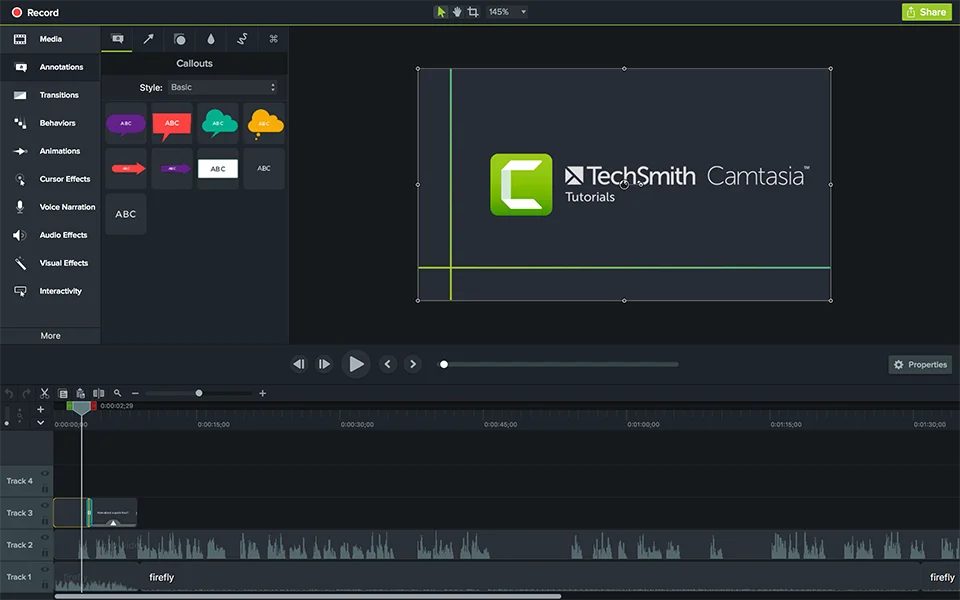
- Multitrack editor with callouts, annotations and quizzes
- Editing by transcript and captions
- Cursor smoothing and click effects
- Screencast sharing with comments
Pros
- The most complete editor of any recorder here
- Easier than a general video editor
Cons
- The most expensive way to export without a watermark
- Heavy on long or 4K projects
- Choose if:
- You produce long training videos from several clips
Camtasia, from TechSmith, is a screen recorder with a full multitrack video editor for Windows and macOS, aimed at trainers, educators and teams that make how-to and product videos. It records the screen up to 4K with webcam, microphone and system audio, and its editor adds annotations, callouts, zoom-and-pan, cursor smoothing and click effects, captions, quizzes and editing by transcript. It is sold only as an annual subscription; the full editor starts with the Essentials plan.
Rankings and alternatives
- Windows screen recorders #6 of 10 Long, edited training videos
- OBS Studio #1 Free, no limits, the most control
- Bandicam #2 Simple recorder you can buy once
- FocuSee #3 Automatic zooms for tutorials and demos
- Mac screen recorders #7 of 9 For trainers who need quizzes and captions
- CleanShot X #1 Best for most Mac users
- Screen Studio #2 For demos where the video is the product
- Tella #3 For hosted, edited course and pitch videos
- Video editing software for YouTube #8 of 8 For screen-recorded tutorials
- DaVinci Resolve 21 #1 Best overall, and free to start
- Adobe Premiere #2 The standard, if you'll hire editors
- CyberLink PowerDirector #3 Most editor for the money on Windows









Windows screen recorders scores
Evaluated Nov 17, 2026 Evidence ↓- Recording quality and smoothness · counts double 3
3/5 means: 1080p or 4K at up to 60 fps, with some reports of stutter, crashes or heavy load on Windows
Records up to 4K (the store page) and, per a review, 60 fps, but reviewers report crashes, lag and heavy PC load on long or high-res projects. Hardware encoding for capture is not documented in the sources read; the reports are not Windows-specific.
- Ease of getting a finished video 3
3/5 means: Recording is easy, but finishing a video means learning a full editor or a second app
Many reviewers call it easy to learn for beginners, but finishing a video means learning a full timeline editor, and some find the full feature set cumbersome. A 4 is arguable for people who only trim and export.
- Editing depth 5
5/5 means: A full multitrack editor with annotations, callouts, transitions, captions and your own media on separate tracks
Full multitrack timeline with annotations, callouts, transitions, captions, text-based editing and your own media on separate tracks, on Essentials.
- Cost over three years 1
1/5 means: More than $500
Essentials is $179.88 per year, so $539.64 over three years (179.88 x 3), above $500. No monthly or one-time option exists; Starter is cheaper but watermarks exports.
- Recording options 4
4/5 means: All the basics plus one or two extras, such as separate audio tracks, a phone or a capture device
Region or full-screen capture up to 4K, webcam, microphone and system audio, with multitrack recording so screen and camera stay on separate tracks. Multi-monitor and phone details were not verified in this research.
- Polish without editing · counts half 3
3/5 means: Click effects plus cursor smoothing or simple automatic zooms; most zooms are placed or fixed by hand
Cursor smoothing, click effects and Rev's layouts and backgrounds are there, and SmartFocus suggests zooms, but most zooms are still placed or fixed by hand on the timeline; it doesn't produce a polished result on its own the way the dedicated auto-zoom recorders do.
- Sharing · counts half 4
4/5 means: Hosted links with comments, transcripts or analytics
Screencast hosting with comments, reactions, transcripts and view notification, but capped at 25 videos on Essentials and not an instant link on stop. Viewer analytics beyond view notification are not documented.
- Gameplay capture · counts half 2
2/5 means: Records games through ordinary screen or window capture
Camtasia is aimed at tutorials and demos; no game capture mode or instant replay appears in the pages read, so it is scored as ordinary screen capture. Not established as absent.
Mac screen recorders scores
Evaluated Nov 17, 2026 Evidence ↓- Polish without editing 3
3/5 means: Cursor smoothing and click effects after recording; zooms are placed by hand
Cursor smoothing, click and keystroke effects, and cursor path editing after recording; zooms are placed by hand with zoom-and-pan.
- Editing depth 5
5/5 means: A full multitrack editor with annotations, callouts, transitions, captions and your own media on separate tracks
A full multitrack editor with annotations, callouts, transitions, behaviors, captions, quizzes and editing by transcript from the Essentials plan up.
- Ease of getting a finished video 3
3/5 means: Recording is easy, but finishing a video means learning a full editor
Recording is simple, but the editor is a full production tool that casual users find complex.
- Sharing 3
3/5 means: A hosted share link with limited storage or features
Up to 25 videos can be hosted privately on TechSmith Screencast with timestamped comments; longer libraries need another host.
- Cost over three years 1
1/5 means: More than $500
The full editor starts with Essentials at $179.88 a year, so about $540 over three years; perpetual licenses are no longer sold.
- Recording options · counts half 4
4/5 means: All the basics at up to 4K, plus one or two extras such as an iPhone, keystrokes or GIF export
Screen up to 4K with webcam, microphone and system audio.
Video editing software for YouTube scores
Evaluated Nov 17, 2026 Evidence ↓- Speed of cutting a typical YouTube video · counts double 3
3/5 means: A conventional timeline with good trimming tools, but little automation for removing pauses, retakes or filler words
A conventional multitrack timeline plus text-based editing and filler-word removal from Essentials, which is fast for tutorials; silence removal, multicam and quick vlog or gaming cuts are not documented, and reviewers point heavy projects to Premiere or Final Cut.
- Editing depth and production ceiling 3
3/5 means: Multiple tracks and keyframes, with clear limits in color, multicam, motion graphics or long projects
Multitrack timeline, annotations, cursor effects, background removal and animations, but a review says multicam and cinematic projects suit other editors; color grading and masks are not documented.
- Automatic captions 3
3/5 means: Automatic captions that work, with a clear weakness in accuracy, languages, styling, workflow or caption-file export
Essentials includes unlimited auto captions and translation to 7 languages and 9 dialects, but caption styling, accuracy, animated Shorts looks and SRT export were not confirmed.
- Voice and audio cleanup 3
3/5 means: Useful noise reduction or speech enhancement, but little else, or results reviewers call uneven
One-click AI noise removal and filler-word removal, but no voice-enhance or ducking found; a reviewer says the noise remover can make things worse, though that account is from 2022.
- What a growing channel pays 3
3/5 means: $350 to $600 over three years
Essentials is 179.88 x 3 = US$539.64 over three years, in the $350 to $600 band, with unlimited captions and noise removal on the plan page (noise removal plan not explicitly stated).
- Shorts and vertical video 2
2/5 means: Vertical projects or exports possible, but no reframing help; each Short is rebuilt by hand
TechSmith shows vertical video with layouts and SmartFocus, but auto reframe, a Shorts preset and clip-finding were not confirmed, so each Short is mostly built by hand; direct YouTube publishing exists.
- Learning curve 4
4/5 means: Approachable; most creators edit a full video in their first session with some looking around
Capterra reviewers with no editing experience call it easy to learn, and a minority find the full feature set cumbersome.
- Smooth on a typical creator's computer 3
3/5 means: Works on a typical computer with lag on long or high-resolution projects, or occasional crashes
Modest requirements (8 GB minimum, 16 GB recommended), but a review and several Capterra reviewers report lag, heavy CPU use and occasional crashes on long or high-resolution projects.
- Computers and devices it runs on · counts half 4
4/5 means: Windows and Mac with the same features
Windows and Mac with the same editor; no Linux, browser or phone editing app for the same projects.
Pricing
- Starter $39.00 /year Billed yearly. Screen and camera recording with screenshot tools and simple video creation; lacks the Essentials editor features such as text-based editing, captions and cursor path editing.
- Essentials $179.88 /year Billed yearly. The full Camtasia editor with multitrack recording, cursor effects and path editing, text-based editing, filler-word removal and unlimited captions.
- Create $249.00 /year Billed yearly. Adds AI script generation and AI voiceovers.
- Pro $599.00 /year Billed yearly. Adds TechSmith's most advanced AI and team features.
Prices checked Nov 17, 2026.
Evidence and sources
Windows screen recorders scores
Recording quality and smoothness 6 quotes
-
Screen recording Record part or all of your computer screen up to 4K UHD quality.
techsmith.com/store/camtasia · checked -
Users on low-end hardware; Camtasia may lag with long, high-res recordings.
PodcastVideos.com, review site author · podcastvideos.com/camtasia-2025-screen-recording-video-editing-review · checked -
RAM · 8GB of RAM · 16GB of RAM or more
techsmith.com/camtasia/system-requirements · checked -
I wish it didn't require so much of my PC resources. Other software that I use for video making/editing use less PC power, so I get things done faster. It can also be a bit cumbersome to learn and understand all the functionalities. But I always think that it's best to have it either as a backup (if you use Premiere Pro for instance) or as a main, with other software (like NCH Video Pad) for the quick tasks of cutting and basic editing.
Capterra reviewer, verified Camtasia user · capterra.com/p/203013/Camtasia/reviews · published · checked -
Stability is the second theme. Reviewers report random crashes that they cannot reproduce, lock-ups when making several edits quickly, and glitches mid-project on large compositions. Adding clip speed is cited as a specific trigger, and some describe the app shutting down entirely on heavy projects.
toolsurf.com/camtasia-reviews-2026 · checked -
Performance lag appears just as often. One reviewer describes editing becoming extremely slow after many cuts in a single project, and slow rendering on long high-resolution exports.
toolsurf.com/camtasia-reviews-2026 · checked
Ease of getting a finished video 3 quotes
-
I wish it didn't require so much of my PC resources. Other software that I use for video making/editing use less PC power, so I get things done faster. It can also be a bit cumbersome to learn and understand all the functionalities. But I always think that it's best to have it either as a backup (if you use Premiere Pro for instance) or as a main, with other software (like NCH Video Pad) for the quick tasks of cutting and basic editing.
Capterra reviewer, verified Camtasia user · capterra.com/p/203013/Camtasia/reviews · published · checked -
Camtasia has a lot of great features. It's super easy to learn for people with no experience creating videos. I had zero experience before I started creating software help videos at my company.
Capterra reviewer, verified Camtasia user making software help videos · capterra.com/p/203013/Camtasia/reviews · checked -
Stability is the second theme. Reviewers report random crashes that they cannot reproduce, lock-ups when making several edits quickly, and glitches mid-project on large compositions. Adding clip speed is cited as a specific trigger, and some describe the app shutting down entirely on heavy projects.
toolsurf.com/camtasia-reviews-2026 · checked
Editing depth 3 quotes
-
Text-based video editing Edit video by editing the words in your script or transcript.
techsmith.com/store/camtasia · checked -
Filler word and hesitation removal Automatically detect and remove filler words and hesitations.
techsmith.com/camtasia · checked -
Heavy multi-camera, cinematic or narrative projects better suited to advanced editors like Premiere Pro or Final Cut.
PodcastVideos.com, review site author · podcastvideos.com/camtasia-2025-screen-recording-video-editing-review · checked
Cost over three years 4 quotes
-
For educational and how-to content $179.88 per year billed yearly
techsmith.com/store/camtasia · checked -
TechSmith is transitioning to an annual subscription-only model, beginning with Snagit 2025 and Camtasia 2025.
support.techsmith.com/hc/en-us/articles/27009223314701-TechSmith-Transition-to-Annual-Subscription-Pricing-Model-in-2025 · checked -
Videos without watermark (Essentials, Create, Pro)
support.techsmith.com/hc/en-us/articles/40593880288397-Getting-Started-with-a-Camtasia-Starter-Plan · checked -
You can no longer buy Camtasia once: TechSmith moved to an annual subscription-only model with Camtasia 2025, in January 2025.
saascrmreview.com/camtasia-pricing · published · checked
Recording options 3 quotes
-
Screen recording Record part or all of your computer screen up to 4K UHD quality.
techsmith.com/store/camtasia · checked -
System audio recording Record the audio coming through your computer system.
techsmith.com/store/camtasia · checked -
Text-based video editing Edit video by editing the words in your script or transcript.
techsmith.com/store/camtasia · checked
Polish without editing 4 quotes
-
Cursor smoothing, clicks, and keystroke editing Simplify and edit mouse movement in your video.
techsmith.com/store/camtasia · checked -
Amelia Dame from TechSmith’s social media team will show a real example of turning a desktop recording and mobile recording into a vertical video by adding captions and using Rev layouts and SmartFocus to emphasize important content. Finally, we’ll cover simple edits and export settings to help your videos look more polished on social platforms.
techsmith.com/learn/webinars/361105 · checked -
Looks - Video Layout Templates Choose from over 85 screen-focused, camera-focused, or balanced layouts. Customize any look to match your style.
techsmith.com/store/camtasia · checked -
Camtasia Rev then applies layouts, backgrounds and filters, and SmartFocus adds automatic zooms and pans.
toolsurf.com/camtasia-reviews-2026 · checked
Sharing 2 quotes
-
Privately host up to 25 videos on Screencast and get timestamped comments and reactions.
techsmith.com/store/camtasia · checked -
25 videos · 25 videos · 25 videos · Unlimited
techsmith.com/store/camtasia · checked
Gameplay capture 1 quote
-
Screen recording Record part or all of your computer screen up to 4K UHD quality.
techsmith.com/store/camtasia · checked
Mac screen recorders scores
Polish without editing 1 quote
-
Cursor smoothing, clicks, and keystroke editing Simplify and edit mouse movement in your video.
techsmith.com/store/camtasia · checked
Editing depth 2 quotes
-
For educational and how-to content $179.88 per year billed yearly
techsmith.com/store/camtasia · checked -
Text-based video editing Edit video by editing the words in your script or transcript.
techsmith.com/store/camtasia · checked
Sharing 1 quote
-
Privately host up to 25 videos on Screencast and get timestamped comments and reactions.
techsmith.com/store/camtasia · checked
Cost over three years 2 quotes
-
For educational and how-to content $179.88 per year billed yearly
techsmith.com/store/camtasia · checked -
TechSmith is transitioning to an annual subscription-only model, beginning with Snagit 2025 and Camtasia 2025.
support.techsmith.com/hc/en-us/articles/27009223314701-TechSmith-Transition-to-Annual-Subscription-Pricing-Model-in-2025 · checked
Recording options 2 quotes
-
Screen recording Record part or all of your computer screen up to 4K UHD quality.
techsmith.com/store/camtasia · checked -
System audio recording Record the audio coming through your computer system.
techsmith.com/store/camtasia · checked
Video editing software for YouTube scores
Speed of cutting a typical YouTube video 3 quotes
-
Text-based video editing Edit video by editing the words in your script or transcript.
techsmith.com/store/camtasia · checked -
Filler word and hesitation removal Automatically detect and remove filler words and hesitations.
techsmith.com/camtasia · checked -
Heavy multi-camera, cinematic or narrative projects better suited to advanced editors like Premiere Pro or Final Cut.
PodcastVideos.com, review site author · podcastvideos.com/camtasia-2025-screen-recording-video-editing-review · checked
Editing depth and production ceiling 1 quote
-
Heavy multi-camera, cinematic or narrative projects better suited to advanced editors like Premiere Pro or Final Cut.
PodcastVideos.com, review site author · podcastvideos.com/camtasia-2025-screen-recording-video-editing-review · checked
Automatic captions 1 quote
-
AI translation Translate your audio and transcription to any of 7 languages and 9 dialects.
techsmith.com/camtasia · checked
Voice and audio cleanup 3 quotes
-
AI background noise removal Remove unwanted background noise from your audio recordings with one click to enhance your audio quality.
techsmith.com/camtasia · checked -
Filler word and hesitation removal Automatically detect and remove filler words and hesitations.
techsmith.com/camtasia · checked -
I do wish camtasia had better audio editing tools. The noise remover and ones they have tend to make things worse rather than better. There is another feature you can purchase in addition to camtasia that specializes in audio. There are times when camtasia crashed and thankfully a separate backup is saved when that happens, but it can be frustrating when you get kicked off.
Capterra reviewer, verified Camtasia user · capterra.com/p/203013/Camtasia/reviews · published · checked
What a growing channel pays 2 quotes
-
For educational and how-to content $179.88 per year billed yearly
techsmith.com/store/camtasia · checked -
AI background noise removal Remove unwanted background noise from your audio recordings with one click to enhance your audio quality.
techsmith.com/camtasia · checked
Shorts and vertical video 1 quote
-
Amelia Dame from TechSmith’s social media team will show a real example of turning a desktop recording and mobile recording into a vertical video by adding captions and using Rev layouts and SmartFocus to emphasize important content. Finally, we’ll cover simple edits and export settings to help your videos look more polished on social platforms.
techsmith.com/learn/webinars/361105 · checked
Learning curve 2 quotes
-
Camtasia has a lot of great features. It's super easy to learn for people with no experience creating videos. I had zero experience before I started creating software help videos at my company.
Capterra reviewer, verified Camtasia user making software help videos · capterra.com/p/203013/Camtasia/reviews · checked -
I wish it didn't require so much of my PC resources. Other software that I use for video making/editing use less PC power, so I get things done faster. It can also be a bit cumbersome to learn and understand all the functionalities. But I always think that it's best to have it either as a backup (if you use Premiere Pro for instance) or as a main, with other software (like NCH Video Pad) for the quick tasks of cutting and basic editing.
Capterra reviewer, verified Camtasia user · capterra.com/p/203013/Camtasia/reviews · published · checked
Smooth on a typical creator's computer 4 quotes
-
Users on low-end hardware; Camtasia may lag with long, high-res recordings.
PodcastVideos.com, review site author · podcastvideos.com/camtasia-2025-screen-recording-video-editing-review · checked -
RAM · 8GB of RAM · 16GB of RAM or more
techsmith.com/camtasia/system-requirements · checked -
I do wish camtasia had better audio editing tools. The noise remover and ones they have tend to make things worse rather than better. There is another feature you can purchase in addition to camtasia that specializes in audio. There are times when camtasia crashed and thankfully a separate backup is saved when that happens, but it can be frustrating when you get kicked off.
Capterra reviewer, verified Camtasia user · capterra.com/p/203013/Camtasia/reviews · published · checked -
I wish it didn't require so much of my PC resources. Other software that I use for video making/editing use less PC power, so I get things done faster. It can also be a bit cumbersome to learn and understand all the functionalities. But I always think that it's best to have it either as a backup (if you use Premiere Pro for instance) or as a main, with other software (like NCH Video Pad) for the quick tasks of cutting and basic editing.
Capterra reviewer, verified Camtasia user · capterra.com/p/203013/Camtasia/reviews · published · checked
Computers and devices it runs on 2 quotes
-
MacOS 14+ compatibility
techsmith.com/store/camtasia · checked -
RAM · 8GB of RAM · 16GB of RAM or more
techsmith.com/camtasia/system-requirements · checked
Facts
License 1 quote
-
TechSmith is transitioning to an annual subscription-only model, beginning with Snagit 2025 and Camtasia 2025.
support.techsmith.com/hc/en-us/articles/27009223314701-TechSmith-Transition-to-Annual-Subscription-Pricing-Model-in-2025 · checked
Runs on 1 quote
-
MacOS 14+ compatibility
techsmith.com/store/camtasia · checked
Needs 2 quotes
-
MacOS 14+ compatibility
techsmith.com/store/camtasia · checked -
RAM · 8GB of RAM · 16GB of RAM or more
techsmith.com/camtasia/system-requirements · checked
More from the sources
Pricing 2 quotes
-
For product marketing and software demos $249.00 per year billed yearly
techsmith.com/store/camtasia · checked -
For workplace communication and team alignment $39.00 per year billed yearly
techsmith.com/store/camtasia · checked
Limits and known issues 3 quotes
-
The upload to YouTube feature just stopped working with the recent version I purchased. My old version still works fine with that but the fact that I can no longer directly upload to YouTube drives me absolutely bonkers. Many others have reported this issue online and there doesn't seem to be a solution as of yet.
Capterra reviewer, verified Camtasia user · capterra.com/p/203013/Camtasia/reviews · published · checked -
With this plan you have access to Snagit Individual for quick image and video capture and editing, along with Camtasia Editor (with watermark) for more advanced video editing capabilities.
support.techsmith.com/hc/en-us/articles/40593880288397-Getting-Started-with-a-Camtasia-Starter-Plan · checked -
Starter is a screenshot plan, not a video-publishing plan: it pairs Snagit Individual with a Camtasia Editor that still adds a watermark.
saascrmreview.com/camtasia-pricing · published · checked
What users say 1 quote
-
I use Camtasia to create tutorials videos for my classes at a local university and a local technical college as well as creating tutorials for my YouTube channel.
Capterra reviewer, instructor who makes tutorials for classes and a YouTube channel · capterra.com/p/203013/Camtasia/reviews · published · checked
Platforms and requirements 2 quotes
-
Operating System · macOS 15.0 · macOS 27.0 or later
techsmith.com/camtasia/system-requirements · checked -
Windows 10 & 11 compatibility
techsmith.com/store/camtasia · checked
License 1 quote
-
While internet access is not required continuously, it is necessary for initial activation and then once every 90 days to maintain product functionality.
IconLogic, e-learning training company blog quoting TechSmith's FAQ · blog.iconlogic.com/2025/02/techsmith-and-subscriptions.html · published · checked
Pricing
techsmith.com/store/camtasia · checked