Best e-reader apps for Android
Most “best e-reader app” lists put Kindle next to Moon+ Reader as if you’d pick one or the other, but they do different jobs. Kindle, Google Play Books, and Kobo are bookstores with a reader attached, and the books you buy there carry DRM, copy protection that limits which apps can open them; Kindle books open only in Amazon’s apps. Moon+ Reader, ReadEra, and the rest open the DRM-free EPUBs and PDFs you already have. Most people need one of each: Kindle (or Play Books, if you’d rather not tie your library to Amazon) for bought books, ReadEra for everything else, and Libby for free library loans.
So the ranking comes in two parts. The first covers the store and library apps, where the store behind the app matters as much as the reading. The second covers readers for your own files, where only the reading counts.
Apps for store and library books
The store comes first. A Kindle book won’t open in Google Play Books, and a Play Books purchase won’t open in Kindle, so the app you read in follows from where you buy. If you already have a library with one store, stay with it unless something below is a dealbreaker.
Kindle
The biggest store, and the app to use with a Kindle
Ranking: Best apps for store and library ebooks
#1 4.5/5
Kindle is where most people already have their books, and for them the choice is made. Amazon’s store has nearly every mainstream release plus a huge self-published catalog you won’t find in other stores, much of it included in Kindle+, Amazon’s subscription for unlimited reading of included books (long sold as Kindle Unlimited), at $11.99 a month in the US. And in the US you can buy books inside the Android app, though plenty of guides still say you have to use a browser.
The reading view is solid rather than exciting: typeface, text size, margins, alignment, page turns or continuous scrolling, and dark backgrounds. Where Kindle pulls ahead is everything around the text. X-Ray lists the characters and terms in the book you’re reading, the dictionary, Wikipedia, and translation are a long press away, and My Notebook gathers your highlights and notes. Your place, highlights, and notes follow you to a Kindle e-reader, an iPhone, and the web. If you own a Kindle, this is the phone app to use. In the US, Libby can send library loans to it too.
Your own files work through Send to Kindle: share an EPUB or PDF from your phone, or email it to your Kindle address, and it lands in your library next to your bought books. It’s a detour compared with a reader that opens files straight from your phone, and Amazon converts the EPUB instead of showing it as it is. The other catches are ads for more books on the home and store screens (never on the page you’re reading), and the fact that everything you buy stays in Amazon’s apps and devices.
What it does
- The largest ebook store, with Kindle+ for unlimited reading of included titles
- X-Ray, dictionary, Wikipedia, and translation lookups
- Send to Kindle for your own EPUB and PDF files
- Sync with Kindle e-readers, iPhone, iPad, and the web
Pros
- Nearly every mainstream book plus a large self-published catalog
- Books can be bought inside the Android app in the US
- Reading aids such as X-Ray that other store apps lack
- Your place and notes follow you to Kindle e-readers
Cons
- Ads for books on the home and store screens
- Bought books open only in Amazon's apps and devices
- Your own EPUBs go through Amazon instead of opening from the phone
- Choose if:
- You own a Kindle e-reader or read many self-published books
Google Play Books & Audiobooks
The open alternative to Kindle
Ranking: Best apps for store and library ebooks
#2 3.9/5
Google Play Books is probably already on your phone, and it’s the better pick if you’d rather not hand Amazon your whole library. The store carries almost every mainstream book, though fewer self-published ones than Amazon. There’s no subscription: you buy what you want, and the app shows no ads.
Two things make it friendlier than Kindle if you also have your own files. You can upload EPUBs and PDFs from the phone (PDFs need Enable PDF uploading turned on in the settings first), and they sync with your bookmarks, highlights, and notes to every device where you sign in, the web included. And when a seller offers a book without DRM, Play Books lets you download the file and keep it, to read in any app you like. Your highlights and notes can also collect in a Google Docs file per book in your Drive, which is handy if you write about what you read.
The reading view is clean and polished, with a choice of typefaces, line spacing, and a night theme, but it has fewer color and theme options than a dedicated reader. And there’s no e-reader that syncs with it, so it suits people who read on phones, tablets, and computers.
What it does
- Ebook and audiobook store, with no subscription
- Uploads of EPUBs and PDFs you own, synced across devices
- DRM-free downloads of books whose seller allows it
- Highlights and notes saved to Google Docs
Pros
- Already installed on most Android phones, with no ads
- Your own EPUBs and PDFs sync like bought books
- Books sold without DRM can be downloaded and kept
Cons
- Fewer color and theme options than dedicated readers
- No e-reader to pair it with
- No subscription for heavy readers
- Choose if:
- You want your bought books and your own files in one synced library

Kobo | eBooks & Audiobooks
A cheaper subscription than Kindle+, and the app for Kobo owners
Ranking: Best apps for store and library ebooks
#3 3.7/5
Kobo Books makes sense in two cases: you own a Kobo e-reader, or you read enough to want a subscription and would rather pay less. Kobo Plus Read costs $7.99 a month in the US, and Read & Listen adds audiobooks for $9.99, which is less than Kindle+ alone. The store carries most mainstream books, and your place syncs between the app, Kobo’s web reader, and Kobo e-readers.
The app itself is the plainest of the three stores: text size, typefaces, margins, line spacing, and night mode. It’s weak with your own files, too. You can import DRM-free EPUBs from your phone but not PDFs, and an imported book stays on the phone you imported it on; it never shows up on your Kobo or your tablet. Audiobooks are only sold in some countries.
What it does
- Kobo store with Kobo Plus subscriptions for ebooks, audiobooks, or both
- Sync with Kobo e-readers and Kobo's web reader
- Audiobooks in the same app, in some countries
Pros
- A cheaper subscription than Kindle+, with audiobooks for a little more
- Pairs with Kobo e-readers
Cons
- A basic reading view next to Kindle and Play Books
- Imported EPUBs stay on one device, and PDFs can't be imported
- Choose if:
- You own a Kobo or want Kobo Plus
Libby by OverDrive
Free ebooks and audiobooks from your library
Ranking: Best apps for store and library ebooks
#4 3.4/5
Libby is the free option: sign in with a library card and borrow ebooks and audiobooks. It runs on Android, iPhone, Fire tablets, and the web, and keeps your place in step between them. Its audiobook player goes up to 3x speed and has a sleep timer. You can link more than one library card. In the US, Libby can send a loan to your Kindle app or e-reader instead, and on Kobo e-readers you can borrow and read Libby books directly.
What you can read depends on your library, and new and popular books usually mean a hold queue. Libby is library-only, with no store and no way to open your own files. The reader covers the basics (text size, page layout, lighting, and highlights with notes) and not much more. I’d use it alongside a store app rather than instead of one.
What it does
- Free loans of ebooks, audiobooks, and magazines with a library card
- Several library cards in one app
- Loans delivered to Kindle (US libraries only) and readable on Kobo e-readers
Pros
- Free
- A good audiobook player, at no extra cost
- Runs on Android, iPhone, Fire tablets, and the web
Cons
- Popular books often mean waiting for a hold
- No store and no way to open your own files
- A basic reading view
- Choose if:
- You'd rather borrow than buy
1–5 per criterion · select a score for its reasoning and any sources
| # | Product | Overall | Books you can get , counts double | What reading costs | Reading comfort | Reading on all your devices | Your own EPUB and PDF files | Highlights, notes and lookups | Audiobooks and read-aloud , counts half |
|---|---|---|---|---|---|---|---|---|---|
| 1 | Kindle | 4.5 | 5 | 4 | 4 | 5 | 4 | 5 | 3 |
| 2 | Google Play Books & Audiobooks | 3.9 | 4 | 3 | 4 | 4 | 4 | 4 | 4 |
| 3 | Kobo | eBooks & Audiobooks | 3.7 | 4 | 4 | 3 | 5 | 2 | 3 | 5 |
| 4 | Libby by OverDrive | 3.4 | 3 | 5 | 3 | 4 | 1 | 4 | 5 |
×2 = counts double in the overall score, ×½ = counts half.
How each criterion is scored
Books you can get
Counts double in the overall score: For a store or library app, the books it can give you decide the choice before anything else; a better reader is no use when the book you want isn't there.
How many of the books a reader wants they can get and start reading in the app: the size of the store or library collection, new releases and self-published books, and whether popular titles are there right away or only after a wait. Judged from the catalog's published size and how the store or library works.
- 5 The largest selection, with nearly every mainstream book plus a large self-published and exclusive catalog, ready to read right away
- 4 A large store with nearly all mainstream new releases ready to buy, but fewer self-published or exclusive titles than the biggest store
- 3 A large collection, but popular titles often mean a wait or depend on where you live or which library you belong to
- 2 A modest selection, or popular books mostly arrive only after long waits
- 1 A small or niche selection, with most popular books missing
What reading costs
What a reader pays to read regularly, say two or three books a month, through the app: free books such as library loans, subscriptions that cover many books, and the price of buying books one at a time.
- 5 Reading is free for most readers, such as library loans with a library card
- 4 Normal store prices plus a subscription that covers many books for a monthly fee, or free library loans in some countries
- 3 Books bought one at a time at normal store prices, with frequent deals or rewards but no subscription or free loans
- 2 Books bought one at a time, with occasional deals
- 1 Every book is bought one at a time at high prices, with no free or subscription option
Reading comfort
How pleasant the app is for reading a whole book on a phone or tablet: typefaces, text size, margins and line spacing, themes for night reading, page turning or scrolling, and how fast and stable it is. Judged from the app's reading settings and what reviewers and many users agree on.
- 5 Among the best reading views on Android, with fine control of the page and very few complaints
- 4 Comfortable and polished, with a good choice of typefaces, spacing and themes and only minor complaints
- 3 Comfortable, with the basic settings (text size, a few typefaces, a dark theme) and some gaps or complaints
- 2 Readable, but with very few settings or frequent complaints about bugs
- 1 Cramped or unstable, with few settings and widespread complaints
Reading on all your devices
Whether you can pick up the same book where you left off on another phone or tablet, an iPhone or iPad, a computer's browser and an e-reader, with highlights and notes following you.
- 5 Android, iPhone and iPad, a web reader and the store's own e-readers, with your place, highlights and notes kept in step
- 4 Android, iPhone and iPad, and a web reader or an e-reader, with your place kept in step
- 3 Android plus one other kind of device, such as iPhone or a web reader
- 2 Android devices only
- 1 Only on one Android device
Your own EPUB and PDF files
Whether you can add DRM-free books you already have, such as EPUB and PDF files, to the same library, and whether they then sync like store books.
- 5 Most common ebook formats can be added easily and sync fully across devices
- 4 EPUB and PDF can be added from the phone or by email or upload, and your place and notes in them sync across devices
- 3 EPUB and PDF can be added, but they don't sync or adding them is awkward
- 2 You can add one format, such as EPUB, but the files stay on the one device
- 1 You can't add your own files
Highlights, notes and lookups
How well the app supports reading closely: highlights and notes, a dictionary, translation and background lookups, and getting your highlights out of the app.
- 5 As 4, plus extra reading aids such as character and term lookups or a notebook across all your books
- 4 Highlights, notes, dictionary and translation, plus an export of your notes
- 3 Highlights, notes and a dictionary, but no way to export them
- 2 Highlights or bookmarks only, with no dictionary
- 1 No highlights or notes
Audiobooks and read-aloud
Counts half in the overall score: Many readers also listen, but most use a separate audiobook app when they do, so listening in the reading app is a convenience rather than the reason to choose it.
Whether the same app also plays audiobooks, or reads an ebook aloud, so you can switch between reading and listening.
- 5 As 4, plus audiobooks included in a subscription or loan at no extra cost, or text-to-speech for ebooks
- 4 Audiobooks in the same app, bought or borrowed, with speed controls and a sleep timer
- 3 Audiobooks bought for a book can be played or switched to, but listening isn't central to the app
- 2 Only the phone's accessibility screen reader
- 1 No audiobooks and no read-aloud
Readers for your own files
If your books are DRM-free files, from Humble Bundle, Standard Ebooks, Project Gutenberg, a publisher that sells without DRM, or your own Calibre library (a free desktop program that organizes ebooks), you choose an app by how it reads. None of these apps opens Kindle books. Half of them show ads in their free versions; ReadEra, PocketBook Reader, and KOReader show none.

#1 3.9/5
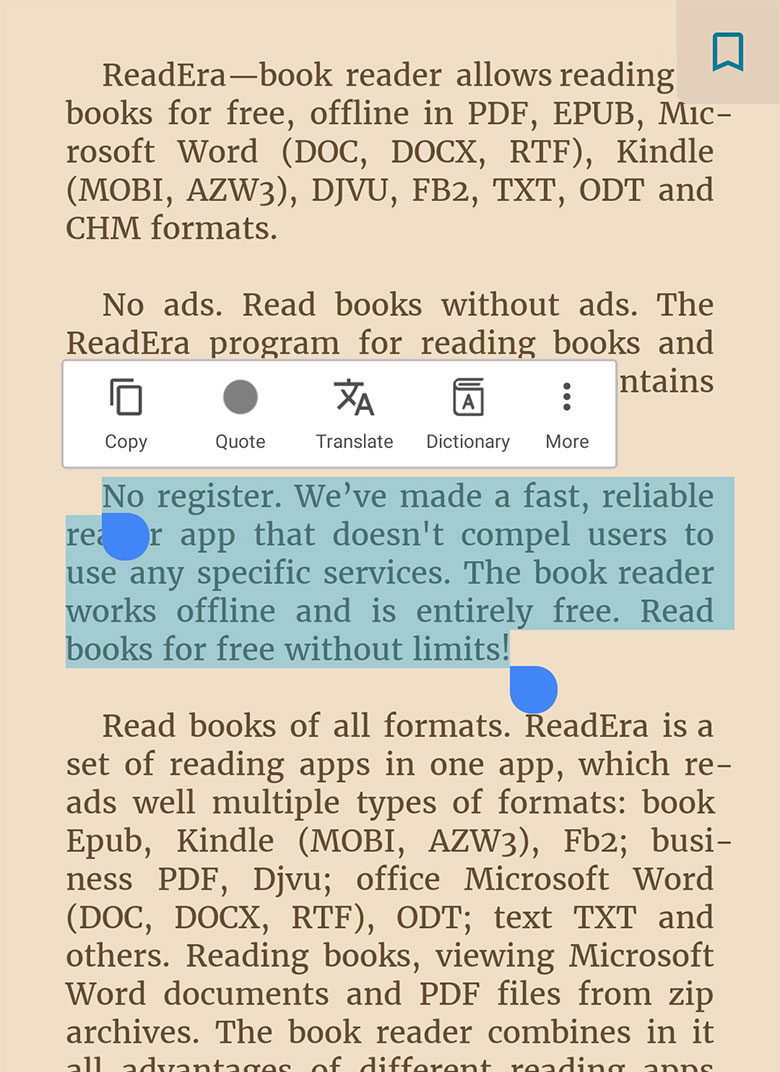
ReadEra is the one I’d install first. It’s free, it shows no ads, and it doesn’t ask you to sign up, unlike the store apps above. Open it and it finds the EPUBs, PDFs, MOBIs, AZW3s, FB2s, DjVu scans, and Word documents already on your phone and sorts them by author and series, with collections and to-read lists on top.
The reading view is calm and clean. The settings cover what most people touch: typeface, size, spacing, margins, hyphenation, and themes for day, night, and sepia reading. It reads aloud with your phone’s voices, with a sleep timer.
The free app stays on one phone, though. Sync through Google Drive, read-aloud with the screen locked, your own fonts, and extra highlight colors are in ReadEra Premium, a one-time purchase under $15. The automatic scan also sweeps in every supported document on the phone, so expect some tidying of the library. And it doesn’t open DRM-protected books.
What it does
- Opens EPUB, PDF, MOBI, AZW3, FB2, DjVu, DOCX, and comic archives
- Finds books on the phone and sorts them by author and series
- Read-aloud with a sleep timer
- Google Drive sync in the one-time Premium edition
Pros
- Free with no ads and no account
- One of the most comfortable reading views on Android
- Works with no setup
Cons
- Sync between devices needs Premium
- Pulls every document on the phone into the library
- No DRM-protected books
- Choose if:
- You want one free, ad-free reader for your own files and don't need sync
Moon+ Reader
The most control over how you read
Ranking: Best readers for your own EPUB and PDF files
#2 3.8/5
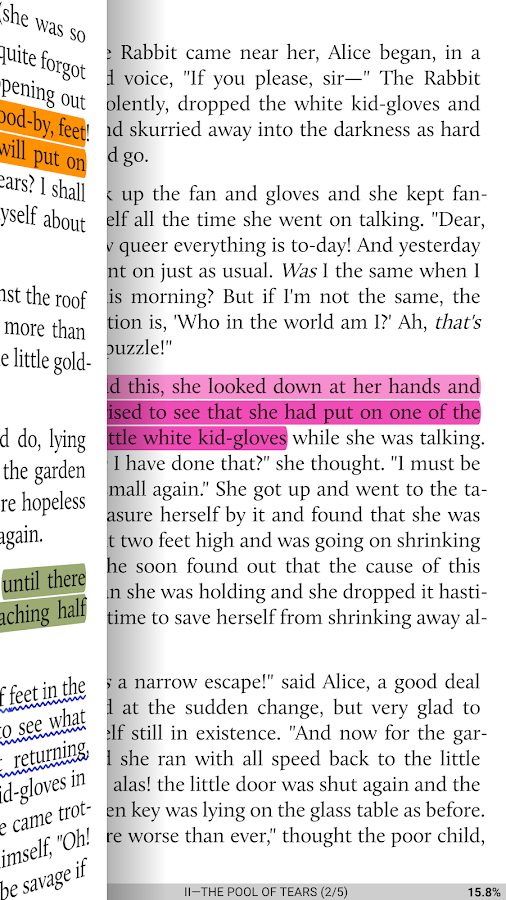
Moon+ Reader lets you decide what taps, swipes, and key presses do, volume buttons included: it offers 24 customizable operations, including bookmarking, search, and font size. It has five auto-scroll modes, your own fonts and backgrounds, and a long list of themes. It opens nearly every format there is and browses OPDS catalogs (feeds that let an app search and download from an online library), so you can point it at your own Calibre server. It syncs your place, highlights, and notes between Android phones and tablets through Dropbox or a server you run yourself (using WebDAV). That sync is free in Moon+, while ReadEra charges for its own.
The price is clutter. The settings run deep enough to take weeks to learn, and the free edition shows ads. Moon+ Reader Pro, a separate app you buy once, removes them and adds PDF annotation, more themes, and headset-button controls. Moon+ is Android-only, so the sync stops at your Android devices.
What it does
- Taps, swipes, and hardware keys mapped to the actions you choose
- Five auto-scroll modes
- Sync of place, highlights and notes through Dropbox or WebDAV
- OPDS catalogs, including your own Calibre server
Pros
- More control over the page and gestures than nearly any reader
- Free sync of highlights and notes between Android devices
- Opens almost every ebook format
Cons
- Ads in the free edition
- Settings that take a long time to learn
- Android only, so no sync with an iPhone or computer
- Choose if:
- You want every tap, swipe and hardware key mapped to your own action, with free sync between Android devices
PocketBook Reader
For Adobe DRM books and free cross-device sync
Ranking: Best readers for your own EPUB and PDF files
#3 3.6/5
PocketBook Reader is the one to get if some of your books carry Adobe DRM, the copy protection many non-Amazon stores and some library services use for EPUB and PDF downloads. It opens those along with the usual DRM-free formats, plays MP3 and M4B audiobooks, reads aloud, and browses OPDS catalogs. It’s free, with no ads and no sign-up needed to read.
Its other draw is PocketBook Cloud, which syncs your books and your place between the app on Android or iPhone and PocketBook’s own e-readers, free with a PocketBook account. No other app in this group syncs your files that widely for free. It doesn’t always behave, though: a longtime user on the app’s store page reports cloud uploads failing and collections not syncing between phone and tablet. The reading settings cover fonts, colors, spacing, margins, and a night dimmer; for detailed control over taps and gestures, Moon+ Reader goes further.
What it does
- Opens Adobe DRM EPUB and PDF plus the common DRM-free formats
- Audiobook player for MP3 and M4B files
- PocketBook Cloud sync with iPhone and PocketBook e-readers
Pros
- Free with no ads
- Opens Adobe DRM files, which many Android readers can't
- Free sync to an iPhone or a PocketBook e-reader
Cons
- Cloud sync and collections don't always sync reliably
- Less control over taps and gestures than Moon+ Reader
- Choose if:
- Your library or store gives you Adobe DRM files
KOReader
For highlight exporters and typography fans
Ranking: Best readers for your own EPUB and PDF files
#4 3.6/5
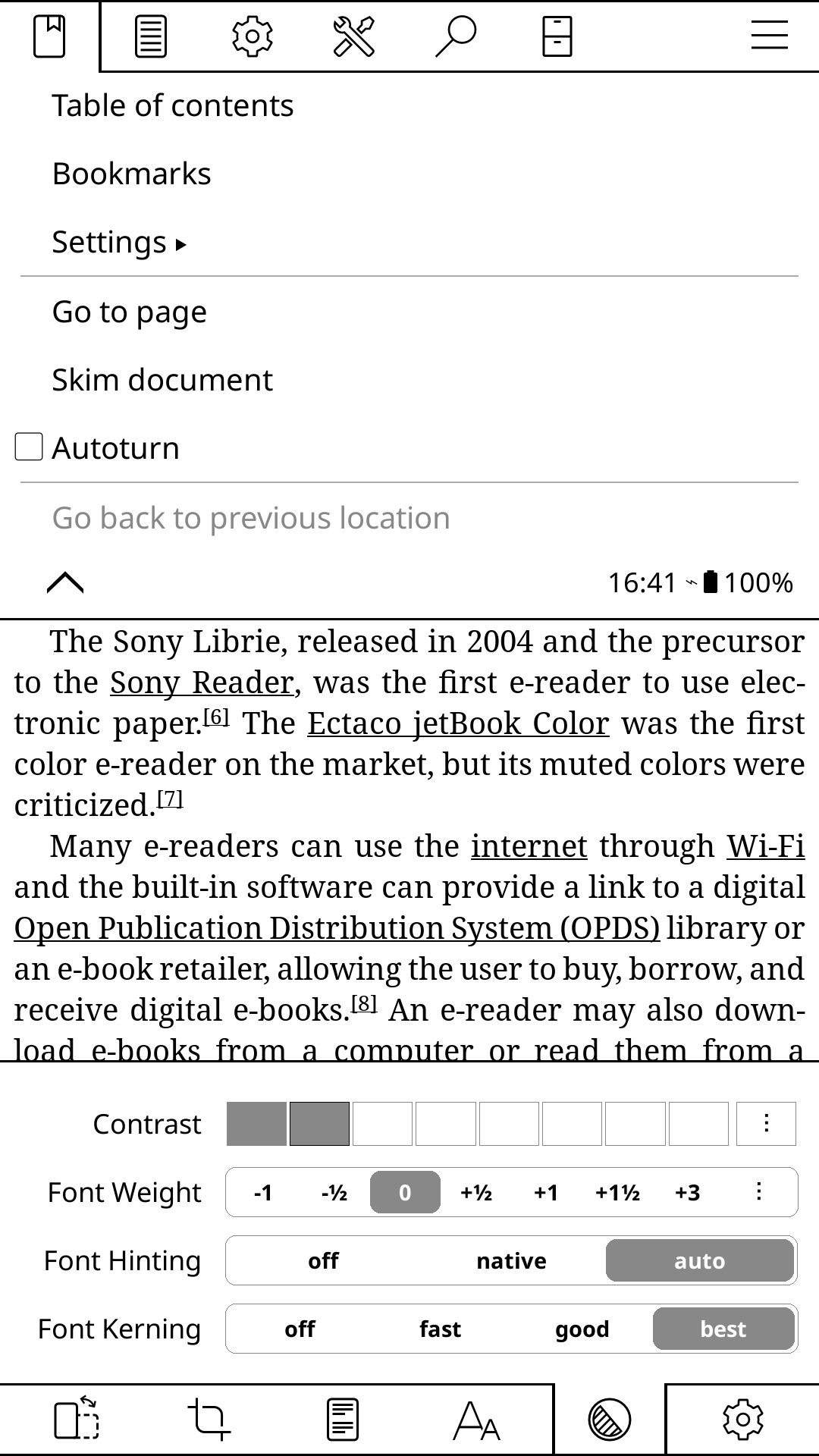
KOReader started as a reader for e-ink devices (people install it on Kindles and Kobos in place of the built-in software), and that shows on a phone: monochrome menus, no animations, and settings laid out in pages. It isn’t on Google Play either. You install it from F-Droid, an app store for open-source apps, or from the project’s GitHub page.
Why bother? Typesetting and notes. You control margins, line spacing, word spacing, kerning, hyphenation, and font weight more finely than in any other app here. Highlights export as text, Markdown, HTML, or JSON, or go straight to Readwise (a service for reviewing highlights) and Joplin (a note-taking app), which suits you if you keep reading notes in a note-taking app. It’s free and open source with no ads, receives books from Calibre over Wi-Fi, and keeps your place in step with KOReader on your other devices, e-readers included. If you want books read aloud, Librera or ReadEra are the apps for it.
What it does
- Fine typesetting controls, including hyphenation, kerning, and word spacing
- Highlight export to Markdown, HTML, JSON, Readwise, and Joplin
- Wireless transfer from Calibre and OPDS catalogs
- Reading-position sync with KOReader on e-readers and other devices
Pros
- Exports highlights to more formats and note apps than other readers
- Free and open source, with no ads
- Also runs on Kobo e-readers and jailbroken Kindles, keeping your place in step
Cons
- An interface built for e-ink that feels dated on a phone
- Not on Google Play
- Choose if:
- You want your highlights in Readwise, Joplin or Markdown files
Librera Reader
The listener's pick, with read-aloud and recording
Ranking: Best readers for your own EPUB and PDF files
#5 3.6/5
Librera Reader is the app for listening. It reads aloud with any voice installed on your phone, has its own playback controls, and can record a book page by page to MP3 or WAV files for a music player. It also opens nearly every format, browses OPDS catalogs and offline Calibre libraries, lets you set tap zones and volume keys, and has a hands-free auto-scroll it calls Musician’s mode, for reading sheet music or lyrics on a stand.
It’s open source, and the Google Play version shows ads. Librera PRO removes them, and the F-Droid build is free and ad-free but drops the Google Drive sync that otherwise keeps your place and bookmarks in step between Android devices. The interface is functional rather than pretty. The maintainer, who is in Ukraine, has posted that development is frozen because of the war; new builds still come out regularly, but don’t count on big new features.
What it does
- Read-aloud with any installed voice, plus recording to MP3 or WAV
- Configurable tap zones and volume keys, and Musician's mode auto-scroll
- OPDS catalogs and offline Calibre libraries
- Google Drive sync between Android devices
Pros
- Read-aloud that can record books to audio files
- Open source, with an ad-free F-Droid build
- Opens nearly every format
Cons
- Ads in the free Google Play version
- A plain, busy interface
- Regular builds but no big new features, by the maintainer's own account
- Choose if:
- You want to record books as audio files for a music player
FBReader
A long-running reader for LCP-protected books
Ranking: Best readers for your own EPUB and PDF files
#6 3.1/5
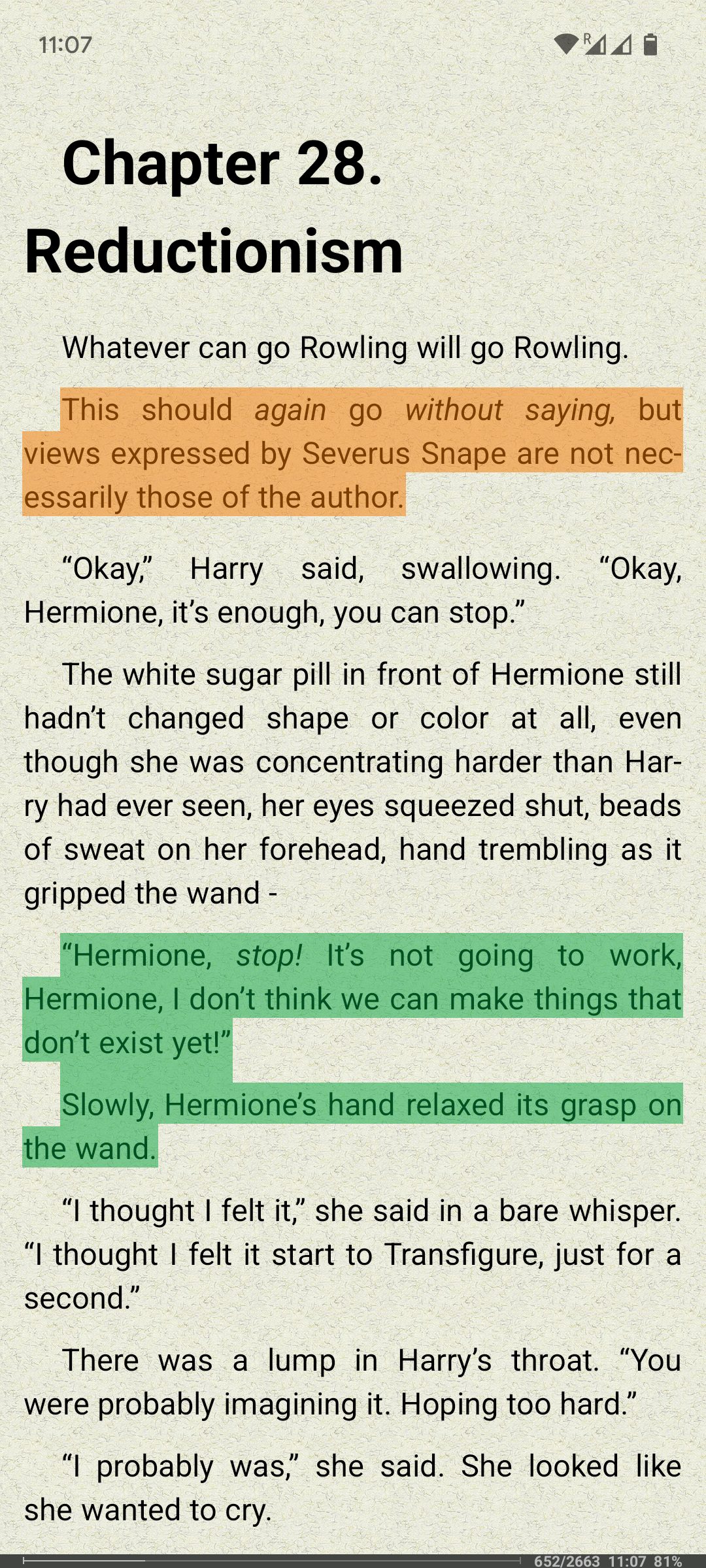
FBReader is a light reader that’s at its best with EPUB, and it opens EPUBs protected with Readium LCP, a newer copy protection some libraries and stores use. Its customization is decent, with your own fonts, themes, and gesture settings, and it browses OPDS catalogs and syncs your library and reading position through its Google Drive-based Book Network.
The free edition shows ads and needs a separate plugin for PDFs. Read-aloud, translation, and built-in PDF support come with FBReader Premium, a separate app you buy once. Unless you have LCP books, ReadEra does the same job for free and without ads.
What it does
- Opens Readium LCP-protected EPUBs
- OPDS catalogs and Book Network sync of library and position
- Your own fonts, themes, and gestures
Pros
- Opens Readium LCP books, which few readers here support
- Light and well suited to EPUB
Cons
- Ads in the free edition, and a plugin for PDFs
- Read-aloud and translation need the separate Premium app
1–5 per criterion · select a score for its reasoning and any sources
| # | Product | Overall | Reading comfort , counts double | Formats it opens | Control over the page and gestures | Price and ads | Syncing between devices | Read-aloud | Highlights, notes and export | Organizing your books , counts half |
|---|---|---|---|---|---|---|---|---|---|---|
| 1 | ReadEra | 3.9 | 5 | 4 | 4 | 4 | 3 | 4 | 3 | 3 |
| 2 | Moon+ Reader | 3.8 | 4 | 4 | 5 | 3 | 3 | 3 | 4 | 4 |
| 3 | PocketBook Reader | 3.6 | 4 | 5 | 3 | 4 | 4 | 3 | 2 | 4 |
| 4 | KOReader | 3.6 | 3 | 4 | 5 | 5 | 3 | 1 | 5 | 4 |
| 5 | Librera Reader | 3.6 | 3 | 4 | 5 | 3 | 3 | 4 | 4 | 4 |
| 6 | FBReader | 3.1 | 3 | 3 | 4 | 2 | 3 | 3 | 3 | 4 |
Equal displayed overall scores are ordered by the earlier criteria; a known score comes before an unknown score. Identical scores use alphabetical order.
×2 = counts double in the overall score, ×½ = counts half.
How each criterion is scored
Reading comfort
Counts double in the overall score: Every reader of these apps opens their own files to read for hours, so how comfortable and dependable the reading is matters more than any single feature.
How pleasant the app is for reading a whole book on a phone or tablet: how well it lays out the text, how easy its menus are to use on a touchscreen, and how fast and stable it is with large libraries and long books. Judged from what reviewers and many users agree on, store ratings, and how the app works.
- 5 Among the most pleasant readers on Android, easy to use from the first book, with very few complaints
- 4 Comfortable and dependable, with minor complaints
- 3 Comfortable once set up, with clear rough edges such as an interface built for another kind of device, clutter or some rendering complaints
- 2 Usable, but with a confusing interface or frequent complaints about freezes and rendering
- 1 Awkward or unstable, with widespread complaints about crashes or layout
Formats it opens
Which ebook and document formats open without another app: EPUB, PDF, MOBI and AZW3, FB2, DjVu, comic archives (CBZ and CBR), DOCX and TXT, and DRM-protected EPUB and PDF from stores and libraries that use Adobe DRM or Readium LCP.
- 5 All the common formats plus DRM-protected EPUB or PDF from stores and libraries
- 4 All the common formats (EPUB, PDF, MOBI and AZW3, FB2, DjVu, comic archives, DOCX), but no DRM-protected books
- 3 Most common formats, but one of them, such as PDF or DjVu, needs a separate plugin
- 2 EPUB, PDF and a couple of others, with common formats missing
- 1 EPUB only, or EPUB and PDF only
Control over the page and gestures
How far you can tune the reading view and the way you turn pages: your own fonts, margins, line spacing, hyphenation and themes; tap zones, swipes and volume-key page turns; and auto-scroll.
- 5 Nearly everything can be set, including tap zones, gestures, keys and auto-scroll, plus custom styles or typesetting rules
- 4 Fine control of the page, including your own fonts, plus configurable taps or volume keys
- 3 Typefaces, margins, spacing and themes, but little control over taps, gestures or keys
- 2 A few typefaces, spacing and themes, with fixed tap behavior
- 1 Text size and a dark theme only
Price and ads
What you pay, and whether you see ads, to get the features scored on the other criteria.
- 5 Everything is free, with no ads
- 4 Free and ad-free for reading, with a one-time purchase for extras such as sync or background read-aloud
- 3 Free with ads, and a one-time purchase removes them and adds extras
- 2 Free with ads, and a core feature such as PDF or read-aloud needs a paid edition
- 1 Paid only, or a subscription for the main features
Syncing between devices
Whether your books, reading position and highlights follow you to another phone or tablet, or to another kind of device such as an iPhone or an e-reader, and what it takes to set that up.
- 5 Books, place, highlights and notes sync automatically and for free across Android, other phones or computers and e-readers
- 4 Books and your place sync automatically and for free to another kind of device as well, such as an iPhone or an e-reader
- 3 Your place, and often bookmarks or highlights, sync automatically between Android devices, or only on a paid edition
- 2 Sync only through a folder you set up yourself, or only of the files and not your place
- 1 No sync; at most a manual backup you restore yourself
Read-aloud
Whether the app reads books aloud with the phone's text-to-speech voices, and how practical that is for listening: background playback with the screen off, a sleep timer, and speed controls.
- 5 As 4, free, plus extras such as recording speech to audio files or headset controls
- 4 Built-in read-aloud with speed controls and a sleep timer, with background playback in the free or paid edition
- 3 Built-in read-aloud with basic controls, or only in the paid edition
- 2 Read-aloud through a separate plugin or only in limited formats
- 1 No read-aloud
Highlights, notes and export
How well you can mark up books and take your notes elsewhere: highlights in several colors, notes, a dictionary lookup, and export of highlights to a file or to note apps such as Readwise or Joplin.
- 5 As 4, plus export to several formats or direct sync to note apps
- 4 Highlights, notes and dictionary lookup, with export of a book's notes to a file or email
- 3 Highlights, notes and dictionary lookup, with export only as a whole-app backup or by sharing one at a time
- 2 Highlights and notes, with no export
- 1 Bookmarks only
Organizing your books
Counts half in the overall score: Readers with a few dozen books barely use library tools, while those with large collections care, so it matters less than the reading itself.
How the app gathers and sorts your books: finding files on the phone, shelves and collections, authors and series, and getting books from OPDS catalogs or a Calibre library.
- 5 As 4, with both OPDS and a Calibre connection, and editing of book details
- 4 Automatic scanning, collections, and authors or series, plus OPDS catalogs or a Calibre connection
- 3 A library with shelves or collections, or OPDS catalogs, but not both
- 2 A list of recent books plus a file browser
- 1 Just a file browser
Which app fits you
Plenty of people end up with two apps, a store or library app for books with DRM and a reader for everything else. Here’s where to start:
- You buy from Amazon or own a Kindle: Kindle.
- You buy now and then and want files you can keep where the seller allows it: Google Play Books.
- You read a lot and want a subscription, or own a Kobo: Kobo Books, whose subscription costs less than Kindle+.
- You’d rather not pay at all: Libby for library books and ReadEra for your own files.
- Your own EPUBs on one phone: ReadEra.
- The same files on an Android phone and tablet: Moon+ Reader, whose Dropbox or WebDAV sync is free, or ReadEra Premium.
- Your own files on an iPhone or computer too: upload them to Google Play Books. PocketBook Reader covers an iPhone and PocketBook e-readers.
- Books with Adobe DRM from a store or library: PocketBook Reader.
- Highlights in your notes: KOReader.
- Listening more than reading: Librera, or ReadEra if you want something simpler.
The verdict
For books you buy, Kindle is still the default, and for good reasons: the biggest catalog, Kindle+ if you read a lot of self-published books, buying inside the app in the US, and the best lookups while you read. Its cost is lock-in. Every book stays in Amazon’s apps, and your own EPUBs get converted on their way in.
Google Play Books is the better choice if you buy a few books a year and care about keeping them, since it syncs your own uploads properly and lets you download DRM-free copies when the seller allows. Kobo is worth it for Kobo e-reader owners and subscribers on a budget, and Libby belongs on the phone of anyone with a library card, next to whichever store you choose.
For your own files, ReadEra gives most readers everything they need for free: a comfortable page, no ads, and a library that builds itself. The main thing it lacks is sync, which costs a one-time Premium purchase. Moon+ Reader is the step up for anyone who wants taps, gestures, and themes set exactly, with free sync between Android devices if you can live with ads or pay for Pro.
PocketBook Reader is the specialist for Adobe DRM books and the easiest free way to share your files with an iPhone or an e-reader. KOReader and Librera are for narrower jobs, getting highlights out and having books read aloud, and they’re the best at those jobs.
Frequently asked questions
Do I need another app if my phone came with Google Play Books?
Not for books you buy from Google, and Play Books also reads EPUB and PDF files you upload. A dedicated reader such as ReadEra or Moon+ Reader opens files straight from your phone without uploading them, handles more formats (MOBI, FB2, DjVu, and comic archives among them), and gives you more control over the page.
Can I move books I bought to a different app?
Kindle books, no: they open only in Amazon’s apps and devices. Google Play Books lets you download a DRM-free copy when the seller allows it, and that file opens in any reader here. Books sold with Adobe DRM, which many non-Amazon stores use, open in PocketBook Reader.
We scored 10 products on 15 criteria using 147 quotes, 51 of them from the products' own websites. How our rankings work